
When Normal File Transfer Breaks Down
Every transfer routine has a ceiling. The overnight job has faithfully moved a few hundred megabytes of reports for years. Then it gets handed a research dataset, a video archive, or a departing server's entire disk. Suddenly nothing about the old routine works. The transfer outlives its window. A dropped connection at hour nine throws away hour one through hour eight. Nobody can say whether the copy that finally landed is complete. The tools did not change; the scale did, and scale changes the rules.
This article is about recognizing that moment before it recognizes you. You will learn the one piece of arithmetic every large-transfer plan starts with. You will see a worked table of how long data actually takes to move at realistic speeds. You will walk up the ladder of size thresholds where practice has to change. And — most usefully — you will learn how to identify which constraint is really limiting you. That matters because "the network is slow" turns out to have five different causes with five different fixes. It is the opening article of our Moving Media and Massive Datasets series, and everything else in the series builds on it.
Start With the Arithmetic
There is exactly one formula at the heart of every large data move. It is short enough to do on a napkin: transfer time equals data size divided by effective throughput. Everything else — the scheduling, the tooling, the decision to ship a box of drives instead — is a consequence of what that division produces.
Two of those words need careful definitions, because they hide the traps. Bandwidth is the capacity of a link — what the circuit could carry in a perfect world, the number on the invoice. Throughput is what your transfer actually achieves, and it is always lower. The gap comes from protocol overhead (packet headers, encryption framing, acknowledgments flowing back the other way). It also comes from other traffic sharing the link and from the disks at either end. And it comes from how well the transfer protocol copes with distance. For planning, assume a healthy, well-tuned path delivers roughly two-thirds to three-quarters of the nominal link rate to a sustained transfer. Then measure, because assumptions at this scale cost days.
The other trap is units. Network links are sold in bits per second; files are measured in bytes. A byte is eight bits, so a "100 megabit" line moves at most twelve and a half megabytes each second. Forgetting the factor of eight makes every estimate optimistic by a factor of eight, which is roughly the difference between "done overnight" and "done next week."
Here is the arithmetic in worked form for one terabyte over a 100-megabit line, done both ways — the ideal number and the honest one:
dataset:         one terabyte = 8,000 gigabits = 8,000,000 megabits
nominal link:    100 megabits per second
ideal time:      8,000,000 / 100  =  80,000 seconds  = about twenty-two hours
realistic rate:  ~70 megabits per second sustained (overhead, sharing)
realistic time:  8,000,000 / 70   = ~114,000 seconds = about thirty-two hours
Remember: links are measured in bits, files in bytes. Divide the link speed by eight before you divide anything else. A gigabit line moves about one hundred twenty-five megabytes per second at absolute best — and a sustained real-world transfer will see less.
One more honesty clause before the table. Over long distances, a single connection can achieve far less than two-thirds of the link — sometimes a small fraction of it. That is because of how transport protocols behave when acknowledgments take a long round trip. That physics lives in our acceleration series, not here. The article the bandwidth-delay product explains why distance throttles a single stream. And TCP tuning first covers the free fixes to try before buying anything. In this series we take the achievable rate as an input and design the workflow around it.
The Time-to-Transfer Table
The table below runs the formula across the sizes and links you are most likely to meet. It assumes the realistic rates above: roughly seventy megabits sustained on a 100-megabit link, seven hundred on a gigabit link, seven gigabits on a ten-gigabit link. It also assumes the transfer runs continuously, nights and weekends included.
| Dataset size | 100-megabit link (~70 effective) | Gigabit link (~700 effective) | Ten-gigabit link (~7,000 effective) |
|---|---|---|---|
| Ten gigabytes | About twenty minutes | About two minutes | Seconds |
| One hundred gigabytes | About three hours | About twenty minutes | About two minutes |
| One terabyte | About thirty-two hours | About three hours | About twenty minutes |
| Ten terabytes | About thirteen days | About thirty-two hours | About three hours |
| One hundred terabytes | Over four months | About thirteen days | About thirty-two hours |
A second way to hold these numbers is as a daily budget. Run flat out around the clock, an effective seventy megabits per second delivers about three-quarters of a terabyte per day. Running around the clock, an effective seven hundred megabits delivers about seven and a half terabytes per day. On the same schedule, an effective seven gigabits delivers about seventy-five. Divide any dataset by your link's daily budget and you get the project length in days, which is usually the number management actually asked for. The budget view also makes the recurring case easy to sanity-check. A nightly feed can never exceed one night's budget. A feed that grows toward that ceiling is a deadline approaching on a schedule you can read months in advance.
Read the table diagonally and a pattern appears: every tenfold growth in data buys you the same schedule one column to the right. The dataset that was an overnight job on your current link is a two-week project after it grows tenfold — unless the link grows with it. Also notice what "continuous" means. Thirteen days of transfer is thirteen days of a link partly consumed, with a job that must survive reboots and blips. It is also thirteen days during which the source data may have changed. When the table starts answering in weeks, the alternatives get serious. They include a faster link, a smaller dataset, or the option most people forget is on the table at all. That option is covered in when to ship drives instead of sending bits.
The Thresholds Where Practice Changes
Scale does not degrade a transfer practice gradually; it breaks it in steps. The diagram below shows the ladder — four size rungs where the working rules change, plus the one problem that sits on a different axis entirely.
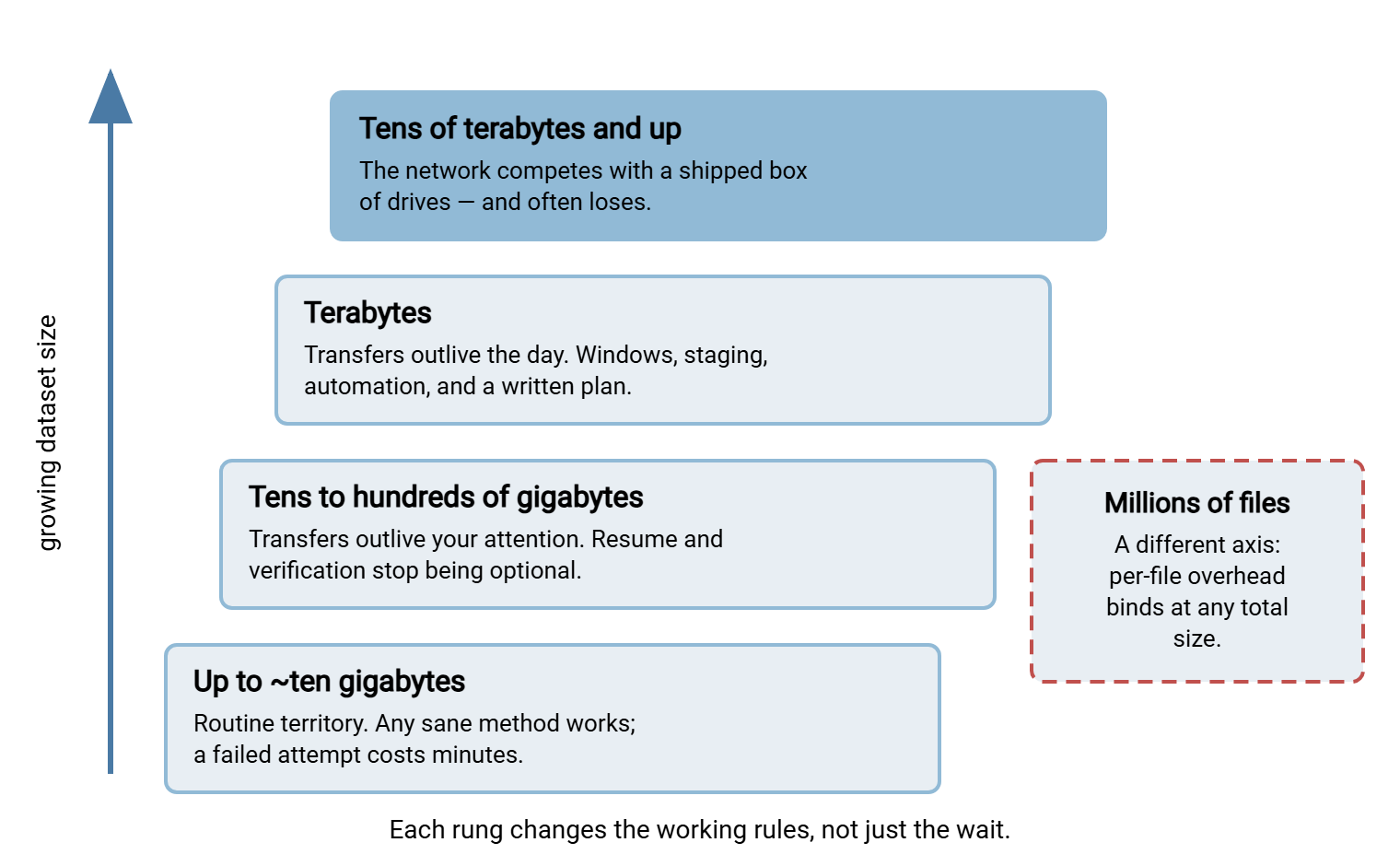
Up to about ten gigabytes, transfers are errands. Almost any method completes them while you get coffee, a failure costs only a retry, and verification-by-vibes ("the size looks right") rarely gets punished. Most of an organization's transfer traffic lives here, and the habits formed here are exactly the habits that fail later.
From tens to a few hundred gigabytes, a transfer outlives your attention span. It runs for hours and will be unattended for most of its life. The odds that a connection hiccups somewhere in those hours climb toward certainty. Two capabilities become mandatory. The first is resume — the ability to continue an interrupted transfer from where it stopped rather than from byte zero. Mature protocols support this, and our guide to protocol-level partial transfers explains it. The second is verification — proving the destination copy matches the source with a checksum, rather than assuming it. A checksum is a small fingerprint computed from the file's content. A silent corruption in a three-hour transfer costs an evening to redo; you want to know the same night, not next month.
At terabytes, a transfer outlives the working day, and it stops being an errand at all — it is a scheduled operation with a name. You need a transfer window (the agreed hours when the move may consume the link). You need a staging plan so the data holds still while it moves, and automation that retries without a human. You also need notifications so the right person knows by breakfast whether the night succeeded. This is also where a one-time bulk move and a recurring transfer job stop being the same discipline. The distinction, and why it matters, is the subject of bulk moves versus daily transfers.
At tens of terabytes and beyond, the table above starts answering in weeks. The honest comparison is no longer between transfer tools — it is between the network and a courier. A box of encrypted drives has appalling latency and astonishing throughput, and above a threshold you can compute, it wins. That crossover math gets its own article later in this series.
And on a separate axis entirely sits file count. One hundred gigabytes as a single archive and one hundred gigabytes as two million tiny files are, for a transfer protocol, different universes. The second can take fifty times longer over the same link, because each file carries fixed per-file costs that dwarf its payload. If your dataset is a directory tree with six or more digits of files, read the many-small-files problem before you plan anything.
Which Constraint Actually Binds You
"The transfer is slow" is not a diagnosis. At scale there are five distinct suspects, and money spent on the wrong one buys nothing:
- Link capacity. The pipe is genuinely full: you are achieving a healthy fraction of the nominal rate, and it simply is not enough for the size. The fixes are a bigger pipe, a longer window, a smaller dataset — or wheels.
- Distance. The pipe is wide but long. A single connection over a high-latency path can run at a small fraction of the link rate even when the link is idle. The bandwidth-delay product article explains the reasons. The fixes start with tuning and parallelism, not purchases.
- Disks. The network is ready but the storage is not. That could mean a source volume grinding through millions of scattered small reads, or a destination array already busy with its day job. No network change helps a transfer that storage cannot feed.
- Per-file overhead. Each file costs fixed round trips and directory operations regardless of its size. Harmless at a thousand files; the dominant cost at a million.
- The window. Throughput is fine — the schedule is not. Eight allowed hours a night against eleven needed hours of transfer is a calendar problem wearing a network costume.
You can usually identify the binding constraint in an afternoon, with no tools beyond the ones you have:
- Create one large test file — tens of gigabytes, so the measurement outlasts startup effects.
- Transfer it over the real path, with the real protocol, at the hour you actually plan to run, and note the sustained rate.
- If the rate is around two-thirds of nominal or better, you are capacity-bound. The arithmetic table is your ceiling; change the link, the window, or the method.
- If the rate is far below nominal and the path is long, you are latency-bound. Work through TCP tuning first, and only then ask whether you need acceleration.
- If the big file flies but the real dataset crawls, you are overhead-bound: it is the file count, not the bytes. That is the many-small-files problem.
- Repeat the test during business hours and after hours. A large gap means you are sharing the link more than you thought, and the window question decides itself.
Remember: a transfer plan without a measured rate is a guess with a spreadsheet. One test file, moved over the real path at the real hour, turns the whole plan from hope into arithmetic.
What Changes in Your Practice Above the Line
Once a dataset crosses into the hours-to-days region, five practices separate the teams who move data calmly from the teams who discover problems at hour forty:
Resume becomes a requirement, not a feature. Choose protocols and tools that continue interrupted transfers from the last good byte. Over a multi-day move, interruptions are not a risk to mitigate; they are a certainty to plan for.
Verification becomes part of the transfer, not an afterthought. Compute checksums at the source, verify at the destination, and keep the results. The habit — and the tooling — is covered in verifying transfers end to end. At terabyte scale, "it probably arrived intact" is not a sentence you want to say to anyone.
The data must hold still. Copy from a snapshot, an export, or a frozen staging folder — not from a live share that users are editing. A source that changes mid-transfer produces a destination that matches nothing.
The move must coexist with the business. A multi-day transfer that saturates the office link will be noticed by lunchtime on day one, and the noticing ends the transfer. Decide up front whether the move owns the link only at night, gets a rate cap around the clock, or earns a temporary dedicated path. A slower transfer that is allowed to finish beats a fast one that gets killed.
The run becomes automated and observable. A transfer that spans nights belongs to a scheduler, not a person with a laptop lid open. This is a natural fit for a Windows automation tool like Sysax FTP Automation. The job runs in the agreed window on a schedule and retries transient failures on its own. It sends an email that tells you by morning whether the night succeeded or where it stopped. Across a two-week move, that is the difference between supervising and worrying.
The receiving end becomes a controlled endpoint. The heavy delivery may cross organizational lines — a dataset arriving from a partner, a media drop from a production company. In that case, you want it landing on a server you run, not a share you emailed credentials for. A Windows server such as Sysax Multi Server gives each sender an isolated account over SFTP, FTPS, or HTTPS. It logs every session and file, so "did it all arrive, and when" is a report rather than an investigation.
Above all, a big move gets a written plan — even one page. The later article on reference patterns for massive data movement gives you three complete plans to adapt. The worksheet below is the minimum version.
A Pre-Flight Worksheet
Copy this into the ticket or the runbook and fill it in before the first byte moves. Every failed large transfer we have ever heard described was missing at least one of these lines.
BIG TRANSFER PRE-FLIGHT
1. Dataset size ............... ______ gigabytes / terabytes
2. File count ................. ______ (six digits or more? solve the
                                        small-files problem first)
3. Measured effective rate .... ______ megabits per second
                                (real test file, real path, real hour)
4. Computed transfer time ..... size / rate = ______ hours
5. Window per night ........... ______ hours
6. Nights needed .............. time / window = ______
7. Resume plan ................ how does an interrupted run continue?
8. Verification plan .......... checksums where? compared by whom?
9. Freeze plan ................ what stops the source changing mid-move?
10. If nights needed > about five: bigger link, smaller dataset,
    or price a shipped drive before committing the network.
The Version to Keep in Your Head
Transfer time is size divided by effective throughput. The size is in bits, the throughput is measured rather than assumed, and the result is read against your window, not against the clock. Around ten gigabytes, transfers stop being errands. Around a hundred, resume and verification become mandatory. At terabytes, the move becomes a scheduled, automated, verified operation. At tens of terabytes, the courier joins the shortlist. And at millions of files, the count matters more than the bytes. Diagnose which of the five constraints binds you before spending on any of them.
From here, the series branches by what you are moving. Read the many-small-files problem if your bottleneck is file count. Read ship or send if the table answered in weeks. And read the reference patterns when you are ready to write the plan.
Frequently Asked Questions
How do I estimate how long a transfer will take?
Why is my transfer so much slower than my link speed?
At what size does a transfer need a real plan?
Will compressing the data first speed things up?
What does resume support actually mean?
From the Sysax team: we build secure file transfer software for Windows. Sysax Multi Server is an FTP, FTPS, SFTP, and HTTPS server. Sysax FTP Automation handles scheduled, scripted transfers. Free trials are on the download page.