
When to Ship Drives Instead of Sending Bits
There is an old networking joke that never stops being an engineering fact. Never underestimate the bandwidth of a truck full of storage rolling down the highway. Administrators tend to meet it as a punchline first and as a purchase order later. That day comes when the transfer estimate for a dataset comes back measured in months, and someone asks, half joking, "couldn't we just… mail it?"
Yes. Sometimes you should. This article treats the courier as what it really is — a network link with extraordinary throughput and appalling latency. It works the comparison honestly. It covers the true total time of a shipment (copying on and off counts) and the crossover point where the truck starts winning. It covers the runbook that keeps a shipped drive safe and provable, and the hybrid pattern that usually beats both pure options. It is part of our Moving Media and Massive Datasets series. It uses the arithmetic habits from when normal file transfer breaks down throughout.
The Truck, Measured Like a Network Link
Take a small, realistic shipment: a padded case holding five drives of twenty terabytes each — one hundred terabytes. It is couriered across the country, door to door in two days. Two days is one hundred seventy-two thousand eight hundred seconds; one hundred terabytes is eight hundred terabits. Divide, and the case "transmitted" at an average of about four and a half gigabits per second for the whole trip. That is a sustained rate most organizations' internet connections cannot touch. Scale the box up and the numbers get silly. A pallet of forty such drives — eight hundred terabytes — delivered in the same two days averages about thirty-seven gigabits per second. That is roughly four dedicated ten-gigabit circuits running flat out, with no contract term.
Now tell the other half straight. The latency of this link — the time from sending the first byte to the far end holding it — is two days. Nothing arrives early. There is no peeking at the data mid-flight. A "retransmission" is another two-day trip. And while the case is on the road, the data in it is frozen in time, aging. Throughput and latency are entirely different properties of a link, and the truck maximizes one by utterly sacrificing the other.
It is also worth seeing why the truck keeps its edge decade after decade. A circuit's capacity is fixed until you renegotiate it, and upgrades come in slow, expensive steps. The box's capacity is the drive count times the drive size — it scales linearly with how much storage you pack. Storage density has grown relentlessly for as long as anyone has measured it. The wire gets faster; the box gets deeper; the joke survives every generation of networking that was supposed to kill it.
That trade dictates where shipping can and cannot make sense. A one-time bulk move — a seed copy, an archive relocation, a facility move — tolerates days of latency happily. It only cares when the whole job is done. A recurring or interactive flow — nightly increments, a live sync, anything with a human waiting — cannot tolerate it at all. The truck competes for the bulk moves only; the wire keeps everything else without a contest.
The Crossover Math, Worked Honestly
The dishonest comparison — the one that makes shipping look magical — is "transit time versus transfer time." The honest comparison is total time to verified data at the destination. For a shipment, that includes work at both ends that the network method doesn't need:
- Copy-on: writing the dataset to the shipping drives, at disk speed, plus a verification read. Writing to several drives in parallel might sustain an aggregate of a few hundred megabytes per second.
- Transit: the courier's one to three days, plus the practical half-day of packaging, labeling, and handoff at each end that never appears in anyone's first estimate.
- Copy-off and verify: reading everything onto destination storage and proving, checksum by checksum, that what arrived matches the manifest.
Work three cases with the daily-budget shorthand: a link's realistic around-the-clock capacity. That is roughly three-quarters of a terabyte per day for an effective 100-megabit path. It is seven and a half terabytes per day for an effective gigabit-class path:
Thirty terabytes, healthy gigabit path. Network: thirty divided by seven and a half is four days of continuous transfer. Shipping takes about a day to write three drives in parallel with a verification pass, and two days of transit. It takes a day and a half to copy off and verify — about four and a half days in total. The network edges it — and delivers the data incrementally as it arrives rather than all at the end. It keeps it continuously current and involves no packing tape. At tens of terabytes on a good link, the truck is not yet the answer; this surprises people.
One hundred terabytes, 100-megabit path. Network: one hundred divided by three-quarters is over four months. Shipping: two to three days per end of disk work plus transit — about a week. The truck wins by roughly a season. This is the regime the joke was written for.
Two terabytes, gigabit path. Network: sixteen terabits at an effective seven hundred megabits is about six and a half hours — done overnight. Shipping cannot beat overnight from a standing start. The wire wins every time the dataset fits inside the shipment's own end-to-end time.
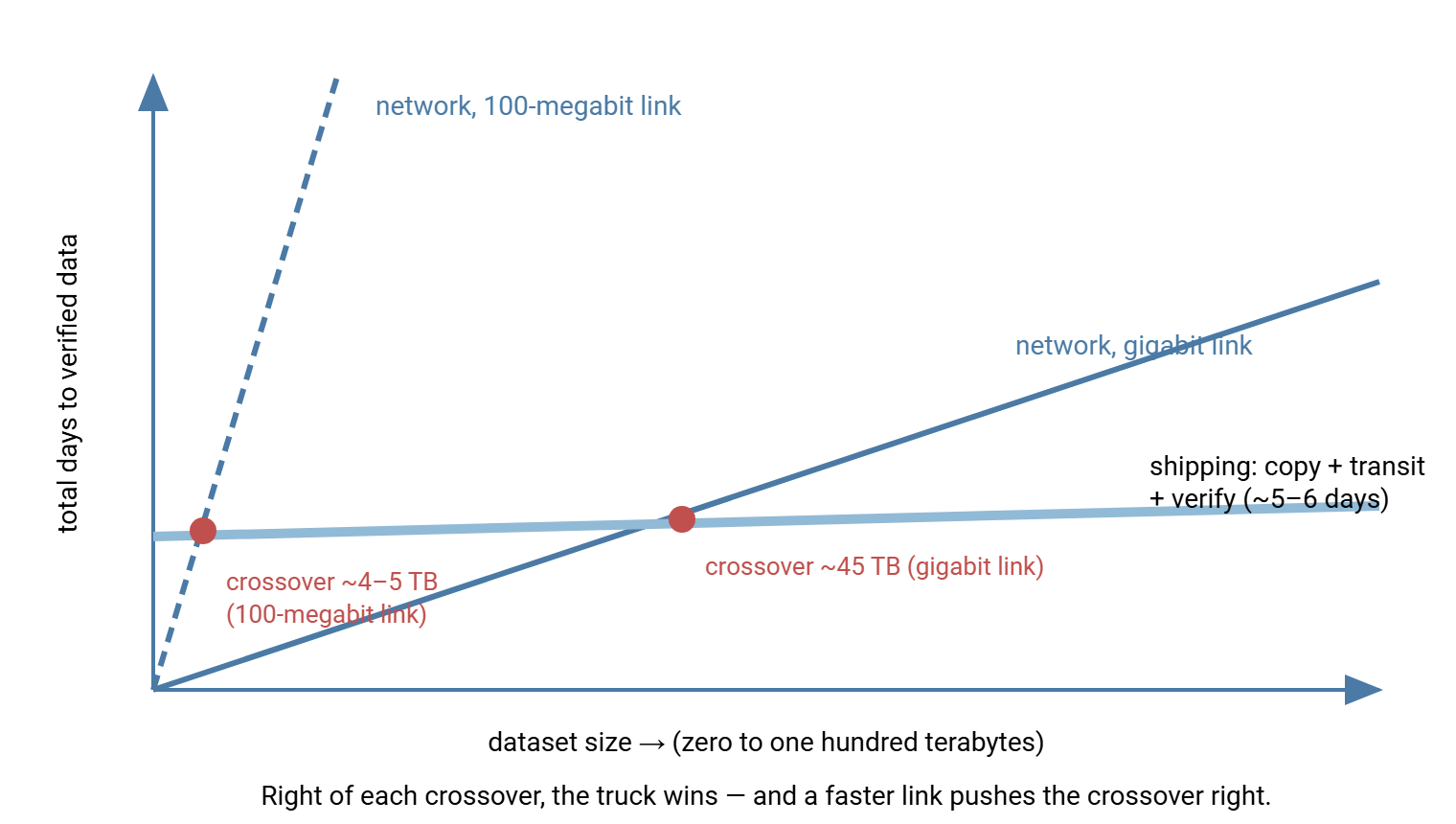
From these falls a rule of thumb you can do standing up: the crossover sits near your shipping process's end-to-end days multiplied by the link's daily budget. If your realistic shipment takes six days door-to-verified, the crossover is about six times the daily budget. That is roughly four and a half terabytes on an effective 100-megabit path, roughly forty-five terabytes on an effective gigabit path. Below the crossover, send; above it, ship. Near it, let the tie-breakers decide. Those are whether the link is needed for other traffic, whether the data must stay current in flight, and which failure mode you would rather explain.
The picture below is the whole decision in one image. Network time grows in a straight line with size, shipping stays nearly flat, and the crossover slides right as the link gets faster.
One caution before you conclude the wire has lost: make sure you are comparing against the link's honest best. A long path delivering a small fraction of its nominal rate to a single stream is often fixable for free. The checklist in do you need acceleration exists precisely to stop people shipping drives, or buying products, to route around an untuned connection.
The Failure Modes Nobody Prices In
The two methods do not just differ in speed; they fail differently, and the failure shapes belong in the decision. Network failures are small and continuous: blips, stalls, an interrupted night. They are also cheap to recover — a resume-capable transfer loses minutes, and progress accumulates steadily, so a network move degrades gracefully under bad luck. Shipping failures are rare and chunky: a case lost, crushed, misrouted, or held at a border. The retry is not a resumed byte stream — it is another full write-verify-transit cycle, costing the entire end-to-end time again. A network plan needs patience; a shipping plan needs contingency. Keep the source copy intact until arrival is verified. Keep a spare drive's worth of capacity in the case so one dead drive doesn't strand the move. Use duplicate shipments for the irreplaceable, and honest padding in any promise you make about the arrival date.
Crossing borders deserves its own respect. An international shipment of storage can meet customs inspection and delay, and "days of latency" can quietly become weeks. The box can be outside anyone's tracking for part of it. The encryption and custody discipline below stops an inspection being a disclosure, but only the schedule padding stops it being a missed deadline. And for pure archival moves, note that drives are not the only medium. Tape cartridges tolerate transit well and hold enormous capacity, at the price of needing compatible tape hardware at both ends. That is a fine trade for an archive, a poor one for a one-off move between ordinary server rooms.
What Shipping Really Involves
The moment data leaves on a drive, it stops being a transfer problem and becomes a custody problem. A portable object holding your organization's data is in strangers' hands, beyond your logs, for days. Three disciplines make that survivable:
Encryption is not optional. A lost or stolen shipment must be a hardware loss, not a data breach — which it is only if the drives are encrypted and the key traveled separately. Full-disk encryption or file-level OpenPGP encryption applied before the data touches the shipping drive both work. The file-level route is explained in how PGP file encryption works. The key or passphrase goes to the recipient by a different channel than the box — never on a note in the case.
Custody is documented, not assumed. Who wrote the drives, when they sealed the case, who carried it, who opened it, and what checksums proved on arrival that the contents were untouched — recorded as it happens. This is chain-of-custody practice, and our custody series covers it properly. Read hashes as custody evidence for why the manifest is the backbone of the record. Read custody-ready transfer design for building the habit into the workflow rather than reconstructing it after questions arrive.
The source survives until the destination verifies. A drive in transit is one unlucky forklift away from nonexistence. Never wipe, retire, or reuse the source copy until the destination has verified every checksum and said so in writing. For irreplaceable data, ship two copies in separate shipments on separate days. The cost of a second case is noise against the cost of the only copy dying in transit.
Remember: shipped data must be encrypted with the key traveling separately, and the source copy must outlive the shipment. Get those two right and every other shipping mistake is recoverable; get either wrong and no courier can save you.
Two mundane preparation details save the most grief. Format the shipping drives with a filesystem the destination can actually read. Agree it in advance, and test with a sample drive if the two sides run different platforms. And fill drives to no more than about ninety percent. That keeps headroom for the manifest, the custody paperwork copies, and the occasional oversized file that refuses to split cleanly across volumes.
The Shipped-Drive Runbook
The runbook below compresses all of the above into the checklist to print and follow. Every line has a scar behind it somewhere.
SHIPPED-DRIVE RUNBOOK
Before the copy
 1. Freeze the dataset (snapshot or staging copy with a cutoff time)
 2. Generate the checksum manifest of everything to be shipped
Write and seal
 3. Encrypt: full-disk on the shipping drives, or OpenPGP per file
 4. Copy to the drives; verify the written copy against the manifest
 5. Confirm the recipient can decrypt: send the key/passphrase by a
    separate channel; test the method on one sample file in advance
 6. Label drives with an ID only — never contents; log drive IDs
 7. Pack padded; seal; record seal/tracking numbers in the custody log
Ship
 8. Tracked, signature-required service; recipient told the ETA and
    what to check before signing (damage, broken seals)
On arrival
 9. Inspect and log condition; decrypt; verify EVERY manifest entry
10. Recipient signs off in writing: counts, checksums, timestamps
Close out
11. Only now release the source copy for reuse or retirement
12. Wipe and store or return the shipping drives; file the custody
    log, manifest, and sign-off together as the move's evidence
The Hybrid That Usually Wins: Seed by Shipping, Sync by Network
The best answer is often not choosing at all. The dataset keeps changing while the truck drives — so let each medium do what it is good at: ship the bulk, then let the network carry the changes.
- Snapshot the dataset at a recorded moment; that timestamp defines the boundary.
- Ship the snapshot on encrypted drives, per the runbook above.
- After arrival and full verification, send everything that changed since the snapshot over the wire. That is a well-defined delta, days old at most, usually a tiny fraction of the whole.
- Switch to the recurring sync or incremental schedule, and the wire owns the flow from then on.
This is the standard opening move for offsite backup — ship the seed, then nightly increments. The pattern is designed in backups and archives over the wire. It is everyday practice in production media, where a shoot's camera originals travel as freight while proxies flow over the wire, as described in moving media through production workflows.
A steady-state cousin of the hybrid also deserves a mention: the scheduled shipment. A site's uplink may never carry its output. The site could be a research station, a survey vessel, or a production unit on location. Such a site can run shipping as its routine transfer method. Drives rotate out on a weekly cadence, each following the runbook, while the thin uplink carries manifests, logs, and the urgent slice. That is not a failure to modernize; it is the crossover math answering the same way every week.
The network half of the hybrid is ordinary, reliable plumbing, which is exactly the point. A scheduled tool like Sysax FTP Automation can run the catch-up delta and then the recurring sync over SFTP or FTPS on a schedule with retries and email notifications. Its OpenPGP support covers the drive-preparation step of the same workflow, encrypting the files before they are ever written to the shipping media. At the receiving end, a Windows server like Sysax Multi Server makes a clean landing zone for the ongoing flow. It provides an isolated account for the sending site, and encrypted protocols. It provides an activity log that picks up the story exactly where the custody paperwork for the shipment left off.
Deciding in One Pass
| Situation | Verdict | Why |
|---|---|---|
| One-time move, size well past the crossover | Ship | Weeks or months of wire time versus about a week end to end |
| Recurring flow of changes | Send | Days of latency per cycle is unlivable; deltas are small anyway |
| Big one-time move plus an ongoing relationship | Hybrid | Ship the seed, sync the delta, network owns it thereafter |
| Site with no usable uplink (field work, remote facility) | Ship by default | The crossover is at zero when the daily budget is near zero |
| Deadline shorter than any courier's transit | Send (and trim the dataset) | Latency is the one thing shipping cannot negotiate |
The Version to Repeat in the Meeting
The courier is a real network link: throughput that embarrasses any circuit, latency measured in days, capacity that scales with the box. Compare it honestly — copy-on, transit, copy-off, verification — against the wire's measured daily budget, and the crossover lands near "shipping days times terabytes-per-day." Below it, send; far above it, ship. And for a big move that starts an ongoing relationship, do both: seed by shipping, sync by network. Whatever ships travels encrypted, documented, and verified, with the source alive until the destination proves itself. For the arithmetic groundwork, revisit when normal transfer breaks down. To see the hybrid inside full designs, go on to reference patterns for massive data movement.
Frequently Asked Questions
Is shipping drives really faster than the internet?
Where is the ship-versus-send crossover point?
How should drives be protected before shipping?
How do I prove the shipped data arrived intact?
What happens to changes made while the drives are in transit?
From the Sysax team: we build secure file transfer software for Windows. Sysax Multi Server is an FTP, FTPS, SFTP, and HTTPS server. Sysax FTP Automation handles scheduled, scripted transfers. Free trials are on the download page.