
Moving Video and Media Through Production Workflows
Media production is what ordinary file transfer looks like with the weights multiplied by a hundred. A single day of shooting can generate more data than a small company's file server holds in total. Every hop in the pipeline — from the camera to the edit suite to the finishing facility to the distributor — is a file transfer with a deadline attached. The deadlines do not move because a copy failed overnight. Administrators who inherit a media workflow discover quickly that the hard part is not any one transfer. It is that the whole business is transfers, chained end to end.
This article maps that chain. You will see the standard pipeline from camera originals to final delivery. You will understand the masters-versus-proxies split that makes terabyte workflows survivable on ordinary networks. You will learn why the first copy after the camera is the one that can never be casual. And you will see where watch folders, delivery specifications, and verification fit. It is part of our Moving Media and Massive Datasets series. The general arithmetic of large moves is covered in when normal file transfer breaks down. This article assumes you have that math in hand.
The Pipeline From Camera to Delivery
Every production, from a two-person documentary crew to a broadcast operation, moves material through the same five stages. These are acquisition, ingest, editorial, finishing, and delivery — usually with an archive step trailing behind. The diagram below shows the flow, and the annotation that matters most: after ingest, the pipeline splits into a light lane and a heavy lane.
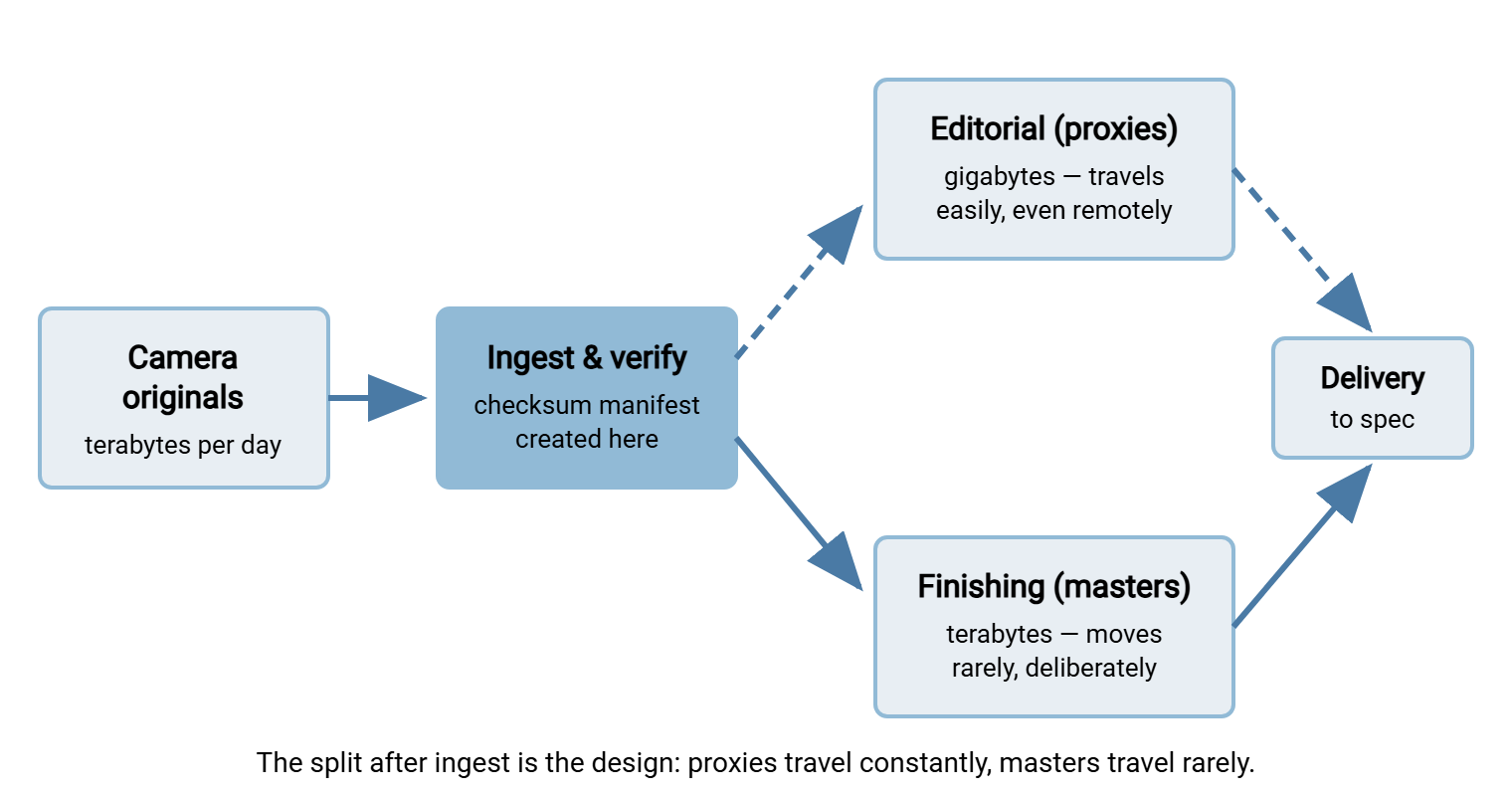
Acquisition happens on set or on location: cameras and sound recorders write camera originals — the full-quality source material — onto camera cards or portable drives. Ingest is the copy off that media onto real storage, with verification, before the cards are wiped and reused. Editorial is the weeks or months of cutting, done almost entirely against lightweight stand-in copies. Finishing is where the full-quality material comes back: color work, sound mixing, and the final assembly at master quality. Delivery hands the finished product to a distributor, broadcaster, or client — against a written specification, through a transfer endpoint, with proof. Each arrow between those stages is a file transfer, and the pipeline's health is exactly the health of its worst arrow.
Masters and Proxies: The Split That Makes It Work
Two terms carry most of the weight in media transfer conversations. A master is a full-quality file: camera originals early in the pipeline, and later the finished full-resolution program — the thing everything else is derived from. A proxy is a deliberately small stand-in. It is the same footage transcoded down to a fraction of the size, typically a tenth or less. It is good enough to make every editorial decision but nowhere near delivery quality.
The reason the split exists is pure transfer arithmetic. Suppose a shooting day produces two terabytes of camera originals, and the location's uplink sustains an effective seventy megabits per second. Two terabytes is sixteen million megabits. Divided by seventy, that is about two hundred twenty-eight thousand seconds. That is roughly sixty-three hours, over two and a half days, to move one day of shooting. The material arrives after the next two days have already been shot; the network never catches up. Now run the same math on proxies at one-tenth the size. Two hundred gigabytes takes about six and a half hours. It uploads overnight and is waiting for the editor at breakfast.
That one calculation explains the shape of nearly every real media workflow:
- Proxies travel; masters stay. Editors — often in another city — work against proxies that moved over ordinary networks. The masters sit on storage at or near where they were ingested.
- Decisions travel back as data, not video. The edit itself is a small project file describing cuts and timings. It references the footage; it does not contain it. Sending an edit back is kilobytes, not terabytes.
- The masters move once, at the end. During finishing, the edit is conformed — reconnected to the full-quality masters — and only the material actually used needs to be at the finishing facility. That is the pipeline's one unavoidable heavy transfer, and it is planned like one.
The overnight rhythm: dailies
The proxy lane runs on a daily clock. The clock is worth walking through once because it shows how transfer speed quietly dictates a production's schedule. Dailies are the day's footage prepared for review and editing — traditionally viewed the next morning, hence the name. Say the crew wraps at eight in the evening. Cards come in and ingest with verification runs until about half past ten. Proxy transcoding grinds until around one in the morning. Then the upload starts. Two hundred gigabytes of proxies over that effective seventy-megabit link is about six and a half hours. That means finishing near half past seven, just ahead of the editors. Every stage in that chain has a little slack except the upload, which owns most of the night. If the shooting ratio rises or the link degrades, the upload is what blows the schedule. That is why productions measure their uplink before they book the location. It is also why the nightly upload is automated, resumable, and monitored rather than left to whoever is still awake.
Masters may have to cross the country — a finishing facility in one city, the storage in another. In that case, you are in the territory where distance throttles single connections and the honest question of purpose-built transfer tools comes up. That evaluation lives in our acceleration series, starting with do you actually need acceleration. Media facilities moving terabytes across long paths on deadlines are one of the few groups that regularly answer yes. And for the initial bulk positioning of a whole shoot's material, the fastest network is sometimes a padded box. The crossover math is in when to ship drives instead of sending bits. Location workflows use it constantly: originals ship, proxies upload.
Ingest: The Copy That Can Never Be Casual
Everything upstream of ingest is unrepeatable. A failed transfer anywhere else in the pipeline costs time. A failed copy off a camera card, discovered after the card was wiped and reshot, costs the footage itself. That is why ingest has rules that look paranoid until the first time they save a production:
- Two verified copies before the card is touched again. The originals are copied to primary storage and to a second, independent destination — different drive, different failure domain.
- Verification means checksums, not eyeballs. A checksum is a short fingerprint computed from a file's exact contents. If source and copy produce the same fingerprint, the copy is bit-for-bit faithful. Matching file counts and sizes proves almost nothing; matching checksums proves everything that matters.
- The checksums are written down and kept. The list of files and their fingerprints — a manifest — is created at this first copy and travels with the material forever after.
That manifest quietly becomes the most valuable file in the production. Every later hop — to the editorial storage, to the finishing facility, to the archive — can be verified against fingerprints made when the material first left the camera. So corruption introduced at any point is caught at the next checkpoint instead of in a screening room. The mechanics of manifest files and how to generate and check them are covered in checksum files and manifests. Media workflows are simply that practice applied with unusual seriousness.
Remember: a camera card is wiped only after two independent copies have passed checksum verification. Not after the copy "finished," not after the sizes matched — after the fingerprints matched, twice. This is the one rule in the pipeline with no exceptions.
Watch Folders: How Media Moves Without Hands
Production generates the same transfers over and over — every render, every review cut, every batch of dailies follows the same path. Media teams automated this long ago with watch folders: directories that a process monitors, acting on whatever lands in them. Drop a render in the outgoing folder; it gets transcoded to a proxy. Drop a review cut in the client folder; it gets uploaded and the producer gets an email. The general pattern, its variants, and its failure modes are covered in the hot folder pattern. Media is its heaviest industrial user.
The media-specific trap is that media files are large and slow to appear. A render lands in the watch folder over many minutes. A naive watcher grabs it while it is still growing and ships a truncated file to a client. Every media watch folder needs a settle rule — act only when the file has stopped changing. The techniques for that are in size stability and settle checks. The rule of thumb: the bigger the files, the longer the settle interval, and a marker file ("upload when the .done file appears") beats guessing.
This is also the natural place for scheduled-transfer tooling rather than custom scripts. A Windows automation tool like Sysax FTP Automation covers the standard media loop directly. It monitors a folder and pushes new files to a review or delivery endpoint over SFTP or FTPS. It sends an email notification when the upload completes. So the producer learns the cut is up from the tool, not from asking. For material that must be protected before it leaves the building, the tool can also apply OpenPGP encryption to files before transfer, which matters more in this industry than most. A pre-release program leaking from a transfer hop is a career-defining event. The reasoning behind encrypting before sending is laid out in encrypt-before-send workflows.
Delivery Specifications: The Contract at the End
The pipeline ends at a delivery specification — the distributor's or broadcaster's written requirements for what a finished delivery must look like. A typical spec dictates the exact file naming, the folder structure, and the technical characteristics of the media files. It dictates the checksum manifest that must accompany them and the transfer method. That is usually an authenticated endpoint the distributor operates, reached over SFTP or HTTPS.
Read one concretely and the flavor is clear. A spec might require the program file to be named to an exact pattern encoding title, episode, and language. It might require audio to be delivered as separate labeled tracks, and every file to be listed in a manifest with its checksum. It might require the whole set to be uploaded to the distributor's authenticated endpoint under a folder path they assign. And it might require the delivery to be considered complete only when their intake system has verified the manifest. Nothing in that list is technically hard. What makes specs dangerous is that they are enforced by machines with no judgment. A lowercase letter where an uppercase was required fails intake as thoroughly as a corrupt file does.
Two operational truths about delivery specs, learned expensively by everyone eventually:
- A delivery that fails the spec did not happen. Distributors run automated intake checks. A wrong filename or a missing manifest bounces the whole delivery, and the redelivery eats days you scheduled for something else. The fix is to run the same checks yourself, automatically, before anything uploads — filename pattern, folder layout, manifest present and matching.
- Proof of delivery is part of the delivery. "We uploaded it Tuesday" settles nothing without evidence. Keep the transfer log, the timestamps, and the verified checksums together for every delivery, so the question of what arrived and when has a documentary answer.
The same contract runs in reverse when you are the receiving side — a post house taking in camera originals from productions, a broadcaster taking deliveries from vendors. Then the endpoint is yours to run, and the requirements mirror back. You need per-sender isolation so one client can never see another's material, encrypted protocols, and logging that records every session and file. A Windows server like Sysax Multi Server fits that receiving lane. Each production or vendor gets its own SFTP, FTPS, or HTTPS account jailed to its own folder tree. The activity log becomes your intake record — who connected, what landed, when, byte counts and all.
The Heavy Hops, Planned Like Freight
Most of the pipeline's transfers are routine once automated. A few are not, and they deserve project treatment every time:
Moving a finished master between facilities. A feature-length master can run to a few hundred gigabytes. Over a gigabit path sustaining an effective seven hundred megabits, three hundred gigabytes is two point four million megabits. That is about thirty-four hundred seconds, call it an hour: comfortably schedulable. Over a hundred-megabit path it is about nine and a half hours — an overnight job with no room for a restart-from-zero failure. That is why resume support and a post-transfer checksum comparison are non-negotiable on master moves.
Repositioning a whole production's originals — to a new facility, to deep archive, to a restoration project. This is tens of terabytes and lives in the ship-or-send crossover territory; treat it as a bulk move with a manifest, not a big copy job.
Image-sequence material. Some workflows store each frame as its own file. A feature's worth of effects shots can be millions of small files, and per-file overhead, not bandwidth, becomes the ceiling. That failure mode and its fixes (bundling above all) are the subject of the many-small-files problem. Recognize it before the transfer starts, because it changes the method entirely.
The trip to the archive. When the production wraps, everything worth keeping moves one last time — to deep storage, often tape-based. Retrieval there is slow, and every restore is itself a transfer project. The archive hop is where the ingest manifest pays its final dividend. Years later, when someone restores the material for a re-release, the fingerprints made on set are still the proof that what came back is what went in. Archive the manifest with the media, always, and treat the archive transfer with the same verification discipline as a delivery. It is a delivery, to your future self.
A Delivery-Day Runbook
Copy and adapt this for the recurring moment the whole pipeline exists for — the day a finished program goes to the distributor:
DELIVERY RUNBOOK
1.  Export complete; files closed and settled (no growing files)
2.  Local spec check: naming pattern ..... pass/fail
                      folder structure ... pass/fail
                      required files ..... all present
3.  Generate checksum manifest for the delivery set
4.  Verify manifest against the files (yes, immediately — catches
    export-time corruption while re-export is still cheap)
5.  Encrypt if the spec or the content requires it
6.  Upload to the delivery endpoint (resume-capable transfer)
7.  Confirm remote listing matches: file count and sizes
8.  Verify remote checksums if the endpoint supports it, or
    download-spot-check one file
9.  Archive together: transfer log + manifest + spec version used
10. Notify the client/distributor; record their acknowledgment
Remember: step 4 is the one teams skip and regret. Verifying the manifest before upload separates "the export was bad" from "the transfer was bad". On delivery day, knowing which one you have is half the fix.
Where This Leaves You
A media workflow is a chain of file transfers wearing a creative industry as a costume. The design rules are few and firm. Split masters from proxies and let only the proxies travel freely. Make ingest sacred — two verified copies and a manifest before a card is wiped. Automate the recurring hops with watch folders that respect settle times. Treat the delivery spec as executable requirements, checked before upload. And plan the handful of genuinely heavy hops with the same arithmetic as any massive move, starting from the breaking-point math. When the material is frames-as-files, read the many-small-files problem first. When it is a whole shoot in a case, read ship or send.
Frequently Asked Questions
What is the difference between a master and a proxy?
Why do productions ship drives instead of uploading footage?
What does verified ingest actually involve?
Why did my watch folder upload a corrupt video file?
What is a delivery specification?
From the Sysax team: we build secure file transfer software for Windows. Sysax Multi Server is an FTP, FTPS, SFTP, and HTTPS server. Sysax FTP Automation handles scheduled, scripted transfers. Free trials are on the download page.