
Designing Transfer Jobs That Recover Themselves
At 02:37 the patching window reboots the transfer server. The nightly job is halfway through file sixty-one of a hundred. It gets no error to handle, no chance to clean up, no final log line. It stops existing, mid-sentence. Every unattended job eventually dies this way. The server reboots for patching, an administrator chasing a memory problem kills the process, the VM host migrates the guest, or the power blinks. Not fails. Dies.
You cannot prevent this. What you can do is choose what the wreckage looks like and teach the next run to tidy it up and carry on as if nothing happened. That separates automation that survives from automation that pages someone. This article is the design guide for that. It covers checkpointing progress, keeping state crash-consistent, making every step safe to run again, and the recover-on-start pattern that ties it together. It ends with a worked example: one job, killed mid-transfer, picking itself up on the next scheduled run with no human involved. It is the capstone of our Retry Logic and Error Handling series; everything the earlier articles built gets assembled here. I have watched a job die at file sixty-one more than once. The good version of that night is the one nobody hears about until the morning report mentions it in passing.
What a Crash Leaves Behind
Design for recovery starts with an honest inventory of the mess a mid-run death creates. When a transfer job is killed without warning, some or all of the following are now lying around:
- A half-written file at the destination. The upload stopped mid-stream; the remote side holds a truncated file that looks real. If the job wrote directly to the final name, downstream systems may already be consuming garbage. That is why careful flows upload to a temporary name and rename at the end, the core discipline of our partial file safety series.
- A lock file with no owner. The job took a lock to stop overlapping runs; the process died; the lock remains. Every future run now refuses to start, politely, forever.
- State in limbo. The run's ledger says file sixty-one is
sent— but was that written before or after the bytes actually all arrived? Nobody alive knows. - Work stranded mid-pipeline. Files sitting in a
working/folder that no living process is working on, temp files, a half-moved batch. - Silence. No failure alert fired, because the code that sends alerts died too. The scheduler may show nothing wrong at all.
Each item on that list is survivable if the next run expects it, and a small disaster if it does not. The three principles below exist to make every line of that inventory boring. Boring is the highest compliment a recovery path can earn.
Principle One: Every Step Resumable or Repeatable
Walk through your job step by step — connect, list, transfer each file, verify, move, record. Ask of each one: if the process dies during this step, what does the next run do? There are only two good answers.
The step can be resumable: its progress survives, and the next run continues from where it stopped. Per-file progress recorded in a manifest is resumable — sixty files marked verified stay verified, and the next run starts at sixty-one. Within a single large file, protocol-level resume can continue a partial transfer rather than starting the bytes over.
Or the step can be repeatable: doing it again from the top is harmless, because the result is the same whether it runs once or three times. Creating a directory that may already exist, uploading to a temp name and renaming over the target, recomputing a checksum — all repeatable. The formal name for this property is idempotence, and it matters enough to have its own series. The series on duplicate detection and idempotency covers how to get it when the receiving system, not just the file system, sees your repeats.
What a step must never be is neither. The classic offender is appending to a remote file. Die halfway and the next run cannot tell what was appended, cannot redo it safely (double append), and cannot resume it (where exactly did it stop?). Steps like that get redesigned — build the complete file locally, then upload-and-rename — not wrapped in hope. The same test catches "send the notification email, then record that we sent it." Die between the two and the next run re-sends. Flip the order or make the send idempotent; do not leave the step in neither camp.
The design test: point at any line of your job and say "the process dies here." If the answer to "what does the next run do?" is ever "it depends" or "someone checks by hand," that line is where your next incident lives.
Principle Two: Crash-Consistent State
Consider the job's own records: the manifest from partial failures in multi-file jobs, the attempt counters from the dead-letter pattern, the lock. They are only useful after a crash if the crash cannot corrupt them. State is crash-consistent when, at every instant, what is on disk is either the old value or the new value. It is never a torn half-write, never a claim ahead of reality. Three habits get you there.
Update files atomically. Rewriting a state file in place means a crash mid-write leaves neither version. Write the new content to a temp name in the same folder, then rename it over the old file. On the same filesystem, a rename replaces the file in one indivisible step. Alternatively, keep the state as an append-only journal where a torn final line is detectable and ignorable.
Record outcomes after they are true, intentions before you act. Mark a file verified only after the verification actually passed — never optimistically, never "it will finish in a second." And write uploading file 61 before starting the upload. The pair gives the next run exact knowledge: anything marked done is done; anything marked started-but-not-done is the limbo to re-check. This ordering — intent, act, outcome — is the whole trick behind every recoverable system, from databases on down, and it costs two log lines.
Make folder moves atomic too. Transitions like incoming/ to working/ to done/ should be renames on one filesystem, so a file is always in exactly one stage. A copy-then-delete across filesystems can die between the copy and the delete, leaving the file in two stages at once. That is the ambiguity you built the folders to prevent.
record "uploading 0061"                 # intent, written first
put inv_YYYYMMDD_0061.pdf  -> remote .part name
verify remote size + checksum           # confirm reality
rename remote .part -> final name       # publish atomically
record "verified 0061"                  # outcome, written last
Principle Three: Recover on Start
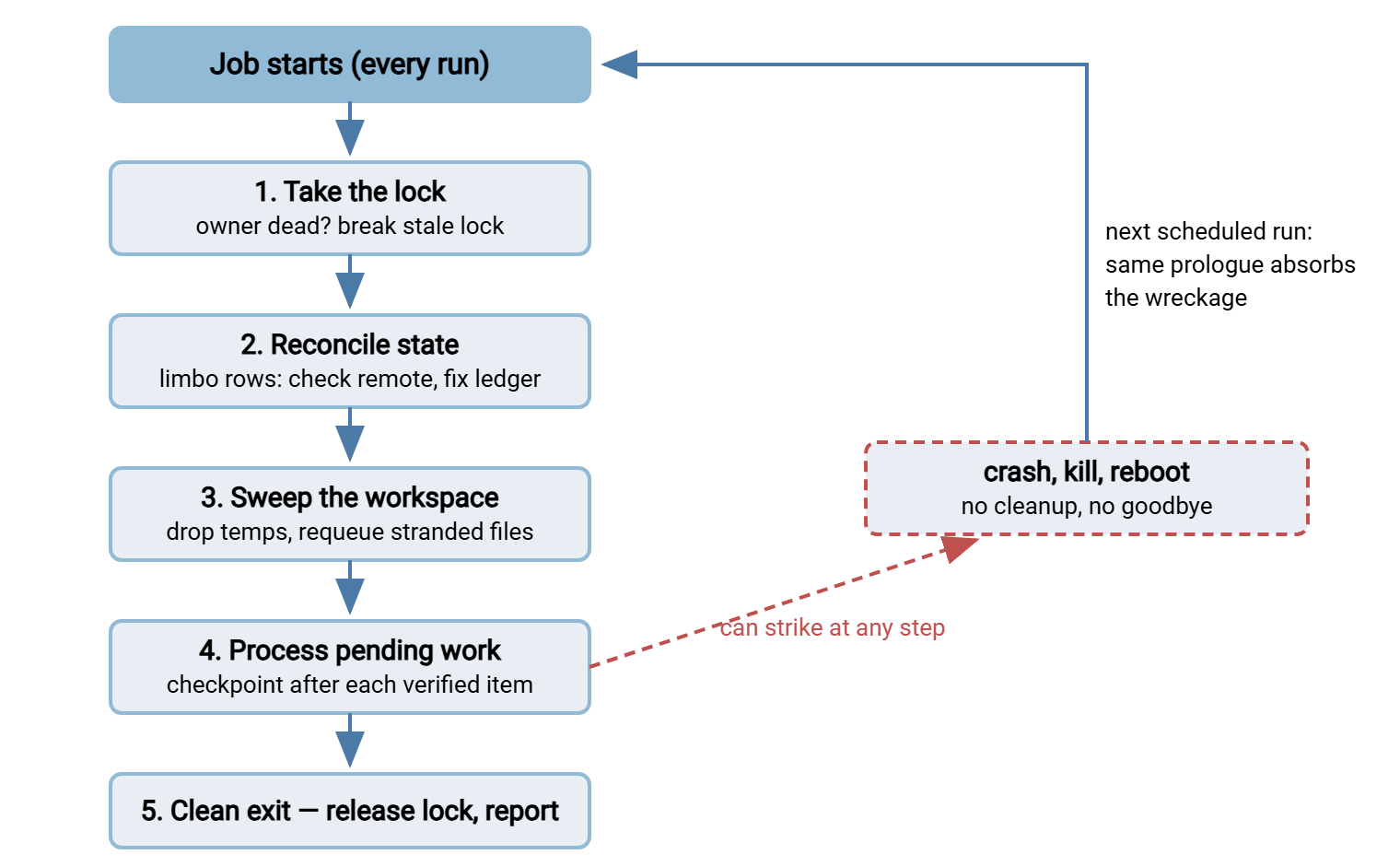
The first thing every run does is assume the previous run may have died, and clean up accordingly. That is the pattern that ties the three principles into a running job. Recovery is not a special mode entered after detecting disaster; it is the standard prologue, executed on every single start. On a healthy day it takes a fraction of a second and does nothing. Cheap, scheduled paranoia is the whole idea.
- Take the lock — and test a lock you find. A lock file should contain the owning process id. If that process no longer exists, the lock is stale wreckage from a dead run: log that fact, break it, and proceed. (Overlap prevention and lock hygiene in shell jobs is covered in our Bash and cron series.)
- Reconcile the state against reality. Read the manifest. Rows marked
verifiedare trusted. Rows in limbo — intent recorded, outcome missing — get checked against the remote side. Does the file exist there, at the right size, with the right checksum? If yes, mark it verified (the crash happened after the work finished). If no, delete any remote temp fragment and reset the row topending. End-to-end checks are exactly the machinery described in verifying transfers end to end. - Sweep the workspace. Delete local temp files the dead run abandoned; move anything stranded in
working/back into the queue. Nothing that a dead run touched may stay half-touched. - Then do the normal work — which is now just "process whatever is pending," with a checkpoint after each item.
The diagram below shows the shape: a straight path every run walks, and a crash anywhere on it hands the remains to the next run's prologue. The prologue does not take it personally.
Checkpointing: How Often to Save Progress
A checkpoint is the moment the job writes durable progress, the manifest row flipping to verified. Checkpoint too rarely and a crash forfeits real work. A job that only records success at the very end redoes the entire batch after dying at file ninety-nine. Checkpoint absurdly often and the bookkeeping becomes its own workload. Neither extreme fails loudly, which is how both survive code review.
For file transfer the natural grain is almost always one checkpoint per verified file. Files are the unit of value, verification is the moment of truth, and a manifest write is cheap next to a network transfer. Finer grain — within a single file — is worth having only for genuinely large files. There, you get it from the protocol's own resume support rather than your ledger. The within-file story lives in partial file safety. The redo-cost rule of thumb: a crash should never cost more than the one item that was in flight, plus the few seconds the recovery prologue takes.
Give the checkpoint a deliberate home, too. It belongs on durable local disk, in the flow's own folder, next to the run logs. It does not belong in the process's memory or on a network share that may be the very thing that failed. It does not belong in a temp location the OS cleans on reboot. The reboot that kills the job must not also erase the job's memory of what it finished. If state and workload can die together, the checkpoint is decoration. I once found a ledger kept in a temp folder the OS emptied on reboot. The job woke up every morning with amnesia and a clear conscience.
The Worked Example: Killed at File Sixty-One
Now watch every piece operate at once. The nightly-push job moves one hundred invoice PDFs to a partner's SFTP server, starting at 02:00. Each file is uploaded to a .part temp name, verified by size and checksum, renamed into place, and checkpointed in the manifest. At 02:37, mid-upload of file sixty-one, the patching window reboots the server. The process dies instantly: no error handler ran, the lock file remains, and the manifest's last row says uploading 0061. The partner's server holds a 312 KB fragment called inv_YYYYMMDD_0061.pdf.part.
At 03:00 the scheduler starts the job again — an ordinary scheduled run, not a special recovery invocation. Its log tells the whole story:
Mar 14 03:00:02 flow=nightly-push run=r_0300 start
Mar 14 03:00:02 lock: held by pid 4182 - not running, breaking stale lock
Mar 14 03:00:03 reconcile: manifest shows 60 verified, 1 in limbo (0061), 39 pending
Mar 14 03:00:04 reconcile: remote 0061.part is 312448 bytes, local is 780331 - incomplete
Mar 14 03:00:04 reconcile: deleted remote 0061.part, row 0061 reset to pending
Mar 14 03:00:05 sweep: no local temps; workspace clean
Mar 14 03:00:05 processing 40 pending files
Mar 14 03:12:41 done: 100/100 verified  status=OK  note=recovered-from-interrupted-run
Walk the wreckage inventory from earlier against this log. The stale lock: detected by pid, broken, logged. The limbo row: reconciled against remote reality. The fragment was incomplete, so it was removed and the file requeued. Suppose the crash had come a second later, after the rename and before the checkpoint. Reconciliation would instead have found the finished file intact and marked the row verified, redoing nothing. The half-written destination file: the partner never saw it, because it lived under a .part name that was never renamed. So their side stayed clean throughout. The stranded work: files sixty-one through one hundred were still pending, and the run delivered them. Total human involvement: zero. Total cost of the crash: one re-uploaded file and twenty-three minutes of calendar time, visible in the morning report only as a one-line note. The reboot earned a footnote, which is all the fame a reboot deserves.
Notice also what the reconciliation step leaned on: a trustworthy record of what actually arrived. Your own manifest carries half the truth; the receiving server carries the other half. The far side may be a server you operate — say Sysax Multi Server, which logs all activity to both file and database. In that case, the question "did file sixty-one complete before the crash?" has an authoritative, queryable answer from the receiving end. That is precisely what you want your recovery logic (or your own morning-after spot check) comparing against.
One more habit turns this from theory into something you can trust: rehearse the crash. In a test window, kill the job deliberately — an abrupt kill, not a polite stop — while it is mid-transfer. Watch the next run's log with your own eyes. Does it break the lock? Does reconciliation reach the right verdict on the limbo file? Does the destination stay clean throughout? A recovery path that has never been exercised is a guess, and the worst time to test a guess is during a real outage. Teams that run this drill once a quarter, in the same spirit as a restore drill, get something valuable beyond confidence. The recovery log excerpt above stops being aspirational documentation and becomes a known, recognizable shape. So when it appears for real at 03:00 someday, the on-call reader has seen it before and knows it means the system worked.
Meridian Parts ran that drill for the first time mostly to tick a box. The engineer killed the nightly-push job mid-file and started it again by hand, expecting a log like the one above. Instead the run printed lock held, exiting and stopped, because the lock file held a timestamp and no process id. So nothing could tell a dead owner from a live one. In production, the next patching reboot would have parked the job politely, forever, with a green status in the scheduler. They added the pid, re-ran the drill, and watched the stale lock get broken on the first try. The fix took an afternoon, which is a fair price for a weekend nobody had to spend.
What Recovery Cannot Do
Recover-on-start absorbs process death. It does not repeal the rest of this series, and pretending otherwise builds a job that hides real problems. A job that hides problems is not resilient. It is just quiet.
Permanent failures still stop the job. If the run died because the credential was rejected, the next run will be rejected too. In that case, recovery hands the problem straight to the classification logic, which must alert rather than march on. Poison files still get quarantined: a file that keeps killing the run is exactly the repeat offender the dead-letter pattern evicts. Recovery makes the run survive it; the quarantine makes the run stop meeting it. And crash loops need a counter: if the job itself dies early on several consecutive runs, something environmental is wrong. A note-and-alert after the third consecutive interrupted run beats an infinite cycle of tidy recoveries. The watchdog side of that belongs to transfer job monitoring.
The scheduler is a quiet partner in all of this: recovery-on-start only runs if something starts the job again. So the pattern assumes a schedule or supervisor with sensible retry behavior of its own — the outer loop from the backoff article. On Windows estates, this outer layer is often a transfer scheduler rather than raw scripts. Sysax FTP Automation runs transfer tasks on schedule with retry and error handling built in and can email on failure. That covers the re-run-and-notify machinery. The crash-consistent state and reconciliation discipline described here remain design work you apply to whatever your tasks execute.
The Recovery Design Checklist
The whole article as a checklist to hold against any unattended transfer job:
- Lock file contains the owner's pid; every start tests and breaks stale locks.
- Every upload goes to a temp name and is renamed only after verification — the destination never shows a partial file.
- Progress ledger (manifest) updated atomically: intent before acting, outcome only after it is true.
- Every step is resumable or repeatable — no appends, no neither-category steps.
- Recovery prologue on every start: lock, reconcile limbo against remote reality, sweep temps, requeue strays.
- Checkpoint after each verified file; a crash costs at most the item in flight.
- Consecutive-interruption counter, with an alert when it trips.
- Give-up paths intact: permanents alert, poison quarantines, partial runs report as partial.
If this is the first article of the series you have read, the supporting depth is behind each line. See partial failures for the manifest, retry strategies for the timing, and poison files for the eviction path. A job that passes the checklist does not merely tolerate the 02:37 reboot — it renders it invisible. That is the entire ambition of error handling: failures still happen, and nobody has to care.
Frequently Asked Questions
What does crash-consistent state mean?
Does the recovery routine only run after a crash?
How does the next run know the previous one died?
Will re-running after a crash create duplicate files?
How often should a transfer job checkpoint its progress?
From the Sysax team: we build secure file transfer software for Windows. Sysax Multi Server is an FTP, FTPS, SFTP, and HTTPS server. Sysax FTP Automation handles scheduled, scripted transfers. Free trials are on the download page.