
Handling Burst Load: The Month-End Stampede
For twenty-nine days a month the transfer server is bored. Then, at two in the morning on the last day, three hundred partners' scheduled jobs fire within the same five minutes. The disk queue climbs into the forties, half the uploads time out, and the clients retry in unison. The on-call phone rings. The next morning someone proposes a server three times the size — to handle ninety minutes of load that occurs twelve times a year. There is a better answer, and most of it costs nothing.
This article, part of our Capacity & Concurrency series, is about the burst: a short period in which demand rises far above its normal level. It shows how to see a burst coming from your own logs. It explains why the retry storm after a burst is usually worse than the burst itself. It covers how to spread partner windows so the peak flattens, and which limits to tighten temporarily. It explains when scaling up or out is actually warranted, and how to talk to partners about all of it. It ends with a runbook for the night itself.
Why Bursts Happen, and Why They Are Predictable
Transfer bursts come from three sources, and all three are visible in advance.
The calendar. Month-end closes, quarter-end reporting, payroll runs, and regulatory deadlines make every partner's business generate files on the same day. The volume is not larger per partner; it is simply synchronized.
The clock. Schedulers love round numbers. A job written as "run at 02:00" fires at exactly 02:00:00, and so does every other partner's job written the same way. Even on an ordinary night, the top of each hour carries a spike of logins that the rest of the hour does not. The peak-to-average ratio — the busiest minute divided by the average minute — on a partner-facing server is often twenty or more, almost entirely because of the clock.
The cascade. One upstream event releases many downstream jobs at once. For example, a source system finishes its export and forty consumers start pulling. Or a server comes back from maintenance and every client that failed during the outage retries at the same moment. That second case has a name, the thundering herd, and it is the mechanism by which a small outage becomes a long one. Our anatomy of the batch night article maps how these dependencies chain together.
Because each source is tied to a calendar, a clock, or a known dependency, bursts are forecastable to the minute. What is usually missing is not the ability to predict them but the habit of looking.
Seeing the Burst Coming
Your server's own logs contain the whole history. Two views are enough: concurrent sessions per minute (the sampling loop from the connection limits article) and successful logins per minute, which shows arrival rate. On a Linux SFTP server the login count comes straight from the authentication log:
$ grep 'Accepted' /var/log/auth.log | awk '{print $1, $2, substr($3,1,5)}' \
    | uniq -c | sort -rn | head -4
    212 Mar 31 02:00
     96 Mar 31 02:01
     41 Mar 31 02:02
     11 Mar 31 01:30
On Windows, the same question against a text log that records each login:
PS C:\> Select-String -Path C:\logs\sftp\*.log -Pattern 'Login successful' |
    ForEach-Object { $_.Line.Substring(0,12) } | Group-Object |
    Sort-Object Count -Descending | Select-Object -First 3 Count, Name
Read the first output: 212 logins in the single minute after two o'clock, 96 the next minute, then a rapid fall. That is the signature of clock-synchronized jobs. Three hundred and fifty partners logged in during the first three minutes of a ninety-minute window; the other eighty-seven minutes were nearly empty. Everything that follows in this article is about that shape. The server did not lack capacity for the window — it lacked capacity for three minutes of it.
Do this analysis for the last three month-ends and you have the forecast: which minute, how many, how long the tail lasts, and whether it is growing. A useful second view is a grid of day-of-month against hour, with the session peak in each cell. The month-end column and the top-of-the-hour rows light up immediately. Any cell that lights up unexpectedly is a partner whose schedule changed without telling you. Our reading transfer logs article covers the log formats if yours differs. The server health monitoring series covers keeping these views current automatically.
The Second Burst Is the Retry Storm
When the server fills, it refuses, and the refused clients come back. If they all come back after the same fixed delay, the burst repeats, minus the sessions that got in the first time. It keeps repeating until the herd thins. Timeouts make it worse. A client whose upload stalls at the saturated disk gives up, reconnects, and starts the file again from the beginning. So the server does the work twice. This is why a burst that should have cleared in ten minutes takes an hour.
The cure is queue-and-retry etiquette on the client side, and it has two parts. Backoff: each successive retry waits longer than the last, typically doubling. Jitter: each wait is randomized, so clients that were refused together do not return together. A refused client can wait somewhere between thirty and ninety seconds, then between one and three minutes, then between two and six. That spreads a herd of three hundred across many minutes instead of one. The mechanics, including how to choose the caps, are in our article on retry strategies and backoff. The etiquette to publish to partners fits in a table:
| Attempt | Wait before retrying | Notes |
|---|---|---|
| 1st retry | 60 s ± 30 s | Never retry instantly; never retry inside a tight loop |
| 2nd retry | 2 min ± 1 min | Resume the file if the protocol supports it rather than restarting |
| 3rd–5th retry | Double each time, capped at 15 min | The cap keeps a long outage from producing hour-long gaps |
| After the 6th | Stop and alert a human | A job that retries forever is a job nobody is watching |
The server can help by refusing fast and clearly, which the limits article covers. It can also keep its idle timeout short enough that abandoned sessions from timed-out clients are reaped quickly. It cannot enforce good retry behavior on a partner's client. That is a conversation, and it belongs in onboarding.
Gotcha: after an outage or a maintenance window, every partner's retry fires at once when the server returns. Bring the server back with its limits in place, expect a ten-minute herd, and do not mistake that herd for a new problem.
Spreading the Stampede: Staggered Partner Windows
The cheapest capacity you will ever buy is a partner agreeing to run at 02:20 instead of 02:00. The peak in the example above — 350 arrivals in three minutes — exists only because nobody told the partners otherwise. Three approaches, in increasing order of effort:
Offer a window, not a time. Onboarding documents that say "send by 03:00" produce jobs at 02:00. Documents that say "send any time between 23:00 and 03:00; we process at 03:30" produce jobs spread across four hours. That is because each partner picks the slot that suits their own batch. The downstream deadline is what matters, and our article on cutoff times and deadlines shows how to set it so partners have room.
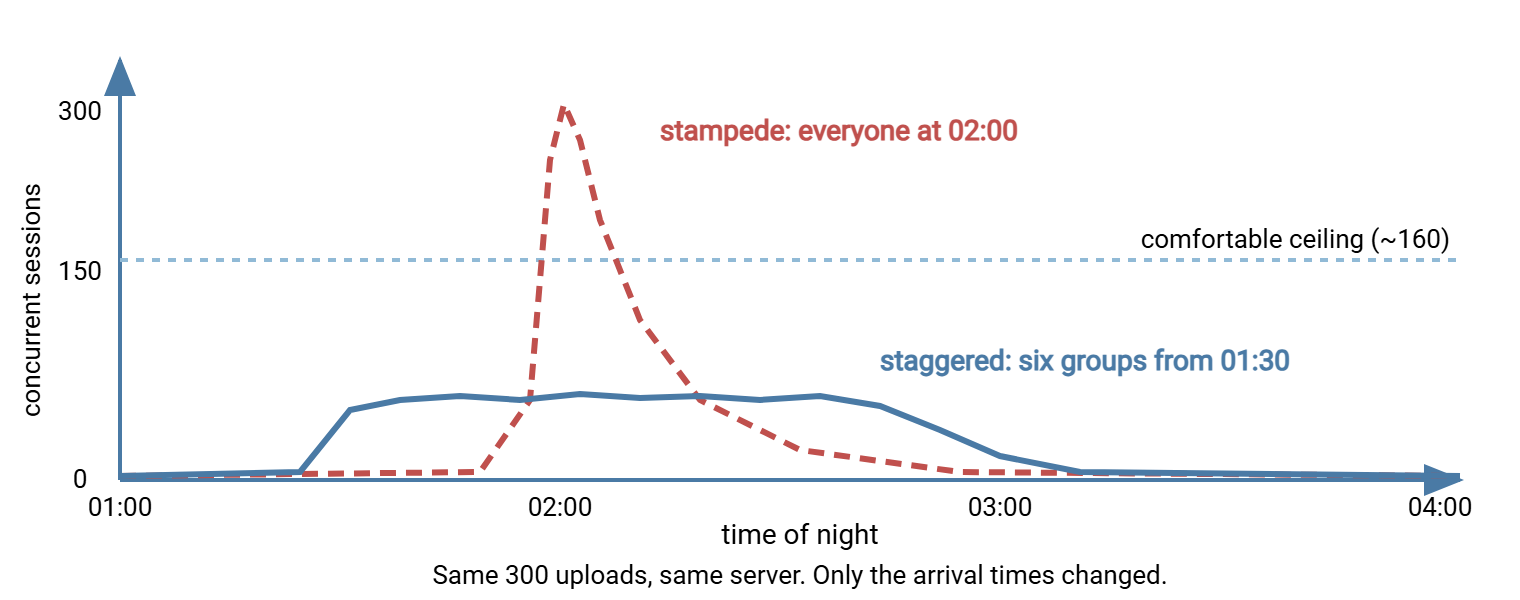
Assign slots. Divide the partners into groups and give each group a start time. That could be three hundred partners in six groups of fifty, starting every fifteen minutes from 01:30. The peak concurrency drops from around 310 to around 60, and with it the disk queue, the login spike, and the retry storm. This takes one spreadsheet and one email per partner.
Ask for a random minute. Some partners cannot change the hour but can change the minute. A job at 02:17 is as good to them as one at 02:00 and far better for you. Assign the minute from the account name, or simply ask them to pick one that is not :00, :15, :30, or :45.
The diagram below shows the effect on the same three hundred uploads. One view shows a stampede that overshoots the server's comfortable ceiling for several minutes. The other shows them spread across staggered windows that never approach it.
If your own organization is one of the partners in somebody else's stampede, the same rules apply to you. A scheduling tool such as Sysax FTP Automation lets you set a job to a specific off-peak minute and retry with a wait on failure. That makes you the partner everyone else's server likes.
Temporary Limits: Tightening the Fuse for the Night
The limits you chose for ordinary days assume ordinary arrival rates. For the burst window, a few of them are worth changing deliberately, then changing back:
- Lower the per-user cap for the window — from four sessions to two, say — so that the global limit is shared across more partners. On a burst night, fairness across partners matters more than parallelism within one.
- Shorten the idle timeout from ten minutes to three, so sessions abandoned by clients that timed out are reaped quickly and their slots return to the pool.
- Keep the global limit where it is. The temptation is to raise it "just for tonight." If the disk was the wall, a higher limit lets more sessions hit the wall; the refusals were protecting the sessions that got in.
- Pause everything that is not the burst. Internal downloads, log rotation, malware rescans of old files, backups of the data volume, cleanup jobs, and any database maintenance should not run during the window. Each is a competitor for the disk queue.
- Leave the login rate limit alone, or loosen it slightly. Its job is to stop the key-exchange spike from pinning the CPU, and a burst is exactly when it earns its keep. If the CPU counters show room, allowing a few more unauthenticated connections at once shortens the queue at the door without endangering anything behind it.
Servers differ in how they support this. Some allow limits to vary by schedule; some can be changed by script or command line; some need a configuration edit and a service reload. Where none of those is practical, choose the tighter values permanently. A per-user cap of two costs most partners nothing on an ordinary night and saves the server on the bad one.
Scaling Up Versus Scaling Out for Bursts
Sometimes spreading is not enough — the partners cannot move, or the volume is genuinely large — and capacity has to grow. Match the remedy to the shape of the burst:
| Burst shape | Usually the right move |
|---|---|
| Short, monthly, disk-bound | Fix the disk first (solid-state, separate volumes); it is cheaper than anything below |
| Predictable, a few hours, on a virtual machine | Scale up temporarily: resize the VM before the window and back after, scripted |
| A handful of heavy partners dominate | Split them onto a second server or listener with its own limits and disk |
| Growing every month, no longer a spike | Scale out: multiple servers behind a load balancer with shared or replicated storage |
| Intake is fine, downstream processing is the bottleneck | Accept into a fast staging area and process from a queue after the window |
Scaling up means a bigger machine and is the simpler path; on virtual infrastructure it can be temporary, which suits bursts well. Scaling out means more machines and brings its own problems — shared storage, session affinity, keeping configuration in sync — that our high availability series covers. The staging-area option is underused. In that option, the server's only job during the burst is to accept bytes onto fast storage. Validation, scanning, and delivery can happen from a queue afterward. Our article on staging area design shows the layout.
Remember: a burst that lasts ninety minutes a month is a scheduling problem before it is a hardware problem. Spread it, tighten the fuse, fix the disk, and only then price a bigger server.
Communicating With Partners
Every measure above except the disk involves partners, and they cooperate far more readily when they are told why. Three moments matter. At onboarding, publish the window, the limits, and the retry etiquette alongside the hostname; the partner onboarding runbook has a place for it. Before a known burst, a short notice a week ahead lets partners adjust:
Subject: Month-end transfer window for sftp.example.com

Our busiest period is the last night of each month, 01:30-03:00. To keep
uploads fast for everyone:
- Your assigned start window is 02:15-02:30 (group D).
- Sessions are limited to 2 per account during this period.
- If refused, wait 1-2 minutes and retry; do not retry in a loop.
- Files received by 03:30 are processed in the morning run.
During the window, if you change a limit or the server degrades, say so somewhere partners can see it. That could be a status page, a mailing list, even an automatic reply on the support address. A partner who knows the server is busy waits; a partner who does not know opens a ticket and retries in a loop. After the burst, the refusal counts and per-account session peaks tell you who is not following the etiquette. A friendly note with the numbers fixes most of them. Our partner expectations article covers making these terms part of the agreement rather than a favor.
The Burst Runbook
A runbook turns the bad night into a procedure. This one is short enough to copy into a ticket and check off:
- One week before: confirm the partner groups and start windows. Check free space on the data and log volumes (the burst needs room for 60 GB plus temp files). Review last month's refusal counts and session peak. Confirm the on-call contact.
- The day before: reschedule or pause backups, cleanup jobs, rescans, and internal bulk downloads that overlap the window. Apply the temporary per-user cap and idle timeout if they are not permanent. Snapshot the current configuration so the change can be reverted.
- Thirty minutes before: open a terminal on the server and start the watch loop. On Linux, use
vmstat 5andiostat -x 5side by side. On Windows, use a continuousGet-Counter:
PS C:\> Get-Counter -Counter @(
  '\Processor(_Total)\% Processor Time',
  '\PhysicalDisk(_Total)\Avg. Disk Queue Length',
  '\Memory\Available MBytes',
  '\TCPv4\Connections Established'
) -SampleInterval 10 -Continuous
- During the window, act on thresholds you decided in advance, not on instinct. Disk queue above 8 for two minutes means pause anything else touching the disk. Available memory below 1 GB means lower the global limit now. Refusals climbing while the resource counters are healthy means the limit is too tight and can be relaxed by a quarter. Anything else, note the time and leave it alone.
- Do not restart the service during the burst unless it has genuinely stopped serving. A restart drops every session in progress and triggers the retry herd on top of the burst.
- The morning after: record the session peak, the login-per-minute peak, refusal counts per partner, and p95 upload duration. Revert temporary limits. Update the sizing worksheet if the peak grew. Send the notes to partners who need them.
The point of steps one and six is that each burst improves the forecast for the next. After three months the runbook is boring, which is the goal.
What to Take Away
Bursts are predictable because they come from calendars, clocks, and cascades, and your own login log tells you the minute. The damage comes less from the burst than from the retry storm behind it, so publish backoff-with-jitter etiquette and keep idle timeouts short. Spreading partners across windows flattens the peak for free. Temporary per-user caps share the server fairly for the night. Only when those are exhausted should you scale up, split heavy partners off, or scale out. Write the runbook, run it, and refine it.
Before the next burst, prove your ceiling with the method in load testing a transfer server safely. Check the operating-system limits in the capacity tuning checklist. A burst is the moment a forgotten file handle limit chooses to matter.
Frequently Asked Questions
What is a thundering herd?
Why does jitter matter if clients already back off?
Should I raise the connection limit for the month-end night?
How do I get partners to change their schedule?
Is it better to scale up or scale out for bursts?
From the Sysax team: we build secure file transfer software for Windows. Sysax Multi Server is an FTP, FTPS, SFTP, and HTTPS server. Sysax FTP Automation handles scheduled, scripted transfers. Free trials are on the download page.