
Staging Areas: The Neutral Ground Between Systems
When two systems exchange files directly, they are tied together in ways that only become visible at the worst moments. The billing system cannot deliver its nightly extract because the ERP server is mid-patch. The warehouse system holds a credential for the production database host. A planned migration of one system turns into a renegotiation with the owners of five others. None of this is anyone's mistake — it is simply what direct coupling costs.
The staging area is the old, unglamorous, extremely effective answer. It is a transfer endpoint that belongs to neither system, where the producer drops files and the consumer collects them. Each side deals only with the neutral ground, on its own schedule, with its own credentials. The pattern is simple to describe and easy to build badly. A staging server without clear folder contracts and cleanup ownership degenerates into a swamp of mystery files within a year.
This article covers the design properly: what coupling actually costs, how the pattern works, and the folder tree and the folder contract. It covers who cleans up what and how to size and secure the middle. And it covers — honestly — when staging is more machinery than a flow deserves. It is part of our Server-to-Server Exchange Patterns series.
What Direct Coupling Actually Costs
A direct flow — system A transfers straight to system B — is the right first answer for many pairs. Our article on choosing push or pull walks through setting one up well. But every direct flow creates four couplings, and they accumulate:
- Availability coupling. The transfer succeeds only if both systems are up at the same moment. A maintenance window on either side becomes a transfer outage for both, so patching schedules that were nobody's business become everybody's negotiation.
- Credential coupling. One production system holds a standing credential for another production system. Whichever direction you choose, a compromise of one box now reaches into the other, and every credential rotation involves two teams.
- Network coupling. The firewall path runs production-to-production. Security reviews dislike it, and each new flow between different pairs adds another opening between zones that otherwise would not talk.
- Change coupling. Rename a folder, move a server, retire a hostname — and the other system's jobs break. Migrations stop being internal projects; every change needs a partner on the far side to change in step.
One or two direct flows carry these costs lightly. The pain grows with the number of system pairs, with the number of teams involved, and with how different the systems' uptime patterns are. A nightly extract between two servers owned by the same team is fine directly. A dozen flows crossing team and zone boundaries is how estates end up fragile. It is how the topology conversation in hub-and-spoke vs point-to-point eventually starts.
The Staging Area Pattern
A staging area breaks one flow into two independent legs. The producer pushes the file to the staging server whenever the data is ready. The consumer pulls it from the staging server whenever it is ready to process. In between, the file simply sits — safe, logged, and owned by the middle.
The diagram below shows the anatomy: both production systems initiate outbound connections toward the neutral endpoint, and neither ever connects to the other.
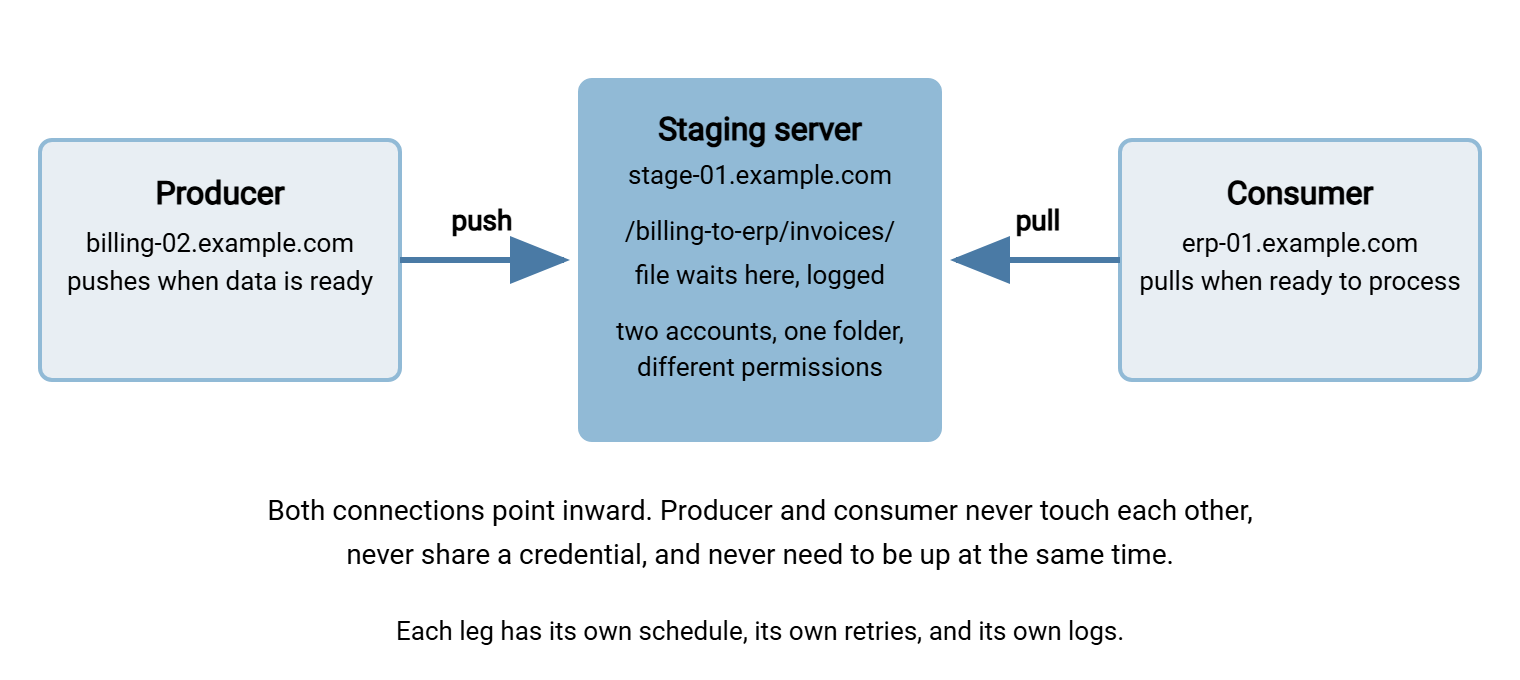
Every coupling from the previous section dissolves. Availability: the producer can deliver at Mar 14 02:10 while the consumer is down for patching. The consumer can collect at 05:30 after the producer has gone quiet. The file waits patiently in between. Credentials: each system holds a credential only for the staging server, an endpoint built and hardened for exactly that exposure. Nothing holds a credential for a production system. Network: production zones need only an outbound path to one address. Change: either system can move, migrate, or rebuild. The other side notices nothing as long as the staging folder and its contract stay put.
Push-then-pull is the canonical shape, because it lets both production systems stay outbound-only, but the pattern tolerates variants. If the consumer cannot run scheduled jobs at all — a locked-down appliance, a partner with only a server — the second leg can run from the staging box itself. In that case, a scheduled task there, built with a tool like Sysax FTP Automation, picks up arrivals and uploads them onward. The decoupling survives; only the initiator of the second leg changes. What must not change is the principle that the middle is the only machine anyone connects to.
There are real costs, to be honest about upfront. Every file crosses the network twice and is stored in three places for a while. There is a new server to run, patch, and monitor. And end-to-end latency is the sum of two schedules, not one. That point has enough teeth that this series gives it a full article, timing and handoffs between independent systems.
Anatomy of the Folder Tree
A staging server's value lives or dies in its folder structure. The organizing rule: one folder per flow, named for the flow, owned by the flow's contract. The folder must never be a shared dumping ground where several flows mingle and scripts guess which files are theirs. A tree that has aged well looks like this:
/staging
  /billing-to-erp
    /invoices            <- the contracted handoff folder
      invoice_YYYYMMDD.csv
    /acks                <- optional return path, consumer to producer
  /wms-to-erp
    /shipments
      shipments_YYYYMMDD_0410.csv
  /erp-to-partnerco
    /pricelist
      pricelist_full_YYYYMMDD.csv.tmp    <- mid-upload, invisible to the contract
      pricelist_full_YYYYMMDD.csv
Three details carry most of the weight. First, the top-level names encode direction (billing-to-erp), so nobody has to remember which side writes and which side reads. Second, datestamped names — shown here as literal YYYYMMDD tokens — make every file self-describing and self-sorting. The reasoning is in naming convention design. Third, files being uploaded wear a temporary name (.tmp) until complete, so the consumer can never collect a half-written file. This is the temp names and atomic renames pattern, which staging makes trivially enforceable.
The optional /acks folder is worth a comment. When the consumer must confirm receipt or report rejects back to the producer, give that return traffic its own folder flowing the other way. Do not let reply files mingle with data files. A staging flow with a return path is really two flows, and each deserves its own contract line.
Accounts mirror the tree. The producer's account can write into /billing-to-erp/invoices/ and see nothing else. The consumer's account can read the same folder and see nothing else. On a Windows staging box running Sysax Multi Server, that is the natural setup. The server runs as a Windows service. Each account is isolated to its own folder tree, and the IP allow and block lists pin each account to the one machine that should ever use it. Two accounts, one folder, different permissions — that is the whole security model of a staging flow, and it is pleasantly auditable.
The Folder Contract
Folders decouple machines; contracts decouple teams. A folder contract is a short written agreement between producer and consumer about how the shared folder behaves. It covers the things each side may assume, and therefore the things neither side may silently change. It fits on one page and lives with the flow's documentation. It prevents the two most expensive sentences in integration work: "we assumed you would" and "nobody told us."
A contract worth copying:
FOLDER CONTRACT — billing-to-erp / invoices
Path:          /billing-to-erp/invoices/ on stage-01.example.com (SFTP)
Producer:      billing team, account svc-billing-push (write only)
Consumer:      ERP team, account svc-erp-pull (read only)

Files:         invoice_YYYYMMDD.csv, one per calendar day, header row included
Completeness:  uploaded as *.tmp, renamed to final name when complete;
               consumer must ignore *.tmp
Delivery by:   02:30 server local time
Collected by:  05:30 server local time
Empty days:    producer still delivers a header-only file (absence = failure)
Retention:     staging purges files older than 14 days, automatically
Consumer must: tolerate re-delivered files with the same name (replacement)
Errors:        bad files moved by consumer to /billing-to-erp/invoices/rejected/
               and reported to billing by the next business day
Change rule:   30 days notice for any change to path, name, or format
Notice what the contract nails down. The completeness signal — how the consumer knows a file is finished — is stated explicitly, because guessing at it is the root of most partial-file incidents. The options and their tradeoffs are covered in arrival contracts and debouncing. The empty-day rule turns silence from an ambiguity into a defined failure. And the deadlines give both sides something to monitor against. The folder contract is the small sibling of a full file interface contract, which also specifies the format's columns and semantics. When the data itself needs agreement, step up to the patterns in our files as integration glue series.
Remember: the staging folder is an interface, and interfaces need contracts. If a rule is not written in the folder contract, one side will eventually violate it innocently — and the argument that follows will have no referee.
Ownership and Cleanup
Staging areas fail slowly, by filling up. Every file that lands must eventually leave, and the single most important governance decision is who deletes what. There are two workable models:
- Destructive pull: the consumer deletes (or moves) each file after fetching it successfully. The folder doubles as a to-do list — anything present is unprocessed. The cost: once fetched, the file is gone from the middle, so a consumer that mangles its copy during processing has nothing to re-pull.
- Age-based purge: the consumer only reads; the staging server itself deletes files older than the retention window. The consumer can re-pull for recovery any time within the window, at the price of needing to track what it has already processed. Typically it remembers the last datestamp it handled, with the techniques from safe reprocessing patterns guarding against double-loads.
Age-based purge is the friendlier default for flows with datestamped, one-per-day files; destructive pull suits queues of many small unpredictable files. Either way, write the ownership down — one owner per responsibility, no "whoever notices":
| Responsibility | Owner | Failure if unowned |
|---|---|---|
| Deliver complete, correctly named files on time | Producer team | Consumer processes junk or nothing |
| Collect by deadline; quarantine bad files to rejected/ | Consumer team | Files pile up; errors vanish silently |
| Purge on retention schedule; alert on disk thresholds | Staging admin | Disk fills; every flow on the box halts at once |
| Watch that expected files arrive and get collected | Staging admin (alerts routed to both teams) | Silent failure discovered by end users |
| Empty the rejected/ folder; decide each file's fate | Producer team | Rejects accumulate; problems never get fixed upstream |
The middle row is the one estates forget. Staging servers are where transferred files quietly accumulate. That pattern is common enough that we wrote about where transferred files accumulate. An automated purge is not optional hygiene but a load-bearing part of the design. Retention on the staging server should be short and boring: long enough to cover a weekend plus a recovery re-pull, rarely longer than a couple of weeks. Staging is a corridor, not an archive; if the business needs history, that belongs on a system built for retention.
Sizing, Monitoring, and Trust in the Middle
Sizing a staging server is arithmetic, not art. For each flow: average daily volume, times the retention window, times a safety factor of three to cover peak days and stalled consumers. Sum across flows, then add headroom for the one scenario that actually fills disks — a consumer that stops collecting for a week while producers keep delivering. A quick worked line: a flow that delivers around 200 MB a day with fourteen days of retention needs about 2.8 GB steady-state. So budget roughly 8 GB for that flow alone. Do that for every flow and the disk requirement stops being a guess. If the total is uncomfortable, the retention windows are too long.
Because the staging server is the one component every flow depends on, it earns real monitoring. A scheduled check asks two freshness questions per flow. Did the expected file arrive by the delivery deadline? And did it leave (or get collected) by the collection deadline? The general technique is described in freshness checks and expected files. The staging server's own records answer the second half. On a Sysax Multi Server endpoint, activity logging to a file or a database gives you a queryable record of every login, upload, and download per account. That is also exactly the evidence trail you want when producer and consumer disagree about whose side failed. On editions with event triggers, the server can act the moment a file arrives. It can run a program or script that validates the file or notifies the consumer's team. That turns the passive middle into an active participant in the handoff.
Treat the box itself as the sensitive endpoint it is: it accepts inbound connections from multiple zones and briefly holds business data at rest. Patch it on schedule, restrict each account by IP, and keep no interactive users on it. Place it in a network segment designed for listening. The reasoning mirrors our DMZ for transfer discussion. A staging server is a small attack surface, but it is a shared one.
When Staging Is Overkill
Every pattern has a boundary, and staging's is easy to state: the middle earns its keep by decoupling; where there is nothing to decouple, it is pure overhead. Skip the staging area when:
- One team owns both ends. The couplings that staging dissolves — schedules, credentials, change coordination — are cheap when the same people control both systems. A direct pull between two servers you administer yourself needs no referee.
- There are only a handful of flows. Two or three stable pairs do not justify a new server to run and patch. Choose direction well, constrain the accounts, and revisit if the count grows.
- Latency matters. Staging adds a second hop and a second schedule. A file that must land within minutes of creation wants a direct push, or an event-triggered relay, not a corridor with two timetables.
- Files are enormous. Doubling the network trips and tripling the storage of very large files is a real bill. Bulk data has its own patterns — see moving media and massive datasets before defaulting to a middle box.
And watch for the opposite drift: a staging server that accumulates flows until it is de facto shared infrastructure for the whole estate. That is not failure — it is a staging area growing into a hub. Its new duties (naming standards, credential management at scale, monitoring for everyone) deserve deliberate adoption rather than accretion. The next article, hub-and-spoke vs point-to-point, is about exactly that threshold. The reference designs article shows a worked staging estate end to end.
The Neutral Ground, Summarized
A staging area converts one fragile, coupled flow into two robust, independent legs. The producer pushes to the neutral ground, and the consumer pulls from it. The middle is a hardened endpoint with per-flow folders, per-account isolation, short retention, and honest logs. It absorbs the differences in schedule, availability, and trust. The design work is not the server; it is the folder tree, the folder contract, and the cleanup ownership table. Write those three down and the staging area will out-live the systems on either side of it.
If you are deciding whether a flow should be direct or staged, start with the direction worksheet. If your staging server is quietly becoming the center of the estate, read on about topologies.
Frequently Asked Questions
What is a staging area in file transfer?
Is a staging area the same thing as a hub?
Who should delete files from the staging folder?
How long should files stay on the staging server?
How does the consumer know a file on staging is complete?
From the Sysax team: we build secure file transfer software for Windows. Sysax Multi Server is an FTP, FTPS, SFTP, and HTTPS server. Sysax FTP Automation handles scheduled, scripted transfers. Free trials are on the download page.