
Hub-and-Spoke vs Point-to-Point Topologies
Ask an administrator to describe one file transfer flow and you will get a crisp answer: source, destination, schedule, protocol. Ask for a drawing of all the flows — every system, every arrow — and the room usually goes quiet. Most estates have never been drawn. They grew one flow at a time, each connection justified on its own, and the overall shape was never anyone's decision.
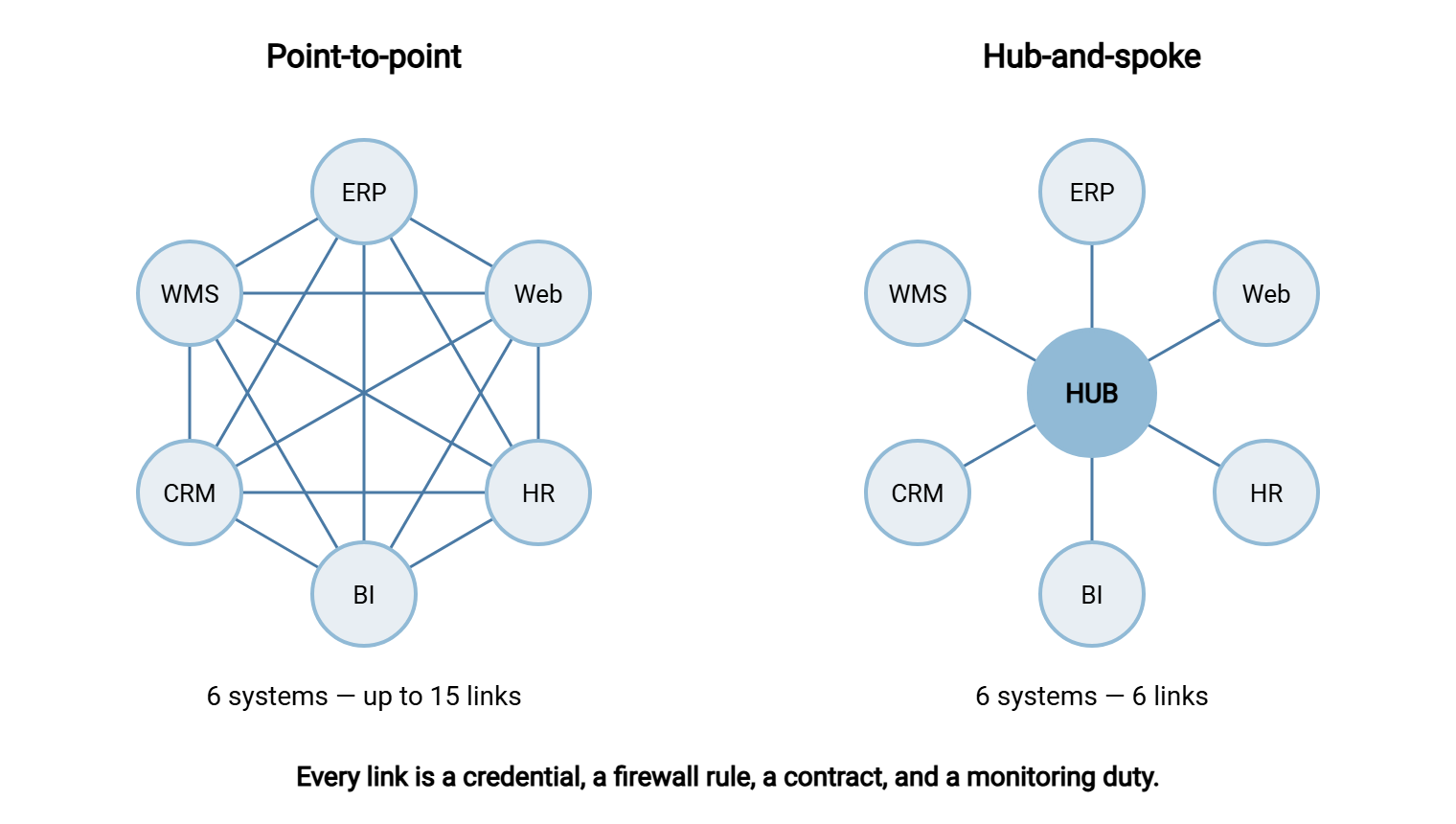
That shape is the estate's topology, and there are really only two pure forms it can take. In a point-to-point topology, systems that need to exchange files connect directly to each other, pair by pair. In a hub-and-spoke topology, every system exchanges files with one central endpoint — the hub — and never with each other. Almost everything about operating an estate at scale follows from which shape dominates. That includes how many credentials exist, how many firewall rules, whether anyone can see the whole, and how hard the next change is.
This article — part of our Server-to-Server Exchange Patterns series — explains why point-to-point creeps up on you and what the N-squared problem really costs. It explains what a hub genuinely takes on (including its honest downsides) and why real estates end up hybrid. It covers how to draw the topology you actually have before choosing the one you want.
How Point-to-Point Estates Happen
Nobody chooses point-to-point. It is what happens when each flow is set up by the team that needed it, at the moment they needed it. The warehouse system needs shipment data on the ERP server — a script and an account, done in an afternoon. Finance needs the same extract — another script, another account. A partner comes online, a reporting system appears, someone connects the HR system to payroll. Each decision is locally cheap and locally sensible.
Run the clock forward on any ordinary company and you can watch the mesh assemble itself. Year one: three systems, two flows, one administrator who knows both by heart. A few years in: the ERP has been joined by a warehouse system, a web shop, a BI platform, and two partners. There are a dozen flows written by four different people, two of whom have left. Nothing dramatic happened — no bad decision anyone could point to. The estate simply obeyed the default, and the default is point-to-point. That is because the direct link is always the shortest path for the person solving today's problem.
The global cost is invisible because each link's overhead lands in a different place. Every direct link carries, at minimum:
- a credential pair — an account on one side, a stored secret on the other, both needing rotation someday;
- a firewall rule — one more approved path between zones, reviewed annually by someone who no longer remembers why;
- a contract — folder locations, naming, completeness signals, agreed between two teams, usually verbally;
- a monitoring duty — someone, somewhere, ought to notice when this particular flow stops.
Multiply by dozens of links and the estate becomes something nobody can hold in their head. The symptoms are familiar. Flows are discovered for the first time during outages. A decommissioning is delayed for months because nobody knows who still connects to the old box. Credential rotation is postponed indefinitely because the blast radius is unknowable. This is transfer sprawl, and if it has already happened to you, our FTP sprawl and consolidation series is the recovery program. This article is about the geometry that causes it.
The N-Squared Problem
The geometry is unforgiving. With n systems, the number of possible direct links is n × (n − 1) ÷ 2. That number grows with the square of the system count, which is why this is called the N-squared problem:
| Systems exchanging files | Possible direct links | Links with a hub |
|---|---|---|
| 4 | 6 | 4 |
| 6 | 15 | 6 |
| 10 | 45 | 10 |
| 15 | 105 | 15 |
No real estate wires every possible pair — but it does not need to. Even a third of the possible links, at fifteen systems, is thirty-five bilateral relationships, each with its own credentials, conventions, and quirks. And that is the deeper trouble with point-to-point: not just the count, but the divergence. Each link was negotiated separately, so each has its own naming scheme, its own completeness signal, its own retry behavior, its own idea of a deadline. There is no single place where a question like "what came in last night?" has an answer.
The diagram below shows the same six systems both ways. The mesh on the left has up to fifteen links to manage; the hub on the right has six.
What a Hub Actually Takes On
A hub is more than a server in the middle — it is a reassignment of duties. Work that was smeared across every link concentrates in one place, which is exactly the point:
- Credentials collapse from many pairs to one per system. Each spoke holds one credential, for the hub. Nothing holds a credential for a production system, and rotation becomes a per-spoke chore instead of a per-pair negotiation. This is the estate view we develop in credentials between servers.
- The firewall picture becomes one sentence. Spokes may reach the hub; nothing else is open. New flows stop generating new rules.
- Monitoring gets a home. Every file in the estate crosses the hub, so "what arrived last night, and what is missing?" is answerable in one place. It takes one set of freshness checks instead of dozens — the practice covered in freshness checks and expected files.
- Standards become enforceable. One folder convention, one naming scheme, one completeness signal, applied to every flow because every flow lives on one box under one owner.
- The audit trail unifies. One activity log covers the estate's transfers, which is the difference between assembling evidence and dreading the question.
To make the reassignment concrete, follow one flow through. The warehouse system finishes its shipment extract and pushes shipments_YYYYMMDD_0130.csv to its own account on the hub, into /wms-to-erp/shipments/. It uploads under a temp name and renames on completion. The hub logs the arrival. Later, on its own schedule, the ERP side pulls from the same folder using its own account, which can read that folder and nothing else. If the file has not arrived by its deadline, the hub's freshness check — not either production system — raises the alert. Neither system knows the other's hostname, holds the other's credential, or cares about the other's maintenance window. Multiply that by every flow and you have the whole trick.
Mechanically, a hub is a hardened transfer endpoint with per-flow folders and per-system accounts — a staging area, generalized. On Windows, Sysax Multi Server fits the role directly. It runs as a service and speaks SFTP, FTPS, FTP, and HTTPS so mixed spokes can all connect. It isolates each account to its own folder tree and restricts each account by IP. It logs every action to a file or database for the audit trail. A file may need to move onward — from the intake folder of one flow to the outbox of another, or out to a spoke that cannot pull. In that case, the editions with event triggers can run an action the moment a file arrives. Or a scheduled task on the hub built with Sysax FTP Automation handles the onward leg on a timetable. The hub pattern does not require any particular software; it requires that these duties land somewhere deliberate.
The Honest Costs
Concentration cuts both ways, and the hub's drawbacks deserve plain statement:
- Single point of failure. When the hub is down, every flow is down. The mitigations are unglamorous: keep the hub boring (one job, no experiments) and patch it in announced windows. Back up its configuration, document its rebuild, and monitor it from outside itself. This is the discipline described in monitoring the monitoring. Estates that need more move to a standby or clustered arrangement, but most first hubs need reliability discipline more than redundancy hardware.
- An added hop. Producer to hub to consumer is two transfers, two schedules, and more end-to-end latency than one direct link. For a nightly batch this is irrelevant; for a minutes-matter handoff it may rule the hub out for that flow.
- A team becomes a bottleneck. Every new flow now needs the hub owner's involvement — which is the feature (someone finally sees everything) and the friction (a queue forms). A lightweight request process matters more than people expect.
- The junk-drawer risk. A hub without governance accumulates undocumented folders and orphan flows just like the mesh did — sprawl with better geometry. The folder contracts and cleanup ownership from staging area design apply to every hub flow, without exception.
Remember: a hub concentrates risk as well as order. Do not build one unless a named team will own it — its uptime, its standards, its request queue, and its purges. An unowned hub is the worst of both worlds: every flow depends on it, and nobody runs it.
Hybrid Realities
Pure topologies live in articles; real estates are hybrid. The practical goal is not "everything through the hub" but hub by default, direct by documented exception. Legitimate exceptions look like this:
- The heavyweight pair. Two systems exchanging very large volumes nightly may keep a direct link to avoid doubling the byte-miles through the hub. This is the kind of flow our massive datasets series deals with.
- The latency-critical handoff. A file that must land seconds after creation takes the direct path; a hub hop and a second schedule would eat the budget.
- The partner-dictated link. External partners connect how they connect. Many estates put partner traffic on a dedicated edge endpoint rather than the internal hub, and bridge it to the hub internally. This is the pattern explored in our transfer gateways and proxies series.
- The legacy survivor. A direct link that predates the hub and works flawlessly may not be worth migrating until its next change forces the question.
The word documented is doing the work in that rule. A hybrid estate where each direct link has a written reason is a designed estate. A hybrid estate where direct links simply never got migrated is a mesh with a hub-shaped ornament. Note also that one-to-many distribution — the same file fanned out to many sites — is its own shape with its own designs. Our multi-site distribution series covers it separately.
Draw the Topology You Have
You cannot choose a target topology until you can see the current one, and seeing it takes about two hours with a whiteboard. The method is a compressed version of the file flow census:
- List the nodes. Every system that sends or receives files — internal servers, partner endpoints, appliances. Check scheduled tasks and scripts for hostnames you forgot.
- List the edges. One line per flow, in a fixed format. Direction of data, who initiates, schedule, owner. Estimates are fine; blanks are findings.
- Draw it. Nodes in a circle, edges as arrows. Ugly is fine — the shape appears fast.
- Read it. Count links against systems, find the accidental hub, and mark the edges nobody owns.
A realistic inventory, in a format worth copying:
FLOW INVENTORY — one line per flow
flow-id  from            to              initiator  schedule       owner      notes
F01      wms-01          erp-01          wms (push) nightly 01:30  logistics  shipments csv
F02      erp-01          bi-02           bi (pull)  nightly 05:00  data team  sales extract
F03      erp-01          partner-a       erp (push) nightly 03:00  finance    invoices, SFTP
F04      crm-01          erp-01          ???        hourly?        ???        found in old script
F05      hr-01           payroll-ext     hr (push)  monthly        hr ops     encrypted
F06      web-01          erp-01          erp (pull) nightly 02:00  ecommerce  orders
F07      erp-01          wms-01          wms (pull) nightly 04:30  logistics  stock levels
F08      bi-02           partner-b       bi (push)  weekly Mon     data team  report pack
Totals: 8 systems, 8 flows, 2 partners, 1 unknown owner, 1 unknown initiator
Keep the format ruthlessly small — one line per flow — because the goal is the shape, not the documentation. The census article covers the fuller record (formats, volumes, data sensitivity) for when you need it. For topology work, these seven columns are enough to draw every arrow and expose every gap.
Three readings matter most. First, the accidental hub: in the inventory above, erp-01 appears in five of eight flows. Most estates already have a center of gravity like this — a system that participates in most exchanges because it holds the master data. That is a clue about where a deliberate hub would sit naturally, and a warning. That production system is currently carrying hub duties (many accounts, many firewall paths, everyone's uptime dependency) without hub design. Moving the exchange role off the busy production box onto a dedicated endpoint next to it is often the single highest-value move available. Second, the unknowns: flow F04 has no known owner and no known initiator. Rows like it are why topology work pays for itself before any redesign happens. Third, the chains: sequences like F01 then F02 — warehouse data reaching BI only via the ERP — mean some flows have hidden upstream dependencies. So one missed link breaks systems two hops away. Chains are also timing hazards — every extra hop adds a schedule that must land in the right order. This series takes up that problem separately in the article on cross-system timing.
Deciding, and Getting There Gradually
There is no magic threshold, but the signals stack up reliably. Point-to-point stops scaling somewhere around ten flows or three teams. The signals are that rotation of any shared secret has become a dreaded project, and the topology drawing surprised people. New flows take weeks because each is a fresh negotiation. An audit question ("show me everything that left for partners last month") has no single place to be answered. If most of those ring true, the estate wants a hub. If none do — a handful of flows, one team, stable pairs — point-to-point with well-chosen directions (see push or pull) is the right answer. In that case, a hub would be ceremony.
Getting there is never a big-bang migration. The reliable path starts with standing up the hub as an ordinary staging endpoint. Route the next new flow through it. Then migrate existing flows opportunistically, each at its next natural change — a credential rotation, a server replacement, a format revision. Migrating one flow is small, contained work. Create its folder and accounts on the hub, then run old and new paths in parallel for a few cycles. Compare arrivals, then retire the direct link and its firewall rule. Every migrated flow shrinks the mesh, and the flows that never present a reason to move become your documented exceptions. Resist the tempting shortcut of declaring the accidental hub to be the official one. A production ERP moonlighting as transfer infrastructure couples the estate's file exchange to that system's load, upgrades, and outages. Put the hub role on its own endpoint, even if it sits on the very next rack. A complete worked example of a hub estate — folders, accounts, timings, and the reasoning — is in this series' reference designs article.
Choose the Shape on Purpose
Point-to-point and hub-and-spoke are not rival products; they are the two ends of a dial that every estate sits on somewhere. Small, single-team estates belong near the point-to-point end, where directness is simplicity. Growing, multi-team, partner-facing estates drift toward the hub end, where concentration buys visibility, standards, and one place to answer questions. The price is a box that must be owned seriously. The failure mode is not picking the wrong end; it is never picking, and letting the square law pick for you.
Draw the estate, count the links, name the accidental hub — and then read the staging area and reference design articles to see what the deliberate version looks like.
Frequently Asked Questions
Is hub-and-spoke always better than point-to-point?
What is the N-squared problem in plain words?
Is a hub the same as a staging area?
Does every file have to pass through the hub?
Isn't the hub a dangerous single point of failure?
From the Sysax team: we build secure file transfer software for Windows. Sysax Multi Server is an FTP, FTPS, SFTP, and HTTPS server. Sysax FTP Automation handles scheduled, scripted transfers. Free trials are on the download page.