
Push or Pull: Choosing Direction Between Systems
Between any two systems that exchange files, someone once decided which machine does the work. Either the source system logs into the destination and uploads — a push. Or the destination logs into the source and downloads — a pull. In a surprising number of estates, nobody remembers making that decision. The direction was set by whoever wrote the first script, copied into the next ten flows, and never questioned again.
It deserves questioning, because direction quietly decides four other things. It decides which firewall must accept an inbound connection and which machine holds a credential for the other. It decides who finds out about failures and who experiences them as silence. And it decides who is even capable of retrying. Get those four right and a flow runs for years without drama. Get them wrong and you end up with the classic bad outcome: the side that is hurt by a failure is the last to hear about it.
This article is the working version of the decision — the one you make flow by flow, ending in a worksheet you can copy. It is part of our Server-to-Server Exchange Patterns series. If push and pull are new terms entirely, start with the beginner's introduction to push vs pull. This article assumes those basics and concentrates on the consequences.
Two Directions, One Data Flow
First, here is a distinction that prevents half the confusion in every direction conversation. The data direction and the connection direction are two different things. Data direction is fixed by the business — the invoice file is produced on the billing system and needed on the ERP system, full stop. Connection direction is the choice: which machine opens the network connection and drives the transfer.
The side that initiates runs a transfer client — software that connects out, authenticates, and issues commands. The initiating side also runs a scheduler or trigger that decides when to run. The other side runs a transfer server: a service that listens on a port (an SFTP or FTPS endpoint, say) and waits to be contacted. That split is the entire mechanical difference between the two patterns:
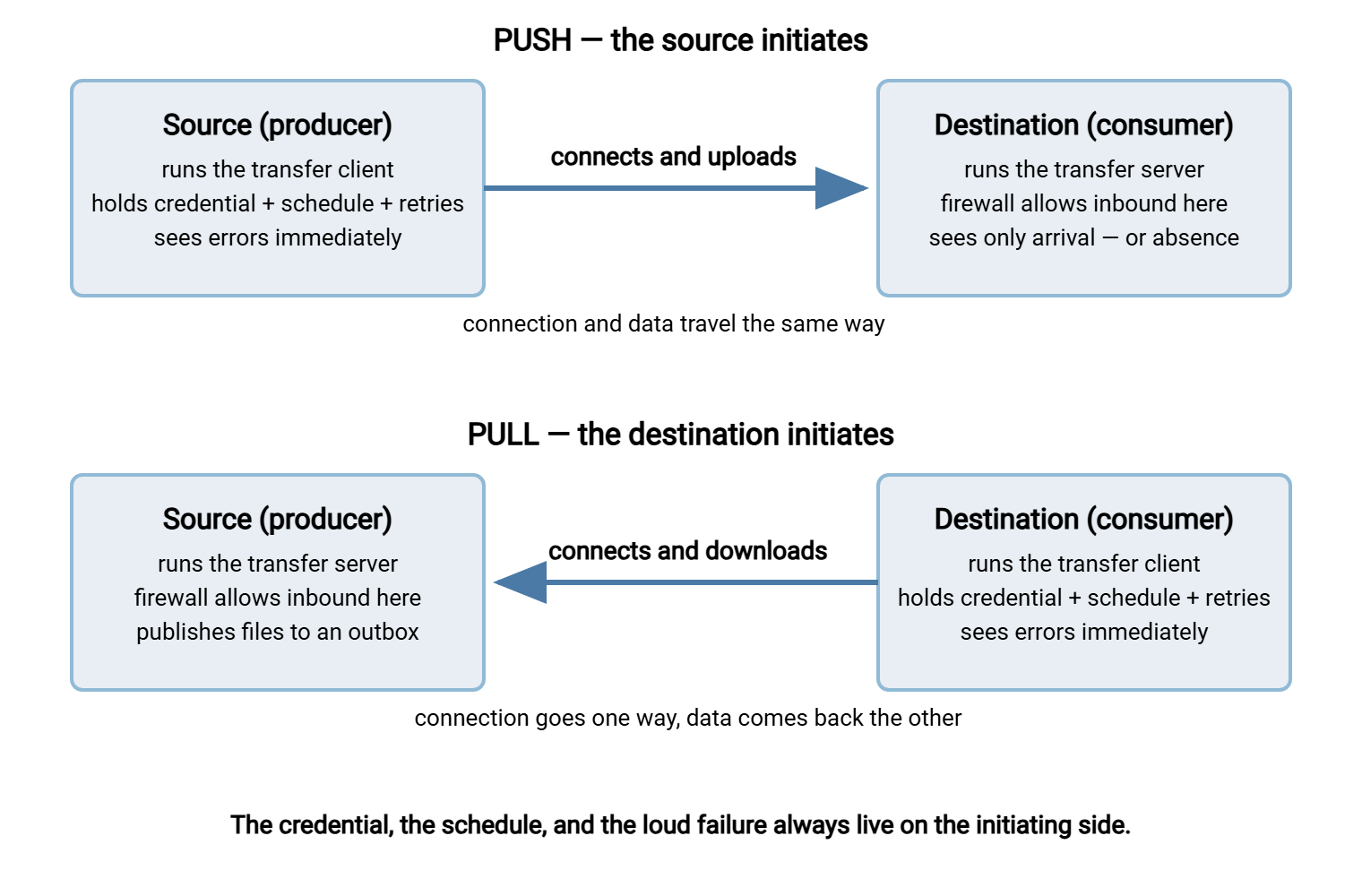
- Push: the source runs the client. It connects to the destination's server and uploads the file.
- Pull: the destination runs the client. It connects to the source's server and downloads the file.
Either way, the same file ends up in the same place. What changes is where the moving parts live — and the moving parts are what fail, what get audited, and what get attacked. Four consequences follow directly from the choice, and the rest of this article takes them one at a time:
- Firewall posture — the passive side must accept an inbound connection.
- Credential placement — the initiating side must hold a credential for the passive side.
- Failure visibility — the initiating side sees errors; the passive side sees only absence.
- Retry ownership — only the initiating side can try again.
Firewall Posture: Who Accepts the Connection
Whichever side runs the server must accept an inbound connection. That connection arrives from another machine, as opposed to an outbound connection the machine makes itself. Firewalls treat the two very differently. Outbound connections are broadly permitted on most networks. Inbound connections require a deliberate opening — a rule that says traffic from that address, to this port, is allowed in.
This single fact settles more direction decisions than anything else, because many organizations run their protected networks outbound-only. Internal systems may dial out, but nothing outside may dial in. Under that policy the internal side must initiate every exchange with an external party. Notice that this works for both data directions. Sending a file to a partner is a push from inside. Receiving a file from a partner is a pull from inside: your system connects out to the partner's server and downloads. The data comes in, but the connection still goes out. No inbound hole is ever opened in your own perimeter.
The mirror image is just as important: whoever agrees to run the listening endpoint takes on real work. A server that accepts connections from another network must be hardened, patched, and monitored for password-guessing attempts. It must be kept behind sensible firewall rules — ideally in a screened network segment rather than the internal LAN. Our guide to inbound vs outbound flows in a DMZ covers that side of the bargain. The point for direction planning is that running the server is a cost. It should be assigned deliberately, not inherited by whoever lost the scheduling meeting.
Between two systems on the same internal network the stakes are lower, but the logic is identical. Network zones inside an organization have trust boundaries too. A production database segment often refuses connections from the office LAN, for example. The side that accepts the connection is the side whose zone must permit it. The diagram below puts the two patterns side by side, with the credential and firewall consequences marked.
Credential Placement: Who Holds a Key to Whom
The initiating side must authenticate to the passive side, which means it stores a credential — a password, or better, a private key. That credential unlocks an account on the other machine. This is worth saying plainly: choosing a direction chooses which server holds a standing secret that can log into the other. That secret sits on disk, unattended, ready to be used at schedule time. It is exactly the kind of thing an attacker who lands on the box goes looking for.
So think through the blast radius in both directions before you choose:
- Push: the source holds a credential that can write into the destination's intake folder. If the source is ever compromised, the attacker can plant files on the destination — malformed data, oversized junk, or worse. What the attacker cannot do, if the account is set up well, is read anything else on the destination.
- Pull: the destination holds a credential that can read the source's outbox. If the destination is compromised, the attacker can take whatever files are sitting there. That is why an outbox that accumulates months of history is a bigger liability than one that is cleaned promptly.
The saving grace is that the passive side controls the account, and can constrain it tightly. The account can be locked to a single folder, limited to the minimum operations, and accepted only from the initiator's IP address. A push account should be able to write to the intake folder and nothing more. A pull account should read the outbox and nothing more. On a Windows endpoint running Sysax Multi Server, that is per-account configuration. Each account gets its own isolated folder tree. The server's IP allow and block lists refuse logins from anywhere other than the expected machine. The habits that keep such accounts healthy over the years — one account per flow, no sharing, documented ownership — are covered in service account hygiene. The estate-wide view of who should hold what is its own article in this series: credentials between servers.
Remember: the connection's direction is also the credential's direction. Whoever initiates holds a key to the other side. If one of the two systems is meaningfully less trusted, arrange the flow so that system holds no key at all. Examples include an internet-facing box, a partner's machine, or a lab server. That less-trusted system is instead the one being visited.
Failure Visibility: Who Finds Out, and How Loudly
When a transfer fails, the two sides have completely different experiences. The initiator gets an explicit error: a refused connection, an authentication failure, a timeout — something with a name, at a known time, in its own log. The passive side gets nothing. No connection arrived, no log line was written, no error occurred locally. From the passive side, a failed transfer is indistinguishable from a day with no data.
Here is what that looks like in practice. The producer's job log records a push failing at two in the morning:
Mar 14 02:10  job upload-invoices: connecting to erp-01.example.com
Mar 14 02:10  job upload-invoices: ERROR connection timed out
Mar 14 02:15  job upload-invoices: retry 1 of 3 failed - connection timed out
Mar 14 02:25  job upload-invoices: retry 2 of 3 failed - connection timed out
Meanwhile the consumer's log for that night contains nothing at all. Its morning batch load happily processes an empty intake folder, or worse, silently reprocesses yesterday's file. The consumer discovers the problem hours later, from users, which is the most expensive way to discover anything.
The design principle that falls out of this: align the pain with the signal. Prefer the direction where the side that is harmed by a failure is the side that sees the error. A file that feeds the consumer's critical morning process argues for pull. The consumer's own job fails loudly, on the consumer's own monitoring, with the consumer's own team on call. A file that discharges the producer's obligation (a report a regulator or partner expects from you) argues for push. You see your own failure while there is still time to fix it.
When constraints force the misaligned direction, compensate on the passive side with a freshness check. This is a small scheduled job that verifies the expected file actually arrived by its deadline and alerts if not. That turns silence back into a signal. The technique deserves its own article, and has one: freshness checks and expected files.
Retry Ownership: Who Tries Again
Only the side that runs the client can reconnect, which means the initiator owns retry — the whole apparatus of trying again. That includes how many attempts, how far apart, and when to give up and alert a human. The passive side cannot retry anything; it can only wait. When you assign a direction, you are assigning the retry engineering to that side. So it should go to the team actually equipped to build and operate it. The principles are in designing for recovery; what matters here is who has to apply them.
The two directions also retry differently well:
- Pull retries are naturally gentle. A download is a read operation. If it fails halfway, the consumer throws away the partial local copy and fetches again. The source is untouched. Re-pulling is also a recovery tool — if the consumer mangles its copy during processing, it can simply fetch the file again, as long as the outbox retains it for a while.
- Push retries need more care. A failed upload can leave a partial file on the destination, and a retried upload can collide with it. Or a too-eager consumer can grab the incomplete file before the retry finishes. Pushing safely means uploading under a temporary name and renaming on completion, the pattern covered in temp names and atomic renames.
Retries also have a deadline: there is no point retrying an invoice feed past the moment the consumer's batch run needed it. A good retry policy knows the flow's cutoff and escalates to a human while intervention can still help. This is a timing question this series takes up in timing and handoffs between independent systems. On the practical side, this is why the initiating end deserves a real scheduling tool rather than a bare script in a task scheduler. A product like Sysax FTP Automation generates the scheduled upload or download task through a wizard. It watches folders for new files and sends email notifications when a transfer fails. This is precisely the failure-visibility machinery the initiator is supposed to provide.
When the Choice Is Made for You
Plenty of flows never reach the worksheet, because a hard constraint settles the direction first. It is worth recognizing these on sight:
- Only one side can run a server. A transfer server is a piece of listening infrastructure — installed, firewalled, maintained. If the other party has only a client and no appetite for more, the direction is decided: they initiate, you listen, or the reverse.
- Policy forbids inbound. If your security zone is outbound-only, your side initiates everything — push to send, pull to receive — and the conversation is over.
- The partner dictates terms. Larger partners publish how they exchange files: "upload to our SFTP endpoint" or "collect from our server after the cutoff." You adapt on your side.
- Only the producer knows when data is ready. If files appear at unpredictable times, a push triggered by the producer at the moment of readiness beats a pull that polls blindly. Or the producer signals readiness and the consumer pulls on cue, a handoff pattern covered later in this series.
- One producer, many consumers. Pushing the same file to twenty destinations means twenty credentials and twenty retry loops on one machine. Letting consumers each pull from one well-run outbox often scales better — the shape of the problem our multi-site distribution series explores.
When a forced direction leaves you with misaligned failure visibility or an uncomfortable credential placement, you are not stuck. A staging area is a neutral endpoint that the producer pushes into and the consumer pulls from. It splits the flow so that both sides initiate outbound and neither holds a credential for the other's machine. That pattern gets the full treatment in staging areas: the neutral ground between systems.
The Per-Flow Direction Worksheet
Direction is a per-flow decision, not an estate-wide policy. A healthy estate contains both pushes and pulls, each chosen for a reason. Run this worksheet once per flow, ideally while you are already cataloging flows for a file flow census. Keep the filled copy with the flow's documentation. Ten minutes per flow, once, buys you an answer to "why is it this way?" for the lifetime of the flow.
DIRECTION WORKSHEET — one per flow
Flow name: ____________________  Source: ____________  Destination: ____________

1. Can each side accept an inbound connection?
   Source runs a reachable server:  yes / no    Destination:  yes / no
   (If only one side can listen, the other side initiates. Decision made — record and stop.)

2. Does either network's policy require outbound-only?     side: ____________
   (That side must initiate.)

3. Who knows when the data is ready?      producer / consumer / fixed schedule

4. Who is harmed if the transfer fails?   producer / consumer / both
   (Prefer the harmed side as initiator — it sees errors first.)

5. Who can operate scheduled jobs, retries, and alerts well?   ____________

6. Which side may hold a standing credential for the other?
   Source may hold one for destination:  yes / no
   Destination may hold one for source:  yes / no

7. Decision:  PUSH / PULL / STAGE (split into push + pull via a staging area)
   Reason, in one sentence: ________________________________________________
   Compensating controls (freshness check, temp-name uploads, ...): _________
When the answers conflict, apply them in this order. Hard constraints first: questions 1 and 2 eliminate options, and there is nothing to weigh. Failure-pain alignment second: question 4 is the one that decides whether the flow pages the right team at the right time. Operational maturity third: a beautifully aligned direction operated by a team with no scheduler and no monitoring is worse than the reverse. Credential comfort last — not because it matters least, but because a well-constrained account (question 6) can usually be made acceptable in either direction.
A worked example. Nightly invoices move from billing-02.example.com to erp-01.example.com. Both can run servers (1). Neither zone is outbound-only (2). The file is ready at a predictable time (3). The ERP team's morning close is harmed by a miss (4). The ERP team also has the stronger job tooling (5). Both credential placements are acceptable with a jailed account (6). Decision: pull, by the ERP side, shortly after the ready time. That decision includes a temp-name convention on the billing outbox so a pull never grabs a file mid-write. The reasoning is brief, and now it is written down.
| Situation | Favored direction | Why |
|---|---|---|
| Consumer's critical process depends on the file | Pull | The harmed side sees the error and owns the retry |
| Producer must prove delivery (obligation flows outward) | Push | Producer sees failure while there is time to fix it |
| Files appear at unpredictable times | Push | Only the producer knows the moment of readiness |
| One side's network is outbound-only | That side initiates | Policy constraint — push to send, pull to receive |
| Neither side should hold a key to the other | Stage | Both initiate outbound to a neutral middle endpoint |
Choosing Deliberately
Push or pull looks like a small implementation detail and is actually four architecture decisions wearing a trench coat. Those decisions are where the firewall opens, where the credential lives, who sees failures, and who owns retries. The initiating side takes on the client, the schedule, the secret, and the loud errors. The passive side takes on the server, the hardening, and the silence. Choose so that the constraints are respected, the pain lands next to the signal, and the retry engineering goes to a team that can carry it. Write the reason down on the worksheet, because the next administrator will otherwise inherit an accident and call it a design.
From here, a natural next step in this series is staging area design, which dissolves the direction dilemma for flows where neither end should trust the other. Another is credentials between servers, which zooms out from one flow's credential to the whole estate's.
Frequently Asked Questions
Is push or pull more secure?
Can one flow use both push and pull?
Does the choice of direction change which protocol I use?
Who should own retries in a server-to-server flow?
What if neither side is allowed to accept inbound connections?
From the Sysax team: we build secure file transfer software for Windows. Sysax Multi Server is an FTP, FTPS, SFTP, and HTTPS server. Sysax FTP Automation handles scheduled, scripted transfers. Free trials are on the download page.