
Three Reference Designs for Server-to-Server Exchange
Patterns are easy to agree with and hard to start from. Yes, direction should be chosen deliberately; yes, staging decouples; yes, hubs tame sprawl. But on Monday morning you still face a blank page and a dozen concrete questions the patterns do not answer by themselves. What folders, exactly? Which side runs at what time? Where do the accounts live and what are they called?
This article answers by example. It works through three complete designs at three estate sizes. These are a small estate exchanging directly, a growing estate organized around a staging server, and a larger estate running hub-and-spoke. Each has its topology, folder layout, direction and timing choices, credential placement, and, most importantly, the reasoning. None of them will match your estate exactly. All of them are close enough to steal from, and each one names the moment it stops being the right answer and the next one begins.
This is the capstone of our Server-to-Server Exchange Patterns series. The direction logic comes from push or pull. The middle-box thinking comes from staging area design and hub-and-spoke vs point-to-point. The timetables come from timing and handoffs. Here these ideas meet reality.
The Three Estates at a Glance
The diagram below shows the three shapes side by side: direct links for the small estate, a staging box in the middle of the growing one, and a star for the hub estate.
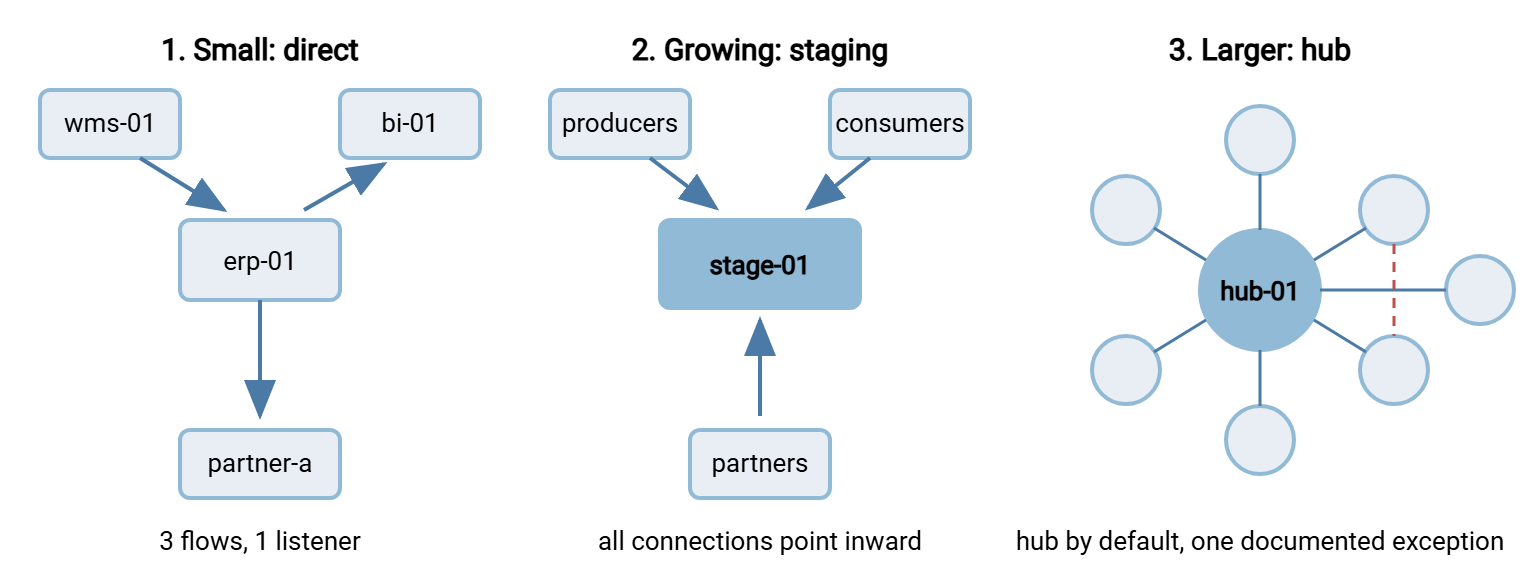
Pick your entry point by pain, not by headcount. If you can hold every flow in your head, start at design one. If handoffs and credentials have started tangling teams together, start at design two. If nobody can draw the estate and audits hurt, start at design three. Then adapt — the final section covers how.
Design One: The Small Estate, Direct
Scenario. One IT team runs everything: an ERP system (erp-01.example.com), a warehouse system (wms-01), a reporting platform (bi-01), and one external partner who receives invoices. Three flows, all nightly. Everyone who touches any of it sits in the same room.
Topology and direction. Three direct links, but not three arbitrary ones. The design decision that shapes everything: run exactly one listener. The ERP endpoint is the only transfer server on the network; everything else initiates toward it or out from it:
- Shipments, warehouse to ERP: the warehouse pushes into the ERP endpoint's intake folder. The warehouse system knows the moment its extract is complete. The alternative — running a second listener on
wms-01so the ERP could pull — buys nothing worth a second server to harden. - Sales extract, ERP to reporting: the reporting platform pulls from an outbox on the ERP endpoint. Reporting is the side harmed by a miss, so it holds the error and the retry, exactly as the direction worksheet recommends.
- Invoices, ERP to partner: the ERP side pushes to the partner's endpoint. The obligation flows outward — if delivery fails, this team must see the failure while there is time to fix it. The partner, like most larger partners, dictates the arrangement anyway.
Folder layout on the single listener:
erp-01 transfer endpoint
/xfer
  /in
    /wms-shipments/          <- svc-wms-push writes here, sees nothing else
      shipments_YYYYMMDD.csv     (uploaded as *.tmp, renamed when complete)
  /out
    /bi-sales/               <- svc-bi-pull reads here, sees nothing else
      sales_YYYYMMDD.csv
  /spool
    /partner-a-invoices/     <- local staging for the outbound push
      invoice_YYYYMMDD.csv
Timing. The warehouse commits to delivery by 01:45 (its worst night plus one retry cycle). The ERP's processing job runs a polling window from 02:00, consuming the shipment file on arrival. It publishes the sales extract to the outbox by 04:15. Reporting polls from 04:30 to 05:30. The invoice push fires at 03:00 with retries until 04:30, then alerts. Every deadline lives in a one-page timetable pinned next to the run book.
Credentials and operations. There are two accounts on the listener (svc-wms-push, svc-bi-pull), each jailed to its one folder and pinned to its one source address. One outbound credential, for the partner's endpoint, is held on the ERP side. The pushing legs run as scheduled tasks. A tool like Sysax FTP Automation builds the upload task through a wizard and emails the team when a run fails. At this scale that is the entire alerting stack, backed by a freshness check on the intake folder (the expected-files technique).
Where this design bends. The shipments flow carries a deliberate misalignment worth naming. The warehouse pushes, so the warehouse sees the errors — but the ERP side is the one harmed by a miss. The freshness check on the intake folder is not decoration; it is the compensating control that turns that misalignment from a gamble into a design. The reverse choice (ERP pulls) would have aligned pain and signal at the cost of a second listener on wms-01. This estate judged one hardened endpoint worth more than perfect alignment, and wrote the judgment down.
Reasoning, and the exit sign. This design's virtue is that one administrator can hold all of it in mind: one listener, three flows, three accounts, one timetable. Its known compromise is that a production system's sidecar endpoint is carrying the exchange role — tolerable while flows are few and one team owns everything. The exit sign is growth in couplings, not gigabytes. The estate has outgrown design one when a third team wants a feed, or the second partner arrives. The same is true when ERP maintenance windows start being negotiated around other people's transfers.
Design Two: The Growing Estate, Staged
Scenario. The same company a few years on: eight systems, three teams (ERP, logistics, data), two partners, ten flows. The ERP endpoint has become an accidental hub — everyone's transfers depend on a production box. Credential rotation requires three teams in a room, and the couplings bite monthly.
Topology and direction. A dedicated staging server, stage-01.example.com, in a screened network segment, becomes the only listener in the estate. Every flow follows the same two-leg pattern: producers push in when ready; consumers pull out when ready. Production systems initiate outbound only; nothing ever connects to a production system. Partners connect to the same staging endpoint, into their own jailed folders. The couplings from design one dissolve: any system can be patched, moved, or rebuilt without asking anyone, as long as its folder contracts hold.
Folder layout — direction encoded in the names, one folder per flow:
stage-01 staging server
/staging
  /wms-to-erp
    /shipments/            deliver by 01:45   collect 02:00-03:00
  /erp-to-bi
    /sales/                deliver by 04:15   collect 04:30-05:30
  /erp-to-partner-a
    /invoices/             deliver by 02:30   partner collects to 06:00
  /partner-b-to-erp
    /orders/               partner delivers   collect hourly 06:00-20:00
  /crm-to-bi
    /contacts/             deliver by 03:30   collect 04:00-05:00
  ... one folder per flow, ten in all
Conventions (every folder, no exceptions):
  names: <dataset>_YYYYMMDD.csv, uploaded as *.tmp then renamed
  retention: staging purges at 14 days; consumers never delete
  rejects: consumer moves bad files to <flow>/rejected/ and reports
The two partner flows show the pattern absorbing outsiders without special cases. Partner A collects invoices from its jailed folder; partner B delivers orders into its own. In both, the partner initiates. That means no partner is ever given a credential that reaches inside this estate. This estate never holds a partner's inbound firewall opening on its conscience. Each partner is just one more account, one more folder, one more contract line.
Timing. Each folder's deliver-by and collect-window pair is a slack budget worked from that flow's worst observed night. This is the method from the timing article. The pairs are published in one timetable, in one reference timezone, owned by whoever owns the staging box. Consumers use polling windows; the hourly partner-order flow shows the pattern flexing to intraday work without any new machinery.
Credentials. There are twenty accounts on the staging server — a producer account and a consumer account per flow. Each is folder-jailed, IP-pinned, and named so the purpose is legible (svc-wms-shipments-push). Every secret in the estate now unlocks only the staging server; no production system holds a key to any other. Rotation is a two-party runbook between one team and the staging admin. On the Windows box itself, Sysax Multi Server covers the role's requirements directly. It runs as a service. It speaks SFTP and FTPS for the internal legs and HTTPS where a partner needs browser access. It isolates each account to its folder, filters by IP, and logs every login, upload, and download to file or database. That is the shared evidence trail that settles whose-side-failed questions between teams.
Reasoning, and the exit sign. The estate bought decoupling with one new server and the discipline of folder contracts. The price is honest: a box to own and patch, every file crossing the wire twice, and end-to-end latency that is the sum of two schedules. The exit sign is scale of governance rather than scale of data. When flows pass a couple of dozen, when a fourth and fifth team arrive, or when partners multiply, the staging box is already a hub in fact. The same is true when audit questions ("show me everything that left last month") take days to answer. In those cases, it is time to make it a hub on purpose.
Design Three: The Hub Estate
Scenario. Fifteen-plus systems, six partners, five teams, roughly thirty flows, and real audit obligations. Files are how this company's systems and partners interlock, and the nightly schedule is dense enough that timing failures cascade. This is the world our nightly batch ecosystems series describes.
Topology. Hub-and-spoke, deliberately governed. An internal hub (hub-01.example.com) is the default path for every internal flow. Partner traffic terminates on a separate hardened edge endpoint in the DMZ (edge-01) — partners never touch the internal hub. A scheduled relay bridges edge and hub, the front-door arrangement our transfer gateways and proxies series details. One direct link survives by design: the imaging system ships multi-gigabyte files straight to the processing cluster, because doubling that volume through the hub would buy nothing. It is documented as the exception, with its reason.
Folder layout and standards. The staging tree, promoted to law:
hub-01
/flows
  /<source>-to-<dest>
    /<dataset>/            the contracted handoff folder
    /<dataset>/rejected/   consumer quarantine, producer empties it
Standards bound to every flow at creation:
  - folder contract on file (paths, names, deadlines, retention, rejects)
  - names <dataset>_YYYYMMDD[_HHMM].csv per the estate naming standard
  - *.tmp upload + rename; consumers ignore *.tmp everywhere
  - freshness check registered for both deliver-by and collect-by
  - two accounts created from template, jailed and IP-pinned
  - purge at 14 days (extensions are contract changes, not favors)
Timing. The hub is where the estate's timetable finally lives in one place. Every flow's deadlines are in one document, and every arrival is stamped in one log, in one reference timezone. Handoffs are polling windows by default; where minutes matter, the hub reacts instead of waiting. On editions of Sysax Multi Server with event triggers, a file's arrival can immediately run a validation script or kick off the onward relay. That collapses hub latency for the flows that need it. A quarterly timetable audit compares actual arrival times against budgets and re-tunes the slack before it silently erodes. The chain problem gets explicit treatment at this scale. Multi-hop sequences (warehouse to hub to ERP to hub to BI) are mapped with an owner for the end-to-end deadline. There are freshness checks at every intermediate hop so failures alarm where they happen. There is a pre-agreed catch-up procedure for the night a whole chain misses.
Credentials and governance. There is one account per spoke flow on hub or edge, from a template nobody hand-rolls. Every rotation follows a standard two-party runbook. A credential inventory answers "this box fell — what do we revoke?" in minutes. New flows arrive through a lightweight request: the requesting team fills in the folder-contract form. The hub team provisions folders, accounts, and freshness checks from the template, and the flow exists by the next business day. The speed is what keeps teams from routing around the hub and re-growing the mesh. The hub team owns the box's uptime, its patch windows, its configuration backup, and its rebuild document. The monitoring that watches the hub lives off the hub.
Reasoning, and the standing risks. Concentration is the point and the price. The hub answers every visibility, standards, and audit question in one place. It is a single point of failure whose outage stops the estate, a fact treated with reliability discipline rather than denial. The junk-drawer drift is held off by the rule that no folder exists without a contract. The bottleneck risk is held off by the one-day provisioning path. The temptation to route the imaging volumes through the hub is held off by the documented-exception lane. This design does not remove risk. It moves risk somewhere staffed, named, and watched.
Adapting a Design to Your Estate
The three designs are positions on one road, and estates move along it by growth rather than by leaps. Design one becomes design two by standing up the staging box and migrating flows opportunistically, each at its next natural change. Design two becomes design three when governance — standards, request paths, a named owner, partner separation — is added to a staging server that has already become load-bearing. Nothing is ever migrated big-bang, and the flows that never present a reason to move become documented exceptions rather than guilt.
Whichever design you adapt, five constants run through all three. They are the parts to copy even if you copy nothing else:
- Temp-name uploads with atomic renames, everywhere — the completeness signal that makes every other promise keepable (the pattern in full).
- Datestamped, convention-bound file names, designed once per estate (naming convention design).
- One account per flow per direction, folder-jailed, IP-pinned, legibly named.
- Deadlines with slack budgeted from worst nights, written where both teams can see them.
- A freshness check on every contracted folder, so absence is an alert, never a surprise.
Remember: the estates differ in topology; the flows barely differ at all. A well-built flow — contracted folder, jailed accounts, temp-name renames, budgeted deadlines, freshness check — looks identical whether it terminates on a sidecar endpoint, a staging box, or a hub. Build every flow that way and the topology can evolve underneath without rework.
Two adjacent worlds are deliberately out of scope here and covered by their own series. One is fanning one file out to many sites (multi-site distribution). The other is estates where some endpoints live in cloud storage rather than on servers (cloud and hybrid transfer). Both inherit these designs' bones — contracts, direction logic, slack — with their own twists.
Steal These, Then Write Yours
A reference design's job is to be argued with. Take the one nearest your estate and walk its choices against your flows. Check where its direction logic holds for you, where your constraints differ, and which of its deadlines your producers could actually meet. Write down the deltas. The result is your design, at perhaps a tenth the cost of starting blank, and with the reasoning already articulated for the next administrator who asks why.
The tools for the argument are the rest of this series. There is the direction worksheet for every flow and the folder contract for every handoff. There is the topology drawing for the estate and the slack budget for every deadline. Between those four and these three worked estates, the blank page problem is gone.
Frequently Asked Questions
Which of the three designs should I start with?
Can I run a staging server and still keep some direct flows?
Do these designs require special software?
Why do the growing and hub designs make producers push and consumers pull?
How big should an estate be before a hub makes sense?
From the Sysax team: we build secure file transfer software for Windows. Sysax Multi Server is an FTP, FTPS, SFTP, and HTTPS server. Sysax FTP Automation handles scheduled, scripted transfers. Free trials are on the download page.