
SFTP vs FTPS: Ending the Confusion for Good
A partner emails: "Please send the files by secure FTP." You set up an SFTP account and send credentials. Two days later their transfers are failing with certificate errors — because their software speaks FTPS. That is a different protocol that happens to contain the same three letters. Some version of this misunderstanding costs administrators real hours every week, and it survives because the names practically beg to be confused.
This article ends the confusion permanently. You will learn where the naming mess came from, and what SFTP and FTPS each actually are. Most usefully, you will learn the concrete, observable differences: which ports they use and how many connections they open. You will learn whether they present certificates or host keys, and how each behaves at a firewall. The article closes with a cheat sheet you can lift straight into an email to a confused partner. It also provides a set of questions that identify the right protocol in one exchange instead of five.
This is part of our SFTP In Depth series, so SFTP gets the home-field introduction — but the goal here is precision, not cheerleading. Both protocols are legitimately secure when configured well. They are simply not the same thing.
How the Naming Mess Happened
FTP — the File Transfer Protocol — came first, decades before encryption was a standard expectation. When the industry retrofitted security, it did so twice, in two unrelated ways, and both results ended up with "FTP" in the name:
- FTPS took the existing FTP protocol and wrapped its connections in TLS — Transport Layer Security, the same encryption layer that puts the S in HTTPS. The protocol inside the encryption is still ordinary FTP, commands and quirks included.
- SFTP came from the opposite direction. The designers of SSH (Secure Shell, the encrypted remote-login tool) added a file transfer service that runs inside an SSH connection. It was designed from scratch and borrows nothing from FTP — not its commands, not its connection model, not its replies. The name means SSH File Transfer Protocol.
Then the vocabulary got worse. People say "secure FTP" for either one. URL schemes look like typos of each other: sftp:// means the SSH protocol, ftps:// means the TLS one. To complete the chaos, the acronym SFTP had already been used long ago for an obscure "Simple File Transfer Protocol." Nobody runs that protocol anymore, but it still appears in old port tables. Marketing copy blurs everything further by listing "secure FTP support" without saying which.
The result: two mature, widely deployed, completely different protocols whose names differ by the position of one letter. The only defense is to know exactly what each is — so here is each, in one section apiece.
What SFTP Actually Is
SFTP is a file transfer service carried inside SSH. An SFTP session is one TCP connection — to port 22 by default, because that is SSH's port. On that connection, the SSH machinery does its work. The server proves its identity with a host key (a cryptographic keypair belonging to the server, verified by fingerprint). The user authenticates with a password or an SSH key, and everything from that point on is encrypted. The client then asks the server to attach the connection to its file transfer subsystem. File operations flow as tidy request-and-response packets: open, read, write, rename, delete, list.
The details of that architecture — layers, channels, handles, offsets — are the subject of the companion article how SFTP actually works. For this comparison, three properties matter:
- One connection carries everything. Commands, listings, and file contents all travel on the same TCP connection. There is no separate data connection, ever.
- Identity comes from SSH. Servers are known by host keys; users by passwords or SSH keys. No certificates are involved anywhere.
- It is not FTP underneath. There is no
PASV, noLIST, no reply code 226 — a network trace of an SFTP session contains no FTP at all, just SSH.
What FTPS Actually Is
FTPS is the FTP you may already know, upgraded with TLS encryption. Everything structural about FTP survives, including its defining oddity. There is a control connection (the long-lived conversation carrying commands like login and "send me this file"). There are also separate, short-lived data connections, one per file transfer or directory listing. These are negotiated through the active and passive modes explained in our active vs passive FTP guide.
The TLS wrapping comes in two flavors. In explicit FTPS, the client connects to the normal FTP port, port 21, and immediately issues an AUTH TLS command — "let's encrypt this conversation before I log in." In implicit FTPS, the client connects to a dedicated port, port 990, where TLS is simply assumed from the first byte. Either way, the server proves its identity with an X.509 certificate — the same kind of certificate a website presents. It is typically issued by a certificate authority and carries an expiry date. Data connections get their own TLS wrapping too, with some compatibility wrinkles all their own. The full story lives in our FTPS series.
The diagram below puts the two side by side. This single picture resolves most of the practical confusion.
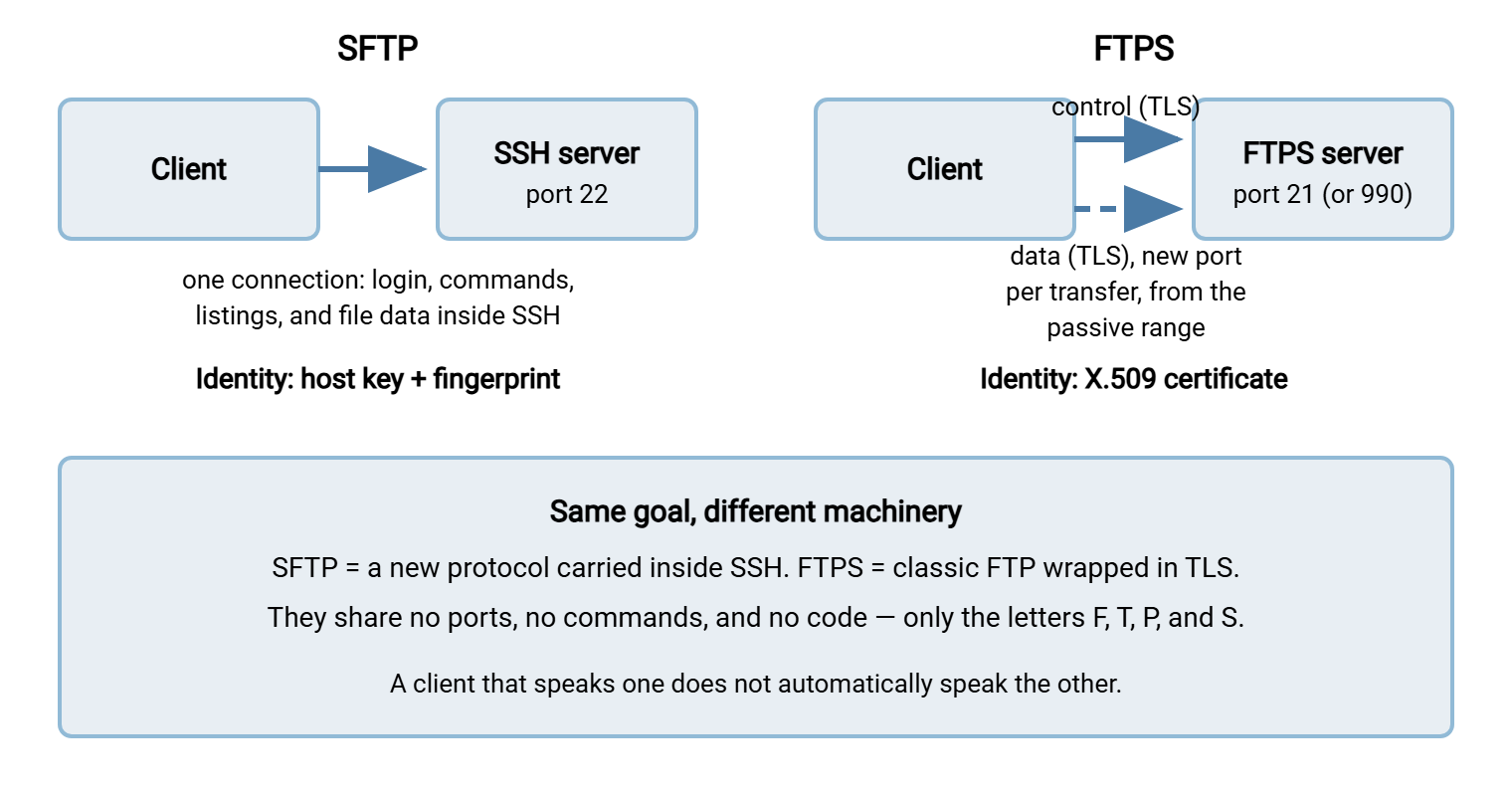
Remember: the S in FTPS means "plus TLS security around FTP." The S in SFTP means "SSH" — and the protocol behind it is not FTP at all. If you retain one sentence from this page, make it that one.
Consequence 1: Secure FTP Ports (SFTP 22, FTPS 21 or 990) and Firewall Behavior
The most operationally important difference is how each protocol looks to a firewall.
SFTP needs exactly one rule: allow TCP to port 22 (or your chosen SSH port). Every part of the session — authentication, commands, listings, file data — flows through that one connection. NAT does not confuse it, because no addresses or ports are ever negotiated inside the session for a second connection.
FTPS needs the whole FTP rule set, made harder by encryption. The control port (21 or 990) must be open, and so must the server's passive port range. That is the block of high-numbered ports handed out for data connections. The administrator must define and open it deliberately (the craft explained in configuring passive port ranges). Worse, plain FTP's one firewall mercy disappears. Many firewalls contain a helper that reads FTP control traffic and opens data ports on the fly. Under TLS that helper is blind — it cannot read the encrypted commands. The failure patterns this creates are cataloged in why firewalls block active FTP. They are a large part of why network teams tend to prefer the one-port protocol. The head-to-head decision framework is in our SFTP vs FTPS vs FTP series.
Consequence 2: Certificates vs Keys
The two protocols answer "how do I know I'm talking to the right server?" with different paperwork, and the difference shapes day-to-day operations more than any cryptographic detail.
FTPS servers present X.509 certificates. A certificate binds a name (like files.example.com) to a public key. It is signed by a certificate authority the client already trusts, and expires on a schedule. That buys automatic trust decisions — any client can validate a properly issued certificate with no prior contact. The cost is a lifecycle: issuance, renewal before expiry, chain and name-matching errors when something is misconfigured. If you have ever chased an "unknown certificate" error, you know the genre.
SFTP servers present host keys. A host key is a bare keypair with no name, no authority, and no expiry. Trust is established the first time a client connects. The client shows the key's fingerprint (a short digest like SHA256:d0Yqz2ap...). A human confirms it matches what the server's administrator published. The client remembers the key from then on — warning loudly if it ever changes. Administrators call this trust on first use. It means no renewal calendar and no certificate authority bills, but it puts a duty on you. Publish your fingerprints through a channel partners can trust, and announce host key changes ahead of time. Otherwise, every partner's software will (rightly) raise an alarm.
User authentication differs the same way. FTPS users almost always authenticate with passwords (client certificates exist but are rare in practice). SFTP users can use passwords too, but the protocol's signature feature is SSH key authentication. The client proves it holds a private key matching a public key registered on the server. This is stronger than passwords and dramatically better for unattended jobs. That subject earns its own article: SFTP authentication: passwords, keys, and combinations.
Consequence 3: Clients, URLs, and What Ships Where
Because the protocols share nothing on the wire, client support is a checklist item, never an assumption:
- URL schemes:
sftp://host/pathmeans the SSH protocol;ftps://host/pathmeans FTP over TLS. A URL beginningftp://promises no encryption at all. - Graphical transfer clients: the popular ones generally speak both, but each connection profile is set to one protocol. A profile created as FTPS will never reach an SFTP-only server, whatever the error message implies.
- Command-line tools: the
sftpandsshcommands (standard on Linux, macOS, and included in modern Windows) speak only the SSH side. The ancientftp.exeon Windows speaks only plain FTP — neither secure protocol. Don't let its name mislead a colleague into thinking "FTP is installed, so secure FTP will work." - Server products: some servers implement one protocol, some both. A Windows server such as Sysax Multi Server offers FTP, FTPS, and SFTP from a single installation. That is the pragmatic answer when different partners insist on different protocols: run both endpoints, migrate at your leisure.
- Automation tools: the same check applies to schedulers and scripts. A scheduled-transfer tool like Sysax FTP Automation selects FTP, FTPS, or SFTP per connection profile. So a partner's protocol choice becomes one dropdown rather than a script rewrite.
How to Tell Which One You're Dealing With
When a partner's documentation just says "secure FTP," two moves identify the real protocol in minutes.
Move 1: ask three questions. (1) What port — 22, 21, or 990? (2) Should we expect an SSH host key fingerprint, or a TLS certificate? (3) Does the address start sftp:// or ftps://? Any one answer settles it; asking all three catches partners who are themselves confused.
Move 2: probe the server and read the banner. Each protocol announces itself in its first bytes, so a plain TCP connection tells you what is listening:
$ nc files.example.com 22
SSH-2.0-OpenSSH_for_Windows        <-- an SSH banner: this is SFTP territory

$ nc files.example.com 21
220 Example Corp FTP Service       <-- an FTP greeting: plain FTP or explicit FTPS
                                       (if AUTH TLS is accepted, FTPS is offered)

$ nc files.example.com 990
(silence, then binary on TLS handshake)   <-- implicit FTPS behaves like HTTPS:
                                              TLS first, greeting inside
An SSH-2.0 banner on the target port means SFTP. A human-readable 220 greeting means the FTP family, with AUTH TLS support indicating explicit FTPS. Immediate TLS with no greeting on port 990 means implicit FTPS. Sixty seconds with a network utility beats a week of guessing.
Three Places the Mix-Up Bites Hardest
Knowing the difference in theory is one thing; knowing where the confusion causes outages is what saves you time. Three recurring scenes:
Partner onboarding. The classic. One side provisions SFTP, the other configures FTPS, and both see "connection failed" errors that look like credential problems. These symptoms are worth memorizing. An FTPS client pointed at an SFTP server usually reports a garbled greeting or a TLS handshake failure. It received an SSH-2.0 banner where it expected a 220 reply. An SFTP client pointed at an FTPS server reports something like "connection reset" or "invalid protocol version" on port 21. Neither message says "wrong protocol," so nobody suspects it. Put the protocol, port, and expected fingerprint or certificate name in the first onboarding email and this scene never plays.
Firewall change requests. An administrator requests "open the firewall for secure FTP," the network team opens port 22, and FTPS traffic keeps failing. Or the reverse happens, and a passive range gets opened for a protocol that never needed it. Every firewall request should name the protocol precisely, because as the sections above show, the two have almost opposite network footprints. This matters double behind load balancers and proxies, where FTP-family protocols need special handling that SSH does not. The gory details are in FTP through load balancers and proxies.
Audits and compliance paperwork. Security questionnaires love the phrase "secure FTP," and answering imprecisely can misstate your real posture. If the auditor's checklist expects certificate expiry monitoring and you run SFTP, the correct response is not to invent a certificate. It is to explain the host-key model and show your fingerprint-publication practice. Precision here is not pedantry; it is what makes the control you actually operate legible to the person assessing it.
The Cheat Sheet
This table is the shareable summary — accurate enough for engineers, plain enough for the partner's project manager.
| Question | SFTP | FTPS |
|---|---|---|
| Name expands to | SSH File Transfer Protocol | FTP over TLS ("FTP Secure") |
| Built on | SSH — a new protocol, no FTP inside | Classic FTP, wrapped in TLS encryption |
| Default ports | 22 | 21 (explicit) or 990 (implicit) + passive data range |
| Connections per session | One | Control + a data connection per transfer or listing |
| Server proves identity with | SSH host key, verified by fingerprint | X.509 certificate, validated via certificate authority |
| Typical user authentication | Password and/or SSH key | Password (client certificates possible, rare) |
| Firewall profile | One port, NAT-friendly | Multiple ports; encrypted control blinds firewall helpers |
| URL scheme | sftp:// |
ftps:// |
| Is it secure when configured well? | Yes | Yes |
So Which Should You Use?
Honest answer: both are strong, and the decision is usually operational rather than cryptographic. SFTP tends to win on day-to-day simplicity — one port, no certificate renewals, key-based automation — which is why it has become the default request in business file exchange. FTPS tends to appear where an existing FTP workflow needed encryption with minimal change, where a partner's toolchain is FTP-shaped, or where certificate-based trust is an explicit requirement. Neither choice is wrong; supporting both is often the least painful path when you serve many partners. The full decision framework — including migration routes away from plain FTP — is the business of our comparison series.
Whichever you offer, say it precisely in your own documentation: "SFTP (SSH, port 22)" or "explicit FTPS (TLS, port 21)" — five extra words that prevent the ticket this article opened with.
The Version to Tell a Colleague
SFTP and FTPS are two unrelated answers to the same question. FTPS is old-school FTP with TLS encryption wrapped around it: certificates, port 21 or 990, and the same separate data connections that make firewalls grumble. SFTP is a different protocol entirely that runs inside SSH: one connection to port 22, host keys instead of certificates, SSH keys for logins. A client configured for one cannot talk to the other. When someone says "secure FTP," ask which — or check the banner: SSH-2.0 means SFTP, a 220 greeting means the FTP family.
To go deeper on the SSH side, read how SFTP actually works and then SFTP authentication. For the TLS side, start with our FTPS series. And for the basics of FTP's own ports, the quick blog read What port is FTP? rounds out the picture.
Frequently Asked Questions
What is the difference between SFTP and FTPS?
Is FTPS secure? And is plain FTP secure?
SFTP vs FTP over SSL — is "FTP over SSL" the same as FTPS?
Which secure FTP ports do I need to open?
Is SFTP more secure than FTPS?
Do SFTP and FTPS use the same port?
Does SFTP need a TLS/SSL certificate?
Can one server offer both SFTP and FTPS?
What is "FTP over SSH" — is that SFTP?
How do I quickly check whether a server speaks SFTP or FTPS?
From the Sysax team: we build secure file transfer software for Windows. Sysax Multi Server is an FTP, FTPS, SFTP, and HTTPS server. Sysax FTP Automation handles scheduled, scripted transfers. Free trials are on the download page.