
Migrating Users Off Consumer Tools Gently (Blocking Comes Last)
The sanctioned path exists, the pilot teams have switched without being told to, and the register still has thirty-odd rows of teams who have not. Moving them is the part of the project that most organizations get backwards: they block the consumer domains on a Friday and call it migration. It is not. Migration means moving the data and moving the partners who hold the old links. Then you teach each team the new path in twenty minutes. Only then do you close the old one. Do this in that order, department by department.
This article is the method. It covers the order of operations and the migration window, a fixed period in which one team moves with support. It includes the checklist for moving the data out of a consumer account without losing any of it. It covers the notice that moves the partners and the communications plan. It also covers the staged block that comes last and the departments that need their own handling. It is the fifth article in our Shadow File Sharing series, and it assumes the sanctioned path has passed the parity pilot from the fourth.
The Order of Operations
Five phases, always in this order, because each one makes the next one safe. First, the sanctioned path is proven: pilot teams have switched and the proxy log shows it. Second, the amnesty from the discovery article is extended for the whole migration, so nobody hides a share to avoid being the last one moved. Third, each team gets a migration window, in the tier order from the triage article, highest score first. Fourth, the consumer domains get a warning page for two weeks. Fifth, and only fifth, they get blocked. The diagram shows the sequence.
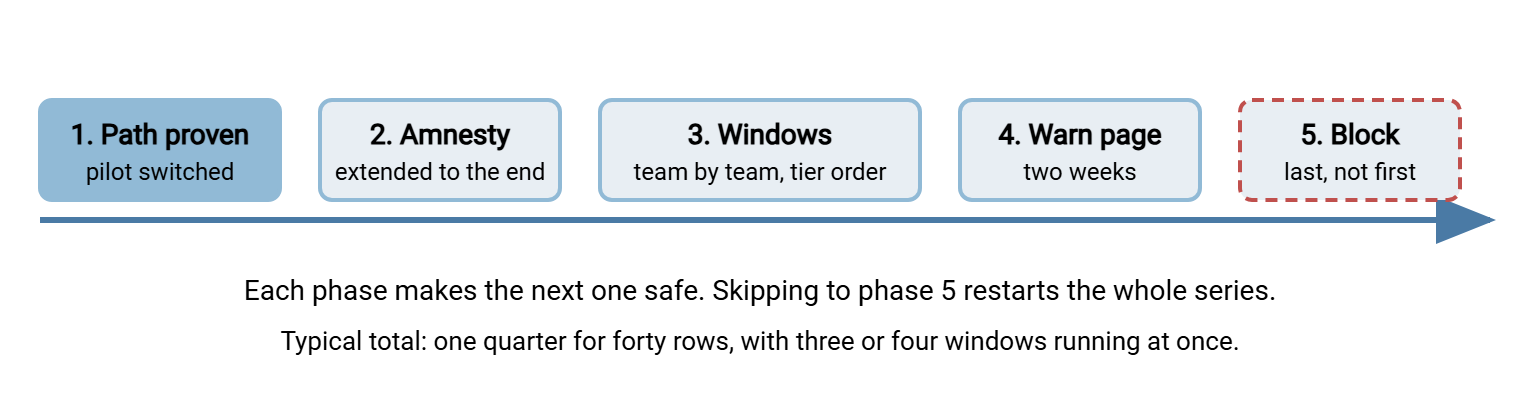
The order matters because the block is the only irreversible step. A team migrated before the block loses nothing and gains a supported path. A team blocked before migration loses its working process on a Friday afternoon. By Monday it has found another consumer service. That is the Northgate Retail story from the first article and the reason this article exists.
The Migration Window
A migration window is four to six weeks for one team. You run three or four at a time so that forty rows take a quarter rather than a year. Inside the window the shape is always the same. First comes a twenty-minute kickoff where the team sees the new path and gets their accounts confirmed. Next comes a data move done by the team with your help. Then comes a partner notice sent by the team in its own name. At a checkpoint halfway through, you look at the proxy volume together. At the close, the old location is emptied and the team says, in writing, that it is done. The team leads the window. You support it. That distinction is what makes it gentle.
The email that opens a window is the template most readers of this article will steal, so here it is in full. It goes from IT to the team's manager and the register contact. It is written for someone who will read the first four lines and skim the rest.
Subject: Marketing file sharing migration window, YYYY-MM-DD to YYYY-MM-DD

Hello Priya, hello Tom,

Marketing's turn to move from share-example.net to the company sharing page
starts on YYYY-MM-DD and runs for five weeks. Here is the whole plan.

WHAT CHANGES
  - New sends go through the sharing page: [link]. Browser only, nothing
    to install, recipients just open a link. Your accounts already exist.
  - The print supplier and the agency get an upload page of their own so
    they can send proofs back without an account.

WHAT WE DO TOGETHER
  Week 1   Kickoff, 20 minutes, your team meeting. We show the page and
           answer questions. We agree who owns the data move.
  Week 1-2 Move the files out of share-example.net into your team folder.
           Checklist attached; we sit with whoever does it.
  Week 2   You send the partner notice (draft attached) to the printer
           and the agency. Both links work in parallel until week 5.
  Week 3   Checkpoint, 15 minutes. We look at what is still going to the
           old service and fix whatever is causing it.
  Week 5   Close: old folders emptied, old links revoked, you confirm.

WHAT HAPPENS AFTER
  Two weeks after the last team's window, share-example.net shows a
  warning page, and two weeks after that it is blocked. Nobody in
  Marketing will be affected by then, because you will already be done.

WHAT DOES NOT HAPPEN
  Nobody is in trouble for anything found during the move. The amnesty
  from the discovery survey runs until the end of the migration.

Questions any time: [IT contact, phone, chat]
Two details in that email carry most of the weight. "Both links work in parallel until week five" is the sentence that stops the team panicking, because it means no send fails during the move. And "you confirm" at the close puts the finish line in the team's hands. That is where it belongs, since they are the ones who know whether the printer has actually switched.
Moving the Data
Every consumer sharing account that has been used for work holds files the company needs and nobody has listed. Moving them is a checklist job. The checklist has one rule above all others. Nothing is deleted from the old location until the copy in the new one has been counted, sized, and opened. The steps:
- Inventory the old account. Most consumer services show a total file count and size somewhere in their settings; write both down. If the account mixes personal and company files, agree with the owner which folders are company data. Only those move.
- Export to a staging folder on company storage. Use the service's bulk download or export, which usually produces one or more archive files. Unpack them into a staging folder, for example
\\fileserver\migration\marketing-staging, that only you and the owner can see. - Verify the export. Count and size the staging folder and compare with step one. In PowerShell:
Get-ChildItem -Path .\marketing-staging -Recurse -File | Measure-Object -Property Length -Sum | Select-Object Count, Sum
Small differences in size are normal, because services store some files in their own format and convert on export. A difference in count is not normal, and means the export was incomplete. - Upload into the sanctioned path. Into the team's folder, keeping the folder structure the team already uses, so nothing has to be relearned. For a large export, use the server's SFTP door and a bulk client rather than the browser, which is what that door is for.
- Open a sample. The owner opens ten files, chosen from different folders and different years, and confirms they are the right files and they open. This catches the export that renamed everything or dropped the file extensions.
- Keep the staging copy until the window closes. Then delete it, because a forgotten staging folder is a new shadow share with a company address.
- Empty the old location and revoke its links. Delete the company folders from the consumer account. Revoke every share link the owner created for work. If the account is a company-registered one, close it; if it is personal, it stays the owner's, with the company data gone.
Two cautions from experience. Consumer exports are careless with file names. They add suffixes for duplicates, replace characters the service did not like, and occasionally lose the extension entirely. So budget time for step five and read our article on safe characters across platforms before you are surprised. And where the data is regulated, generate a manifest with hashes before and after the move. For that manifest, use the method in checksum files and manifests. That is because "we counted the files" satisfies you and "here is the manifest" satisfies the auditor.
Never revoke a link before the partner on the other end has used the new one at least once. Not the printer, not the agency, not the supplier who "only sends twice a year". A revoked link that a partner is still using fails silently on their side and loudly on yours, a fortnight later, when the proofs do not arrive.
Moving the Partner Relationships
The data is the easy half. The hard half is the two hundred suppliers, the printer, and the agency. They have the old link in a bookmark, an email signature, or a procedure document of their own. They will keep using it until it fails. Each partner needs a notice, sent by the team that works with them rather than by IT. A message from a stranger's department is deleted and a message from Priya is read. The notice is four lines and does one thing:
Subject: New way to send us files (please update your bookmark)

From YYYY-MM-DD we are sending and receiving files through our company
sharing page instead of share-example.net.

  To send us files:   [upload page link] - no account needed, just open it.
  To receive from us: you will get a download link by email as before.

The old link keeps working until YYYY-MM-DD, then it will be switched off.
If anything does not work, reply to this email and I will sort it out.

Priya Mehta, Marketing, Meridian Parts
Send it in week two. In week three look at the old location together to see who has not switched yet. They get a phone call, not a second email. For partners who send you files under a contract or a schedule, the notice becomes a short connection guide. Our partner onboarding documentation series shows how to write one that a partner's junior admin can follow without ringing you. Where the partner is a customer rather than a supplier, our article on the customer account lifecycle covers the case where the relationship outlives any one link.
Meridian Parts, for the record, did the data move perfectly and forgot the printer. The marketing coordinator's old anyone-with-the-link folder was emptied and its share revoked at the close of the window, exactly as the checklist said. But the printer had never received a notice. It kept uploading proofs to the address in its bookmark for three weeks. Nobody at Meridian was looking there any more. The folder, loyal to the end, accepted every one of them. The autumn catalog nearly missed the same press slot that had started the whole shadow sharing story a year earlier.
The Communications Plan
Migration fails on communication more often than on technology, and the failure is nearly always the same. The people who needed to hear something heard it from the wrong person, at the wrong time, or not at all. The plan below is the minimum. Every row is an audience, a message, the channel that audience actually reads, and when.
| Audience | Message | Channel | When |
|---|---|---|---|
| Helpdesk | What is changing, the one-page user guide, the five likely questions and answers | Team meeting and a saved ticket macro | Before anyone else hears anything |
| Managers | Why, the window schedule, what their team must do and by when, the amnesty | Management meeting, ten minutes, plus the schedule by email | Two weeks before the first window |
| All staff | The new page exists, it is easier, here is the one-page guide, your team's window is coming | One email from the head of IT and an intranet page | Day the first window opens |
| Migrating team | The window email above, then the kickoff | Email to manager and contact; twenty minutes in their own meeting | One week before their window |
| Partners | The partner notice above | Email from the team's own contact, never from IT | Week two of the window |
| Everyone | The old services show a warning page from date X and stop from date Y; how to request an exception | Email plus the warning page itself | Two weeks before the warning page |
The helpdesk row comes first for a reason I learned the hard way. I once announced a migration to eight hundred people before telling the four people who answer the phone. I spent the following morning apologizing to each of them in turn. The one-page user guide that most rows refer to, and the twenty-minute kickoff format, belong to the teaching side of this problem. Our training and adoption series covers that in full.
Blocking Comes Last, and in Two Stages
When the last window has closed, the consumer domains can finally be closed off, and even then not all at once. Stage one is a warning page. The proxy still allows the service, but the first visit each day shows a page that says the service is being retired. That page links to the sanctioned path and links to an exception request. Two weeks of warning page catches everyone the windows missed. In my experience, that is a small number of people who were on leave, plus one contractor nobody had on the register. Stage two is the block itself, with the same page shown instead of the service.
Blocking has two honest limits, and users should hear both. It works on the company network and the company VPN; it does nothing about a phone on mobile data, and it is not meant to. The purpose of the block is to stop the consumer tool being the easy path from a work machine. It is not to build a wall, and a wall would not hold anyway. The second limit is that some outsiders will keep sending you links from their own consumer tools. Opening a link a customer sent is not shadow sharing. It is receiving a file, and the exception process should say so plainly. Our article on the exceptions process covers how to grant those without reopening the whole door.
Keep the discovery one-liners running after the block, monthly, and expect the top of the list to change. The domain you blocked disappears. If a new sharing domain appears in its place within a month, a team has a need the sanctioned path is not meeting. In that case, the right response is the parity checklist, not another block. That loop is the subject of the final article in the series.
Departments That Need Special Handling
Most teams fit the standard window. A few do not, and it is cheaper to know which in advance than to discover it in week three.
| Department | Why it is different | Handling |
|---|---|---|
| Marketing and creative | Multi-gigabyte files; agencies with their own tools and habits | Longer window; an upload page per agency; test a five-gigabyte send in the kickoff, not after |
| Sales | Mobile; customers send links from whatever they use | Kickoff on phones; written rule that opening a customer's link is fine and sending goes through ours |
| HR, legal, payroll | Regulated data; retention rules | First windows, hash manifests on the move, privacy officer at the close |
| Finance | Auditors and banks often insist on their own portals | Receiving via the auditor's portal is an approved exception; sending goes through ours |
| Engineering and IT | Will script around any block; needs a machine-friendly door | Give them the SFTP door and ask them to help; they make excellent pilot users for the second loop |
| Executives | Their assistants do the sending, often from the executive's account | Train the assistant; give the assistant their own account with access to the executive's folder |
The destination for all of them is the same: a folder per team and an account per person on the sanctioned server. Every upload and download is logged there. A transfer server with per-account folders and activity logging, such as Sysax Multi Server, gives the migrated data an owner and a record on the first day. Those are precisely the two things the migrated data never had in the consumer account.
After the Last Window
The one-minute version: prove the path, extend the amnesty, and run migration windows team by team in tier order. Move the data with a checklist that never deletes before it counts. Move the partners with a notice from someone they know. Communicate in the order helpdesk, managers, everyone, team, partners. Block in two stages only when the windows are done. Gentle is not slow. A quarter for forty rows is typical, and it is a quarter at the end of which the register is empty and nobody has been ambushed.
The register will not stay empty on its own. The final article, Keeping Shadow Sharing From Coming Back, covers the light monitoring, the new-starter path, and the request route that keep it that way. If the migration surfaced needs the path could not meet, go back to the parity checklist before you go anywhere else.
Frequently Asked Questions
What if a team refuses to move?
Should the consumer account be closed or just emptied?
How long should a migration window be?
Can we block the domains as soon as the last window closes?
A customer keeps sending us links from their own consumer tool. Is that shadow sharing?
From the Sysax team: we build secure file transfer software for Windows. Sysax Multi Server is an FTP, FTPS, SFTP, and HTTPS server. Sysax FTP Automation handles scheduled, scripted transfers. Free trials are on the download page.