
Keeping Shadow Sharing From Coming Back
Shadow sharing is not defeated; it is outcompeted, and only for as long as the competition holds. The register is empty today because the sanctioned path is at parity with the consumer tools today. It will refill the first time a new starter arrives with a habit. The same happens when a team acquires a need the path does not meet. A request for a bigger limit left in a queue for three days will do it too. None of those events is unusual. All three will happen this quarter. Prevention is the practice of noticing them early and answering them fast.
This article is that practice. It covers monitoring that is light rather than creepy, with the monthly one-liner that does it. It includes the new-starter card that gives every new employee the sanctioned path on day one. It covers a request route that answers in hours and a quarterly re-discovery that takes an afternoon. It also covers the feedback loop that turns every reappearance into an improvement. This is the final article in our Shadow File Sharing series, and it is the one that runs forever.
The Loop, Not the Line
The series so far reads as a line: discover, triage, build, migrate. Prevention is the discovery that the line was always a loop, running at low volume for as long as the organization exists. The diagram shows it. The first pass through the loop is a project with a budget and a quarter's calendar. Every pass after that is a habit that costs an afternoon a month.
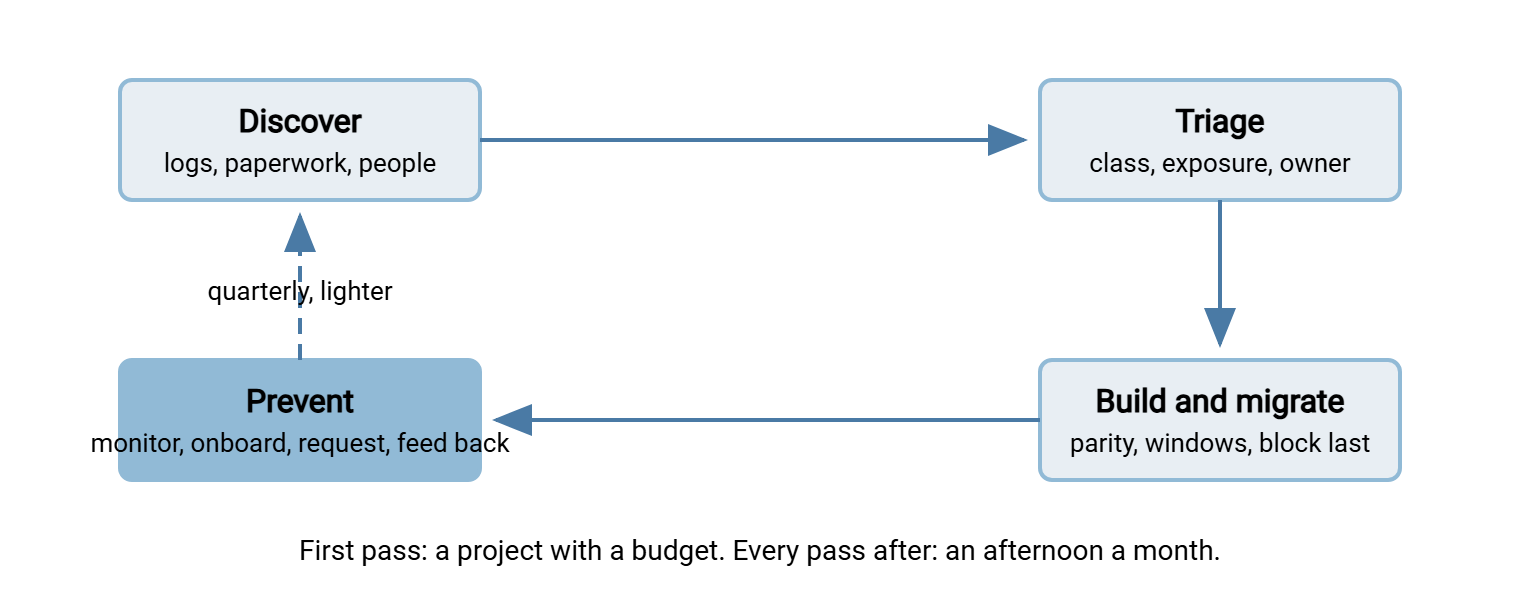
The dashed arrow is the whole of this article. Everything below is a way of running the discover step cheaply and continuously. That keeps the triage and migrate steps small enough to be done in an afternoon rather than a quarter.
Monitoring That Is Light, Not Creepy
The test for monitoring is simple: if the monthly report could be used to name a person, it is the wrong report. The right report names destinations and teams, and it answers three questions. Has a new destination entered the top of the upload list? Is the volume to known sharing services going up or down? Is the sanctioned path being used more or less than last month? Three numbers, one page, sent to whoever owns the transfer service, once a month.
The first question is answered by comparing this month's top upload destinations with last month's. That is a job for the one-liners from the discovery article plus one tool you may not have met. comm compares two sorted files. With the -13 flags, it prints only the lines that appear in the second file and not the first. The proxy log layout is the one used throughout this series. Field five is the method, field six the destination host, field nine the bytes.
for m in lastmonth thismonth; do
  awk '$5=="POST" || $5=="PUT" {up[$6]+=$9} END {for (h in up) print up[h], h}' proxy-$m.log \
    | sort -rn | head -50 | awk '{print $2}' | sort > top-$m.txt
done
echo "New in the top 50 upload destinations this month:"
comm -13 top-lastmonth.txt top-thismonth.txt
Keep a plain text file of the sharing domains you already know about, one per line. Check the new arrivals against it and the whole list against the month's top fifty:
grep -F -f sharing-domains.txt top-thismonth.txt
Anything that prints is a known sharing service still, or again, in the top fifty by upload volume. It is either a blocked domain being reached from somewhere the block does not cover, or a new team that has not met the sanctioned path. For anyone whose logs arrive on a Windows workstation, there is a PowerShell equivalent for the comparison. It is Compare-Object (Get-Content top-lastmonth.txt) (Get-Content top-thismonth.txt), filtered on the => side indicator.
The third question is whether the sanctioned path is being used. That is answered from its own log rather than the proxy. This is where the path has an advantage the consumer tools never gave you. A transfer server that logs activity by account, such as Sysax Multi Server, can tell you how many accounts sent or received something this month. It can also tell you how many bytes moved. When that number goes up as the shadow number goes down, prevention is working. When both go down, a team has found a third path, and the quarterly re-discovery will find it.
Two things the monitoring deliberately does not do. It does not inspect what is in the files. That is the job of data loss prevention, which works as a safety net behind the sanctioned path rather than a replacement for it. Our articles on pattern-based controls and handling DLP hits cover that layer. And the monitoring does not produce a dashboard per person. The moment it does, the amnesty from the discovery article is retroactively a lie. In that case, the next re-discovery survey will come back empty.
Remember: prevention is parity maintained, not a wall built. Every reappearance of a sharing domain in the top fifty is a team telling you something, in the only language available. The team is telling you that the sanctioned path has fallen behind on something. The correct response is the parity checklist. The incorrect response is another block, and it will work for about a week.
The New-Starter Path
Every new employee arrives with a habit: whatever their last employer let them do. For most people that was a consumer sharing tool. If the sanctioned path is not in front of them in their first week, the habit wins by default. In that case, the register gains a row that took no effort at all to create. Two things stop that. The account must exist on day one, created by the same process that creates the mailbox, so nobody ever has to ask. Our user lifecycle series covers the provisioning mechanics. And the new starter must be handed the path in a form they can read in three minutes. That is the card below.
The card is one page, joke-free, and written for someone who has never heard the words "sanctioned" or "transfer". It goes in the new-starter pack, on the intranet, and on the back of the helpdesk's welcome email. Adapt the details; keep the length.
HOW TO SEND AND RECEIVE FILES AT ACME                    (keep this page)

Your file sharing account already exists. Log in at [link] with your
normal username and password. Nothing to install. Works on your phone.

SENDING A FILE TO SOMEONE OUTSIDE ACME
  1. Open [link] and drag the file onto the page.
  2. Click Share. Copy the link it gives you.
  3. Paste the link into your email. The recipient just clicks it.
  The link stops working after 14 days. Extend it on the page if needed.

RECEIVING A FILE FROM SOMEONE OUTSIDE ACME
  1. Open [link], choose your folder, click "Request files".
  2. Send them the upload link. They open it and drop the file. No account.
  3. You get an email when it arrives.

SENDING A FILE TO A COLLEAGUE
  Small file: attach it to an email as usual.
  Large file: use the sharing page exactly as for an outsider.

BIG FILES (over 10 GB), REGULAR PARTNER EXCHANGES, ANYTHING UNUSUAL
  Ask at [request form link]. Standard requests are answered the same
  working day. If you are not sure whether to ask, ask.

PLEASE DO NOT
  Use a personal cloud drive or a consumer sharing service for Acme files.
  Not because you would be in trouble, but because nobody at Acme can see,
  back up, or recover what is in them, and the link never expires.

Stuck? Helpdesk: [phone / chat]. Someone will walk you through it.
The "please do not" section is written the way it is on purpose. It gives the reason, not the rule. A new starter who understands why will remember, and one who is merely told will forget by the second week. Teaching the path beyond the card belongs to our training and adoption series. That includes the twenty-minute session that new starters get in their first month.
A Request Route That Answers in Hours
The single biggest cause of shadow sharing returning is a request that took days. A user asks for a bigger limit, a partner upload page, or a team folder. The ticket sits in a queue. The deadline arrives before the answer; the consumer tool is eleven minutes away. Prevention therefore needs a request route with two properties. It is easy to find, and it answers in hours, not days. The first article called the ticket queue a place where requests go to mature. The request route is the place where they go to be answered instead.
The route is a short form with five fields: what you need to do, with whom, how big, how often, and by when. There is a published answer time per request type. The table is the commitment; publish it where the card points.
| Request | Who answers | Answered within |
|---|---|---|
| Bigger file or link limit for one send | Helpdesk, from a written rule | Two working hours |
| Upload page for a partner or agency | Helpdesk, from a template | Same working day |
| New team folder or shared inbox | Transfer service owner | Same working day |
| Regular scheduled exchange with a partner | Transfer service owner, with the partner onboarding form | Two working days to a test file |
| Use of an outside tool for a genuine reason | Transfer service owner plus security, via the exceptions process | Two working days |
The default answer is "yes, and here is how". The times are met by taking decisions out of the queue and writing them down as rules the helpdesk can apply without asking anyone. A bigger limit for one send does not need a manager. A partner upload page does not need a security review, because the page was reviewed once when the service was built. The only row that needs a real decision is the last one. Our article on the exceptions process shows how to make even that one fast without making it careless. Measure the median time to answer every month and put it on the same one-page report as the shadow numbers. When the median creeps past a day, the shadow numbers will follow it within a quarter. You will have had warning.
Quarterly Re-Discovery
Once a quarter, run a lighter version of the discovery article. It takes an afternoon rather than six weeks, because the ground rules are agreed, the one-liners are saved, and the register already exists. The checklist:
- Run the upload-by-destination and machines-per-destination one-liners against the last thirty days of proxy log, and the query-count one-liner against DNS.
- Ask finance for any new recurring expense lines described as subscription, storage, or upgrade since last quarter.
- Ask the helpdesk for tickets mentioning "link", "expired", or "too big" since last quarter, counted by team.
- Send the three-question survey below to all staff, anonymous, open for two weeks.
- Update the register: close rows whose destination has gone quiet, add rows for anything new, re-score anything whose contact has left.
- Write the one-page report: new rows, closed rows, parity gaps found, request route median time.
QUARTERLY FILE SHARING CHECK (anonymous, three questions, one minute)

1. In the last three months, did you send or receive a work file through
   anything other than the company sharing page or email?
   [no / yes, once or twice / yes, regularly]
2. If yes, what did it do that the company page did not?  [free text]
3. Is there a file sharing task you find harder than it should be?  [free text]
Question two is the parity checklist writing itself, one quarter at a time. Question three finds the needs that have not yet become shadow tools, which is the cheapest moment to meet them. Re-discovery is also the point at which the amnesty is quietly renewed. The survey introduction repeats the promise, and the register still contains no names that were not volunteered.
Close rows carefully. A destination that has gone quiet in the proxy log may be quiet because the team moved to the sanctioned path. Or it may be quiet because the block works and the team moved to a phone on mobile data. The difference shows up in the sanctioned path's own log. If the team's accounts are active there, close the row. If they are not, the row is not closed, it is hiding. It gets a conversation rather than a tick.
The Feedback Loop
Every reappearance is a parity gap, and the feedback loop is what turns the gap into a change. The monthly check may find a sharing domain, or the survey may find a "yes, regularly". In either case, the response is the same three-question conversation from the first article, in the same order. What were you trying to do, what did we make hard, and what would have made you use ours? The answers go into a backlog. The backlog is worked in order of how many rows it would close. Once a quarter the changes are published to the whole organization under a heading that says, more or less, "you asked, we changed". That last step is the one most teams skip. It is the one that keeps the survey response rate from decaying, because people answer surveys that visibly cause things to happen.
Four numbers on one page tell you whether the loop is working. Upload bytes to known sharing domains should trend down. Active accounts on the sanctioned path should trend up. Median hours to answer a request should stay under a working day. Parity gaps closed this quarter should be a small positive number forever. If the last number is zero for two quarters running, the loop has stopped. That is not because the path is perfect but because nobody is listening.
Kestrel Payroll ran the loop for a long time without incident. Then it hired a new client services director who arrived with a habit. Within a month her team was exchanging client files through a personal cloud drive. Within that month, the monthly check found the domain in the top fifty by upload before anyone had noticed a problem. The conversation took twenty minutes and found two gaps. The team needed a request-files link for clients, which the path had but nobody had shown them. The director had never been given the new-starter card, because directors do not get the new-starter pack. Both were fixed in a week. The director, to her credit, asked why nobody had told her on day one. That was exactly the right question, and the new-starter pack now goes to directors too.
The Loop, Closed
The one-minute version of the whole series: shadow sharing is an unmet requirement written in the only language available. Find it by counting destinations rather than people. Sort it by real risk, and build a path at parity with the tools that won. Move teams onto it gently with blocking last. Then keep the path at parity forever. Use a monthly one-liner, a new-starter card, and a request route that answers in hours. Add a quarterly afternoon of re-discovery and a habit of publishing what changed. The requirement cards from the first article never stop arriving. Prevention is reading them a little sooner each time.
If you are starting the loop rather than closing it, begin with discovery without a witch hunt and the ground rules it sets. In that case, keep the parity checklist open in another window, because every article in this series ends up pointing back to it. Funding the path in the years after the project budget is spent has its own series, making the business case for transfer investment. The monthly one-page report is most of the evidence that series asks for.
Frequently Asked Questions
Is monthly monitoring of the proxy log not itself a bit creepy?
How often should we re-run full discovery?
A new consumer tool has appeared that is easier than our path. What now?
Do we need data loss prevention tooling as well?
Who should own prevention once the project is over?
From the Sysax team: we build secure file transfer software for Windows. Sysax Multi Server is an FTP, FTPS, SFTP, and HTTPS server. Sysax FTP Automation handles scheduled, scripted transfers. Free trials are on the download page.