
Building a Sanctioned Path That's Just as Easy as the Shadow One
You now know what the shadow tools are, which teams use them, what for, and which rows of the register are on fire. The next job is to build the thing that replaces them, and the whole of this article rests on one word. A sanctioned path is the way of moving files that the organization supports and can answer for. Parity is the condition where the sanctioned path matches the shadow tool on every feature the users actually use, as judged by the users. Without parity, the sanctioned path is a policy with a login page, and the register will refill within a quarter.
This article shows you how to harvest the requirements from the shadow tools' best features. It explains why browser-based transfer is the right shape for the non-technical majority and how to fill in the parity checklist honestly. It also shows how to run a pilot with the heaviest shadow users. That way, the first people to judge parity are the hardest to please. It is the fourth article in our Shadow File Sharing series. It does not design the sharing service itself. Our sharing service design article does that, and this one produces its input.
Harvest the Requirements From the Register
The discovery register's "Need" column is a requirements document that forty teams wrote for you, one row at a time, in the only language they had. Reading it as one is the first step. Group the rows by the four needs from the first article, count them, and write one sentence per group that says what the path must do. The table below is the harvest from the Meridian Parts register, which is small enough to fit and typical enough to copy.
| Need | Register rows | Requirement, in one sentence |
|---|---|---|
| Send out | 23 of 44 | Any employee can send a file of up to several gigabytes to any outsider from a browser, and the outsider needs only the link. |
| Receive in | 11 of 44 | Any employee can hand an outsider an upload link that drops files into the employee's own folder, with no account for the outsider. |
| Reach my files | 7 of 44 | An employee can open their own folder from a phone or home browser without a VPN or an installed client. |
| Co-edit | 3 of 44 | Out of scope for a transfer path; handed to the owner of collaboration tools with the three rows attached. |
Two things stand out in every harvest I have done. The "send out" need dominates, so it is where parity matters most. And the co-edit rows are honest failures of scope: a transfer service does not solve them. Pretending it does by calling a download link "collaboration" is how you lose the trust of the three teams who asked. Hand those rows on and say so. For the full method of turning needs into a requirements list with acceptance tests, see our article on requirements for a sharing service people will adopt. It goes deeper than this one needs to.
The Parity Checklist
The parity checklist is the article's template and the thing you will be judged by. There is one row per feature the shadow tool has that users actually use. There is one column for how the shadow tool does it, one for how the sanctioned path does it, and a Yes or No. It is filled in with the users, not for them, because parity is measured from the sender's chair. Here is the Meridian Parts checklist after the pilot, with the honest answers left in.
PARITY CHECKLIST: sanctioned path vs share-example.net      Date: YYYY-MM-DD

Feature the users rely on         Shadow tool          Sanctioned path              Parity?
------------------------------    -----------------    -------------------------    -------
Works in a browser, no install    yes                  yes (HTTPS web page)         YES
Recipient needs no account        yes                  yes (private download link)  YES
Drag-and-drop upload              yes                  yes                          YES
Progress bar during upload        yes                  yes                          YES
Files up to 5 GB                  yes (paid tier)      yes, 10 GB per file          YES
Resumes an interrupted upload     yes                  no; restart from zero        NO
Link ready in one click           yes                  two clicks (upload, share)   YES (agreed)
Link expiry by default            no (never expires)   yes, 14 days, adjustable     YES (better)
Password on a link                optional             optional                     YES
Notified when recipient downloads yes                  yes (email on download)      YES
Upload link for outsiders         yes                  yes (per-folder upload page) YES
Works from a phone browser        yes                  yes                          YES
Works from home without VPN       yes                  yes (published via gateway)  YES
Sync folder on the desktop        yes                  no; not offered              NO (accepted)
Revoke a link after sending       yes                  yes                          YES
Admin can see who downloaded      no                   yes (activity log)           YES (better)
Time from need to first send      11 minutes           4 minutes (account exists)   YES

Open items: resumable upload (vendor roadmap; workaround: split >2 GB files)
Accepted gaps:  sync client (marketing: "we never used it for work anyway")
Read the No rows first, because they are the work list. Read the "(agreed)" and "(accepted)" annotations second, because they are where honesty lives. Parity does not mean identical. It means that for every feature, either the sanctioned path does it, or the users have said out loud that they do not need it. A No row that the users have not accepted is a reason they will go back to the old tool. They will not tell you when they do.
Notice the last row. Time from need to first send is the friction measurement from the first article. It is the only row that matters if you can only have one. Four minutes beat eleven because the account already existed. If the sanctioned path had needed a ticket to create the account, that row would read "three days" and the rest of the checklist would be decoration.
Browser-Based Transfer for the Non-Technical
The right shape for the sanctioned path, for the people who fill most of the register, is a web page. Not a client, not a mapped drive, not a protocol they have to learn the name of. HTTPS is the encrypted form of the web protocol every browser already speaks. A transfer service that runs over it needs nothing installed on the sender's machine, the recipient's machine, or the phone in the car park. Our article on how web upload works explains what happens under the drag-and-drop. The article HTTPS versus SFTP explains why the browser path and the SFTP path are for different audiences rather than competitors.
That last point deserves a plain statement, because it is where many first attempts fail. SFTP is the right sanctioned path for scripts, servers, and partners with technical staff. It is a poor sanctioned path for a marketing coordinator, because it needs a client, a host name, a port number, and a conversation about host keys. The register will contain both kinds of need. Serve the machines with SFTP and the people with a browser. Put both behind the same accounts and the same logging so the organization has one path with two doors rather than two paths.
A transfer server that offers web-based HTTPS transfers alongside SFTP, such as Sysax Multi Server, covers the essentials of the checklist above. Users need only a browser, and each account has its own folder. Files can be handed to outsiders as private download links, and every upload and download lands in the activity log. Features beyond those vary by product. Examples include link expiry defaults, download notifications, upload links for outsiders, and how the page behaves on a phone. Check the candidate against the checklist rather than the brochure. Treat every row the brochure does not mention as a No until you have seen it work.
Links That Expire, and Receiving as Well as Sending
Two features on the checklist are where the sanctioned path should beat the shadow tool rather than merely match it. Both are worth explaining to users as improvements rather than restrictions. The first is expiry. A consumer share link, left to itself, lives forever, which is how fourteen months of payroll ended up reachable in the triage article. A sanctioned link that expires by default, after a period the sender never has to think about, removes the standing-link problem without asking anyone to remember anything. The design of expiry, passwords, and revocation is covered in share links, expiry, and access control. The parity point is simply that the default must do the work. A setting the sender has to choose is a setting the sender will skip.
The second is receiving. The "receive in" rows in the register are the ones the old official path never served at all. It assumed you could create an account for every outsider. An upload link is a web address an outsider can open to drop files into a specific employee's folder with no account of their own. It is the consumer tools' answer, and the sanctioned path needs the same. Where the outsiders are customers at volume, the design becomes a portal. Our article on customer upload portals covers that shape. For the buying team's two hundred suppliers, a per-team upload page is usually enough.
Remember: the default does the work. Three defaults make a sanctioned path safer than the shadow tool without making it harder. A link expires unless someone extends it. An upload page logs every drop. An account exists before the user needs it. Anything that depends on the sender choosing the safe option will, on a Tuesday afternoon with a deadline, not be chosen.
Mobile, Home, and No VPN
The path must work where people are, and people are not at their desks when they most need to send a file. A phone browser is enough if the transfer page is designed for a small screen, which is a question to test rather than assume. Working from home is a harder requirement, because the obvious answer, "connect to the VPN first", adds a box to the friction diagram. The shadow tool has no such box. If the transfer service can be published to the internet safely, it should be, through a gateway or a DMZ rather than a hole in the firewall. Our articles on the one front door concept and why a DMZ for transfer explain the two usual shapes.
Publishing the service outside the network raises the question of who is allowed in. The honest answer is that the login has to carry that weight rather than the network. Our article on identity-centric transfer access is the longer treatment. The short version is about a sanctioned path reachable from anywhere, with named accounts and a log. It is safer than a shadow tool reachable from anywhere with a personal account and no log, which is what you have today.
Fewer Steps Than the Shadow Tool
The first article counted boxes; this section is about removing them. Three removals account for most of the difference between a sanctioned path people use and one they nod at. First, the account exists before the need does. Every employee gets a transfer account on their first day, provisioned from the directory or by the same process that creates their mailbox. So nobody ever raises a ticket to send a file. Our user lifecycle series covers the provisioning mechanics. Second, the recipient never needs an account, in either direction. Third, the request path for anything unusual, such as a bigger limit or a partner folder, answers in hours. The prevention article in this series explains how to keep it that fast.
Count the steps for the top need after those three changes. Open the page, drag the file, copy the link, paste it into the email. That is four steps and no waiting, which is one more than the shadow tool. For the first time, it is close enough that the safer path wins on every other row. It took three years of vendors, tickets, and slide decks for most organizations to arrive at "make it a web page". It is worth remembering that the users arrived there first.
The Pilot With the Heaviest Shadow Users
Pilot the path with the people who use the shadow tools most, not with the IT department and not with volunteers. The heaviest users know the requirements better than anyone. They will find the gaps in a week that a friendly pilot would miss in a quarter. When they switch, everyone in their team notices. Take the top five to ten rows of the register by volume, invite the contact from each, and run four weeks. The diagram shows the loop.
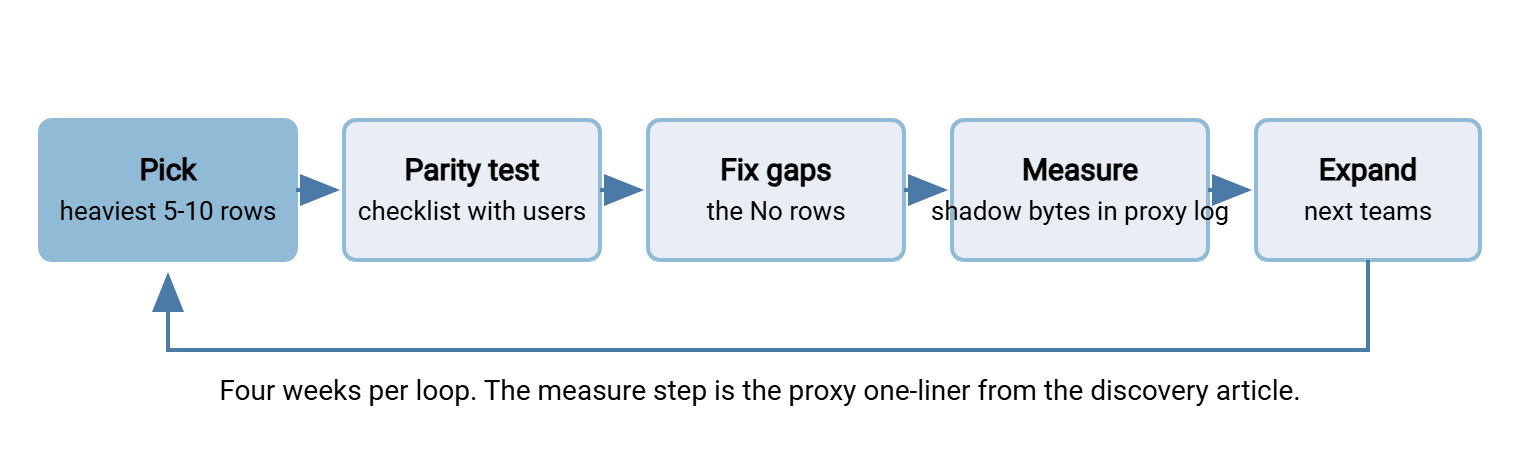
The success measure is not a survey. It is the upload-bytes-per-destination one-liner from the discovery article, run against the pilot teams' machines, before and after. If the bytes to share-example.net fall while nobody has been told to stop, parity is real. If they do not fall, something on the checklist is wrong. The pilot users will tell you what if you ask the right question. It is not "do you like it" but "what did you do the last time you went back to the old tool, and why?" Every answer to that question is a No row you missed.
The pilot invitation is short, because the people you are inviting are busy, and it makes one promise that must be kept:
Subject: Would your team test the new file sharing page for four weeks?

Your team sends more files to outsiders than almost anyone here, which is
why we are asking you first. We have built a company file sharing page
that is meant to be as easy as the tool you use now: browser only, no
account for the recipient, links that expire on their own.

What we ask: use it for real sends for four weeks, and tell us every time
you go back to the old tool and why. Fifteen minutes with us each Friday.

What we promise: nothing you tell us is a problem for you or your team.
If it is not as easy, we fix it or we do not launch it.

Your account is already set up: [link]. Nothing to install.
The Path That Was Used Once, Politely
Acme, a fictional engineering firm, built its first sanctioned path the way the security policy suggested. It put a transfer client on every laptop, allowed connections only over the VPN, and required a ticket to create each outside recipient. The pilot users, chosen for their enthusiasm rather than their volume, each used it once, said it was fine, and went back to drop.example.org. The proxy log showed the upload volume there had not moved by a single gigabyte. The second attempt was a web page published through the gateway, with accounts pre-created and download links the recipient could just open. Within a month the bytes to drop.example.org had halved. Within that month, the marketing coordinator asked for a second upload link so the agency could send proofs back. Nobody had told her to.
The difference between the two attempts was not the server, which was the same one. It was the checklist, which the first attempt had never filled in with a user in the room. The funding for the second attempt came from the register itself. Our business case series explains how forty rows of evidence become a budget line. The No rows of the parity checklist are the most specific ask you will ever put in front of a finance director.
Where the Path Leads
The one-minute version: harvest the requirements from the register and fill in the parity checklist with the users. Build a browser-based path with pre-created accounts, links that expire by default, and an upload link for outsiders. Publish it where people actually are. Pilot it with the heaviest shadow users until the proxy log says they have switched. Parity is judged from the sender's chair, and the pilot is where the judgment happens.
Once the pilot teams have switched without being told to, the path is ready for everyone else. Moving them is a communications and data-handling exercise rather than a technical one. That is Migrating Users Off Consumer Tools Gently. Keeping the path at parity as the shadow tools improve is the subject of Keeping Shadow Sharing From Coming Back. The mechanics of rolling a sharing service out to a whole organization are in rollout and adoption.
Frequently Asked Questions
Can our existing SFTP server be the sanctioned path?
Do we have to match every feature of the consumer tool?
How many people should be in the pilot?
What if the pilot shows the path is not at parity and we cannot fix it?
Is a browser page secure enough for confidential files?
From the Sysax team: we build secure file transfer software for Windows. Sysax Multi Server is an FTP, FTPS, SFTP, and HTTPS server. Sysax FTP Automation handles scheduled, scripted transfers. Free trials are on the download page.