
Capacity Planning for Transfer Storage
"How full is it?" "About eighty percent." "So we're fine for a while?" That exchange is the whole capacity planning process on most transfer servers. It ends in a guess because nobody measured the one number that matters, the growth rate. Capacity planning sounds like a job for a spreadsheet specialist with a budget cycle. For a transfer server it is four numbers and one division, and the whole thing fits on an index card. Extrapolating from last week is not planning; it is a horoscope with a ruler. Guesses are how servers fill up on a weekend.
This article shows how to measure the growth rate honestly. It shows how to project it forward without fooling yourself and apply the headroom rules that turn a raw disk size into a usable one. It also helps you decide between adding disk and cleaning up. Usually the answer is both, in the right order. It ends with a planning worksheet you can fill in for every volume in an afternoon. It is part of our Storage Growth series and follows on from why transfer servers fill up. This article is about the disk. CPU, memory, and connection capacity have a series of their own at server capacity and concurrency.
The Four Numbers
Every capacity decision about a volume comes down to four quantities. A volume, to be precise, is one formatted chunk of disk presented as a drive letter or a mount point. Each volume gets its own set of numbers.
- Capacity is the total size of the volume. It is the number on the box and the least useful of the four, because you can never actually use all of it.
- Used is how much is occupied right now. Every tool reports it; it is the number everyone already looks at.
- Growth rate is the net change in used space per unit of time, usually gigabytes per month. Net matters: it is what arrived minus what was deleted, not what arrived.
- Runway is how long until the volume is full: the space you can still use, divided by the growth rate. It is the only one of the four that tells you when to act.
One unit caveat before you write anything down. Operating system tools usually report sizes in binary units, where a gigabyte is 1024 megabytes. Disks are sold in decimal units, where it is a thousand. The difference is about 7% at the gigabyte scale and closer to 10% at the terabyte scale. It does not matter which you use as long as you use the same one throughout. The worked examples here use round decimal numbers for readability. It is not a conspiracy, but the box does come out looking bigger.
Measuring the Growth Rate Honestly
The growth rate cannot be looked up. It has to be measured, and measuring it means recording used space at intervals and dividing the change by the elapsed time. The simplest version needs no tooling at all: on the first of each month, record the used space of each volume in a text file. On Linux, df -P prints one line per volume in kilobyte units that are easy to compare:
$ df -P /srv/transfer
Filesystem     1024-blocks       Used  Available Capacity Mounted on
/dev/sdb1       1953514584 1562811667  390702917      81% /srv/transfer
On Windows, Get-PSDrive D | Select-Object Used, Free gives the same two numbers in bytes. Three monthly samples are the minimum for a rate you can trust; six are better, because transfer volumes have rhythms. A quarter-end, a year-end, or a partner's seasonal peak can double the inflow for a few weeks. A rate measured across one of those peaks will overstate the year. The growth monitoring article automates the sampling and keeps a rolling rate; for planning, the monthly text file is enough to start. A text file is not glamorous, but it has never once been down.
Three honesty rules apply to the measurement. First, measure net growth over a period that includes whatever cleanup normally runs, so the rate reflects what the server actually keeps. If you take your two samples either side of a one-off purge, you will measure negative growth and conclude the volume is shrinking. We did exactly that once, and the relief lasted about a month. Second, do not measure right after a change. A new partner onboarded three weeks ago has not yet shown a full month of growth. Third, separate the volumes. A server with data, logs, and temp on one volume has one blended rate. That hides the fact that logs are growing at three times the rate of data. The volume layout article explains why separating them helps planning as much as it helps resilience.
Here is a worked measurement. Three monthly samples of used space on a 2 TB data volume read 1420 GB, 1480 GB, and 1540 GB. The change over two months is 120 GB, so the rate is 60 GB a month. Used space today, a few weeks after the last sample, is 1600 GB, leaving 400 GB free. Those are the numbers the rest of this article uses.
Projecting: Straight Line, Then Adjust
The first projection is a straight line: divide free space by the rate. With 400 GB free and 60 GB a month, runway is 400 ÷ 60, which is about 6.7 months, or roughly two hundred days. Write that number down, then adjust it for the things you already know are coming. The straight line assumes nothing changes and something always does.
The adjustments are the step changes described in the first article of this series. They include a new partner, a feed that stops arriving compressed, a project that will park data on the server. Each one adds to the monthly rate from the date it starts. Suppose a new partner goes live next month and will send about 25 GB a month with no cleanup rule yet. The rate becomes 85 GB a month, and the runway shrinks to 400 ÷ 85, about 4.7 months. If the partner's feed is expected to double after a pilot, plan on the doubled figure, not the pilot figure. The rule is short: project with the rate you expect, not the rate you measured, and write down why they differ. A new partner's expected volume is a question for the partner intake checklist, not a number to invent later.
The diagram below shows the projection as a chart. The measured line climbs at 60 GB a month; the adjusted line steepens when the new partner starts. Two ceilings are drawn: the raw capacity, and the usable ceiling explained in the next section. The gap between today and where the adjusted line crosses the usable ceiling is the runway that matters.
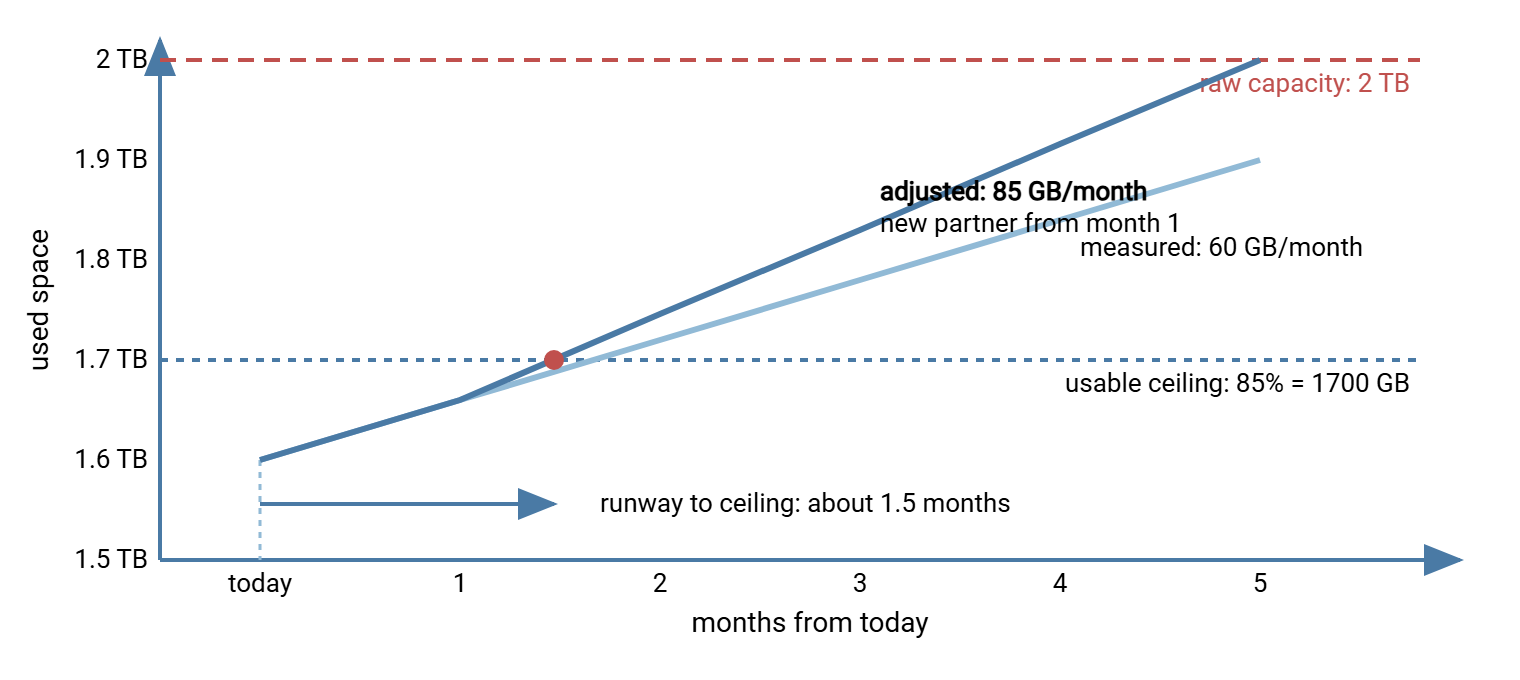
The chart makes the uncomfortable point visible. The adjusted line reaches the usable ceiling in well under two months, not the six and a half that "400 GB free" suggested. That is not a trick of the drawing. It is what happens when you plan against the space you can actually use rather than the number on the box. The number on the box is a promise the filesystem never agreed to.
Headroom Rules: Why 100% Is Not the Ceiling
Headroom is the free space you keep deliberately, and a volume needs it for reasons that have nothing to do with future growth. An upload in progress needs room to land, and a busy transfer server may have several gigabytes in flight at once. Temporary files from processing steps, decrypted copies, and extracted archives all need short-term room. The filesystem itself works badly when nearly full. Linux filesystems reserve a few percent for the system. Windows volumes with shadow copies need space to keep them. Fragmentation rises sharply on a nearly full volume. The last few percent are also where the failure is, so every day spent there is a day one large upload away from an outage.
The practical rule is to treat a percentage of the volume as the real ceiling and plan against that. Common thresholds are: warn at 80% used, act by 85%, and never plan to run past 90%. Call the 85% mark the usable ceiling, and compute headroom against it rather than against the raw capacity. On the 2 TB example, the usable ceiling is 1700 GB. Used space is 1600 GB, so the headroom that actually counts is 100 GB, not 400 GB. At 60 GB a month that is about 1.7 months, roughly seven weeks. At the adjusted 85 GB a month it is under six weeks. The straight-line runway of 6.7 months was never real. Bigger volumes can use a higher percentage (10% of a 20 TB volume is 2 TB, which is more headroom than most servers need). Small volumes need a lower one. But the principle holds: the ceiling is the usable ceiling.
Remember: runway is measured to the usable ceiling, not to 100%. A volume showing 400 GB free with an 85% ceiling has 100 GB of planning headroom. The difference between those two numbers is the difference between "next quarter" and "next month".
Lead Time and the Order-By Date
Runway is only useful when compared with lead time. That is how long it takes, from the moment you decide, to have more usable space on the volume. Lead time includes approval, procurement or provisioning, a maintenance window, and the work itself. For a virtual disk on a hypervisor with spare capacity it can be a day. For physical disks through a purchasing process it is commonly six to eight weeks, and for a storage array expansion it can be a quarter. Be honest about your own organization's number; it is usually longer than the technical step suggests. The disk is patient; the purchase order is more patient still.
The order-by date is runway minus lead time minus a safety margin. With six weeks of runway and six weeks of lead time, the order-by date was yesterday. That is the most common outcome of doing this exercise for the first time. The first time I did it, the date was a month into the previous quarter. It is also why the exercise is worth doing every quarter rather than once. The goal is to make the order-by date fall comfortably in the future, every time you look.
Add Versus Clean
When runway is short, there are two levers: add capacity, or reclaim it. They are not alternatives; most servers need both, but the order matters. Cleaning first is usually right, for two reasons. First, it is fast. An archive with 480 GB of files past their retention window can be moved or deleted this week. That buys months of runway at no cost and with no procurement. Second, adding disk to a server with no cleanup rules just moves the date of the outage. The decision table below is the one to work through:
| Question | If yes | If no |
|---|---|---|
| Is there data past its retention window, or debris (partials, temp, duplicate copies) worth more than a month of growth? | Clean first. Recompute runway after. | Cleanup will not save you; go to the next row. |
| Is the growth from files that must be kept but are rarely read? | Move them to an archive tier; capacity on the hot server stops growing. | The hot server genuinely needs to hold it; add capacity. |
| After cleanup and tiering, is runway still shorter than lead time plus margin? | Add capacity now, sized for at least a year at the adjusted rate. | Put the order-by date in the calendar and re-measure quarterly. |
| Does every growing folder now have a cleanup or tiering rule? | The growth rate is under control; the plan will hold. | Write the missing rule; without it, added disk fills on schedule. |
Run the example through it. The archive holds 480 GB older than the agreed window, so cleanup comes first and recovers 480 GB. Headroom to the usable ceiling becomes 580 GB, and at the adjusted rate of 85 GB a month the runway is 6.8 months. That comfortably exceeds an eight-week lead time, so the purchase can be planned for next quarter instead of ordered in a panic. The new partner's folder gets a cleanup rule before it ever grows. What you may delete is a governance question answered in the retention basics for admins article. The jobs that do the deleting are covered in our quotas and automated cleanup series. Moving cold data off the server is the subject of archive tiers later in this series.
When you do add capacity, size it for time rather than for a round number. A year at the adjusted rate is a sensible minimum. At that rate, 85 GB a month is about 1 TB a year. So the next volume should be at least 1 TB larger than what you have, after headroom. Buying six months of disk means repeating the whole exercise, including the lead time, in six months.
The Planning Worksheet
Everything above compresses into one row per volume. Fill it in for each volume on the server, and keep it where the next person will find it. The example row uses the numbers from this article.
| Field | How to get it | Example |
|---|---|---|
| Volume | Drive letter or mount point | /srv/transfer (data) |
| Capacity | df -h or Get-PSDrive |
2 TB |
| Usable ceiling | Capacity × 0.85 (adjust for volume size) | 1700 GB |
| Used today | Same tools | 1600 GB |
| Headroom | Usable ceiling − used | 100 GB |
| Measured rate | (Used now − used N months ago) ÷ N | 60 GB/month over 2 months |
| Known step changes | Onboardings, format changes, projects | +25 GB/month, new partner, next month |
| Adjusted rate | Measured + step changes | 85 GB/month |
| Runway | Headroom ÷ adjusted rate | 1.2 months |
| Recoverable by cleanup | Past-retention data + debris, from the disk hunt | 480 GB (archive past window) |
| Runway after cleanup | (Headroom + recoverable) ÷ adjusted rate | 6.8 months |
| Lead time to add | Your organization's honest number | 8 weeks |
| Order-by | Runway − lead time − 1 month margin | About 4 months from now |
| Decision | Clean / tier / add / rule needed | Clean now; rule for new partner; plan 2 TB add next quarter |
If you would rather not do the arithmetic by hand, a few lines of PowerShell turn the numbers into a runway. The same shape works in any scripting language you prefer:
$capacityTB   = 2          # raw capacity of the volume (edit the numbers to fit)
$capacityGB   = $capacityTB * 1000
$usedGB       = 1600
$rateGBMonth  = 60 + 25    # measured rate plus known step changes
$ceiling      = 0.85

$headroom = ($capacityGB * $ceiling) - $usedGB
$runway   = $headroom / $rateGBMonth
"Headroom to ceiling: {0:N0} GB, runway {1:N1} months" -f $headroom, $runway
Keeping the Plan Alive
A capacity plan decays. Every onboarding, every new feed, every retired partner changes the rate. A worksheet from last year is worse than none because it carries false confidence. The habit that keeps it honest is a short quarterly review. Re-sample used space, and recompute the rate over the last six months. Add the step changes you know about, and update the order-by date. Ten minutes per volume. If you have automated the sampling as described in the monitoring article, the numbers are already waiting. The worksheet from last year describes a server that no longer exists.
Two things belong in the worksheet that are easy to skip. One is the list of growing folders and the rule that governs each. A folder with no rule is a rate you have not measured yet. The other is the history: keep each quarter's row. A rate that has doubled twice in a year is telling you something about the business that no single sample can. Scheduled tasks may handle the routine moves that keep the rate in check. A nightly job might shift files past their window to an archive location. In that case, a scheduler with file operations built in, such as Sysax FTP Automation, keeps those moves running without a human remembering to do them. The plan then describes a rate the automation is actually holding, rather than one you hope for.
Kestrel Payroll's quarterly review earned its ten minutes the second time it ran. The previous quarter's row showed the payroll-partner folder growing at 20 GB a month. The new row showed 40 GB. The partner had started sending a full extract alongside the nightly delta and had not thought to mention it. The volume itself still read a comfortable 70% used, which is why nobody had noticed. Re-run at the doubled rate, the runway fell from eight months to under four, which put the order-by date inside the current quarter. The purchase went in that week. The partner confirmed the full extract was intended. The trend line had caught the doubling a good month before the disk would have.
The Index Card Version
Capacity planning for a transfer volume is four numbers: capacity, used, growth rate, and runway. Measure the rate from monthly samples over at least a quarter, and adjust it for the changes you know are coming. Compute runway to the usable ceiling (about 85% of capacity), not to 100%. Compare runway with your real lead time to get an order-by date. Clean and tier before you buy, but buy for a year, and make sure every growing folder has a rule. Then do it again next quarter.
From here, a practical next step is finding what ate the disk. It supplies the "recoverable by cleanup" number. Then read monitoring storage growth. It keeps the rate measured for you and alerts in days-until-full. For the arithmetic of disaster recovery capacity, which is a separate question with its own answers, see our disaster recovery for transfer workflows series.
Frequently Asked Questions
How many samples do I need before I can trust the growth rate?
Why plan to 85% instead of 100%?
Should I clean up or buy more disk?
What is a reasonable lead time to assume?
How much extra disk should I add?
From the Sysax team: we build secure file transfer software for Windows. Sysax Multi Server is an FTP, FTPS, SFTP, and HTTPS server. Sysax FTP Automation handles scheduled, scripted transfers. Free trials are on the download page.