
Why Your File Transfer Policy Is Being Ignored
The policy is finished. Legal reviewed it, the security committee approved it, and it sits on the intranet under a heading nobody has clicked since. It says, in plain language, that files containing customer data leave the organization only through the approved transfer service. Meanwhile the accounts team is emailing spreadsheets to the bank, because that is what they did last quarter and the bank said thank you.
If you have just been told "you own training now", this is where to start. Start with an honest look at why the document is not changing behavior, not with a slide deck. This article explains the gap between policy and behavior and the friction equation that decides what people actually do with a file. It explains how a security team turns into the department of no, and which parts training can fix and which it cannot. It is the first article in our Training & Adoption series; the rest of the series builds the program.
Writing the policy is not the subject here. If you are still drafting one, start with writing rules people follow and rolling out the policy. From here on we assume the policy exists, is sensible, and is being ignored anyway.
A Policy Is a Document. Behavior Is What Protects the Data.
Three words get used interchangeably, and separating them explains half the problem. A policy is the rule and the reason: "customer data leaves the organization only through approved transfer methods, because we are accountable for it." A standard is the specific requirement that satisfies the policy: "the approved methods are the SFTP server and the web portal." A procedure is the step-by-step how: "open the portal, choose the recipient, drag the file in, click Send." Most organizations write the policy carefully, the standard vaguely, and the procedure never.
A policy that people do not follow is not protecting any data. It is protecting the organization's ability to say, after the incident, that a policy existed. That is worth something to a lawyer and nothing to the customer whose payroll file went out as an attachment.
Behavior is what protects the data, and behavior is shaped by three things. They are what people know, what they have practiced, and what the tools in front of them make easy. The distance between what the policy says and what people do is the policy-to-behavior gap. It is the thing you now own. Measure it before you try to close it, because your instinct about where it is will be wrong. Mine was. I once spent a month on an SFTP client module for a department whose real problem was that nobody had given them an account.
The Friction Equation
Friction is every step, wait, decision, and unknown between a person and the thing they are trying to do. Clicks count, but so do questions: do I have an account? What is the address? What if the file is too big? Who do I ask? Each unknown is a step, and unknowns weigh more than clicks. An unknown carries the risk of getting stuck with a deadline running.
The equation itself is short. People take the path with the least friction that gets the job done today. Not the most secure path, not the policy's path: the least friction. This is not laziness. It is the rule you follow when you copy a file with scp instead of opening a change ticket. Training changes what people know, and barely changes what they weigh.
Count the steps honestly for a real case. Priya in accounts at Kestrel Payroll needs to send the monthly payments file to Bluewater Bank. The table counts both paths as commonly deployed, not as the policy imagines them.
| Stage | Email attachment | Approved SFTP path, as deployed |
|---|---|---|
| Open the tool | Email is already open (0 steps) | Find the client. Not installed. Raise a ticket, wait two days (3 steps, 1 unknown) |
| Know the destination | Bank contact is in autocomplete (0 steps) | Host name, port, folder: ask IT (2 steps, 1 unknown) |
| Log in | Already logged in (0 steps) | Account? Password expired? Host key warning? (2 steps, 2 unknowns) |
| Send the file | Drag, type a name, click Send (2 steps) | Navigate to the right folder, upload (2 steps) |
| Confirm it arrived | Sent items; bank replies "thanks" (0 steps) | No receipt; email the bank to ask (1 step) |
| Total | 2 steps, 0 unknowns, about 30 seconds | 10 steps, 4 unknowns, up to 2 days |
The diagram below shows the same comparison as two stacks. The short one is the path the policy forbids, the tall one is the path it requires. The arrow shows where people go.
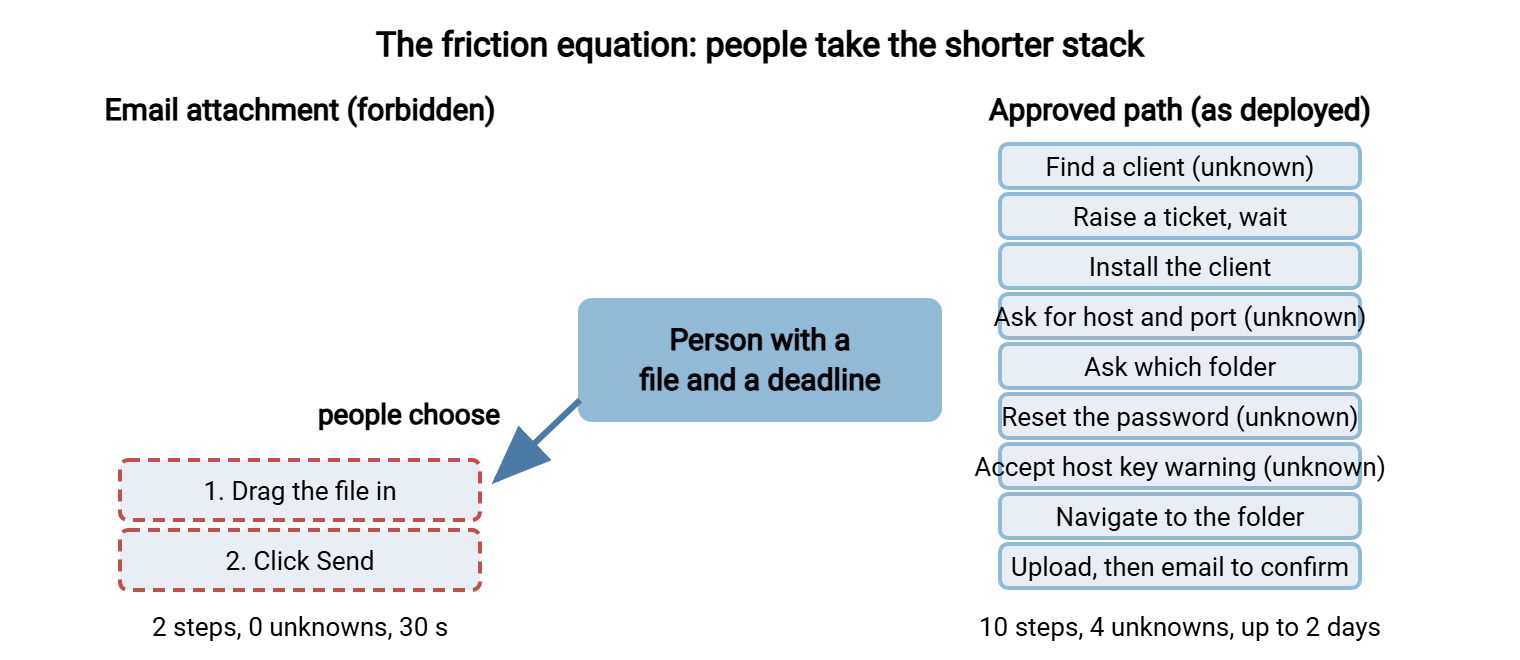
Every unknown on the tall side is a place where the person stops and does something else. That something else is usually email. The email works, the bank says thank you, and the behavior is reinforced. The policy did not lose an argument. It never got into the room.
This is why "we circulated the policy again" does not work. Re-sending the policy adds a step to the secure path, reading it, and removes none. Borrow the friction audit from why users default to attachments and count both paths for your top three transfer tasks before you plan a single module.
Remember: the secure path has to be within about two steps of the insecure path. Otherwise, you are asking people to pay a small tax every day for a benefit they never see. Training a ten-step path does not shorten it. It teaches people that the policy is the tax.
The single biggest shortening is removing the client entirely. A web-based transfer front end is a browser page where the user picks a file and a recipient. It deletes the install step and most of the unknowns with it. Sysax Multi Server offers HTTPS transfers for exactly this case: a non-technical user needs only a browser and a login. The service design behind that is covered in making the secure path the easy path. Until the step counts are close, training is pushing uphill.
How the Department of No Is Born
The department of no is what users call an IT or security team whose every answer is a refusal. Nobody sets out to become it. It happens through a loop, and the loop has four turns.
- A user asks for a way to send a file to an outside party. The answer is "use the approved method", with no help getting there.
- The user, on a deadline, uses email or a consumer sharing site. It works.
- IT discovers the workaround and blocks it: the sharing site is filtered, attachments over a certain size bounce.
- The user finds another workaround, and stops asking IT anything.
Each turn makes the next one more likely. By the third turn the team has a reputation, and reputations are sticky. Users stop asking, so the team stops hearing the real requirement. So the service never improves, and more people go around it. The blocking is not the mistake. Blocking without offering a path is.
You can tell you have become the department of no by the tickets you do not get. When a department that sends files to outside parties daily has raised no transfer requests in six months, they have not stopped sending files.
The loop is where shadow sharing, the use of unsanctioned tools to move company files, comes from. Discovering it without a witch hunt is the subject of our shadow file sharing series. Why email is the workaround of first resort is explained in why email is bad file transfer. Treat every workaround you find as a requirement, written in the only language the user had.
The Four Reasons People Ignore a Policy
Ask a user why they did not use the approved method and you will hear "I didn't know", which sounds like one cause. It is four, each with its own fix and owner. Misdiagnosing which one you have is the most common way to waste a training budget.
| Cause | What it sounds like | What fixes it | Who owns the fix |
|---|---|---|---|
| Unaware: does not know the policy exists or applies to them | "There's a policy?" | Short, targeted awareness at the moment of need | Training (you) |
| No how-to: knows the rule, not the steps | "I'd use the portal if I knew where it was." | A one-page guide and a first-time walkthrough | Training and documentation (you) |
| Friction: knows how, and it is slower or less reliable | "It takes ten minutes and sometimes fails." | Service design: fewer steps, better defaults, faster requests | Transfer service owner |
| Habit: knows how, it is easy, still uses the old way | "I've always done it this way and nobody said stop." | Practice, reminders in the tools, a manager who notices | Training plus line management |
Only the first two rows are training problems in the narrow sense. The third row is a service problem wearing a training costume, and it is the one most training budgets are spent on. You can teach the portal until every user can recite it. If it takes ten minutes and email takes thirty seconds, the ten minutes loses every afternoon.
Finding out which row you have takes an hour, not a survey. Go to the noisiest department and ask five people the same thing: "Show me how you sent the last file to someone outside the company." Not "do you know the policy?", which gets a polite yes. Watch, and write down every step and every hesitation. Five people is enough; the pattern repeats by the third.
What Training Can Fix
Training fixes knowledge gaps, and a surprising share of the gap is knowledge. What the policy says. That it applies to me and my spreadsheet. How to do the approved thing. What to do when it fails. Why any of this matters. Each is a ten-minute lesson, and a twenty-minute module can move a whole department when the cause really is knowledge. Building those modules is the subject of designing a training program people don't dread.
Training fixes the why, which matters more than people expect. A user who understands that an emailed attachment sits in the bank's mailbox, the bank's backups, and the bank contact's phone for years afterwards will reach for the portal unprompted. Nobody told them that. They were told "attachments are prohibited", a rule without a reason. Rules without reasons are followed only while someone is watching.
Training fixes the first-time hurdle. The first use of any tool is the hardest, because every step is an unknown. A walkthrough in which the user sends a real test file, with someone beside them, converts ten unknowns into ten known steps in fifteen minutes. The second time takes two.
What Training Cannot Fix
Training cannot fix friction. If the approved path takes ten steps and two days, no module reduces it to three. You can only train people to endure it, and endurance wears off around the second deadline.
Training cannot fix a missing tool. The policy may forbid attachments for customer data but offer no way to send a file to an outside person with no account on your server. If so, it is asking for the impossible, and people will do the possible instead. Read the approved-methods list as someone in sales who must send a contract to a new customer this afternoon. If nothing covers that, the gap is in the service.
Training cannot fix a request path that takes a week. If a transfer account takes five working days to get, the person with a deadline tomorrow has already decided. A turnaround measured in hours is one of the strongest adoption levers you have.
Training cannot replace automation. For recurring transfers, the payments file every month or the price list every night, the best training is a job that runs itself. A scheduled transfer tool such as Sysax FTP Automation moves the file on a timetable with no human in the loop. A transfer that happens without a person cannot be sent the wrong way by one. Every recurring transfer you automate is one fewer behavior to teach.
Training cannot fix management silence. If the head of accounts still emails spreadsheets to the bank, so will the accounts team. They will then be right to assume the policy is optional. A policy has exactly the authority the nearest manager gives it. Get the manager into the first walkthrough before anyone on their team is asked to.
A Short War Story: The Spreadsheet and the Bank
Kestrel Payroll had a transfer policy, an SFTP account at Bluewater Bank, and a client installed on one shared PC in accounts. The account's password had expired quietly in the spring. Every month after that, Priya emailed the payments file to her contact at the bank instead. Every month the contact replied "received, thanks". When the auditor asked for evidence of approved transfers, the log showed one successful SFTP login all year. It was made by the person who set the account up. Kestrel spent a week explaining that the policy existed, which the auditor described as "noted".
The fix was not more training, or not first. The fix was a browser-based portal that needed no client, plus a password that did not expire silently. It also included a ten-minute walkthrough for the three people who sent that file. The walkthrough came last and took the least time.
The Gap Audit: A Worksheet You Can Steal
Before you design any training, do a gap audit: one row per policy rule, recording what the rule says, what people actually do, and why. It takes an afternoon per department and turns "people ignore the policy" into named causes with named owners. The worksheet below is the whole thing.
POLICY-TO-BEHAVIOR GAP AUDIT
Department: Accounts          Date: YYYY-MM-DD          Auditor: (your name)

Rule (from policy):       "Customer data leaves only via approved transfer methods"
Approved method:          Web transfer portal, https://transfer.example.com
What people actually do:  Email attachment to the bank contact
Observed with:            P. Sharma, accounts (task: monthly payments file)

Steps, insecure path:     2      Unknowns: 0     Time: 30 seconds
Steps, secure path:       10     Unknowns: 4     Time: up to 2 days (account request)

Cause (tick all seen):    [ ] unaware   [x] no how-to   [x] friction   [ ] habit only
Fix type:                 [x] service   [x] one-page guide   [ ] module   [x] manager
Fix owner:                Transfer service owner (steps); training (guide, walkthrough)
Target step count:        3 (open portal, pick recipient, drop file)
Re-check date:            YYYY-MM-DD
Notes:                    Password expired in spring; nobody was told. Bank contact
                          has never been given a portal account.
Two more rows from other organizations show how different the causes can be. At Meridian Parts, engineering sent drawings to a supplier through a consumer sharing site because the drawings exceeded the portal's upload limit. The fix was a limit change, not a module. At Northgate Retail, store managers emailed staff rotas to head office because nobody had told them a rota is personal data. A two-minute explanation fixed it. Same policy, three departments, three fixes. The audit is what tells them apart.
What to Do This Week
- Pick the department that sends the most files to outside parties: usually finance, HR, or engineering.
- Watch five people send a real file. Write down every step and every hesitation. Do not correct them.
- Fill in one gap-audit row for each rule you saw broken.
- Sort the rows. Friction and missing-tool rows go to the service owner. Unaware and no-how-to rows are yours.
- For your rows, write the one-page guide before the module.
- For the service rows, hand over the audit with a target step count. If the fix needs money, our business case series shows how to ask.
- Book a re-check date now. How to tell whether anything changed is in measuring adoption and closing the gaps.
The Policy Never Lost the Argument
The policy is not ignored because people are careless. It is ignored because the path it describes is longer, less certain, and less known than the path it forbids. Training closes the knowledge half of that gap: what the rule is, how to follow it, and why it matters. Service design closes the friction half: fewer steps, faster requests, no client to install. Neither works alone. You will be asked to do the training half first because it is cheaper. Do it, but hand over the gap audit at the same time. That way, the friction half has a name, an owner, and a date.
The next articles take the two halves in turn. The article designing the training program covers the knowledge half. And making the secure path the easy path covers the friction half. The bank will say thank you either way. The aim is that the thank-you goes to the portal.
Frequently Asked Questions
What is the difference between a policy, a standard, and a procedure?
Isn't ignoring the policy a disciplinary matter rather than a training one?
How do I count friction without guessing?
We already run annual security awareness training. Why isn't that enough?
Should we just block email attachments to force people onto the portal?
From the Sysax team: we build secure file transfer software for Windows. Sysax Multi Server is an FTP, FTPS, SFTP, and HTTPS server. Sysax FTP Automation handles scheduled, scripted transfers. Free trials are on the download page.