
Designing a Transfer Training Program People Don't Dread
The default training program arrives fully formed the moment someone says "we need training". It is a ninety-minute session in the big meeting room, forty slides, a quiz, and a spreadsheet of who attended. Everyone passes the quiz. A month later the proxy log looks exactly as it did before. The program proved that people can sit in a room, which was never in doubt.
This article is the alternative: a program built from twenty-minute modules, each aimed at one audience and one task. Each has a real test file in the user's hands before the session ends. You will come away with the audience map and a module outline with timings you can copy. You will also get the list of things to leave out, the formats that work, and a fifteen-minute version for someone's first day. It is part of our Training & Adoption series and assumes you have already read why your policy is being ignored. The gap audit from that article is where this program starts.
Start From the Gap Audit, Not the Policy
A training program is four things: a list of audiences, a set of modules, a schedule, and a way to tell whether it worked. A module is one session, on one task, for one audience, short enough to fit inside a team meeting. Programs that start from the policy produce a module per policy section. Programs that start from the gap audit produce a module per thing people get wrong, which is a much shorter list.
Take the audit rows marked "unaware" or "no how-to" and group them by task. At a typical organization the whole list is five tasks. They are sending a file to an outside person, receiving one from them, and sending something too big for email. They also include sharing within a project and knowing what to do when a transfer fails. Five tasks, not forty slides. Rows marked "friction" go to the service owner; teaching around them only trains people to resent the service.
Write down, for each task, the one behavior you want afterwards. "Uses the portal for customer files." "Raises a request instead of using a personal sharing account." That sentence is the module's purpose, and everything in it either serves that purpose or gets cut. Slides about the history of file transfer protocols do not serve it. I say this as someone who once built eleven of them.
Audiences: Who Needs to Know What
Not everyone needs the same training, and pretending they do is how a program becomes ninety minutes long. An audience is a group of people who move files in the same way and get the same things wrong. Most organizations have five or six. The table maps each to what it needs and how long that takes.
| Audience | What they move | What they must be able to do afterwards | Modules and time |
|---|---|---|---|
| Everyone | Occasional files to outside parties | Say the rule in one sentence, send a file through the portal, run the three-second check | Core (20 min) |
| Frequent senders (finance, HR, legal, sales) | Customer and personal data, daily | Everything in Core, plus: get a recipient set up, handle large files, recover from a failed send | Core + Frequent (20 + 20 min) |
| Technical users (engineering, data, analysts) | Bulk and recurring data, scripts | Core, plus: use the standard client, keep keys out of scripts, ask for a scheduled job instead of a manual routine | Core + Technical (20 + 30 min) |
| Managers | Approvals more than files | Core, plus: approve a request in a day, spot a workaround in their team, know the exception path | Core + Manager (20 + 15 min) |
| New starters | Nothing yet | Send one file through the portal on day one, before any other habit forms | Starter (15 min) |
| Service desk | Support tickets rather than files | Every module above, plus decode the ten common errors and reset an account without a ticket ping-pong | All, plus Support (60 min) |
Notice the shape: one Core module for everyone, and a short add-on per audience. Nobody sits through content meant for someone else, and when the portal changes you update Core once. A finance clerk at Acme learns the same Core as an engineer. The engineer then spends thirty minutes on the standard client, the clerk twenty on recipient accounts. Neither hears about the other's problems, which both appreciate.
Twenty-Minute Modules Over Annual Marathons
Twenty minutes is not an arbitrary number. It is the slot a manager will give you inside an existing team meeting. That means no separate invitation, no room booking, and no email that begins "Mandatory". It is also about as long as anyone stays attentive to a topic they did not choose. A ninety-minute session covers more, and less of it survives the walk back to the desk.
Short modules have a second advantage: timing. A twenty-minute session can be delivered the week a team starts a project with an outside partner, which is the moment they need it. An annual session lands in whichever month the calendar chose and is forgotten by the month the need arrives.
Every module follows the same five-part shape, shown below as a timeline. The middle block is the largest on purpose: half of every module is the user doing the task with a real test file. Nobody learns to send a file by watching someone else send one.
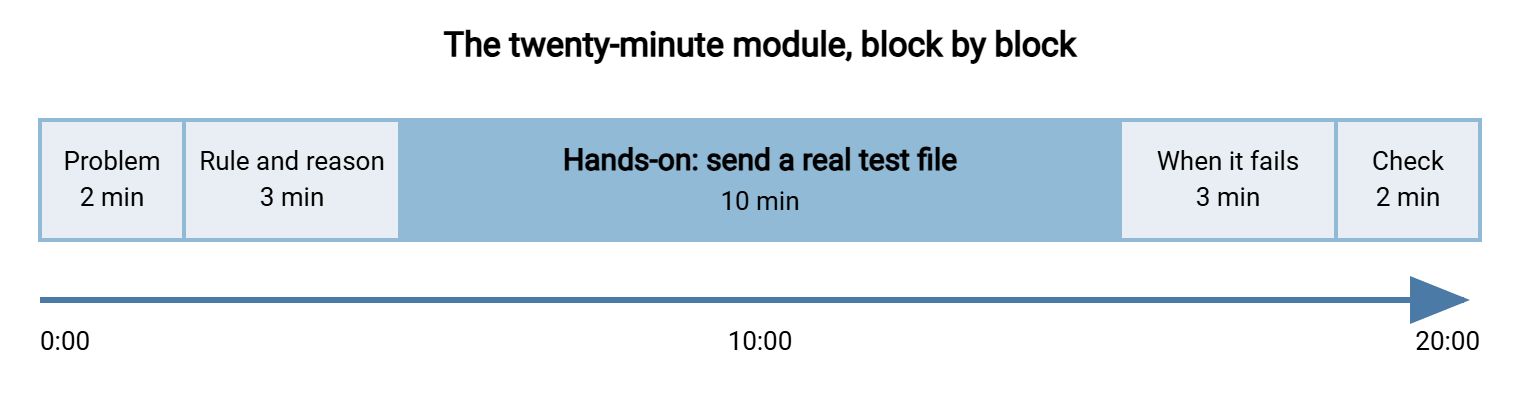
Here is the Core module in full, with timings, materials, and the one criterion that tells you it worked. Copy it, change the host name, and you have your first session. The other modules follow the same skeleton with a different task in the middle block.
MODULE: Core - Sending a file to someone outside the company
Audience:   Everyone                     Length: 20 minutes
Delivered:  Inside the team meeting      Presenter: you, or a trained champion
Pass:       Every attendee has sent a test file through the portal and
            received the confirmation, before the session ends.

Before the session
  [ ] Every attendee has a portal login that works (check the day before)
  [ ] Test recipient set up: training-inbox@example.com
  [ ] Test file on the shared drive: TEST-yourname.txt (they rename it)
  [ ] One-page guide printed or linked, one per attendee

0:00 - 2:00   The problem, in their terms
              One true story from this organization (anonymized).
              No slides. No statistics.

2:00 - 5:00   The rule and the reason
              "Files with customer or personal data leave through the
              portal. It records who sent what to whom, and the link
              expires; an attachment does neither." One sentence, one why.

5:00 - 15:00  Hands-on: send the test file
              Open https://transfer.example.com, log in, choose recipient
              training-inbox@example.com, drop TEST-yourname.txt, click
              Send, read the confirmation. Presenter walks the room.

15:00 - 18:00 When it fails
              Three failures and fixes: "login refused" (reset link),
              "file too large" (large-file option), "recipient not found"
              (request form, answered within one working day).

18:00 - 20:00 The three-second check and where the guide lives
              "Outside? Personal or customer data? Then the portal."
              Show where the one-page guide is. Hand out the card.

Record:       Attendee names + "sent test file: yes/no" (this is the evidence)
The pass criterion is the important line. A module passes when every attendee has done the task, not when the slides are finished. If time runs out, cut the story at the start, never the hands-on block. The record you keep shows who attended and whether they sent the test file. It is also the evidence an auditor will accept as proof of training. The quiz spreadsheet never quite was.
Role-Based Content: The Add-On Modules
The add-on modules use the same skeleton with a different middle block. Each should answer the question its audience actually asks.
Frequent senders ask "what do I do when the recipient does not have an account?" The middle block is the recipient request form: they fill one in for a real contact. The presenter shows what approval looks like and how long it takes. They also send a file larger than the email limit, the case where the old habit reasserts itself. At Kestrel Payroll the accounts add-on was built entirely around the monthly payments file, using a copy with the account numbers replaced by zeros.
Technical users ask "can I script this?" Yes, and the module shows them the standard client and where the connection details live. Then it spends its last ten minutes on the better answer: a recurring transfer should not be a person's routine at all. If the same file goes to the same place every night, it is a scheduled job. In that case, the module ends with them filling in the request for one. A tool such as Sysax FTP Automation runs that job on a timetable with retries and logging, so the behavior you would otherwise teach does not exist. The best training for a recurring transfer is a job that runs itself. The wider case is in why automate file transfers.
Managers ask "what am I supposed to do about this?" The middle block is an approval: they approve a real request from their own team during the session. They see that it takes under a minute. They then get a short list of what a workaround looks like from the outside. A manager who has approved one request and knows the exception path is worth three modules delivered to their team.
Service desk staff ask "what will people ring us about?" About ten things, and the module goes through each with its fix. The client-side half of that list, including the error-message decoder, is already in client support and training. The portal-side half is yours to add.
What to Leave Out
What you cut matters as much as what you keep, because every minute of unneeded content is attention you do not get back. These are the usual passengers, and none belongs in a user-facing module.
- The protocol lecture. Users do not need to know what SFTP stands for, how it differs from FTPS, or why FTP is being retired. They need to know which button to press. The comparison is in SFTP vs FTPS for you; it does not belong in Core.
- The threat landscape. Breach statistics frighten people for the length of the slide and change nothing afterwards. One true story from your own organization does more than twenty statistics from someone else's.
- The full policy text. The policy is a reference, not a script. Quote one sentence and point to the rest.
- Anything the user cannot act on. If the module mentions a control the user does not operate, cut it. They cannot configure the firewall and do not need to hear that one exists.
- The quiz as proof. A quiz proves that people can answer questions about a task. Sending the test file proves they can do it. Keep the record of the second; drop the first.
One thing that looks like a candidate for cutting and is not: the exceptions. Tell people plainly when an attachment is fine. A rule with no exceptions is a rule people quietly decide does not apply to them. The honest list is short and lives in when attachments are fine; two sentences of it belong in Core.
Remember: a module is finished when nothing more can be removed, not when nothing more can be added. If a slide does not change what someone does at their desk tomorrow, it is decoration. Cut it and give the minute back to the hands-on block.
Delivery Formats and When Each Works
The format is not the training; the test file is the training. But format decides whether the session happens at all.
- Live, inside the team meeting. The default for Core and the add-ons. Twenty minutes, the team's own room, the presenter walking behind people while they send. Highest completion, because nobody has to opt in.
- Desk-side, one to one. For anyone who missed the session, and for managers. Ten minutes. Expensive per head and worth it for the people who set the tone.
- Recorded walkthrough. Three minutes, screen only, no introduction, the exact clicks. Not a replacement for the live session; a reminder for the second send, linked from the one-page guide.
- The one-page guide. The format used at the moment of need, which is the moment that matters. Writing it is covered in writing user-facing guides; every module ends by showing where it lives.
- Your learning platform. Use it to record completion and host the recording, not to deliver Core. A module done alone at a desk skips the part where someone walks over when the login fails.
Whatever the format, the portal itself decides half of what you need to teach. A browser-based transfer page needs no client install. So a module for it can spend its whole middle block on the task instead of on setup. Sysax Multi Server provides HTTPS transfers for this reason: a non-technical user needs only a browser and a login. Core fits inside twenty minutes. If users must install and configure a client, add ten minutes and the client guide. Then ask whether that friction belongs in the training or the service.
The New-Starter Version
The new-starter module is the highest-value fifteen minutes in the program, because it reaches someone before any habit forms. A person who sends their first external file through the portal on day one never has to unlearn attachments. A person who spends three months emailing spreadsheets before anyone mentions the portal has a habit. Habits get their own article for a reason.
The starter version is Core with the story shortened and the failure block cut. It is delivered by the new starter's buddy or manager rather than by you. That only works if three things are true on day one. The portal account already exists, the one-page guide is in the welcome pack, and the buddy has done the module themselves. Provisioning the account before the start date belongs to the joiner process in our user lifecycle series. If it is not happening, the starter module fails at minute two.
Give the buddy a script small enough for a card: "Here is the portal. Send me a test file. Here is the one-page guide. Anything outside the company with customer or personal data goes this way; anything else, ask me." Fifteen minutes, one test file, done. The new starter knows the secure path before they know where the kitchen is.
A Short War Story: The Marathon at Meridian Parts
Meridian Parts ran a ninety-minute transfer security session for all staff, with forty slides and a quiz. Its ninety-six percent pass rate went into the board report. The following month, the proxy log showed engineering using the same consumer sharing site as before, at the same volume. Drawings were too large for email and nobody had shown them the alternative. The session had mentioned the portal on slide thirty-one. A rewritten twenty-minute engineering module, built around one real drawing and the portal's large-file option, was delivered inside their weekly meeting. Every engineer sent a test drawing before the module ended. Within a fortnight, engineering's uploads to the portal had tripled and the sharing site had gone quiet. The slide deck was retired with honors.
Scheduling the First Quarter
Do not launch the whole program at once. Start where the gap audit says the risk is, prove the module works, and let the result recruit the next department. A realistic first quarter:
- Week 1: build Core and the one-page guide. Run Core on your own team first and fix everything they trip over.
- Week 2: run Core plus the Frequent add-on for the department with the worst audit row, usually finance or HR. Their manager attends and approves a request live.
- Weeks 3 to 5: Core for the remaining frequent senders, one team meeting at a time. Recruit one willing person per department as a champion, a role defined in measuring adoption.
- Weeks 6 to 8: Technical module for engineering and data teams. Collect the scheduled-job requests it produces and hand them to the automation owner.
- Weeks 9 to 12: the Manager and service desk modules, and the starter module handed to whoever runs induction. Then check the numbers before booking anything else.
That is one module a week, twenty minutes each, inside meetings that were already happening. Nobody has received a calendar invitation with the word "mandatory" in it. Yet by week twelve everyone who moves files has sent one through the portal with someone watching. The wider rollout of the policy itself, communications included, is in rolling out the policy. This schedule slots inside it.
A Program Is a Set of Twenty-Minute Promises
The program makes a small promise to every audience: twenty minutes, one task, a test file in your hands before you leave. And it promises a one-page guide for next time. Keep that promise and people stop dreading training. It stops being training and becomes the afternoon someone finally showed them how to send the thing. The audience map keeps modules short, the skeleton keeps them hands-on, and the cut list keeps the passengers off.
Two articles carry this forward. Teaching secure sharing habits that stick turns the single test file into a repeated behavior. The article measuring adoption and closing the gaps tells you which modules worked and which department needs the desk-side version. The slide deck can stay wherever it is.
Frequently Asked Questions
Why twenty minutes? Won't people forget something that short?
Who should deliver the modules if I am the only admin?
Should the training cover SFTP clients, keys, and protocols?
How often should people repeat the training?
From the Sysax team: we build secure file transfer software for Windows. Sysax Multi Server is an FTP, FTPS, SFTP, and HTTPS server. Sysax FTP Automation handles scheduled, scripted transfers. Free trials are on the download page.