
Teaching Secure Sharing Habits That Stick
Training makes people able to do the right thing. A habit makes them do it at five to five on a Friday, with a manager waiting and a file that has to go now. The twenty-minute module from the previous article gets everyone through one test file. This article is about what happens after: turning that single, supervised send into something people do without deciding to.
A habit is an action triggered by a cue rather than by a decision. The attachment icon is a cue; so is the phrase "can you send me that?" Your users already have sharing habits, attached to email, because email was there first. Replacing them means choosing a few new habits and teaching the reason behind each. It also means drilling them until they need no thought and putting reminders where the old cue used to be. This article covers all four, plus the three-second check that ties them together. It is part of our Training & Adoption series.
Why Knowledge Does Not Become Behavior
Knowing the rule and following it are different skills, and only the second one protects anything. Everyone who has emailed a spreadsheet to the wrong person knew, in principle, to check the address. The knowledge was present. It was not consulted, because at the moment of sending nothing prompted it. That is the whole problem with training that stops at the module. The knowledge is installed, and the cue that would trigger it is not.
The old habit is strong because it has been rehearsed thousands of times. Every attachment ever sent was a repetition. A single training session is one repetition of the new behavior against years of the old one. The odds are not in the session's favor. You do not beat a rehearsed habit with an explanation. You beat it with more rehearsal, in the place where the old cue fires.
The plan, then, has four parts. Pick a few habits, not many. Attach a reason to each that people can repeat. Drill each one with a real file. And place a nudge where the decision is made. A nudge is a small prompt at the moment of choice. It makes the right action easier or the wrong one slightly slower, without forbidding anything. Nudges are cheap. Bans are expensive and, as the first article in this series explains, they breed workarounds.
The Five Habits That Prevent Most Incidents
Look at any list of file transfer incidents and the same five failures account for nearly all of them. They are the wrong recipient, the wrong method, a link that never expired, a shared login, and a mistake nobody reported. Five habits, one per failure, cover the ground. More than five and people remember none.
Habit 1: read the recipient aloud before you send. Most incidents are not the wrong method; they are the right method to the wrong address. Autocomplete offers the first "Dave" it finds, and the first Dave is a supplier. Reading the name and domain aloud, even under your breath, takes two seconds and interrupts the autopilot. The full story of what one wrong address costs is in the misdirected file.
Habit 2: outside the company plus customer or personal data means the portal. This is the method habit, and it is deliberately narrow. Not every file, not every recipient: outside, and sensitive. An internal meeting agenda can go however it likes. The narrowness matters because a rule that applies to everything is a rule people decide applies to nothing. A rule with a clear edge gets followed. If people are unsure what counts as personal data, recognizing personal data gives them the short list.
Habit 3: send a link with an expiry, never a copy that lives forever. A copy attached to an email exists in the recipient's mailbox, their backups, and their phone until the end of time. A link expires, and can be revoked the moment you realize it went to the wrong Dave. The default expiry should be set in the portal so nobody has to remember it. The habit is noticing when a share has been set to "never expires" and asking why. The mechanics are in secure links and expiry.
Habit 4: your login is yours. Not "just for the migration", not "while I'm on leave", not for the contractor who starts Monday. The reason is not the policy. It is that the transfer log records the account name. When a file goes somewhere it should not, the log will say it was you. Anyone who needs access gets their own account. The request path in making the secure path the easy path is designed so that takes hours, not weeks.
Habit 5: say so within the hour. When a file goes to the wrong place, the first hour is when a link can be revoked. A recipient can be asked to delete, and the damage can be contained in that first hour. The habit is reporting immediately. It only forms in an organization that thanks people for reporting rather than asking why they were so careless. That is a management habit as much as a user one. What happens next is covered in personal data transfer incidents.
Here are the five as a card, sized for the edge of a monitor or the back of a badge. Print it and give one to everyone who completes the Core module.
+------------------------------------------------------------+
|  FIVE SHARING HABITS                                       |
|                                                            |
|  1. READ THE RECIPIENT ALOUD before you send.              |
|     (Name and company, not just the first name.)           |
|                                                            |
|  2. OUTSIDE + CUSTOMER OR PERSONAL DATA = THE PORTAL.      |
|     https://transfer.example.com                           |
|                                                            |
|  3. SEND A LINK THAT EXPIRES, not a copy kept forever.     |
|                                                            |
|  4. YOUR LOGIN IS YOURS. Others get their own: ask IT,     |
|     answered within one working day.                       |
|                                                            |
|  5. WRONG FILE OR WRONG PERSON? SAY SO WITHIN THE HOUR.    |
|     servicedesk@example.com  /  ext. 2121                  |
|                                                            |
|  The three-second check: WHO is it for? WHAT is in it?     |
|  WHICH way is it going?                                    |
+------------------------------------------------------------+
Teaching the Why Behind Each Habit
A habit with a reason survives the day the reason is tested. A habit without one lasts until the first deadline. So every habit is taught with its why, in one sentence a user could repeat to a colleague. And "because it's policy" does not count as a why. The policy is where the rule is written down; the reason is what makes someone follow it when nobody is checking.
The best whys are consequences the user can picture. For habit 3: "an attachment you sent last spring is still on the customer's phone." For habit 4: "if someone uses your login, the log says you did it." For habit 5: "in the first hour we can revoke the link; after a day the file has been forwarded." Each is a fact about how the tools work, not a threat, and each beats any statistic about breaches. People forget statistics. They remember the customer's phone.
One story per habit, from your own organization, does more than the why alone. Every organization has them. There is the rota that went to the wrong Dave, and the share link a departed contractor could still open. There is also the file discovered in a supplier's mailbox a year later. Anonymize them, tell them in three sentences, and let the room supply the moral. A story people recognize is a story they repeat, and a story they repeat is a habit teaching itself.
Practice Over Lecture
You do not learn to check a recipient by hearing that recipients should be checked. You learn it by checking one, then another, until the check happens before the thought. Each habit therefore has a drill, a short rehearsal with a real file and a real tool, run more than once. The table below is the whole drill program; nothing in it takes longer than five minutes.
| Habit | Drill | When | Time |
|---|---|---|---|
| 1. Read the recipient | Presenter types "Dav" in the portal's recipient box; the room reads aloud which Dave appeared, and picks the right one | Core module, then week 1 refresher | 2 min |
| 2. Portal for outside and sensitive | Five file-and-recipient pairs on a slide; the room calls "portal" or "attachment is fine" for each | Core module, month 1 refresher | 3 min |
| 3. Link with expiry | Each person sends a test link, opens the share settings, reads its expiry date aloud, then revokes it and confirms the link is dead | Core module | 4 min |
| 4. Your login is yours | Each person submits a real account request for a colleague or contact and notes the stated turnaround | Frequent-sender add-on | 3 min |
| 5. Say so within the hour | The mis-send drill: send a test file to the wrong training inbox on purpose, then report it by the real route and time the response | Core module, then after any real incident | 5 min |
Two things about the drills matter more than their content. First, spacing: a habit drilled once in the module, again a week later, and again a month later lasts. A habit drilled three times in one session is forgotten by the second week. Second, the mis-send drill for habit 5 is the one people remember. It is the first time most of them have reported a mistake and been thanked for it. Run it with the service desk in on the plan, so the response is fast and kind. A drill that ends in a lecture teaches the opposite habit.
Practice also reveals which habit is actually hard. At Acme, everyone could do the portal drill by the second attempt. The expiry drill kept failing because the share settings were three clicks deep. That is a service finding, not a training finding, and it went to the portal owner with the step count attached. The drills are the cheapest usability test you will ever run.
Nudges in the Tools People Use
A nudge lives where the old cue lives. The attachment icon is a cue; the nudge sits next to it. The point is to interrupt the autopilot at the moment of decision, not to block. Each of the following is small enough to set up in an afternoon.
- The bounce message that names the portal. Most mail systems reject attachments over a size limit. The rejection text is usually editable. Make it say "Files over this size go through the portal: https://transfer.example.com, guide here" instead of an error code. The moment of rejection is the moment of highest attention.
- The external-recipient banner. Most mail systems can mark a message whose recipient is outside the organization. The banner is the cue for habit 1 and habit 2 at once: "This is going outside. Customer or personal data? Use the portal."
- The portal bookmark, deployed by default. A bookmark on every browser toolbar removes the "where was that address?" unknown. Deploy it centrally so nobody has to add it.
- Expiry set by default. Habit 3 should rarely need remembering, because the portal's default share expiry does the remembering. The nudge is the visible expiry date on the confirmation screen.
- The prompt, not the block. Where data loss prevention tooling exists, its first mode should be a prompt: "this looks like it contains card numbers; did you mean the portal?" The prompt should include a way through for the legitimate case. A prompt is a nudge; a silent block is a workaround waiting to happen. Handling the hits well is covered in handling DLP hits.
- The card on the desk. Low technology, and the one nudge that survives a change of mail system.
Every nudge needs a working destination, and the destination has to be as easy as the attachment it interrupts. A browser-based portal is the usual answer. Sysax Multi Server provides HTTPS transfers so a non-technical user needs only a browser and a login. Its activity logging is what makes habit 4's why true, because the log really does say who sent what to whom. A nudge pointing at a portal that needs a client install is a nudge pointing at a ticket.
Remember: a nudge interrupts the old habit; it does not replace it. The replacement is the drill. Deploy the nudge in the same week as the module. That way, the first time someone sees the banner, they already know what to do about it.
The Three-Second Check
The three-second check is the one habit that carries the other four. It is three questions, asked in order, before any file leaves the building. The exact wording matters because people will repeat what they were given. This is the wording: "Who is it for? What is in it? Which way is it going?" Who catches the wrong recipient. What catches the customer or personal data. Which way catches the attachment that should have been a link. Three seconds, spoken or silent, every time.
Teach it as a spoken phrase, not a diagram. In the Core module, the presenter says it aloud before sending the test file, and the room says it back before sending theirs. It sounds faintly ridiculous the first time, which is fine. The aim is that it becomes the thing you mutter, the way you pat your pocket for keys. Three seconds of feeling silly is a small price for never explaining to a customer where their data went.
The diagram below shows the check as a decision flow, for the guide and for the wall. It exists so that the answer to "which way?" is never a judgment call. Outside plus sensitive means the portal, and everything else is left alone.
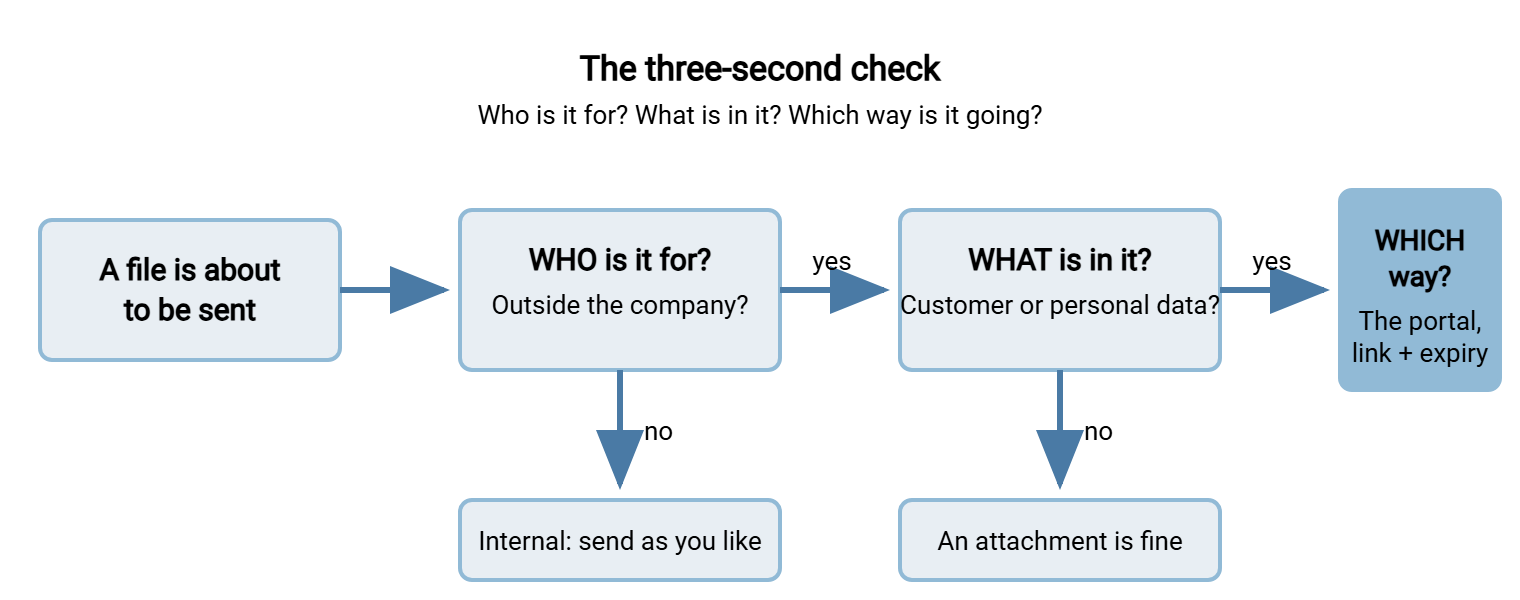
Notice what the flow does not do: it does not send internal files or harmless external ones through the portal. That restraint keeps the habit credible. A check that always answers "portal" is a check people stop running.
A Short War Story: The Wrong Dave at Northgate Retail
An HR administrator at Northgate Retail sent the regional staff list, with home addresses, to "Dave" for a rota review. Autocomplete had chosen a Dave at a shopfitting supplier, and the attachment sat in his inbox unopened. She noticed the next morning, and said nothing for nine days. The last person who reported a mis-send had been asked in a meeting how it could possibly have happened. That was why she said nothing. By the time it surfaced, the supplier's mailbox had been backed up twice and the file could not be recalled. The postmortem found two missing habits, not one careless person. Nobody had ever been taught to read the recipient aloud, and nobody had ever been thanked for reporting a mistake. Both took a month to fix, and the second was harder.
Keeping Habits Alive
Habits decay when nothing reinforces them, so build in three kinds of reinforcement and keep them small. Time refreshers to events: when the portal changes, when a department's numbers slip, or within a week of any real incident. Run the relevant drill again at those times, five minutes, inside the team meeting. For new starters, the five-habit card is in the welcome pack. The buddy runs habits 1 and 2 on day one, as described in designing the program. And champions: one willing person per department who runs the refreshers and hears about near-misses first. The champion role is defined properly in measuring adoption and closing the gaps. Here it is enough to know that habits maintained by someone in the room outlast habits maintained by someone in IT.
There is one more way to keep a habit alive, which is to remove the need for it. A recurring transfer, the same file to the same place every night, should not depend on anyone's habit at all. A scheduled job in a tool such as Sysax FTP Automation sends it on a timetable with no human in the loop. And no human in the loop means no autopilot to interrupt. Every routine transfer you automate is one habit you never have to drill.
Five Habits, One Check, No Lecture
Behavior changes through repetition in the place where the decision is made, not through explanation in a meeting room. The method is five habits, each with a why the user can repeat and a drill they have done more than once. Add a nudge beside the old cue and a three-second check spoken aloud. That is the whole method. It is unglamorous, and it works, and it fits inside the twenty-minute module you already have.
The next articles give the habits somewhere to point. Writing user-facing guides covers the one-page guide the card refers to. The article making the secure path the easy path covers the service design that makes habit 2 a fair ask. Meanwhile, read the recipient aloud. The right Dave will not mind.
Frequently Asked Questions
Why only five habits? Our policy has more rules than that.
What is a nudge, and how is it different from a block?
Does the three-second check really need to be said out loud?
How do I get people to report mistakes quickly?
How often should the drills be repeated?
From the Sysax team: we build secure file transfer software for Windows. Sysax Multi Server is an FTP, FTPS, SFTP, and HTTPS server. Sysax FTP Automation handles scheduled, scripted transfers. Free trials are on the download page.