
Hybrid Transfer Reference Architectures
Principles are easy to nod along with; designs are where they earn their keep. This article closes our Cloud and Hybrid Transfer Architecture series with three complete hybrid designs, worked end to end. One is a partner exchange that adopted cloud storage without touching its partners. The others are a branch-collection flow built on a cloud landing zone, and an application export delivered through a cloud relay. Each one names its context, walks the flow hop by hop, and — most importantly — argues its tradeoffs out loud, including the alternatives it rejected and why.
The organizations are synthetic and the cloud is generic, so nothing here dates or ties you to a vendor. Read them as arguments, not blueprints: your estate will differ in the particulars. The section at the end turns each design into the questions you should answer before adapting it.
How to Read These Designs
All three are settlements of the same four forces — inbound exposure, data gravity, endpoint stability, and the egress meter — using the three shapes cataloged in hybrid topologies. Each design below follows the same template. It covers the context that forced the choice, the shape chosen, the components and the flow in order, and the tradeoffs argued. It ends with a short watch list of the things most likely to bite in year two. Where a control or cost argument is developed fully elsewhere in the series, the design cites it rather than repeating it.
Design One: Partner Exchange with Cloud Storage Behind It
Context. Meridian Foods, a regional producer, exchanges order and invoice files with about thirty trading partners over SFTP. It is a classic estate of the kind our partner exchange series describes. Host keys are pinned in partner automation, and change-control processes are measured in months. Meridian's analytics platform and long-term archive have moved to a cloud region. The mandate: get every received file into cloud storage within minutes, and get analytics results back out to partners — without asking thirty partners to change anything.
Shape. The on-prem front door with cloud behind it. Partner stability dominated the force ranking. Thirty endpoints wired into other companies' change control made "nobody notices" the binding requirement. Inbound exposure was already a solved problem in Meridian's DMZ.
The diagram shows the whole flow; the walkthrough follows it left to right.
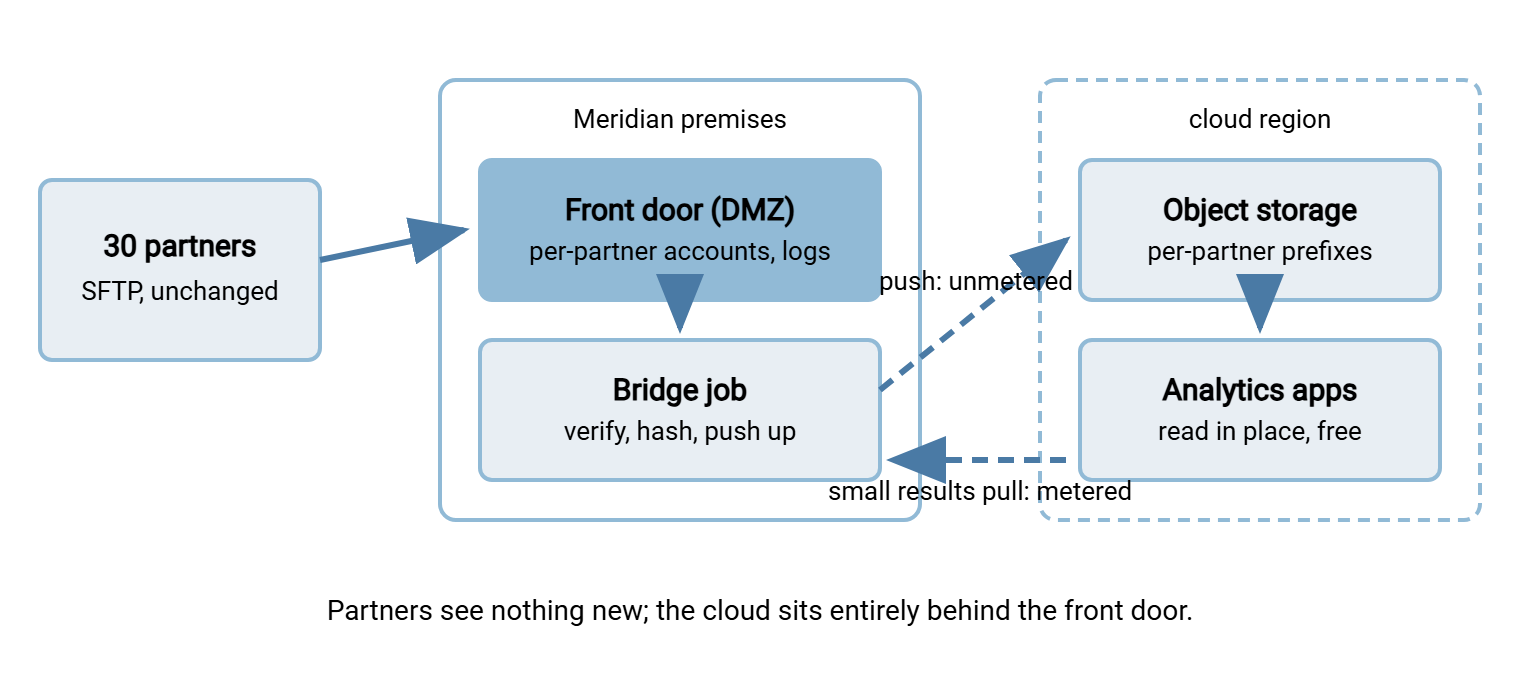
The flow, in order. Partners connect to the same DMZ endpoint as always — a Windows server running Sysax Multi Server. It has a per-partner account, key authentication, IP allow rules, and activity logging to a database. On upload completion, a folder-monitoring bridge job verifies size stability. The job is Sysax FTP Automation watching each partner's arrival folder in the classic hot-folder pattern. It computes a checksum and hands the file to the provider's command-line tool. That tool uploads it under a per-partner prefix with the hash in its metadata. Analytics reads objects in place. The results feed runs in reverse on a schedule. The bridge pulls finished result files down to each partner's pickup folder, and partners collect over the same old SFTP session.
Tradeoffs argued. Why not a cloud landing zone? Migrating thirty partners' endpoints meant a new hostname, a new host key to re-pin, and thirty change windows. That was a year of coordination to save one DMZ server. Meridian would still have paid egress pulling every file back for the on-prem ERP that also consumes them. Why not point partners at a provider SFTP gateway? Same partner migration, plus new log formats and per-account controls differing from the ones their audit answers were built on. The chosen shape's costs are accepted knowingly: Meridian keeps running exposed infrastructure, and the bridge is a new component whose failure delays analytics. That failure is mitigated with the bridge's own alerting on queue depth and last-success age. The meter barely features: the heavy direction is inbound-cheap, and the results pull is small by design — the placement logic from egress and cost awareness.
Notice what the bridge's position buys beyond translation: decoupling. If the cloud side is unreachable for an afternoon, partners are untouched. Files queue on the front door, and the bridge drains the backlog when the region answers again. If a partner unleashes a resend storm, analytics never feels it; the bridge feeds the bucket at its own pace. Each world can have a bad day without the other noticing — exactly the property a flow between thirty external companies and an internal platform should have.
Watch list. The bridge's staging folder must drain by success, not cleanup. The checksum recorded at the front door must be the one verified in the bucket, or the audit story develops a seam. The archive's lifecycle rules need a retention owner, because the bucket quietly becomes the copy of record.
When this design turns wrong. The front-door shape rests on two anchors — a partner roster that must not move, and heavy on-prem readers. It should be re-argued the day either anchor lifts. If the partner count triples, per-partner onboarding and DMZ capacity start to argue for a landing zone. If the on-prem ERP retires and every remaining reader lives in the cloud, the front door has become a detour. Files then land on premises only to be shipped where all the reading happens. And if the bridge's backlog alert fires weekly rather than yearly, the back room has quietly become the main room. None of these is an emergency; each is a prompt to re-run the placement worksheet with current facts.
Design Two: Branch-to-Cloud Collection
Context. Halvorsen Retail runs forty-plus branches on consumer-grade links, each producing nightly sales and inventory files that head office must process before morning. Head office security policy forbids inbound connections from branches; the branches sit behind NAT anyway. Branch links flap often enough that any design assuming a clean simultaneous push at closing time is fiction.
Shape. The cloud landing zone. Inbound exposure ranked first (none allowed at HQ), data gravity second — the files' one real reader is HQ batch processing, which shaped the pull side.
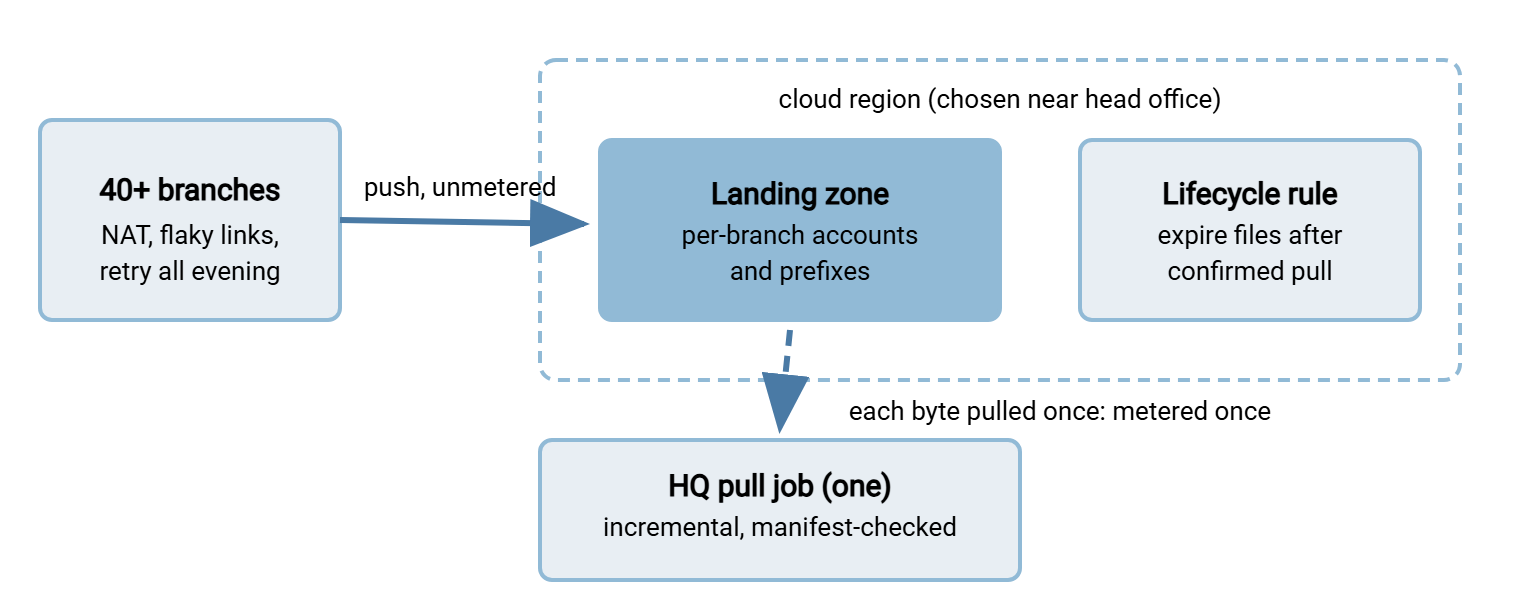
The flow, in order. Each branch pushes its files after close, whenever its link allows, with retries into the evening. Each writes a small manifest last, the settled convention for "the batch is complete." The zone authenticates every branch with its own account and key against per-branch folders mapped to per-branch prefixes. Halvorsen built the zone as a rented Windows machine running Multi Server rather than a managed gateway — argued below. After the last cutoff, one HQ job connects outward, lists each branch prefix narrowly, and pulls only files it has not already fetched. It verifies each manifest per checksum-and-manifest practice, and hands the night's set to batch processing. Freshness monitoring treats every branch as its own promise — "branch file present by cutoff" — in the style of expected-file checks. So the alert names the missing branch, not just "some files missing." Zone copies expire a few days after confirmed pull.
Tradeoffs argued. Why not push straight to HQ? Forbidden inbound, plus forty flaky senders retrying against one corporate endpoint at peak. Why not per-branch VPN tunnels? Forty tunnels to babysit, dropped constantly by retail links; SFTP over the open internet with keys weathers flapping links better than tunnel state does. Why self-managed zone over a provider gateway? Halvorsen wanted per-branch IP rules, one log format across their flows, and accounts they could disable branch by branch during incidents. That is the control-versus-chores tradeoff from the topologies article, decided toward control. The accepted costs: the zone is theirs to patch and harden, and every byte pays the meter exactly once on the pull. That was priced up front, with the region chosen close to HQ so the nightly bulk pull runs short. Listing staleness was designed out by trusting manifests, not listings, to declare completeness.
The design also made branch onboarding boring, which at forty-plus sites is a feature. A new branch means one account, one key, one folder-to-prefix mapping, and one line in the freshness monitor. That is a packet a junior admin applies in minutes from the runbook. That repeatability keeps per-branch isolation honest as the estate grows; once onboarding turns artisanal, corners get cut, and the first cut corner is usually the separate account.
Watch list. Watch the straggler branch that misses cutoff. The pull job runs a late second sweep, and the batch owner decides whether to wait per the dependency rules. Watch zone hardening drift as branch count grows, and the pull job's state file. That file is now the memory of what has been fetched and deserves backup like any state that would be expensive to reconstruct.
When this design turns wrong. The tell to watch for is a second heavy reader growing up in the cloud. If an analytics platform starts consuming the same branch files there, the current design makes it wait for HQ's pull and a push back up. That means two crossings for data already sitting in the region. At that point the storage behind the zone graduates from waystation to shared source. Analytics reads in place for free, HQ still pulls its copy once, and the lifecycle rule loosens to match the slowest reader. The zone itself rarely turns wrong — absorbing flaky senders is a durable virtue. But its retention and its who-reads-from-here list deserve a fresh look whenever a new system wants the data.
Design Three: Application Export Through a Cloud Relay
Context. Ledgerline, a payroll processor, runs its application in a cloud region and must deliver monthly output files to Atlas Group. The client's security team accepts no inbound connections and will not fetch from infrastructure inside another company's application environment. Ledgerline's own policy mirrors it. Classic standoff; both sides can only dial out.
Shape. The cloud relay. Neither party listens; a small rendezvous endpoint does, on ground deliberately separate from both.
The flow, in order. Ledgerline stands up a minimal relay: a small transfer endpoint in a region agreeable to both parties. It is on its own machine and network segment, deliberately outside the application's infrastructure. Each month the application encrypts the output files with Atlas's public key — the encrypt-before-send workflow — and pushes them to the relay over SFTP with a write-only account. Atlas's automation pulls on its own schedule with a read-only account restricted to Atlas's IP range, and decrypts inside its own walls. A retention rule deletes relay copies a few days after confirmed download, and both parties receive the relay's log extract monthly. Each holds evidence of the handoff without seeing the other's internals.
Tradeoffs argued. Why not presigned-style links instead of a relay server? For an occasional, human-paced exchange they would be the lighter answer — the variant noted in presigned URLs. But this is recurring automation with contractual audit duties. A stable endpoint, pinned host key, named accounts, and a log both lawyers can read beat a fresh URL every month. Why put the relay outside the application environment? Blast radius: a compromise of the exchange point must not be a compromise of payroll processing. Auditors get a clean boundary — the instinct that builds a gateway tier in front of internal services. Why does Ledgerline own it rather than a neutral third party? Someone must patch it, answer for it, and pay for it. The client relationship made the vendor the natural operator. The agreement — not the architecture — gives Atlas its guarantees: log delivery, retention limits, notice before changes. The accepted costs: encryption key management on both sides, and the consumer-pull egress, trivial at monthly volumes.
Watch list. Credential and key rotation must be coordinated across two companies — calendar it in the agreement, not in goodwill. The relay is small enough to be forgotten by patching cycles, which is exactly why it must be enrolled in them. The "temporary" second client who joins the relay next year must get their own accounts and prefixes from day one. Otherwise, the relay quietly becomes a shared liability.
When this design turns wrong. Three drifts to watch. If the exchange accelerates from monthly to hourly, the relay still works. But its retention window and monitoring cadence were sized for a slower pulse. In that case, retune both before the backlog does it for you. If a third and fourth client join, the relay stops being a favor and becomes a small multi-tenant service: per-client isolation, a real onboarding packet, capacity thinking. And if either company's posture someday permits inbound from a named counterparty, a direct push could retire the relay entirely. That is a healthy outcome to take deliberately rather than leaving the middle hop running out of habit, unpatched and half-remembered.
Remember: in all three designs, the transfer server is the stable, boring part. Every hard argument was about placement, credentials, and who owns which risk — which is why those arguments, not product choices, are what this series has spent six articles on.
Failure Drills: Prove Each Design Degrades Safely
A reference architecture is not adapted until you have watched it fail on purpose. Each design has one failure it must survive gracefully, and each is cheap to rehearse before go-live. Design one: stop the bridge for an afternoon. Partners stay untouched, the front door queues calmly, the backlog alert fires at its threshold, and the restart drain preserves order and checksums. Design two: hold one branch's file past cutoff. The freshness alert names that branch, and the late sweep catches the file when it appears. The batch owner can point at the written run-now-or-wait rule. Design three: let the consumer's pull fail for a night. Files persist within the agreed retention, the retry succeeds without human hands, and neither party's month-end wobbles.
Repeat the drills after any material change — new region, new client, doubled volume — and file the results with the runbook. The failure rehearsed in daylight is the one that will not page anyone at midnight; the one never rehearsed becomes an incident review.
The Threads Running Through All Three
Lay the designs side by side and the same decisions repeat. Placement followed the readers: Meridian's files stay where the ERP and partners are, with copies pushed cheap-direction to the cloud reader. Halvorsen's land near their one real reader after a single metered hop. Ledgerline's rest briefly on neutral ground. Every leg carries its own scoped credential — per-partner, per-branch, per-direction — so one compromise never unlocks a second world, per the security model. Checksums join the audit story at every hop. The meter was counted at design time and crossed deliberately, once. And every listener — front door, zone, relay — is hardened and monitored as the exposed server it is, whatever flag it flies.
Adapting a Design to Your Estate
Before borrowing any of the three, answer these on paper — they are the questions each design's arguments turned on:
ADAPTATION QUESTIONS - answer before you build

  1. Who are the senders, how many, and can their endpoints change?
     (thirty pinned partners pushed design one on-prem)
  2. What may accept inbound connections, and where?
     (a hard "nothing at HQ" forced design two's landing zone)
  3. Where do the heaviest readers live? That side wants the data.
  4. Which legs cross the meter, and how many times per byte?
     Redesign any answer above "once per consumer side."
  5. What credential does each leg hold, how scoped, when rotated?
  6. Where does each leg log, and can one query trace one file?
  7. Who owns each exposed endpoint - patching, incidents, cost?
  8. What is the retention story for every copy the design creates?
  9. What breaks first at double the volume, and who notices?
 10. Which failure will you rehearse before go-live, and what must
     stay true while it happens?
Treat unanswerable questions as findings: a blank at question five means nobody owns the credentials; a blank at question seven means an endpoint is about to be orphaned. Write the answers into the flow's runbook beside the diagram — the person re-arguing this design in a few years will need the reasoning, not just the result. That is what separates a reference architecture from a cargo-culted one: the arguments travel with it.
Closing the Series
Three designs, one method. Rank the forces honestly, choose the shape they point to, scope the credentials, and count the crossings. Make every leg log into one story, and rehearse the failure before it rehearses you. If you worked through the series from what the cloud actually changes onward, nothing in these architectures should have surprised you. They are the four changes and the unchanged disciplines, arranged with intent. The storage, cost, and security arguments live in their own chapters of this series wherever you need the depth behind a decision.
Frequently Asked Questions
Can I mix elements from different reference designs?
Which design should a small team start with?
Do these designs require special cloud transfer products?
Why does each design insist on files crossing the meter only once?
Who should own a shared component like the relay in design three?
From the Sysax team: we build secure file transfer software for Windows. Sysax Multi Server is an FTP, FTPS, SFTP, and HTTPS server. Sysax FTP Automation handles scheduled, scripted transfers. Free trials are on the download page.