
Hybrid Topologies: On-Prem Endpoints Meeting Cloud
Once one end of a transfer flow lives in the cloud, the hard question is not which protocol to use — the protocols survive the move untouched. The hard question is placement: where does the transfer server itself live, where do files rest between hops, and which side of each boundary initiates the connection? Get placement right and the rest of the design falls out naturally; get it wrong and you fight egress bills, firewall exceptions, and partner complaints for years.
The reassuring news is that hybrid estates keep converging on the same three shapes. They are the cloud landing zone, the on-prem front door with cloud behind it, and the cloud relay between parties. This article — part of our Cloud and Hybrid Transfer Architecture series — walks each shape end to end and argues when each one wins. It gives you a decision table for choosing among them flow by flow.
The Question Under Every Hybrid Design
Start with a liberating fact: a transfer server is software, and it runs wherever you can run a machine. On the hardware in your rack, on a rented Windows or Linux server in a cloud region, or as a provider-managed gateway service — the SFTP endpoint your partners see behaves the same. So placement is a genuine choice, and four forces pull on it:
- Inbound exposure. Somebody must accept incoming connections. Accepting them in a cloud network keeps your corporate firewall closed. Accepting them on premises keeps data home but means running exposed infrastructure — the classic DMZ patterns problem.
- Data gravity. Files should rest near whatever reads them most. A server far from its heaviest consumer turns every read into a long-haul transfer.
- Endpoint stability. Partners embed your hostname, port, and host key into their automation. A shape that keeps their endpoint unchanged is worth a great deal — a lesson every partner exchange program learns.
- The meter. Data entering the cloud is cheap; data leaving is metered. Each shape crosses the boundary in a different place and direction.
When the forces conflict — and they will — rank them for the flow at hand rather than in general. A flow carrying regulated records ranks data gravity and residency first. A flow fed by fifty impatient partners ranks endpoint stability first. A flow between two locked-down enterprises ranks inbound exposure first, because that force is the one nobody can negotiate away. The shape that satisfies the top-ranked force with the least damage to the others is your answer.
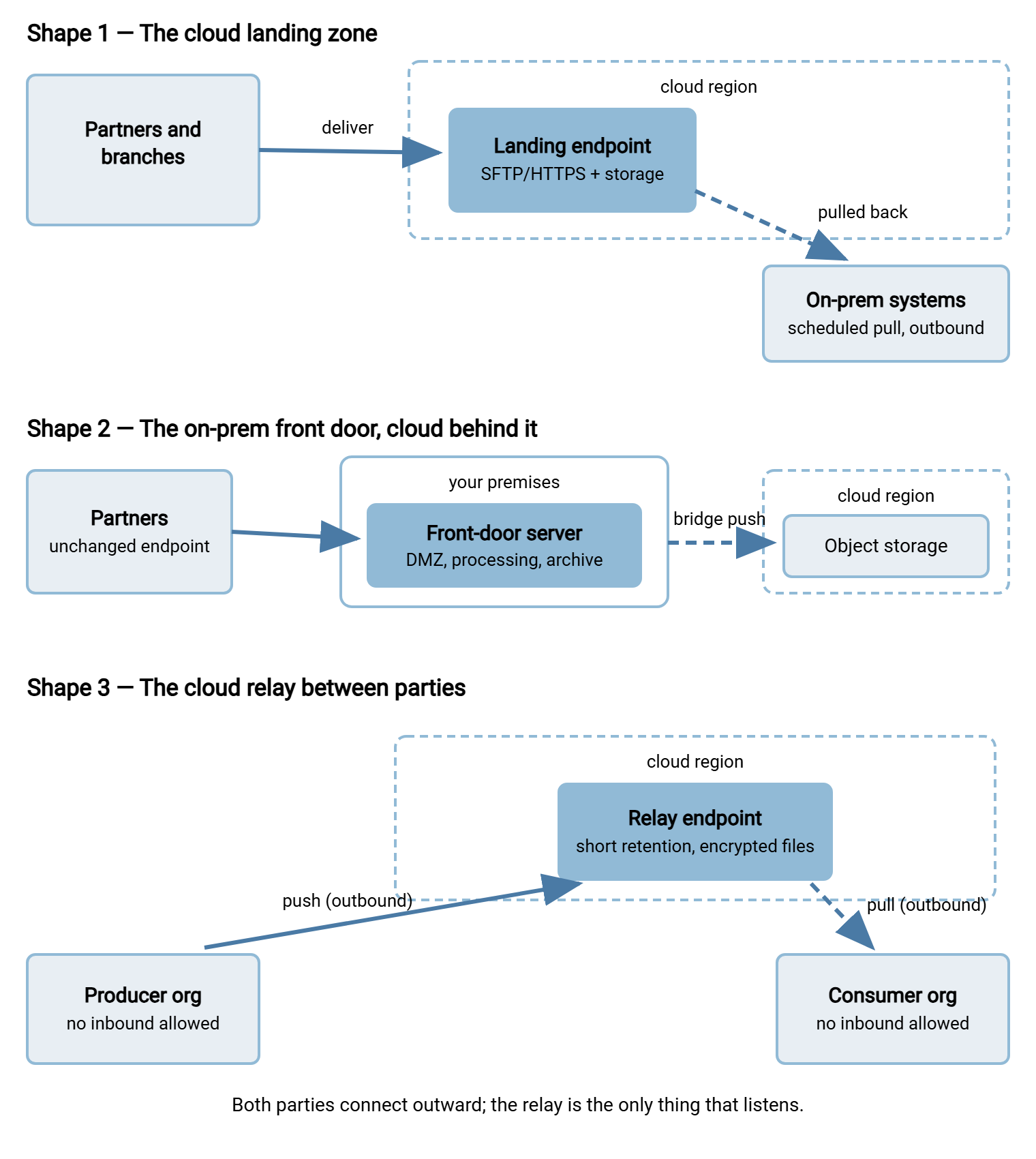
The three shapes are three different settlements between those forces. The diagram below shows all three; the sections that follow take them one at a time.
Shape One: The Cloud Landing Zone
In the landing-zone shape, the transfer endpoint itself lives in a cloud region. It is an SFTP or HTTPS service on a rented machine, or a managed gateway in front of object storage. External senders — partners, branch offices, field devices — deliver there. Your on-prem systems then collect what they need on their own schedule, connecting outward to fetch. Files rest in the cloud briefly or long-term, and nothing on the internet ever connects toward your corporate network.
When it wins. The landing zone earns its keep when inbound traffic is the problem you are solving. Many senders, unpredictable bursts, senders you do not fully trust: all of that lands on rented infrastructure sized for it. Meanwhile, your own firewall stays closed to the world. The landing zone also wins on resilience economics. A landing zone can be rebuilt or resized in minutes, and a flood of partner uploads cannot fill a disk that matters to anything else. Because the endpoint is just software on a machine, you keep full control of accounts and logging if you want it. Consider a Windows instance running Sysax Multi Server in a cloud region. It gives you the same per-account authentication, IP allow and block rules, and activity logging you would run on premises. The landing zone is still your server; only the ground under it is rented.
What it costs. Every file your on-prem side retrieves crosses the meter. So the pull-back leg should fetch once and distribute internally rather than letting each consumer fetch its own copy. The landing zone is an exposed server and must be hardened and patched like one. And the flow now has two legs to monitor — delivery into the zone, collection out of it. Each can fail independently, so each needs its own expected-file checks.
In practice. Picture a distributor with dozens of field offices on consumer-grade connections. Each office pushes its end-of-day files to the landing zone whenever its link cooperates; the zone absorbs the stragglers and the retries all evening. At a set hour, one scheduled job at headquarters connects outward and pulls the day's arrivals in a single pass. It verifies the manifests and hands the files to internal processing. Head office opened no inbound port, sized no upload server for peak, and the meter ran exactly once per file.
Shape Two: The On-Prem Front Door with Cloud Behind It
In the front-door shape, the partner-facing endpoint stays exactly where it always was: a transfer server on your premises, typically in the DMZ. What changes is behind it. A bridge job pushes received files up to cloud object storage for archive, capacity, or processing by cloud applications. It fetches results back down. Partners see nothing move.
When it wins. Endpoint stability is this shape's superpower. Dozens of partners have your hostname, your host key, and your credentials wired into their automation. The front-door shape adopts the cloud without asking one of them to change a byte. It also wins when the authoritative copy must stay home — data-residency obligations of the kind covered in data localization requirements. It also wins when heavy processing already happens on premises and the cloud is genuinely a back room. That might mean an archive tier, overflow capacity, or one cloud-hosted consumer among many local ones. The meter favors it too, since the bridge push runs in the cheap inbound direction, and only what you later retrieve from the archive is metered.
What it costs. You keep running exposed infrastructure, with everything that implies — patching, brute-force defenses, certificate care. The cloud's elasticity does nothing for your front door; a burst of partner uploads still lands on your bandwidth and your disk first. And the bridge is a new moving part that deserves real design: a scheduled or folder-monitoring job. That is the natural home for a tool like Sysax FTP Automation, handing finished files to the provider's tooling as described in object storage in your file flows. It should be a job with retry, verification, and its own alerting, not a script somebody wrote on a Friday.
In practice. Picture a manufacturer whose invoice exchange with a long roster of trading partners has run through the same DMZ server for a decade. Their analytics moved to the cloud; their partners did not. The front-door shape let them add one bridge job that mirrors every received invoice into a bucket within minutes of arrival. There, the cloud side processes at leisure. Partners never received an email, never changed a host key, and the riskiest part of the whole project was a folder-monitoring rule.
Shape Three: The Cloud Relay Between Parties
In the relay shape, neither party accepts an inbound connection. Producer and consumer both connect outward to a rendezvous point in a cloud region — a transfer server or a bucket with a gateway in front. There, the producer pushes and the consumer pulls. The relay is the only listener on the whole path.
When it wins. The relay is the shape for two organizations whose security postures both say no inbound, ever — increasingly the default posture between companies. It suits partner meshes where many parties exchange with many others and nobody wants to host the exchange. It suits senders trapped behind NAT — branch sites, field equipment, home offices — that can dial out but can never be dialed. It also puts the rendezvous on neutral, rebuildable ground. If the relay is compromised or simply obsolete, you tear it down and stand up a fresh one without touching either party's network. Direction-of-initiation reasoning is doing the work here; our push versus pull article and the server-to-server patterns series cover that thinking in depth.
What it costs. Data now rests in a third place, however briefly — so the relay carries real duties. Encrypt files at the file level before they leave the producer (the encrypt-before-send workflow). Keep retention on the relay short and automatic, and harden it like the exposed server it is. The consumer's pull crosses the meter every time. And accountability needs deciding up front: someone owns the relay, its logs, and its incident response, even though the data on it belongs to others.
In practice. Picture two firms exchanging a daily reconciliation file. Each security team refuses inbound connections on principle, and neither will budge. The relay ends the standoff. It is a small transfer endpoint in a region both can reach, with one push account and one pull account. Files are encrypted before they leave the producer, and a retention rule deletes anything older than a few days. Neither firewall changed. When the consumer's auditors asked where the file rests in transit, the answer was one sentence and one log excerpt.
Remember: the relay only removes inbound connections; it does not remove trust decisions. A file resting on the relay is only as safe as the relay's hardening and the file's own encryption. Treat "it's just a relay" as the beginning of the security conversation, not the end of it.
Choosing: The Decision Table
| Question | Cloud landing zone | On-prem front door | Cloud relay |
|---|---|---|---|
| Who accepts inbound? | The cloud endpoint | Your DMZ, as today | Only the relay |
| Where does data rest? | In the cloud until pulled | On premises; cloud copies behind | Briefly on neutral ground |
| Partner-visible change? | New endpoint to adopt | None | Both sides adopt the relay |
| Egress profile | Metered on every pull-back | Cheap push up; metered retrieval only | Metered on the consumer pull |
| Best when | Many or untrusted senders; closed corporate perimeter | Established partner base; data must stay home | Neither party accepts inbound |
| Watch out for | Per-consumer re-downloads; zone hardening | Bridge job quality; DMZ still yours to defend | Relay ownership; file-level encryption; retention |
Variations Inside Each Shape
Each shape has two or three standard builds, and knowing them saves redesign later. The landing zone can be a rented machine running your own server software. That means full control of accounts, IP rules, and log formats, with patching on you. Or it can be a provider-managed gateway in front of object storage. There, the provider patches the endpoint and you accept its logging format and its translation quirks. The choice is the classic control-versus-chores tradeoff, and it is reversible later because senders see an SFTP endpoint either way.
The front door's cloud back room can be a bucket or a rented filesystem. Buckets win for archive economics and durability; a managed filesystem earns its keep when a cloud application insists on reading ordinary files rather than objects. The relay has a lightweight variant worth knowing. For occasional, human-paced exchanges, skip the server entirely and hand each party presigned-style links — one to upload, one to download, both expiring. Recurring automation is better served by real accounts on a real relay endpoint, where host keys and credentials stay stable enough to script against.
To make the choice concrete for one flow, fill in this worksheet — it forces the four forces into the open and usually settles the argument on its own:
PLACEMENT WORKSHEET - one per flow

Flow name:            ______________________________
Senders (who, where): ______________________________
Consumers (who, where): ____________________________
May we accept inbound on-prem?          yes / no / prefer not
Can senders adopt a new endpoint?       yes / no / with notice
Must the authoritative copy stay home?  yes / no
Bytes out of the cloud per month:       roughly ______
  x how many times is each byte fetched? ______
Ranked forces for THIS flow (1-4):
  inbound exposure __  data gravity __
  endpoint stability __  the meter __
Shape chosen:  landing zone / front door / relay
One-line reason: ___________________________________
Mixed Estates Are Normal
Choose per flow, not per company. A real estate might run all three shapes at once. It might use a landing zone collecting branch uploads, and the long-standing front door serving legacy partners untouched. It might use a relay for the one partner whose security team will not open anything for anybody. That is not indecision — it is placement following the forces honestly, flow by flow. What you should resist is accidental variety: three shapes chosen deliberately are an architecture; seven shapes accumulated by habit are sprawl. Write down which shape each flow uses and why, and require a reason before a new flow invents a fourth.
Shapes also change over a flow's lifetime, and that is healthy. A front door becomes a landing zone when the partner roster outgrows your DMZ. A relay retires when two companies merge networks. Just treat a shape change as what it is — a transfer migration with partner-visible edges. It deserves the notice periods and cutover care covered in our migrating transfer workloads series, not a quiet weekend change.
One caution for the landing-zone and relay shapes: putting the endpoint in a region is also putting it a distance from everyone. A region far from your senders adds latency to every session, and single-stream throughput over long paths hits the ceiling described in bandwidth-delay product. Pick the region closest to the heaviest traffic, not the one that happened to host your first experiment.
Disciplines That Apply to All Three
Whichever shape a flow takes, the same operating rules keep it honest. Every leg gets logged, and the logs get joined. A hybrid flow's story spans at least two systems. Ship both sides' logs to one place so a single query can trace a file end to end. This is the approach in centralizing logs, and a theme this series returns to in the security model article. Every leg gets its own credential, scoped to that leg. The account that delivers into the landing zone must not be the credential that pulls from it. Every leg gets its own monitoring promise. "File left the branch," "file reached the zone," and "file arrived on-prem" are three separate facts. An alert should name which one failed. And every exposed element — zone, front door, relay — gets the full hardening treatment, because attackers do not read your architecture diagram; they scan for listeners.
Clocks deserve their own sentence. A multi-leg flow is a relay race, and the baton passes on a schedule. Senders finish by one time; the pull leg starts after it, with slack in between for stragglers and retries. Cloud machines commonly default to universal time while your on-prem schedulers speak local time. Pick one convention for every schedule in the flow, write it down, and re-check the handoff times twice a year when clocks shift. A mysterious "missing" feed that arrives exactly one hour late is a timezone bug announcing itself.
Picking Your Shape
Ask the four questions in order: who must accept inbound connections, where should files rest, what can partners tolerate changing, and which direction crosses the meter how often. The answers usually point at one shape per flow — landing zone when inbound is the enemy, front door when partner stability or residency anchors you, relay when nobody will listen. From here, hybrid reference architectures works three of these decisions end to end with named tradeoffs. The article on egress and cost awareness gives the meter the full treatment your pull-back legs deserve.
Frequently Asked Questions
Does a cloud landing zone mean I have to use the provider's transfer service?
Which shape is cheapest?
Can one estate use more than one shape?
Is the cloud relay the same thing as a DMZ?
Who should own a relay used by two companies?
From the Sysax team: we build secure file transfer software for Windows. Sysax Multi Server is an FTP, FTPS, SFTP, and HTTPS server. Sysax FTP Automation handles scheduled, scripted transfers. Free trials are on the download page.