
Object Storage in Your File Flows
Sooner or later a partner, a cloud application team, or your own archive project says the words: "just drop the files in the bucket." Your instincts may have been formed on filesystems — folders that contain things, files you can rename, listings that cost nothing. Those instincts will serve you about eighty percent of the time in object storage. The remaining twenty percent will bite in ways that are hard to debug precisely because everything looks so familiar.
This article maps the object world honestly for a transfer administrator. It covers what buckets, objects, and keys actually are, which of your file-world habits carry straight over, and which ones must change. It shows how the SFTP world you already run bridges into the object world you are being asked to feed. It is part of our Cloud and Hybrid Transfer Architecture series, and everything here is provider-neutral — the model below is recognizable on every major platform.
Buckets, Objects, and Keys in Plain Words
A bucket is a named container for data, created once and addressed globally within your cloud account. Inside it live objects: each one a complete blob of bytes plus a little attached metadata. That metadata includes the object's size, a checksum the storage service recorded at upload, a content type, and any custom name-value pairs you add. Every object is addressed by its key: a single string, unique within the bucket, that serves as the object's entire name and address.
Here is the part that rewires filesystem thinking. A key like feeds/acme/in/orders_YYYYMMDD.csv contains slashes, and the provider's console will happily render it as a folder tree. But there are no folders. The bucket is a flat namespace — one enormous, unordered set of keys. The slashes are ordinary characters. What looks like a directory is a prefix: a leading substring that many keys happen to share. The listing API can filter on it, and the console can draw it as a hierarchy. Nothing "contains" anything. You cannot create an empty folder, because there is no folder to create; a prefix exists exactly as long as at least one key carries it.
The diagram below puts the two mental models side by side: real nested containers on the filesystem, and a flat set of key strings that merely display as a tree.
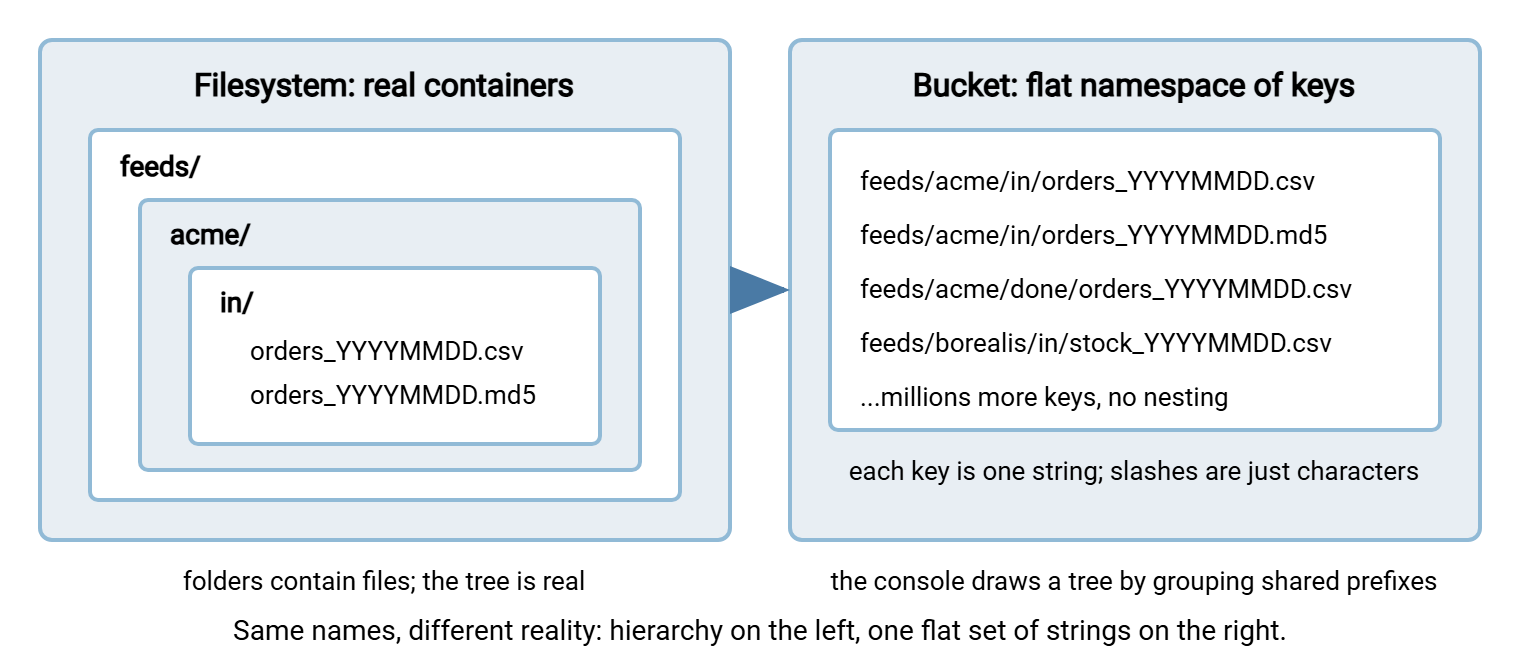
Why does the difference matter if the console hides it? Because the operations you script against a bucket follow the flat model, not the drawn one — and the next section is the list of places where that shows.
Five Filesystem Habits Object Storage Breaks
First: there is no editing in place. Objects have whole-object semantics — you upload a complete object, and you replace it by uploading a complete replacement under the same key. There is no opening an object to change ten bytes in the middle, and as a rule no appending to the end of one either. The growing log file you tail on a server has no direct equivalent; the object-world habit is to write a new, complete object per batch or per period.
Second: rename is not rename. A filesystem rename is a cheap metadata operation, which is why the temp-name-then-rename trick in atomic-arrival patterns costs nothing. In a bucket, "renaming" an object means copying it to a new key and deleting the old one. Platforms can do the copy server-side without re-uploading the bytes, but it is still two operations. Consider a workflow that shuffles thousands of files between in/, processing/, and done/ prefixes. All that copying adds up in requests and time.
Third: listing is an API call, not a glance. Asking what a bucket contains is a paginated request. The service returns one page of keys at a time, you ask again for the next page, and every request is billable. With a few hundred objects nobody notices. With millions of keys, a full listing takes real time and real money. That is why key design (below) aims to let every consumer list a narrow prefix rather than the world. It is also why most platforms can instead emit an event notification when an object arrives, so nobody has to poll at all.
Fourth: permissions are policies, not modes. There is no owner-group-other on an object. Access is granted by policies evaluated by the platform's identity service — rules like "this identity may put objects under this prefix." The practical translation of your directory-permission habits is prefix-scoped policy, and it is covered properly in the security model of cloud-involved transfers.
Fifth: arrival works differently — mostly in your favor. On a filesystem, a file appears the moment it is created and grows while it is written, which is why half-written files plague transfer flows. An object, by contrast, generally becomes visible under its key only when the upload completes. Large objects are typically uploaded in parts and assembled at completion, so consumers never see a half-object. One honest caveat: consistency — whether a listing or read immediately reflects the newest write — varies by platform. Many now give strong read-after-write behavior; others have offered eventual consistency, where a just-written object might briefly not appear in a listing. Check what yours promises, and design so that a briefly stale listing delays a flow rather than breaking it.
What Happily Carries Over
Now the good news, which is most of your discipline. Naming rigor transfers completely. A key is a name you control end to end, so the conventions from sortable datestamp formats apply verbatim. Keys sort lexically in listings, so year-month-day ordering pays off even more than it did on disk. Integrity practice transfers. Checksums and manifests work exactly as before, with a bonus. The storage service records a checksum at upload that you can compare against your own. Custom metadata gives you a place to carry your hash with the object. Retention thinking transfers, and gets easier: platforms offer lifecycle rules that expire or tier objects by age automatically — the purge script you babysat becomes configuration.
The architectural instincts survive too. Push-versus-pull reasoning is unchanged: somebody still initiates, somebody still owns the retry, and the bucket is simply a very patient middle party that both sides can reach. Batch thinking is unchanged — a delivery is still a set of files plus a manifest, whether the set lives under a path or under a prefix. And monitoring transfers: an expected-file check does not care whether the expected thing is a path or a key. So "the orders feed has not arrived by six" is the same alert, pointed at a prefix. The teams that struggle with object storage are rarely the ones lacking cloud knowledge. They are the ones who let the new vocabulary talk them out of disciplines they already had.
Habit by Habit: Keep, Adapt, or Replace
The table below is the working summary — the file-world habit on the left, its object-world fate on the right.
| File-world habit | In object storage | Verdict |
|---|---|---|
| Sortable, datestamped file names | Becomes key design; lexical sorting of listings makes it even more valuable | Keep |
| Checksums, manifests, verify-after-transfer | Identical, plus the service-recorded checksum and object metadata to carry yours | Keep |
| Temp name, then rename on completion | Largely unnecessary — objects appear only when complete; rename itself is copy-plus-delete | Adapt |
| Moving files between in/, processing/, done/ | Works, but every move is copy-plus-delete; at volume prefer markers, metadata, or a small state list | Adapt |
| Polling a folder listing for new arrivals | Poll a narrow prefix at low volume; at scale use the platform's arrival event notifications | Adapt |
| Appending to a growing file | No equivalent — write a complete new object per batch or period | Replace |
| Directory permissions and account homes | Prefix-scoped policies from the identity service; no accounts on the storage itself | Replace |
| Cron job that purges old files | Lifecycle rules expire or tier objects by age — retention as configuration | Replace, gladly |
Talking to a Bucket: APIs, Links, and Gateways
How do bytes actually get in and out? The native answer is the platform's HTTPS API — REST-style requests that put, get, list, and delete objects. It is the same family of mechanics described in our article on REST APIs for file transfer. Almost nobody hand-writes those requests; you use the provider's command-line tool or a software library. Both also handle the upload-in-parts dance that large files over HTTP require.
For handing access to someone without an account, there is the presigned-style link. It is a URL, generated by an authorized identity, that grants exactly one operation on exactly one object until it expires. For example, download this key, or upload to this key, for the next hour. It is the object world's answer to "how do I let a partner fetch one file without provisioning anything," and our presigned URLs article walks through the pattern in detail.
And for keeping the protocol world you already run, there are protocol gateways. These services present an SFTP (or FTPS) endpoint on one side and read and write objects on the other. Providers offer these as managed services, and the same shape can be self-hosted. The category is genuinely useful — partners keep their scripts while storage goes cloud — but the translation is never perfectly invisible. Directory listings are synthesized from prefix queries, renames inherit copy-plus-delete behavior, and per-operation latency is a shade higher than a local disk. Test the operations your flow actually uses rather than assuming filesystem behavior.
Durability, Tiers, and the Archive Question
Two more object-world properties change how you plan flows. The first is durability: platforms store each object redundantly across multiple devices and facilities. That is why buckets became the default landing place for archives. The "keep a second copy somewhere safe" chore is built into the storage itself. Durability is not a backup, though: it protects against hardware loss, not against your own script deleting the wrong prefix.
The second is storage tiers. The same bucket can hold objects in different classes. There is a standard tier for data read often, cheaper infrequent-access tiers, and cold archive tiers that cost very little to keep but make you wait. Retrieval from the coldest tiers is a request-then-wait affair measured in minutes to hours, with retrieval fees on top. Some tiers bill a minimum storage period even if you delete early. Lifecycle rules can demote objects through the tiers by age automatically. The transfer-design consequence: never point a live flow at an archive tier. A consumer that expects to fetch yesterday's file in seconds will time out against an object that must first be restored. Tier the copies nobody reads; keep the working set warm. Remember that when archived data does come back out, the meter on the way out applies just as it does to everything else.
The Bridge Pattern: One Machine, Two Worlds
A managed gateway may not fit. The flow may need OpenPGP handling, virus scanning, validation, or delivery onward to systems that know nothing of buckets. Then the workhorse answer is the bridge machine: one host that stands with a foot in each world. On its protocol side it runs your ordinary transfer stack; on its object side it runs the provider's tooling; in the middle sits a plain folder.
A concrete Windows version of the pattern: the bridge runs Sysax Multi Server as the SFTP front door. So partners and internal jobs deliver files with the credentials, IP allow rules, and activity logging you already know how to operate. A watched folder receives the arrivals. Sysax FTP Automation monitors that folder and runs the validation or OpenPGP steps. Its post-processing hands the finished files to the provider's command-line tool, which does the actual object upload. The reverse direction mirrors it: a scheduled step fetches new objects down to a folder, and the automation delivers them onward over SFTP. Neither product needs to understand buckets — that is the point of the pattern. The bridge is ordinary, debuggable machinery, and every file's passage is logged twice: once by the transfer server, once by the platform.
How do you choose between a managed gateway and a bridge? Use the gateway when the flow is a pure pass-through: protocol in, object out, nothing to inspect or transform, and you are content with the platform's logging. Build the bridge when files need work in the middle — decryption, validation, scanning, renaming to your convention, fan-out to multiple destinations. Also build it when you want one log format and one alerting path across cloud-involved and ordinary flows alike. Plenty of estates run both: gateways for the simple feeds, a bridge for the complicated ones.
Remember: a bridge is a real hop — files land on its disk. Give it the same hardening, monitoring, and cleanup discipline as any transfer server. Make sure its staging folder is emptied by success, not by a weekly cleanup that quietly hides failures.
When Is a File Actually "There"?
Transfer flows live and die on the arrival question, so restate it for objects. An object is "there" when the upload completed — partial objects do not appear under their key. It is correct when its checksum matches what the sender computed. Whole-object visibility is not integrity. The habits from checksum files and manifests still apply. A manifest object per batch remains the cleanest way to say "these twelve keys are the complete delivery." And the object is seen when the consumer's listing or event notification reflects it. This is the one step where platform consistency behavior matters, and where a design that tolerates a short delay beats one that panics.
One further behavior deserves a flag: overwriting. Uploading to a key that already exists silently replaces the object — there is no are-you-sure, and by default no undo. Platforms offer versioning, which keeps prior versions retrievable when a key is overwritten or deleted. For feeds where a re-sent file must never destroy evidence of the original — think disputed partner deliveries — turning versioning on is cheap insurance. Just remember every kept version is billable storage, so pair it with a lifecycle rule that eventually expires old versions.
A Copyable Key Convention
Key design is naming-convention design with one extra goal: every consumer should be able to list narrowly. A convention that has aged well:
<flow>/<party>/<direction>/<YYYY-slot>/<name>

  flow       what business feed this is        orders, invoices, stock
  party      who it belongs to                 acme, borealis
  direction  in (arriving) or out (leaving)    in, out
  YYYY-slot  a sortable date prefix            year/month or year/month/day
  name       your normal file naming           orders_YYYYMMDD_seq01.csv

Examples:
  orders/acme/in/YYYY/MM/orders_YYYYMMDD_seq01.csv
  orders/acme/in/YYYY/MM/orders_YYYYMMDD_seq01.csv.md5
  orders/acme/in/YYYY/MM/manifest_YYYYMMDD.txt

Rules:
  - one party never shares a prefix with another (policy scoping)
  - date lives in the key path AND the file name (listable and portable)
  - consumers list their own flow/party/direction only
  - no key ever depends on listing order for meaning
Every line serves one of the differences above. Party prefixes let policies scope cleanly, and date prefixes keep listings narrow and sorted. Keeping the date in the file name too means the object survives being downloaded into the file world with its identity intact.
Where Object Storage Fits in the Series
Buckets hold objects addressed by flat keys; folders are a drawing convention. Writes are whole-object; renames are copies. Listings are paginated, billable calls; permissions are identity policies. Arrival is atomic but worth verifying anyway. Carry your naming, integrity, and monitoring discipline over unchanged, adapt your workflow-state habits, and let lifecycle rules retire your purge scripts. With the storage model settled, the next questions are architectural: where the transfer server itself should live, and what the meter does to your listing and retrieval patterns. This includes why chatty listing at scale, and datasets so large they change the rules (see our massive datasets series), deserve design attention before the first invoice arrives.
Frequently Asked Questions
Is a bucket just a big shared folder?
Can I edit or append to a file stored as an object?
Do I still need temp-name-and-rename tricks in a bucket?
Can partners keep using SFTP if our storage moves to a bucket?
Why is listing a huge bucket slow and expensive?
From the Sysax team: we build secure file transfer software for Windows. Sysax Multi Server is an FTP, FTPS, SFTP, and HTTPS server. Sysax FTP Automation handles scheduled, scripted transfers. Free trials are on the download page.