
Data Localization: When Data Must Stay Home
This data does not leave the country. The sentence arrives from legal, usually with no further detail and a request to confirm by Friday. Most cross-border data rules are about conditions — data may leave, provided the exit passes through a recognized legal gate. But this instruction is simpler and blunter: no gate, no safeguard paperwork, no negotiation. The data stays home. That is data localization. It converts a legal abstraction into the most concrete infrastructure question there is: where, physically, is every copy of this data? ("Every" is doing a great deal of work in that sentence.)
This article is about living with that instruction as a file transfer administrator. It covers what localization requirements are and where they come from. It explains what "stay home" actually means once you count backups, replicas, and support access. It explains why cloud region menus are the beginning of an answer rather than the end of one. It explains why running your own server in your own building is sometimes the shortest path to a defensible yes. It is part of our Cross-Border Transfers and Data Sovereignty series and builds directly on Cross-Border Transfer Restrictions in Plain Words.
Localization Is the Stricter Cousin of Transfer Restrictions
Place the two ideas side by side and the family resemblance is clear. Transfer restrictions say: leaving the protected zone is a regulated event that needs a legal basis. Localization says: for this data, there is no basis to discuss. Or leaving is permitted only under conditions so specific that day-to-day practice treats it as "stays put." Restrictions regulate the door; localization bricks it up, entirely or almost.
In practice, localization requirements come in three recurring flavors, and knowing which one you are dealing with changes the architecture:
- Hard localization. The data must be stored and processed within the borders, full stop. Every copy, every resting place, domestic. This is the strictest and simplest to reason about: the answer to "can it go abroad?" is no.
- Local-copy requirements. The authoritative or primary copy must remain at home. Copies abroad may be tolerated, or processing abroad may be allowed, as long as the domestic copy exists and stays current. The architecture question becomes "where is the master, and can we prove it is here?"
- Conditional localization. The data stays home by default but may leave after defined steps — a regulator's approval, a specific security review, a named exception. Operationally you treat it as hard localization until legal explicitly says a given flow cleared the steps.
Which flavor applies to which of your data classes — and whether any localization rule reaches you at all — is a legal determination, not an admin judgment. The vocabulary matters because the answer you get back from counsel will be one of these three shapes, and each maps to different work on your side.
Where Localization Requirements Come From
Localization is not one law; it is a pattern that keeps appearing across countries and sectors. The recurring sources, described generically:
- Government and public-sector data. Many governments require that data about their operations, their systems, or their citizens' interactions with the state be hosted domestically. If your organization serves public-sector customers, expect this clause in contracts.
- Health records. Some jurisdictions require certain health information to be stored in-country, on top of the confidentiality rules that regimes like HIPAA exemplify.
- Financial and payment data. A recurring pattern requires certain financial records, or payment transaction data, to be kept on domestic systems. Sometimes it is a local-copy rule so domestic regulators can always reach the records they supervise.
- Telecommunications and subscriber data. Another common sector rule: data about a country's subscribers stays where its regulator can see it.
- Broad national rules. Some countries apply localization expansively — to personal data generally, or to data deemed important to national interests. Organizations operating in such countries typically build in-country infrastructure as a cost of doing business there.
- Contracts and internal policy. Not all localization is statute. A large customer may simply require, by contract, that their data never leave their country. Your own risk officers may decide that certain crown-jewel data stays in the building. From the administrator's chair these bind exactly like laws — the instruction arrives, and the infrastructure must obey it.
Notice what is deliberately absent from that list: named countries with claims about what their law currently demands. That is on purpose — those specifics shift, and tracking them is your legal team's job. What stays stable is the pattern: certain data classes, in certain places, must stay home, and someone will eventually hand you a sentence to that effect. The rest of this article is about what you do with the sentence.
What "Stay Home" Actually Means for Infrastructure
The earlier article in this series, Where Your Transferred Data Actually Travels and Rests, pays off here. A transfer flow is never just two endpoints — it is a family of resting places. Those include staging folders, destination copies, backups on both ends, and replicas made by storage machinery. They include archives and every laptop that downloaded the file. Localization binds all of them. The requirement is not "the main server is domestic"; it is "the data does not rest abroad," and data rests wherever a copy exists.
That single observation generates the entire compliance checklist. The primary server must be in-country — that part everyone gets right, because it is the visible part. I have never once found the violation there. The failures live in the machinery around it:
- The backup that leaves. The transfer server is lovingly hosted in-country, and its nightly backup goes to a backup service whose storage sits in another region. Localization broken, invisibly, every night at two in the morning.
- The disaster-recovery replica. The DR site is in another country because that is where the company's second data center happens to be. For localized data, the DR plan is part of the problem statement.
- The storage default. A cloud volume replicates to a paired region by default; nobody read that page of the documentation.
- The helpful sync. A folder on the transfer server is synced to someone's cloud drive "so the team can see incoming files." Wherever that drive lives, the data now lives too.
- The support session. An engineer abroad — your own night shift, or a vendor's — pulls a copy to debug a failed job. Many organizations' lawyers treat access from abroad as movement abroad, which makes who-can-connect part of localization, not just security.
- The log feed. Transfer logs shipped to a monitoring service hosted elsewhere can carry file names, account names, and paths. Whether that metadata falls under a given localization rule is a legal question — surface it rather than assume.
The diagram shows the shape of the problem: a compliant core, and the quiet arrows that carry copies across the border anyway.
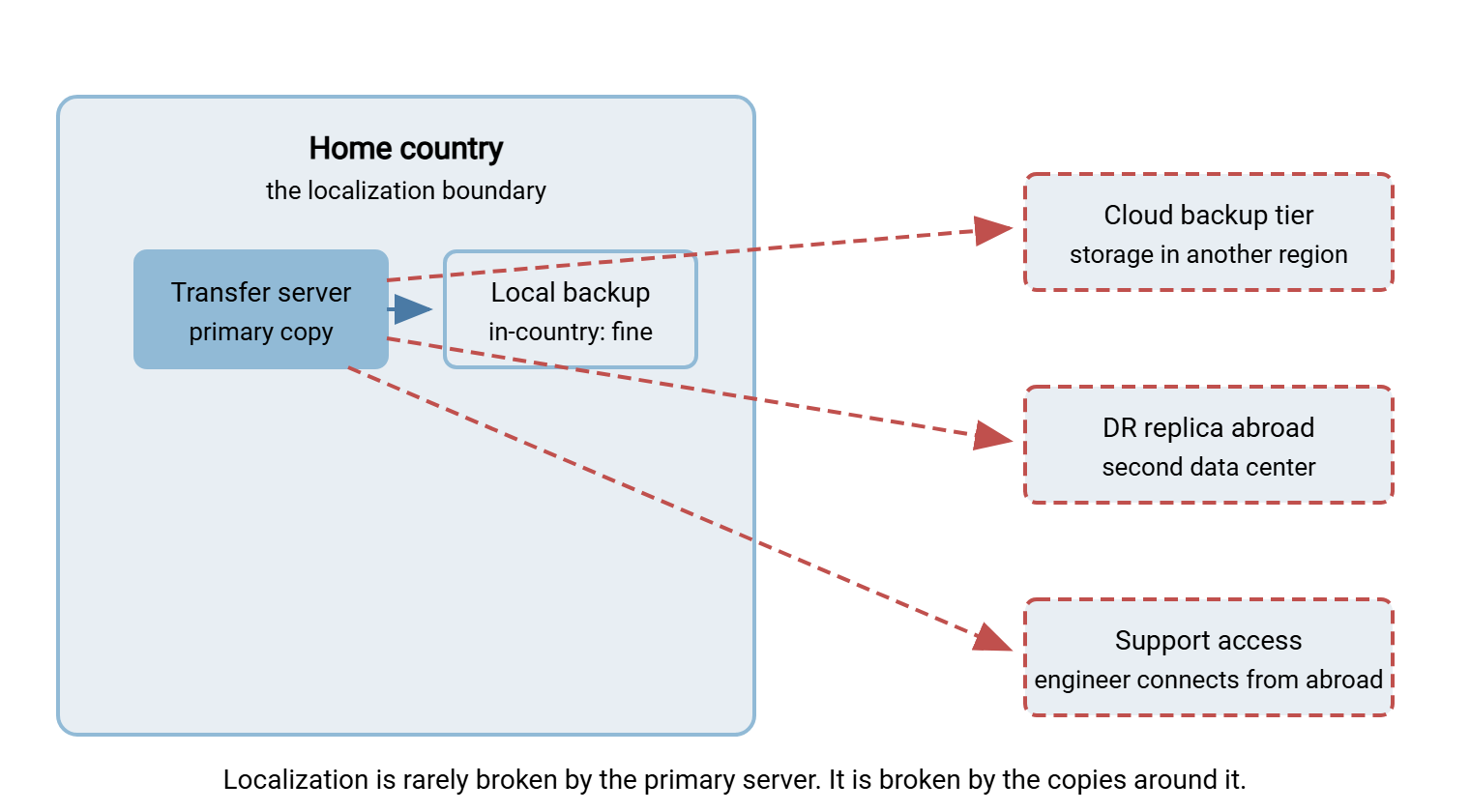
Remember: localization binds every resting place, not just the server everyone can see. The primary copy is almost never the violation — the backup tier, the DR replica, the sync client, and the support session are. Audit the machinery around the server as carefully as the server itself.
Cloud Regions and the Fine Print
Can cloud hosting satisfy a localization requirement? Often yes — providers operate in-country regions in many places precisely because these rules exist. Some offer explicit commitments that data, including its replicas and backups, stays within a chosen boundary. The honest answer is therefore not "cloud is forbidden"; it is "cloud must be verified, in writing, at the level of every copy."
Selecting an in-country region on a menu establishes where the primary copy lives. It does not automatically establish whether the service replicates to a paired region for durability, or where the provider's own backups of the service reside. It does not establish where metadata and telemetry are processed, or from which countries the provider's operations staff can reach customer data. Each of those is a resting place or an access path, and each needs the provider's documented answer — not your assumption. The question set in Where Your Transferred Data Actually Travels and Rests covers the full interrogation. For localization, insist on two additions: a written commitment that all copies remain inside the boundary, and advance notice before any of it changes.
The composite service is the last trap. Your file transfer tool may be in-country while the monitoring add-on, the notification service, or the antivirus pipeline it feeds quietly runs elsewhere. A localization review covers the chain, not the headline product. Assessing what a vendor actually does with your data is its own discipline — our Vendor Security Assessment series walks the method.
Why Self-Hosting Is Sometimes the Simplest Compliant Answer
There is a reason regulated organizations keep returning to a plain, slightly unfashionable architecture. It is a transfer server they run themselves, on hardware they control, in a building or in-country data center they chose. Localization questions that consume weeks of vendor correspondence collapse into sentences you can verify by walking down a corridor. Where is the data? On that server. Where are the replicas? There are none you did not build. Where are the backups? On the storage you pointed them at. Who can access it from abroad? Whoever you allowed, which you can enumerate. (The corridor also never updates its terms of service.)
This is the honest case for self-hosting in this pillar, and it is the design center of Sysax Multi Server. It is a Windows file transfer server you install on your own machine, so the data it holds rests exactly where that machine sits. That answers "where is the data?" in a way that is true by construction rather than by contract. The features that matter for localization are the unglamorous ones. They include SFTP, FTPS, and HTTPS so the in-country flows are still encrypted flows. They include IP allow and block rules to narrow where connections may come from, and activity logging to file and to a database. That logging becomes your standing evidence of what entered and left the server when someone asks you to prove the boundary held.
Say the tradeoff out loud, because pretending it away helps nobody: self-hosting moves the operational burden to you. Patching, hardening, monitoring, backup discipline, and availability are all yours, where a provider would otherwise carry them. Our Hardening Transfer Servers series is the companion reading. The article DR scope for transfer workflows covers the recovery half, where localized copies most often wander. For data under a stay-home rule, that trade is often worth it. That is because the thing you get in exchange — certainty of place — is the exact currency the requirement demands. For everything else, it is a genuine judgment call between two reasonable models.
Partner Endpoints: The Border in the Middle of the Flow
Localization does not end at your rack. If the data may not leave the country, then the endpoints you send it to must also be in the country. In that case, so must their backups, replicas, and support arrangements, because the requirement follows the data into your partner's infrastructure. A flawless in-country setup on your side is undone by a partner whose "local" SFTP endpoint turns out to be a regional cloud instance hosted elsewhere. A partner whose support team works from another continent can also undo it.
Bluewater Bank onboarded a document-processing partner whose SFTP endpoint looked local by every visible measure: domestic address, domestic hostname, domestic account manager. The intake form's next question — where do the endpoint's backups live? — came back as "which site?" The follow-up established that the "local" server was a relay. Files landed, waited an hour, and were forwarded to a processing platform on another continent. Nothing had been sent; the question had been asked before the first byte. The flow was paused, legal got the facts, and the contract grew a clause naming every resting place. The partner's own diagram had shown the relay as one box, which is what relays look like from the outside.
The defense is boringly procedural. Location becomes a standard onboarding question — a line on the partner intake form — asked and answered in writing before the first byte flows. Where is the receiving endpoint hosted, and where do its backups live? Who can access the data and from where, and will you be notified before any of that changes? If the answer matters legally, it belongs in the contract, alongside the security commitments. The structured way of onboarding a counterparty covered in Trading Partner Onboarding is the natural place to bolt this on. And once verified, the flow should be pinned. A scheduled job in Sysax FTP Automation transfers to the endpoint you verified — the same host, every run, with logs. That keeps it from going wherever a busy colleague pastes into a client on deadline day.
A Localization Compliance Checklist
When legal hands you a stay-home instruction for a data class, this is the audit. Work through it for every flow that touches the data; every line needs a verified in-country answer or a documented exception legal has blessed. Every line — including the two you are already planning to skip.
LOCALIZATION AUDIT — per data class, per flow
[ ] Primary server        In-country? Verified how (rack / region docs)?
[ ] Staging + archives    All folders holding the data in-country?
[ ] Backups               Backup storage location? Including any cloud
                          tier the backup product uses?
[ ] DR / replicas         Second site in-country? Storage replication
                          confined to the boundary?
[ ] Sync + downloads      Any folder sync, cloud drives, or routine
                          local downloads? Where do they land?
[ ] Partner endpoint      Host location verified in writing? Their
                          backups and support access too?
[ ] Admin access          Who administers the server, from where?
[ ] Support access        Vendor / provider staff reach? From where?
[ ] Logs + monitoring     Do log feeds or monitoring tools carry the
                          data (or its metadata) out? Legal aware?
[ ] Change notice         Will you hear before any location changes?
The two lines people skip are the last two. Logs and monitoring feeds are data flows like any other. Does metadata count as "the data" for a given rule? That is precisely the kind of thing to surface to counsel rather than decide at the keyboard. And change notice is what keeps the whole audit from silently expiring the first time a vendor migrates.
Keeping It True Over Time
A localization answer is a snapshot. The forces that invalidate it are mundane and constant. The backup product adds a cloud storage tier in an update. The partner migrates their data center to a hosting provider in another region and mentions it in a newsletter nobody reads. The monitoring vendor moves its ingestion to a new location. A new hire on another continent gets added to the admins group because that is the template. None of these announce themselves as compliance events. All of them are.
Three habits keep the snapshot current. First, re-verify on a cadence — once or twice a year, re-run the audit checklist for localized data classes. Date each answer, so "verified" always has a freshness. Second, catch changes at the source — use change-notification clauses in vendor and partner contracts. Have a standing rule that infrastructure changes touching localized flows get a geography check before rollout, not after. Third, watch the actuals — your transfer server's activity logs show which addresses actually connect and which accounts actually pull files. An unfamiliar source appearing in the log of a localized flow is exactly the early warning you want. Watching this is the operational version of the mapping discipline described in Mapping Your File Flows by Geography.
The larger lesson of this article generalizes beyond localization, and the series capstone, Designing Sovereignty-Aware Transfer Flows, builds on it. Geography is easiest to comply with when it is designed in — endpoints placed deliberately, copies enumerated, changes gated. It is hardest when it is reconstructed afterward. If localization is in your future, the cheapest time to meet it is while the architecture is still on the whiteboard.
Frequently Asked Questions
Is data localization the same thing as data residency?
Does a backup stored abroad really violate a localization rule?
Can cloud hosting ever satisfy a localization requirement?
Does someone viewing the data from abroad break localization?
What if no law applies to us but a customer contract demands localization?
Is keeping everything in-country a safe default even without a requirement?
From the Sysax team: we build secure file transfer software for Windows. Sysax Multi Server is an FTP, FTPS, SFTP, and HTTPS server. Sysax FTP Automation handles scheduled, scripted transfers. Free trials are on the download page.