
Where Your Transferred Data Actually Travels and Rests
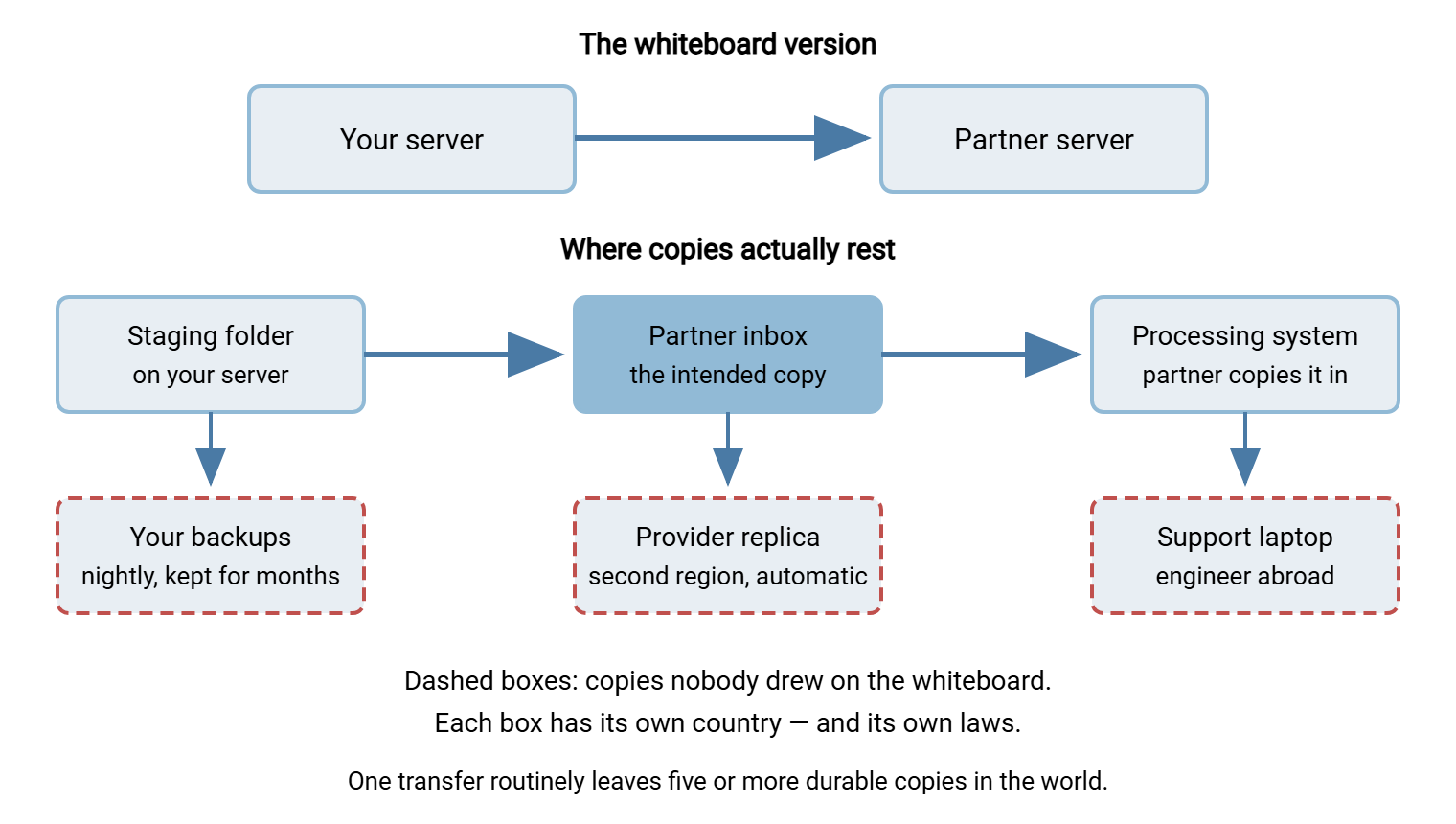
"Draw me where the payroll file goes." I have asked that of a dozen administrators and every one of them drew the same thing: two boxes and one arrow. Our server, their server. The drawing is not wrong — it is just radically incomplete. The file also sits in a staging folder before it leaves and lands in backups on both ends. A cloud provider may replicate it to a second region for durability. A support engineer on another continent can open it before the day is out. Some of those copies rest in countries that never appeared on the whiteboard. The arrow is hiding at least five of them.
This is the load-bearing article of our cross-border transfers and data sovereignty series. The previous piece, Data Sovereignty Explained, established that data answers to the laws of wherever it rests. This one answers the question that immediately follows: where, exactly, does transferred data rest? By the end you will be able to trace a file's real geography — the path it travels and every place a copy comes to rest. You will know which of those places you can actually find out about, and how. Most of them, as it turns out. Not all.
Two Different Questions: The Path and the Resting Places
Start by splitting the vague question "where does our data go?" into two precise ones, because they have different answers and different weight.
The first is about data in transit: which networks and territories do the packets cross while the transfer is running? This is the path — real, physical, and mostly outside your control.
The second is about data at rest: where do durable copies of the file end up sitting once the moving is done? These are the resting places — and there are more of them than almost anyone expects.
Of the two, resting places carry far more compliance weight. A packet crossing a territory exists there for milliseconds, encrypted if you have done your job. A resting copy can sit on a disk for years, reachable by that country's legal process and that operator's staff. When lawyers ask where data "goes," they are usually asking about resting places. When this series talks about placement and localization, resting places are what get placed. The path is not nothing, though, and it deserves an honest look before the bigger half.
The Path: Packets Do Not Respect Borders
The internet routes traffic by network relationships and cost, not by geography or courtesy. When your server in one city transfers a file to a partner in a neighboring city, the packets follow whatever chain of carrier networks currently offers a route. That chain can dogleg through an exchange point in another country entirely. Routes also change without notice: the path your traffic takes today is not a commitment about tomorrow. Unless you buy dedicated private circuits, you do not choose the path, and neither does your partner. The packets go where the peering agreements send them, and the peering agreements have never heard of your compliance policy.
The practical response is not to fight for control of routing — it is to make the path unable to read what it carries. Encryption in transit (SFTP, FTPS, HTTPS) wraps the file so that every network between the endpoints sees only ciphertext. Do that, and the path question loses most of its sting: territories along the way host your packets briefly but learn nothing from them. That is one more reason cleartext protocols have no place in cross-border flows. Our Encryption in Transit series covers how the protection works and what it does not cover. The latter, note well, includes everything in the rest of this article. Encrypting the pipe does nothing about where the decrypted file comes to rest.
Can you at least see the path? Tools like traceroute (or tracert on Windows) list the routers a packet crosses right now. Looking up their operators gives a rough geography. Treat this as a curiosity, not evidence: it shows one moment's route in one direction. I ran one once for a flow between two offices forty kilometers apart and counted nine hops. Two of them were in a country neither office was in; the whiteboard had shown one arrow. If a flow genuinely requires a guaranteed path — a rare, lawyer-driven requirement — the answer is contractual. It requires private connectivity with a carrier who commits to it, not a traceroute printout.
One Transfer, Many Resting Places
The bigger half of the story is the resting places. Follow one file — say, a payroll export headed to an external processor — through an ordinary, well-run transfer flow, and count the durable copies it leaves behind. The diagram shows the whiteboard version on top and the truthful version underneath.
Walk the inventory deliberately, because each entry is a place your data rests with a geography of its own:
- Staging and outbox folders. The export lands on your transfer server before the job picks it up, and often stays after — "just in case." Weeks of sent files accumulate here.
- The destination server. The intended copy, in the partner's inbox folder. How long it lingers there after processing is the partner's habit, not yours.
- Downstream copies at the partner. The file gets imported, copied to the processing system, perhaps forwarded to a subcontractor. Your visibility usually ends at their front door.
- Backups on both ends. Every nightly backup that includes the transfer directories captures the files of that day. It keeps them for the backup retention period, which is often months or years. A file "deleted after processing" lives on in every backup taken while it existed.
- Replicas. If either end hosts on infrastructure with automatic replication, the file exists there too. That could mean a second data center, a mirrored volume, or a provider's durability copies. The copy is created by machinery rather than by anyone's decision.
- Archives and logs. Some flows archive everything sent; some logging captures file contents in debug modes. Both are resting places.
- Endpoint devices. Every laptop that downloads the file to "take a quick look" becomes a resting place that travels through airports.
Where transferred files pile up over time, and how to purge them on schedule, is its own discipline — our Retention and Deletion of Transferred Data series covers it. Here the point is narrower: every one of those copies has a location, and the location may not be the one on the whiteboard.
Remember: a transfer is never one copy in one place. It is a family of copies — staging, destination, backups, replicas, downloads — each with its own country, its own retention, and its own answer to "whose laws apply?" Any geography exercise that counts only the two endpoints is fiction.
Cloud Regions and the Copies You Did Not Make
Cloud and SaaS hosting add a layer of resting places created by the provider's machinery and visible only in the provider's documentation, which is thorough, accurate, and unread.
A region is a provider's named geographic area — a cluster of data centers in one part of one country, or spread across a small area. Choosing a region is a genuine residency decision: it fixes where the primary copy of your data lives. The catch is what else happens around that primary copy:
- Durability replication. Storage services keep multiple copies of everything so a failed disk loses nothing. Some replication stays inside the region; some products replicate to a second region by default — which may sit in another country. The default is whatever the provider chose, not whatever you assumed.
- Backups of the service itself. The provider's own backup and disaster-recovery arrangements may store copies somewhere other than your chosen region.
- Metadata and telemetry. File names, sizes, account details, and access logs are often processed centrally, in the provider's home jurisdiction, even when file contents stay put. Whether metadata matters for your data classes is a legal question — but you should know it moves.
- Content delivery caches. If anything you host is served through a content delivery network, requested files are, by design, copied to edge nodes in whatever countries the readers are in. A CDN is the web of edge servers that hold copies of content close to whoever reads it. That is the entire product. CDNs are wonderful for public downloads and quietly wrong for anything with residency promises attached.
- Support access. The provider's support and operations staff can typically reach customer data under controlled procedures, and those staff follow the sun around the planet. More on people in a moment.
None of this makes cloud hosting unusable for sovereignty-sensitive data. Providers publish region documentation precisely because these questions get asked. Many offer commitments that confine data — sometimes including support access — to a chosen area. The rule is simply: a region selection is the beginning of the answer, not the end of it. What confines the replicas, the backups, the metadata, and the staff is the provider's documented commitment, which someone must actually read.
Northgate Retail chose an in-country region for its transfer server's storage and wrote "in-country" on the geography map with a clear conscience. At the map's first annual re-verification, the administrator read the storage product's documentation properly. They found that the volume had been replicating to a paired region in another country since the day it was created — the default nobody had unticked. Nothing had been exposed; the replica was as locked down as the original, just in the wrong place. Fixing it took a support ticket and a re-provisioned volume. Deciding whether the recovery plan had ever needed that replica took a meeting, of the kind DR scope for transfer workflows exists to shorten. The map now records which page each answer came from.
People Are a Location Too
The most commonly forgotten geography is human: who can open the file, and where are they sitting? Every resting place discussed so far has been a machine, and machines are the easy half.
Picture the ordinary support case. A user uploads a failing document to a ticket. The engineer on rotation this week works from an office nine time zones away. They download the attachment, reproduce the problem, fix it, and close the ticket. Helpful, fast — and a copy of the file now rests on a laptop in another country. That is because "opening a file from over there" and "sending the file over there" are the same event as far as the bytes are concerned. Many organizations' lawyers treat remote access exactly that way. In that view, if staff in a country can read the data, the data effectively goes to that country.
The same logic reaches administrators connecting to the transfer server from abroad, and an outsourced monitoring team with file system access. It reaches the vendor support engineer you invite into a screen-share. For each system that holds transferred files, ask the honest question set. Which humans have credentials, which countries do they work from, and does anything technical hold that line?
Technical constraints do exist. Access controls that grant file access only to named accounts that need it are the first line (our File Server Permissions series is about exactly this). Network-level restriction is the second. On a self-hosted endpoint such as Sysax Multi Server, IP allow and block rules let you restrict which addresses may connect at all. Network-level restriction is a blunt instrument, since addresses are not passports, but a real reduction in who-can-reach-it. The endpoint's activity logging, written to file and database, records where connections actually came from. That is the evidence side of the same question.
Finding Out: The Methods That Actually Work
Knowing the categories is one thing; establishing the facts for your own flows is the practical job. Four methods, in order of reliability.
Read your own configuration. Your transfer server's user folders, your scheduled jobs, your backup targets — these are facts you can verify directly. A scheduled-transfer tool is self-documenting here. The job list in Sysax FTP Automation is literally an inventory of every scripted flow's source and destination. That makes it a head start on the mapping exercise in Mapping Your File Flows by Geography.
Read the vendor's paperwork. For every provider and partner that holds transferred data, the location answers live in contracts, data-processing terms, and hosting documentation. If the paperwork is silent, ask — in writing, and again after their next migration. A question set worth copying into every vendor conversation:
WHERE-DOES-IT-REST — questions for any vendor or partner
1. In which country/region is the primary copy of our data stored?
2. Is it replicated elsewhere (durability, DR)? Where?
3. Where are backups stored, and how long are they kept?
4. Can your support/operations staff access our data?
   From which countries?
5. Do any subcontractors or sub-processors hold or access it?
   Where are they?
6. Will you notify us before any of these locations change?
Question six is the one that keeps the answers true over time; a location answer without a change-notification promise has a shelf life of one migration.
Ask the flow owners. The people who requested each flow know things configs do not show — especially what the partner does with the file after receipt, and whether anyone downloads copies routinely.
Check the logs. Transfer logs show what actually happened: which hosts connected, what was uploaded and downloaded, by which accounts. Logs will not tell you where a partner's backup lives, but they are unbeatable at catching flows nobody mentioned — the forgotten weekly pull from an address nobody recognizes. Discovering what leaves your network in the first place overlaps with data-loss-prevention practice; What Data Leaves Your Network walks that discovery.
Shrinking the Sprawl
You cannot reduce the world's copy-making to zero, but you can shrink it meaningfully, and every copy that never exists is a geography question you never have to answer.
- Keep fewer copies yourself. Purge staging and outbox folders on a schedule instead of "eventually." Exclude transfer directories from backups that do not need them, or shorten their retention where policy allows.
- Encrypt the file itself, not just the pipe. File-level encryption — OpenPGP is the standard tool — travels with the file. So the backup copy, the replica, and the forgotten download are all ciphertext without the key. File-level encryption converts "where are all the copies?" from an emergency into a manageable question. See How PGP File Encryption Works. Scheduled jobs can apply it automatically, since Sysax FTP Automation includes OpenPGP encryption and decryption as a job step.
- Prefer endpoints whose geography you control. A self-hosted server in your own building is a resting place you can point to. The fewer third-party resting places a flow involves, the shorter its geography inventory.
- Send less data in the first place. A file that contains only the columns the recipient needs makes every downstream copy less sensitive. That discipline — minimization — belongs to our Personal Data in File Flows series.
The Map Is Bigger Than the Arrow
The whiteboard arrow from your server to the partner's is real, but it is one line of a longer inventory. That inventory includes the path the packets take (encrypt it and stop worrying), the staging copy, and the destination copy. It includes the backups on both ends and the replicas a provider makes for durability. It includes the caches that serve content near its readers, and the humans who can open the file from wherever they sit. Each entry has a country. Sovereignty attaches to every one of them, not just to the two boxes someone drew — and the arrow between the boxes was never one line either.
None of this is cause for paralysis — it is cause for a list. The next article, Mapping Your File Flows by Geography, turns this article's categories into a worked inventory you can hand to your legal team. The article Designing Sovereignty-Aware Transfer Flows shows how to place endpoints so the list stays short and boring. That is the goal, after all: a geography inventory with no surprises on it.
Frequently Asked Questions
Does the route a transfer takes across the internet matter for compliance?
Do backups really count as data being in another place?
Our provider says our data is stored in a specific region. Is that the full answer?
Is a support engineer abroad viewing a file the same as transferring it there?
How do I find out where a SaaS vendor actually keeps our files?
If we delete a file after the transfer, is the geography question over?
From the Sysax team: we build secure file transfer software for Windows. Sysax Multi Server is an FTP, FTPS, SFTP, and HTTPS server. Sysax FTP Automation handles scheduled, scripted transfers. Free trials are on the download page.