
Mapping Your File Flows by Geography
"Which of our data leaves the country?" It is one line, from counsel preparing transfer paperwork, from an auditor, from a customer's security review. In most organizations it lands on the file transfer administrator, because nobody else is closer to the answer. In most organizations, the honest first response is silence. Not because the flows are secret, but because nobody has ever written them down with a column for where. I have sat in that silence. It lasts about four seconds and feels considerably longer.
This article is the exercise that ends the silence. In an afternoon for a small estate, a week or two for a sprawling one, you will build a geographic flow map. It records every recurring file flow, every endpoint tagged with a place, and every border crossing flagged. Every answer is marked with how you know it — the part that separates a real map from a reassuring one. This article is the working heart of our Cross-Border Transfers and Data Sovereignty series. The earlier articles explain why geography matters; this one produces the document everything else consumes.
Why This Map Is Worth an Afternoon
Every mechanism in this pillar runs on the same fuel. When lawyers assess whether a flow may cross a border, they need to know the flow exists and where it goes. When a regulator's finding about some destination changes, the first question is "what do we send there?" When a localization instruction arrives, the audit starts from the list of flows touching that data. When an incident hits a partner, someone asks what we ever sent them. One document answers all of it — or its absence turns each of those moments into an archaeology dig through server configs and old email.
The map also enforces the division of labor this series keeps returning to. Deciding what a border crossing legally requires is counsel's job and stays that way. Establishing the facts — what flows, from where, to where, verified how — is yours, and no law degree helps with it. The map is the handoff document between the two professions: you fill in the facts, legal writes judgments against them. Keep the roles straight and the exercise stays pleasantly unphilosophical: you are just writing down what your infrastructure does.
Scope it before you start, or it will scope itself into a swamp. A flow, for this exercise, is any recurring movement of files between two systems or parties. Examples are scheduled jobs, standing partner exchanges, automatic backups and replication, and continuous log shipping. They include the routine manual uploads a human performs every week. One-off transfers do not get rows; categories of one-offs do (support attachments as a class, not ticket by ticket). And the map records movements of data, not network connections. The monitoring agent's heartbeat is not a flow, but the log bundle it uploads is. Expect between a dozen and a few dozen rows for a mid-sized organization. If you are heading past a hundred, you are itemizing one-offs and should climb back up a level.
Step One: Start From a Flow Inventory
A geographic map is a flow inventory with location columns, so the first step is the inventory itself. If your organization has already done the census described in A File Flow Census, or maintains a transfer inventory, you are ahead. In that case, take that document and add the columns from this article. If not, build the minimal version now from four sources, in order of reliability:
- Scheduled jobs. Automation is self-documenting. Every job in your scheduler names a source, a destination, and a cadence. A tool like Sysax FTP Automation hands you its job list as a ready-made inventory of every scripted flow it runs. Start here; it is the highest-quality data you will get.
- Server configuration. The accounts and folders on your transfer server imply flows: every partner account exists because something is sent or fetched. An account nobody can explain is a flow nobody remembered — investigate, don't skip.
- Transfer logs. Logs show what actually happens, including the weekly pull from an address no document mentions. A month of logs reviewed against the draft inventory catches most of what the first two sources missed.
- The humans. Ask each department what they send and receive regularly, and with whom. This is where the manual flows surface — the monthly upload someone does by hand, the portal a team drags files into.
For each flow, record the basics before geography enters: a name, the business owner, what data it carries, the endpoints, the direction, and the schedule. Then comes the column this article adds.
Step Two: Tag Every Endpoint With a Place
For every endpoint in the inventory — yours and theirs — answer two questions: which country (or region) is it in, and how do you know? The second question is what keeps the map honest, because location answers arrive with wildly different quality:
- Verified by possession. The server is in your rack, in your building. You can touch it. Highest grade.
- Verified in writing. A provider's region documentation, a contract clause, a partner's written answer to a direct question. Solid, and datable — record where the statement lives.
- Inferred. An IP geolocation lookup, a domain name ending, the partner's mailing address. These are hints. Hosting moves; domains mislead; headquarters and data centers are different things. Useful for a first pass, never for a final answer.
- Assumed. "They're a local company, it must be local." Record it as an assumption — in its own honest words — and put it on the follow-up list.
Remember: a guess recorded as a guess is useful — it shows you where to ask questions. A guess recorded as a fact is dangerous, because legal decisions get built on it. The "how we know" column is not bureaucratic decoration; it is the difference between a map and a rumor.
Getting the written answers is usually one email per partner or vendor. Ask where the endpoint is hosted and where backups and replicas live. Can staff outside that country access the data, and will you tell us before any of it changes? (That question set is developed fully in Where Your Transferred Data Actually Travels and Rests.) Partners handling regulated data answer these routinely; a partner who cannot answer at all has just added themselves to your risk register.
Do not forget that half the endpoints are yours. Your own transfer server, the DR site, the archive volume, the virtual machine a hosting provider runs for you — each needs the same tagging. "Ours" is not a location. Teams are routinely surprised by their own infrastructure. There is the "local" web server that turned out to be a rented machine abroad. There is the file server inherited from an acquisition that never moved from the old country. Tag your side first; it is the half you can verify fastest.
Kestrel Payroll tagged its own side first and found that the archive volume everyone called "the basement" was a rented virtual machine on another continent. It had been provisioned during an office move by someone who had since left, and never brought home. Nobody outside Kestrel had ever had access to it. Once legal had been told what it held, it was migrated home over a weekend. It had been called "the basement" for four years, which is a long time to be wrong about a basement.
Step Three: Add the Hidden Resting Places
Endpoints are where flows point; they are not everywhere the data rests. For each flow — proportionately, with the most care for the most sensitive data — add the satellite locations. Record where your backups of the relevant folders go and whether either end replicates storage elsewhere. Record from which countries people (including support staff) can access the data. Sensitivity is mostly a function of data class. Flows carrying personal data deserve the full treatment (recognizing it is covered in our Personal Data in File Flows series). So do flows carrying health or financial data, and anything under contract-imposed location promises. The public product catalog does not need its backup geography documented — spend the effort where the stakes are.
The Worked Example
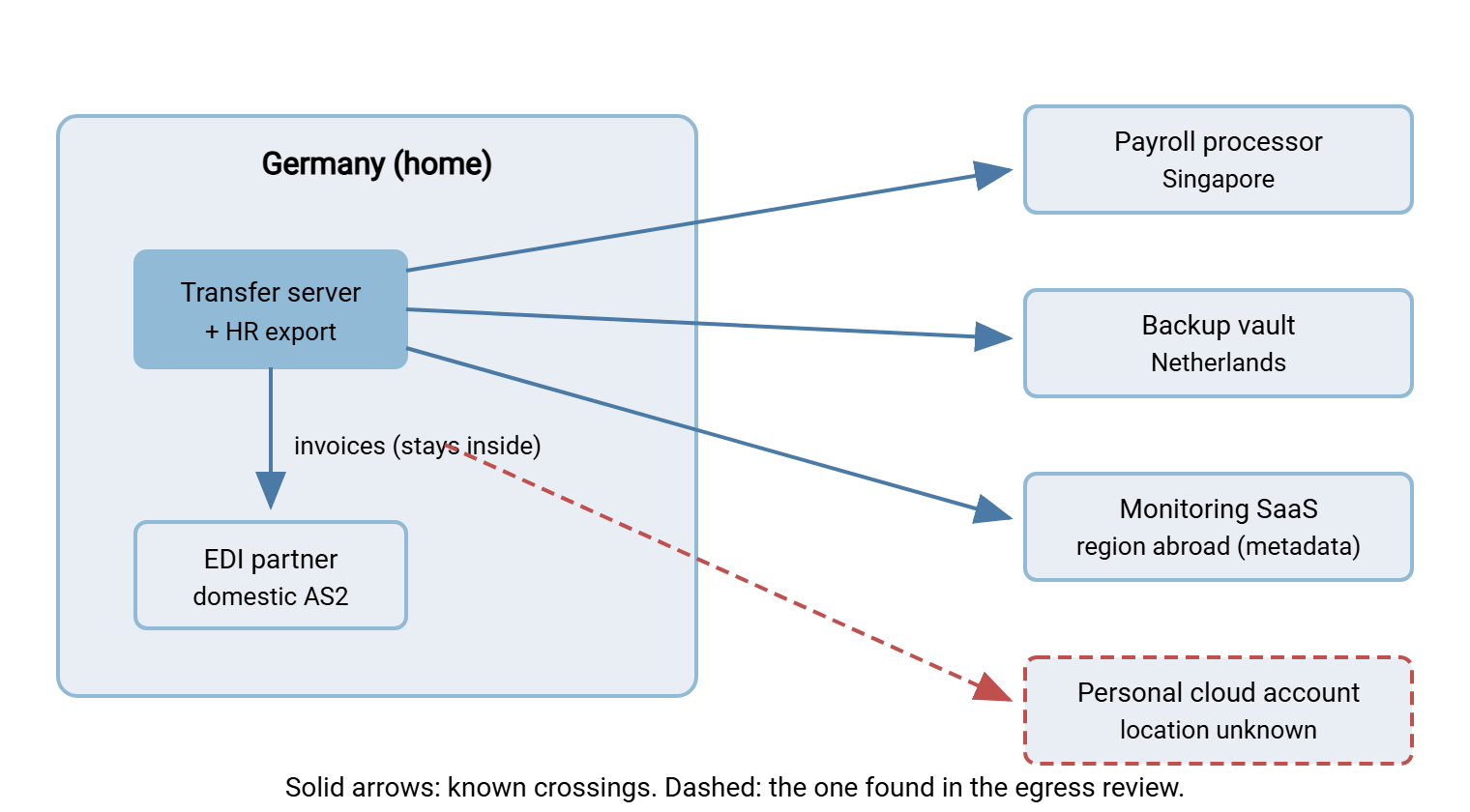
The finished product, for a fictional mid-sized manufacturer headquartered in Germany, looks like this. Seven flows, drawn from exactly the sources above — including the two kinds of entry that make these maps valuable: the flagged unknown and the discovered surprise.
| Flow | From → To | Data | Crosses border? | How we know |
|---|---|---|---|---|
| Payroll feed (nightly) | HR export, Germany → processor SFTP, Singapore | Employee personal + bank data | Yes | Processor's written answer; in contract |
| Invoice EDI (daily) | Transfer server, Germany → partner AS2, Germany | Invoices, contact names | No — partner DR site unconfirmed | Partner email; DR question pending |
| Server backup (nightly) | Transfer server, Germany → backup vault, Netherlands | Everything, incl. staged files | Yes | Provider region documentation |
| Log shipping (continuous) | Transfer server, Germany → monitoring SaaS, region abroad | Log metadata: names, paths, accounts | Yes — metadata only | Vendor docs; flagged to legal |
| Catalog publish (weekly) | Web server → CDN edge caches, worldwide | Public product data | Yes — by design | CDN's published model; public data |
| Support inbox (ad hoc) | Customers, worldwide → support server, Germany | Mixed customer files | Yes — inbound | Server logs; upload portal config |
| Marketing folder sync | Shared folder → personal cloud account, location unknown | Customer contact list | Unknown | Found in egress review; escalated |
Read the last column top to bottom and notice the range: contract, pending question, provider docs, a flag to legal, a design fact, logs, and one escalation. That is what an honest map looks like — mostly solid, explicitly provisional in two places, and carrying one genuine discovery.
Three rows repay a closer look. The invoice EDI flow is domestic — and still earned a footnote, because the partner's disaster-recovery site is unconfirmed, and a DR failover would silently relocate the destination. "No, unless" is a perfectly good answer as long as the unless is written down. The log-shipping row records something teams routinely miss: metadata is a flow too. File names, paths, and account names can be revealing cargo even when file contents stay home. Whether that matters for a given rule is exactly the kind of call that gets flagged to legal rather than made at the keyboard. And the catalog row shows the opposite lesson: a flow can cross every border on the planet and be fine, because the data is public by intent. The map's job is to make each of those situations visible, not to condemn crossings as such.
The same map drawn as a picture makes the crossings jump out:
If you want the spreadsheet version of the template, it is seven columns; copy this header row and start filling:
Flow | Owner | Data class | From (place) | To (place) |
Crosses border? (Yes / No / Unknown) | How we know (+ date verified)
Flag the Crossings and Hand Over the Output
With the table filled, the analysis takes minutes. Filter to the rows where "crosses border" is Yes or Unknown. Sort by data class with personal and regulated data on top, and you are holding the deliverable. It is a one-page list of border-crossing flows, what each carries, and how solid each location answer is. That page goes to legal. What comes back drives your work. Legal tells you which crossings are fine and which need a mechanism such as the contract-based safeguards described in Cross-Border Transfer Restrictions in Plain Words. They tell you which must be re-architected. That division is exactly right: the map never decides anything, and the deciders never guess at facts.
Resist the urge to editorialize the map before handing it over. The catalog flow to the CDN crosses dozens of borders and is almost certainly fine. The metadata trickle to the monitoring vendor looks trivial and may not be. Ranking risk across those is precisely the judgment you are not equipped to make alone. Deliver the facts whole, with your flags, and let the professionals be professionals. I editorialized a map exactly once; the row I had marked "trivial" was the one legal wanted to talk about.
Catching the Surprises
Row seven of the worked example — the personal cloud sync — did not come from any inventory. It came from looking at what actually leaves the network, and every real mapping exercise turns up at least one of its kind. The usual suspects include sync clients on office machines pointed at personal accounts and standing email forwards of reports to external addresses. They include an old scheduled task on a decommissioned-in-theory server, and a vendor's support tool that phones home with more than diagnostics. They include files walking out through ticket attachments. None of these appear in server configs, because none of them were ever supposed to exist.
You find them from two directions. From the network, use an egress review of what connects out through the firewall. That is data-loss-prevention thinking even without a DLP product. The article What Data Leaves Your Network walks the technique. From the server: your transfer server's own activity logs, reviewed for connections that match no documented flow. This is where logging quality pays off. Sysax Multi Server writes activity logs to file and to a database, and the database form matters here. That is because "list all distinct client addresses and accounts from the last quarter, with counts" is a query, not an afternoon of scrolling. Every address on that list either matches a row of your map or starts a conversation.
When a surprise surfaces, handle the person and the flow separately. The flow gets a row, honest columns, and an escalation if the data warrants it. The person almost always turns out to have been solving a real problem with the tool at hand. That means the durable fix is an approved alternative that works, not a reprimand. That is transfer-policy territory rather than mapping territory. Our File Transfer Policy series covers how organizations make the sanctioned path the easy one. The article discovering shadow sharing without a witch hunt covers the conversation itself. The map's role ends at making the invisible visible.
Keeping the Map Alive
A geographic map begins decaying the day it is finished, and it does not tell you. Vendors migrate, partners re-platform, teams adopt tools. Three habits keep it trustworthy without turning maintenance into a job:
- Re-verify on a cadence. Once or twice a year, walk the table. Re-confirm the shaky entries, re-date the solid ones, and re-run the egress and log review for new unknowns. An entry verified long ago is an assumption wearing a badge.
- Update on trigger events. Triggers include a new partner onboarded, a vendor announcing a migration, a backup product changing, or a department adopting a new service. Each one is a row added or a cell changed, in the moment, while the knowledge is fresh.
- Give it an owner and a home. One named person owns the document; it lives next to the flow inventory, not in someone's mailbox. If your change process has a checklist, "does this change where any data rests?" earns a line on it.
Do that, and the next one-line question from legal — and there will be a next one — gets a same-day answer with dates in the margin. That is the whole return on investment, and in a compliance context it is enormous. The four seconds of silence become a lookup.
From Map to Design
The map is the reactive half of geographic discipline: it tells you what is true today, verified and flagged. The proactive half is making tomorrow's truth deliberate. That means choosing endpoint locations on purpose, keeping regulated data inside approved regions, and putting flows on rails so the map stops changing underneath you. That is the closing article of this series, Designing Sovereignty-Aware Transfer Flows. And if this article's copy-counting felt abrupt, the fuller story of resting places is in Where Your Transferred Data Actually Travels and Rests. Read it before your first mapping pass, and the hidden-locations step will feel routine.
Frequently Asked Questions
How detailed does the geographic map need to be?
What if a partner will not tell us where their servers are?
Do inbound flows belong on the map, or only outbound?
Should flows with no personal data still be mapped?
Is an IP geolocation lookup good enough to verify an endpoint's country?
How often should the map be refreshed?
From the Sysax team: we build secure file transfer software for Windows. Sysax Multi Server is an FTP, FTPS, SFTP, and HTTPS server. Sysax FTP Automation handles scheduled, scripted transfers. Free trials are on the download page.