
Designing Sovereignty-Aware Transfer Flows
The map is finished, every row is dated, and it is already wrong about tomorrow. Everything earlier in this series has been about seeing clearly. The series has covered what sovereignty means, where transferred data really rests, how the rules are shaped, and how to map your flows by geography. Seeing clearly is necessary, and reactive. The map tells you what your infrastructure already does; it cannot make tomorrow's infrastructure do the right thing. That takes design. Choose where endpoints live before flows exist, and separate data classes before they mingle. Put transfers on rails so the compliant path is also the path of least resistance.
This is the capstone of our Cross-Border Transfers and Data Sovereignty series, and the most practical article in it. It covers five design principles and a checklist to run before any endpoint is created or moved. It provides a template for recording placement decisions, and the habits that keep a clean design clean when partners quietly move their infrastructure. If you arrived here first, the design will make more sense after Where Your Transferred Data Actually Travels and Rests. The whole approach exists because endpoints are never the whole story. (They are, at best, the first two rows.)
Design Starts With the Placement Rules
Sovereignty-aware design has one prerequisite, and it does not come from the server room. You need placement rules: statements from your legal or compliance function. For each class of data, they say where it may rest and under what conditions it may cross a border. The determinations behind those rules — which regimes apply, which mechanisms are available, what the contracts require — are legal work, as this series has said throughout. But the rules themselves must arrive in infrastructure language, or you cannot build from them. A usable set looks like this:
- Class: employee and payroll data. May rest only on servers in the home country. Transfers to the payroll processor abroad are approved under contract-based safeguards — that flow only, that endpoint only.
- Class: customer personal data. May rest anywhere inside the trusted zone our lawyers have defined. Exits require their sign-off per destination.
- Class: product and public data. No placement restriction. Ordinary security still applies.
If what you have instead is "be careful with sensitive data," push back — politely, in writing — for rules of the shape above. Offer the draft yourself if it helps: name your actual data classes, propose where each currently rests, and ask legal to correct it. Turning vague caution into named classes with named places is the single most useful meeting this whole subject will ever generate. Your geographic flow map from Mapping Your File Flows by Geography is the agenda for it.
Principle One: Put Endpoints Where the Data Must Live
The strongest sovereignty control available to an administrator is embarrassingly simple: the endpoint's location. Every downstream question — whose laws apply, which crossings occur, what the map looks like — flows from where the servers physically are. So place them deliberately. I have inherited estates where the answer to "why is the server there?" was "that rack had space," which does not survive a legal review.
For data that must stay in a place, the direct answer is a server in that place. Self-hosting makes the answer verifiable by construction: Sysax Multi Server runs on your own Windows server. So when the placement rule says "home country only," you rack the machine in the home country. The rule is satisfied by geography rather than by paperwork. Hosted alternatives can work too — an in-country region with written commitments covering replicas, backups, and support access. But then the verification burden the earlier articles described comes with it. Either way, the placement is a decision someone makes on purpose, recorded with its reason. It is not an accident of which hosting was convenient the week the project started.
The same principle reaches the far side of every flow. A partner endpoint is a placement decision you are accepting rather than making. Verify its country in writing during onboarding — the structured checklist in Trading Partner Onboarding is the natural home for the question. Treat "we'd rather not say" as the risk signal it is.
Principle Two: Separate Flows by Data Class, Not Convenience
The second principle is about what shares a pipe. Left alone, transfer estates drift toward convenience: one folder where everything lands, one account every partner uses, one nightly job that moves "the exports." The drift is understandable and, for sovereignty, quietly expensive. That is because when regulated and unregulated data travel mixed, the strictest rule in the mixture governs the whole flow. The payroll rows hiding in a general export make the entire export payroll-grade. The one restricted file in a shared folder makes the folder restricted.
Design the separation in from the start:
- Separate folders per data class and per partner, so "what rests here?" has a one-line answer. That lets a placement rule be applied to a directory instead of to a forensic investigation.
- Separate accounts per flow, so access, logging, and revocation align with one relationship each — the least-privilege layout our File Server Permissions series builds.
- Separate jobs per class, so the restricted flow can change endpoint, schedule, or safeguards without touching anything else.
- Send less in the first place. A feed pruned to the columns the recipient needs may drop out of a restricted class entirely — minimization is a placement tool as much as a privacy one.
Separation also shrinks blast radius: when a partner is breached or a rule changes, the affected surface is one folder, one account, one job — enumerable in minutes.
Acme ran one nightly job named "exports" that moved everything the ERP produced to a logistics partner abroad. When legal's first placement rules restricted the payroll class to the home country, the administrator went looking for where payroll rested. They found it "in the exports," because an HR extract had been bolted onto the job years earlier to save a second schedule. The flow was paused the same day and legal was told. Splitting one job into three, with three accounts, three folders, and a partner who needed the change explained, took the rest of the week. The job had been called "exports" for so long that nobody could say what it exported without opening it. That is how a placement rule finds most estates.
Principle Three: Regional Hubs and Exchange Points
Once an organization operates in more than one regulated region, ad hoc point-to-point flows stop scaling. Every new connection is a fresh border analysis, and the map grows quadratically. The architecture that tames this is the regional hub: each region runs its own transfer server, close to its own systems and inside its own boundary. Flows within a region terminate at the regional hub and never leave. Between regions, there is exactly one sanctioned path — hub to hub. Only the data classes approved for export travel it, under whatever mechanism legal put in place.
The diagram shows the shape for two regions. Everything about it generalizes: more regions mean more hubs and the same single-inter-hub-link discipline between each approved pair.
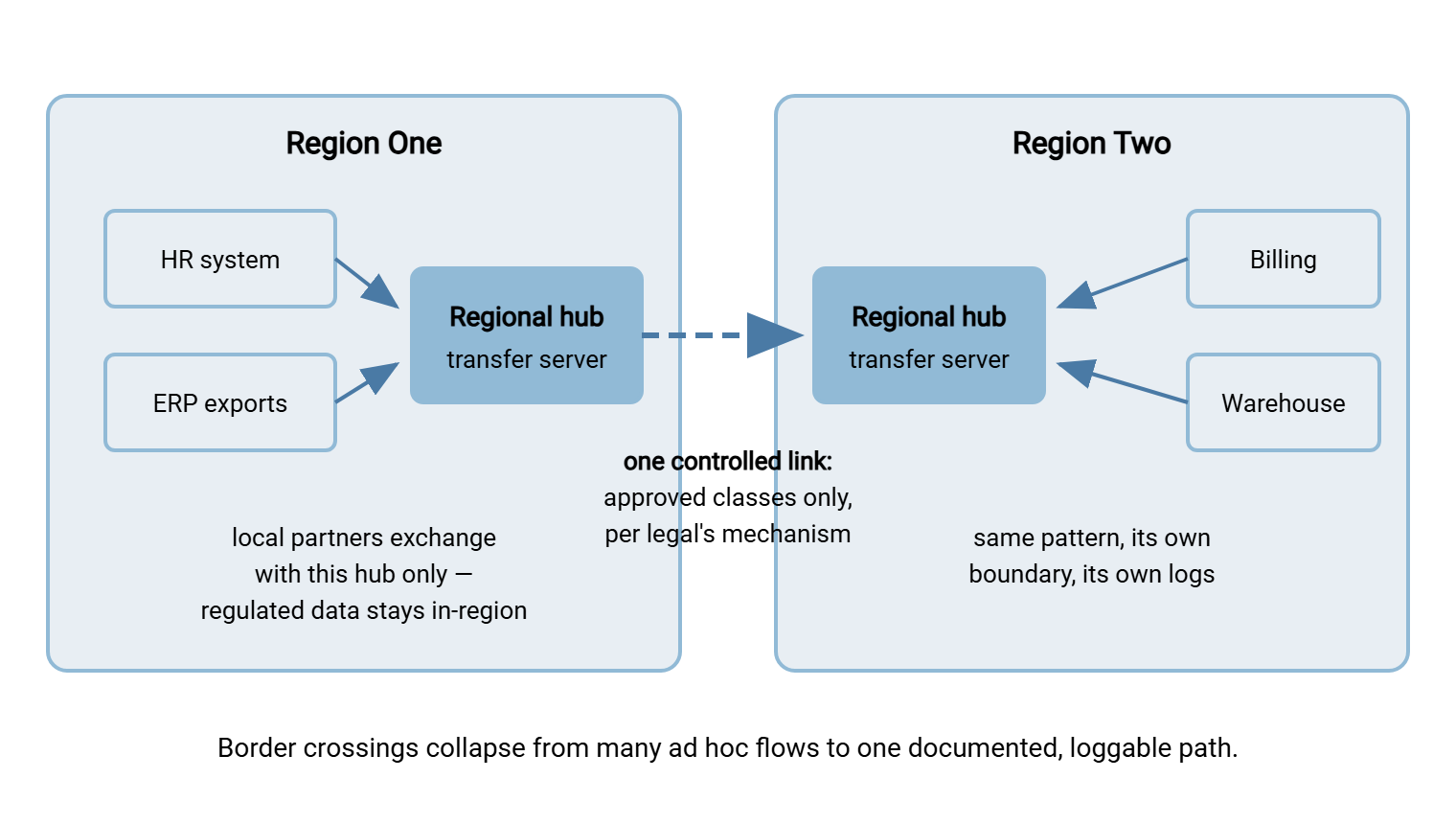
The payoff is concentration. Instead of auditing dozens of point-to-point crossings, you audit one inter-hub link: what classes traverse it, under what safeguards, with what logging. New in-region flows stop being border events at all. And each hub is a natural enforcement point — the place where authentication, encryption policy, and logging are guaranteed. That is the same logic that puts transfer servers in a DMZ for network security. Our DMZ Gateway Architecture series describes that placement. The two patterns compose cleanly: a regional hub is often a DMZ gateway with a jurisdiction attached.
Principle Four: Make the Approved Path the Easy Path
A design only holds if people stay on it, and people stay on paths that are easier than the alternatives. That is the whole argument of making the secure path the easy path. Three mechanisms do most of the work:
- Automation instead of improvisation. Every recurring flow becomes a scheduled job with its endpoint fixed in configuration. In Sysax FTP Automation, the job carries the destination, the protocol, the schedule, and retry handling. So the transfer at two in the morning goes exactly where the design says, every time, with no tired human choosing a destination. When a job fails, retries and error handling keep the fix inside the approved flow rather than prompting a desperate email attachment.
- Structure instead of memory. With folder conventions that mirror the design, using the system correctly requires no tribal knowledge. That means a drop folder per destination class, named by what it is for. If putting a file in
outbound-payrollis the whole procedure, nobody invents their own. - Constraints instead of trust. The hub itself enforces the edges: accounts scoped to their folders, and IP allow and block rules on the server. Those rules mean connections are accepted only from the sources the design expects. The two controls are ordinary settings on Sysax Multi Server. Addresses are not passports, but narrowing who can connect at all removes most accidental and casual bypasses. For the data itself, file-level encryption adds a safeguard that travels with every copy. OpenPGP encryption applied as a job step means even a copy that ends up somewhere unplanned is ciphertext.
Remember: people bypass designs that make their job harder, and they do it for sympathetic reasons on deadline days. Every bypass is an unmapped flow with unknown geography. The design goal is not "forbid the wrong path" — it is "make the right path so easy that the wrong one never tempts."
Principle Five: Write the Placement Decision Down
Every endpoint placed and every flow approved embodies a decision — and undocumented decisions evaporate. The admin who placed the server leaves; the reason the payroll flow goes to that address and no other leaves with them. A placement record is the one-paragraph artifact that prevents this. Keep one per flow, next to your geographic map:
PLACEMENT RECORD — one per flow
Flow:          payroll feed to processor
Data class:    employee payroll (personal data)
Endpoints:     hub-home (our DC, home country) -> processor SFTP
               (Singapore; confirmed in writing, on file)
Basis:         approved by legal under contract safeguards,
               agreement ref on file
Controls:      SFTP only; dedicated account; folder-scoped;
               activity logging retained per policy
Verified:      endpoint location re-confirmed (date)
Owner:         (name / role)
Next review:   (date, at most a year out)
The record is what turns questions into lookups. An auditor asks why data flows to that country: read the basis line. Legal reports that the safeguard template changed: filter records by basis. A migration is announced: the record names the owner who must re-verify. The same habit of evidence-mindedness runs through audit-ready reporting — the placement record is simply its sovereignty-shaped instance.
Two housekeeping details make the records durable. Keep them where the team works — the wiki page or repository that holds the flow inventory. Never keep them in one person's mailbox, and never only in a ticket that will be archived. And when a review re-confirms or changes an answer, add the new dated entry rather than overwriting the old one. The trail of past verifications is itself evidence. That is because the question behind most audit questions is not "where is it?" but "how long have you actually known?" A record with three dated re-verifications answers that without a meeting.
Before You Place an Endpoint: The Checklist
The five principles compress into a checklist to run whenever an endpoint is created, moved, or repointed — your side or a partner's. It takes ten minutes when the answers exist and productively exposes the gap when they do not:
ENDPOINT PLACEMENT CHECKLIST
[ ] Data classes    What will rest here, exactly? Any personal
                    or regulated data in the mix?
[ ] Placement rule  Which rule from legal covers each class —
                    and does this location satisfy it?
[ ] Location proof  Country verified how? (own rack / provider
                    docs / partner's written answer, dated)
[ ] Copies          Backups, replicas, DR for this endpoint —
                    all inside the same boundary?
[ ] Access          Which accounts, which admins, which support
                    staff — from which countries?
[ ] Separation      Own folder + own account per class/partner,
                    or is this mixing flows?
[ ] Rails           Scheduled job defined? Source restrictions
                    (IP allow/block) set? Encryption in transit —
                    and file-level where warranted?
[ ] Logging         Activity logging on, retained, reviewable?
[ ] Record + map    Placement record written; geographic flow
                    map updated; owner and review date named?
Print it, wiki it, or fold it into your change tickets — the format matters less than the habit of never placing an endpoint without answering all nine lines. All nine. Not the seven that were convenient.
Two lines deserve a warning label, because they are the ones teams wave through. "Copies" usually cannot be answered from the transfer admin's chair alone: backup targets and DR replication are often another team's machinery. So the line exists precisely to force that cross-team question before the endpoint goes live rather than during an audit. And "Access" is the line most often left half-filled — the admins are listed, the vendor's support reach is not. A blank there is not a small omission; it is the honest answer "unknown." Unknown access geography on a regulated endpoint is a finding to escalate, not a cell to leave for later.
When Partners Quietly Move
The design you ship is not the design you will be running in a few years, because the world moves under it. Partners migrate data centers, vendors re-platform onto cloud regions, and an acquisition swaps the far end of a flow. These changes are usually announced, when announced at all, in a newsletter sentence nobody connects to compliance. Sovereignty-aware design therefore includes its own maintenance loop:
- Contract for the news. Location and change-notification clauses in partner and vendor agreements make "tell us before you move our data" an obligation instead of a courtesy.
- Re-verify on schedule. Each placement record carries a next-review date — at most a year out. The review re-confirms the location answers and re-dates the record. Stale verification is quiet drift.
- Watch the actuals. Your hub's activity logs show where connections really come from. A partner's endpoint resolving somewhere new, or transfers arriving from an unfamiliar range, is a weak but early signal. Geolocation is a hint, never proof, so the response is a question to the partner, not a conclusion.
- Have a move procedure. When a migration is announced, re-run the placement checklist against the new location. Route the result to legal if a boundary is affected. Update record and map, and only then repoint the job. The procedure is dull, which is the point — dull is what crisis prevention looks like.
Walk the procedure once with the payroll flow from the placement record above; the dry steps come alive on a real case. The processor writes to say it is consolidating hosting into a data center in a different country in ninety days. The record names you as owner — the point of flow ownership and contacts. So the notice reaches someone who recognizes it as a compliance event, not just an IP change. You re-run the endpoint checklist against the new location and the crucial line flips: the destination country has changed. That means the basis line — approval under contract safeguards for the old destination — no longer describes reality. That determination belongs to legal, so the checklist result goes to them. Perhaps the existing safeguards stretch to the new location, perhaps paperwork must be redone, or perhaps the answer is no. Meanwhile you prepare the mechanical side: the new endpoint entry, the map update, the job change — staged, not applied. If the migration date arrives before legal clears it, the call about pausing a payroll feed is made with the flow's business owner, in daylight. It is not made by a job silently transferring to an unapproved country. When sign-off lands, you repoint the job and re-date the record. The whole episode occupies one tidy paragraph in the next review.
The Series in One Paragraph
Data answers to the laws of where it rests, and file transfer is how it comes to rest anywhere. So the administrator who places endpoints and schedules jobs holds real sovereignty controls. The copies are always more numerous than the whiteboard shows. The rules follow a stable pattern of trusted zones and conditional exits even as their details churn. Some data must simply stay home. Map your flows by geography so the facts are known, then design so the facts stay clean. That means placement rules from legal, endpoints located on purpose, and classes kept separate. It means regional hubs concentrating the crossings, automation keeping flows on rails, and every decision written down and re-verified. Start with the mapping exercise if you have not run it. Keep the restriction patterns at hand for the legal conversations. Consult the localization article the day someone says "this data stays here." The lawyers will keep deciding what is allowed. With this design discipline, your infrastructure will keep making their decisions true, and tomorrow's map will be wrong only in the ways you planned for.
Frequently Asked Questions
Do we need a transfer server in every country we operate in?
Does a regional hub have to be separate hardware?
What stops someone from bypassing the approved path?
What if legal has never given us placement rules?
Is a DMZ the same thing as a regional hub?
How often should partner endpoint locations be re-verified?
From the Sysax team: we build secure file transfer software for Windows. Sysax Multi Server is an FTP, FTPS, SFTP, and HTTPS server. Sysax FTP Automation handles scheduled, scripted transfers. Free trials are on the download page.