
Discovering Shadow Sharing Without a Witch Hunt
Before you can build a sanctioned path, you need to know what it has to replace. Which consumer sharing services are in use, by which teams, for what, and how heavily? You cannot get that from the policy, because the policy says none. You get it from three places. They are the logs that recorded every file leaving the building, the paperwork that paid for the tools, and the people who used them. The third source is the richest, and the one that dries up instantly if the first person you talk to gets disciplined.
This article is the discovery method. It shows how to count requests per destination from a proxy or DNS log with a one-liner and what the other evidence looks like. It explains how to run an anonymous survey and an amnesty that get honest answers. And it shows how to record everything in a discovery register, the table the rest of this Shadow File Sharing series works from. A witch hunt, for our purposes, is discovery whose output is a list of names rather than a list of needs. We are not doing one of those.
Ground Rules Before You Open a Single Log
Decide what you are counting before you count it, because the decision determines whether anyone will ever talk to you again. You are counting destinations, volumes, and teams, not building a per-person dossier. The one-liners below deliberately group by destination and count machines rather than listing them. That is a design choice, not laziness. Get four rules agreed in writing with your manager and the security lead before you start:
- Aggregate, not individual. Reports name teams and destinations. Names appear only where a person volunteers them, and only in the register's contact column.
- No discipline arising from discovery. Agreed with HR up front. If a real data theft turns up, that is an incident and goes through the incident process. Mixing the two poisons both.
- Announce it. Tell the organization what you are doing, why, and what you will not look at. Surprise discovery feels like surveillance because it is.
- Destinations, not content. You look at where traffic went and how much, never at what was in the files. Content inspection is a different discipline. Our data loss prevention series covers it, and this article stays out of the file.
One term before we begin. Egress is traffic leaving your network for the internet. Every shadow share is egress, which is convenient. Egress is the one direction almost every organization already logs, usually without ever reading it.
Reading Your Proxy Log
A web proxy is the server that sits between your users' browsers and the internet, fetching pages on their behalf. A proxy log is its record of every request, with the client's address, the destination host, the method, and the size. If you have a proxy, this log is the best single source of shadow sharing evidence you own. If not, skip to the DNS section, which is nearly as good.
Proxy log formats vary by product; many use a header line naming the fields. The excerpt below is a simplified space-separated layout with synthetic destinations, and the one-liners that follow are written for it. Check your own log's header and adjust the field numbers; that is the only product-specific part of this article.
Mar 14 09:12:03 10.20.4.17  POST share-example.net   /api/upload         200 48211334
Mar 14 09:12:41 10.20.4.17  POST share-example.net   /api/upload         200 51887201
Mar 14 09:15:22 10.20.7.90  GET  drop.example.org    /d/8f3a1c           200 1203
Mar 14 09:16:05 10.20.7.90  GET  drop.example.org    /d/8f3a1c/download  200 92117440
Mar 14 09:20:18 10.20.4.17  POST share-example.net   /api/upload         200 47004112
Mar 14 09:31:44 10.20.12.5  GET  locker.example.com  /home               200 8812
Mar 14 09:33:10 10.20.12.5  PUT  locker.example.com  /files/q3-forecast  201 6120044
Read left to right: date and time, the client's internal address, and the HTTP method. Then come the destination host, the path, the status code, and the bytes. Two methods matter here. GET fetches something, so it usually means a download. POST and PUT send something, so they usually mean an upload. A tiny GET for the home page followed by forty-eight megabytes going out is the pattern you are looking for.
Requests per destination host
The first question is simply "where does our traffic go?" Field six is the host, so:
awk '{print $6}' proxy.log | sort | uniq -c | sort -rn | head -25
This prints the twenty-five busiest destinations with a count beside each. The top will be your own services and the big content networks. The sharing services are further down, and you will recognize them by name faster than any tool would.
Bytes uploaded per destination
Request counts flatter chatty sites. The question that finds file sharing is "where do the bytes go out?", so sum field nine for uploads:
awk '$5=="POST" || $5=="PUT" {up[$6]+=$9} END {for (h in up) printf "%14d %s\n", up[h], h}' proxy.log \
  | sort -rn | head -25
A word of honesty about the byte column: some proxies log bytes sent to the client. Some log bytes received from it, and some log both in separate fields. If your "upload" totals look suspiciously small, you are summing the wrong column. The log header usually says which is which.
How many machines, not which ones
The third question is "one person or a whole department?" Count distinct client addresses per host without listing them:
awk '{print $6, $4}' proxy.log | sort -u | awk '{n[$1]++} END {for (h in n) print n[h], h}' | sort -rn | head -25
Forty distinct machines talking to share-example.net is a department with a process. Two is a person with a problem. Both go in the register and get different treatment later.
The same thing in PowerShell
If your proxy exports CSV with a header row, PowerShell does the same job on a Windows workstation. Assuming columns named host, method, and bytes:
Import-Csv .\proxy.csv |
  Where-Object { $_.method -in 'POST','PUT' } |
  Group-Object host |
  ForEach-Object {
    $mb = ($_.Group | ForEach-Object { [double]$_.bytes } | Measure-Object -Sum).Sum / 1MB
    [pscustomobject]@{ Host = $_.Name; Uploads = $_.Count; UploadMB = [math]::Round($mb, 1) }
  } |
  Sort-Object UploadMB -Descending | Select-Object -First 25
Run these against thirty days of log, not one. Shadow sharing is bursty: marketing sends the catalog four times a year and nothing in between. A single week can miss the whole department.
DNS Logs: The Cheapest Signal You Have
DNS is the system that turns a name like drop.example.org into an address. Your internal resolver answers those lookups for every machine on the network. If query logging is on, it records every name anyone asked for. That log sees traffic that bypasses the proxy, and it exists even in organizations with no proxy at all. A typical line, again simplified:
Mar 14 09:11:58 10.20.4.17 query: share-example.net A
Mar 14 09:15:20 10.20.7.90 query: drop.example.org A
Mar 14 09:31:40 10.20.12.5 query: locker.example.com A
Mar 14 09:31:41 10.20.12.5 query: cdn.locker.example.com A
awk '$5=="query:" {print $6}' dns.log | sort | uniq -c | sort -rn | head -40
DNS has two limits. It counts lookups, not bytes, so a visit to a sharing service's home page and a two-gigabyte upload look identical. And it is noisy: one page view can trigger a dozen lookups for content networks and trackers. Use DNS to find candidate names, then use the proxy log to size them. When a name is unfamiliar, dig +short followed by the name shows where it resolves. That is sometimes enough to recognize the provider behind it.
Firewall Logs and the CASB Question
Firewall connection logs record destination addresses rather than names. For cloud services that is nearly useless: the same address ranges host thousands of unrelated services, and they change. If your firewall does application identification, meaning it recognizes services by their traffic patterns and labels them, use its per-application report. That is the useful firewall view. If it only logs addresses, rely on proxy and DNS.
You will also hear the acronym CASB. A cloud access security broker is a service that sits between your users and the cloud applications they use. It reports on, or controls, which applications are in use and how heavily. If you already have one, its discovery report is this article's proxy section done for you, with nicer charts. If not, the awk one-liners above are your CASB for the price of an afternoon, and considerably easier to explain to the finance director.
Evidence That Is Not in Any Log
Logs find the traffic. The paperwork and the helpdesk find the context, and often the tools the logs missed because they were used from home. The table below is the checklist of non-log sources.
| Source | What to ask for | What it reveals |
|---|---|---|
| Expense reports | Finance: recurring small claims described as "subscription", "storage", or "upgrade" | Teams that outgrew the free tier of a sharing app; the claimant is the de facto administrator |
| Browser extension inventory | Endpoint management: installed extensions by name, count only | Sharing and cloud-drive helpers, which indicate regular rather than occasional use |
| Helpdesk tickets | Search ticket text for "link", "expired", "can't open", "too big", "download" | Which services partners send links from, and which internal teams receive them |
| Outbound mail gateway | Domains of links in outbound messages, counted, if the gateway logs or rewrites links | Share links sent to outsiders, including from accounts used at home |
The expense report line deserves a second look. A person who pays for the paid tier of a sharing app and claims it back is not hiding anything. They have told finance in writing what they use. Finance has been quietly approving your shadow IT inventory one line at a time.
The Anonymous Survey
Logs tell you where; only people can tell you why, and why is what the sanctioned path is built from. An anonymous survey gets the why at scale. Keep it to eight questions and make anonymity real (no login, no email capture, no "optional" name field). Say up front that the answers feed the design of a better tool and nothing else.
FILE SHARING SURVEY (anonymous, eight questions, five minutes)

1. Which department are you in?  [dropdown, departments with 10+ people only]
2. In a typical month, how often do you send a file to someone outside
   the organization?  [never / 1-3 / 4-10 / more than 10]
3. How do you usually do it?  [tick all: email attachment / consumer sharing
   service / personal cloud drive / the official transfer system / other]
4. If you use a consumer service or personal drive, what does it do that
   the official way does not?  [free text]
5. How often do you need to RECEIVE a file from an outsider who has no
   account with us?  [never / 1-3 / 4-10 / more than 10 per month]
6. How often do you need a work file from your phone or from home?
   [never / weekly / daily]
7. What is the largest file you have needed to send in the last year?
   [under 25 MB / 25-500 MB / 500 MB-5 GB / over 5 GB]
8. If a company-provided way were as easy as the tool you use now,
   would you switch?  [yes / yes, if ... / no, because ...]
Question eight is the one to read first. The "yes, if" answers are your parity checklist, ready-written. The "no, because" answers are the edge cases you would otherwise discover after launch. Expect a response rate in the low tens of percent; that is enough, because you are looking for patterns rather than a census.
The Amnesty That Gets Honest Answers
An amnesty is a declared period during which people can tell you about the shadow tools they use, and the data in them. It comes with a written promise that nothing bad follows. The amnesty is the most productive discovery technique in this article, and the one most organizations are afraid of. That is because it requires saying out loud that the policy has not been working. It has not been working. Everybody already knows.
The announcement needs a signature from someone senior enough to make the promise real. It also needs a fixed window, and a plain statement of what it does and does not cover. Here is a version to adapt; it is short because a long amnesty letter reads like a trap.
Subject: File sharing amnesty, YYYY-MM-DD to YYYY-MM-DD

Many teams use consumer sharing services or personal cloud drives for work
files because our official method has been harder to use. That is our
problem to fix, and we are fixing it.

For the next four weeks we are running an amnesty:

  - Tell IT which sharing tools your team uses, for what, and roughly how
    much data is in them: short form at [intranet link], or reply here.
  - Nothing you report during the amnesty will be used in any disciplinary
    process. This is agreed with HR and signed off below.
  - You do NOT have to stop using the tool yet. We will contact your team
    about moving when the replacement is ready and proven.
  - The only exception: if a report reveals that data has actually been
    lost or exposed, we will handle that as an incident, because we must.
    The person who reported it will be thanked, not blamed.

What we do with the answers: build a sanctioned way to share files that is
at least as easy as what you use now, and move the data safely. You will
be asked to test it before anyone is asked to switch.

Questions: [IT contact]           Signed: [Head of IT] and [Head of HR]
Say the "you do not have to stop yet" line and mean it. If the amnesty is followed a week later by a proxy block, you have burned the only channel that ever produced honest answers. The next amnesty will then be answered by nobody.
The Discovery Register
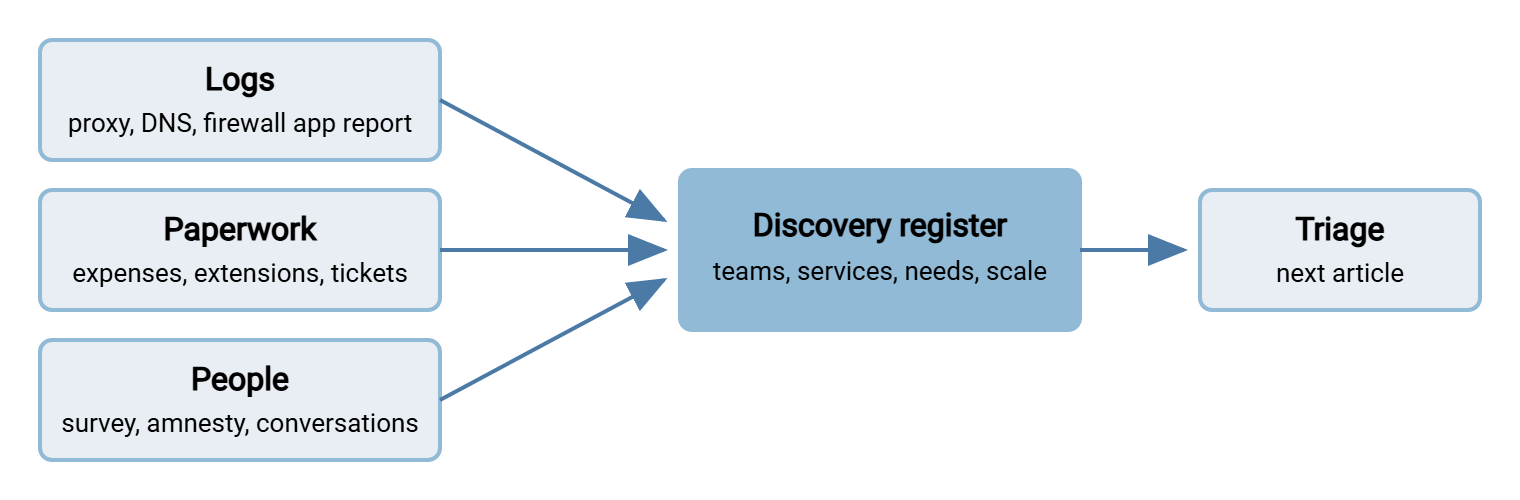
Everything the logs, the paperwork, the survey, and the amnesty produce goes into one table: the discovery register. It is the handoff to triage and the requirements source for the sanctioned path. So keep it boring, consistent, and free of names except in the contact column. One row per team-and-service pair; the columns below are the minimum and the example rows show enough detail. The diagram shows the three evidence streams feeding the register, and the register feeding triage.
| ID | Team | Service (domain) | Need | Evidence | Scale (30 days) | Contact |
|---|---|---|---|---|---|---|
| DR-01 | Marketing | share-example.net | Send artwork to print supplier and agency | Proxy; amnesty report | 6 machines, 41 GB up | P. Mehta |
| DR-02 | Buying | drop.example.org | Receive price lists from ~200 suppliers | Proxy; DNS; helpdesk tickets | 38 machines, 3 GB down | Team lead (via amnesty) |
| DR-03 | Finance | locker.example.com (paid tier) | Reach forecasts from home; share with auditors | Expense report; proxy | 3 machines, 6 GB up | Claimant on expense line |
| DR-04 | Unknown | files.example-cdn.net | Unknown; investigate | DNS only | 1 machine, lookups only | none yet |
Two things about the register. The "Need" column is filled in from the survey, the amnesty, or a conversation, never guessed from the domain. And rows like DR-04 are normal. A domain you cannot explain, seen from one machine, is a candidate, not a finding. Leave it in as "investigate" and move on. Registers that contain only certainties were edited to look good.
Remember: the register counts destinations and needs, not people. If a row cannot be filled in without naming someone who did not volunteer, leave the cell blank. A blank contact cell costs you a conversation; a named one you were not given costs you every future conversation.
What Happens When You Skip the Ground Rules
Bluewater Bank, a fictional regional lender, ran its first discovery as a security investigation. The report listed names. The first two people on it were interviewed with HR present, and word traveled the way word does. The follow-up survey had a nine percent response rate and reported no shadow sharing at all, which the security team briefly found reassuring. The next external audit found thirty-one sharing domains in the proxy logs, three of them in the mortgage team. The second discovery was run as an amnesty, signed by the head of HR. It found forty-four services in a fortnight, with the reasons for every one.
The first discovery cost Bluewater a year, an audit finding, and the trust of the mortgage team. The second cost a four-week window and an afternoon of awk. That is the case you make to the manager who wants names.
Where Discovery Hands Off
Discovery ends with a register, not a verdict. Every row is a team with a need and a service that currently meets it. Triaging What You Find sorts the rows by real risk. So the row with regulated data on an anyone-with-the-link share gets attention before the row with public brochures. Building a Sanctioned Path then turns the "Need" column into a specification.
Discovery is also never finished. The lighter, quarterly version of this article is in Keeping Shadow Sharing From Coming Back. The content-inspection safety net that catches what discovery misses is in our article on DLP without buying DLP. Once the sanctioned path exists, its own activity log becomes the easy half of discovery. A transfer server such as Sysax Multi Server records every upload and download by account. That is the visibility the shadow tools never gave you. If you have no proxy or DNS logging at all, start with centralizing logs, because you cannot discover what nobody recorded.
Frequently Asked Questions
Is it legal to read the proxy logs like this?
We have no proxy and DNS logging is off. Where do we start?
What if the amnesty reveals something genuinely serious?
How long should discovery take?
Should I include email attachments in the register?
From the Sysax team: we build secure file transfer software for Windows. Sysax Multi Server is an FTP, FTPS, SFTP, and HTTPS server. Sysax FTP Automation handles scheduled, scripted transfers. Free trials are on the download page.