
Defining Approved and Forbidden Transfer Methods
Somewhere there is a transfer policy whose forbidden list bans "financial data by email attachment." There is also a finance team that emails the payment run to the bank every Tuesday, because nobody ever offered them anything else. The list is accurate, principled, and ignored by the one department it was written for. Strip away the preamble, the scope statement, and the signature block, and a file transfer policy is two lists. One says: for this kind of transfer, use this tool. The other says: these methods are off limits, and here is what to use instead. An employee may open the policy at four in the afternoon with a deadline at five. The lists are the only part they will read — so they had better be complete, specific, and fast to use.
This article is about building both lists so that Tuesday has somewhere to go. That means starting from the needs people actually have rather than the technologies you happen to run. It means pairing every prohibition with a working alternative, and writing entries concrete enough that nobody has to interpret them. By the end you will have a decision table you can adapt. You will have worked answers for the transfer needs that come up in nearly every organization, and policy language you can lift directly. This is the second article in our Writing a File Transfer Policy series. The first, why your organization needs a policy at all, makes the case this one builds on.
Start From Needs, Not Tools
The most common mistake in this part of the policy is writing it as an inventory of technology: "the company operates an SFTP server; use it." That sentence is true and useless. The employee with a deadline does not think in protocols. They think in needs: I have to get this drawing to the machine shop. The customer wants to send us their data. This report has to reach the accountant every Friday. A policy organized by tool forces every reader to translate their need into your vocabulary. A policy organized by need does the translation once, in advance, for everyone.
So the first step is not writing at all — it is listing the legitimate transfer needs your organization actually has. If you ran a discovery pass of the kind described in the previous article, you already have this list. Every shadow path you found is a need wearing a disguise. The personal cloud account is the need "send big files to outsiders." The USB stick is the need "get files to a partner with no connectivity story." Write the needs down in the words a non-technical colleague would use. For most organizations the list converges on a familiar half-dozen:
- Send a large file to a partner, customer, or vendor.
- Receive files from customers or partners — sometimes very large ones.
- Run a recurring feed: the nightly report, the weekly batch, the monthly export.
- Send a one-off, unusually huge file — the video, the disk image, the dataset.
- Share small everyday documents with colleagues and outside contacts.
- Move files between internal systems and teams.
Every one of those needs must land on an approved method. That is the completeness test for your approved list: walk each need through the policy and see where it comes out. A need with no landing place is not a gap in your users' discipline — it is a gap in your policy. It will be filled by whatever free service has the best search ranking that week.
The Rule That Makes It All Stick: Every No Needs a Yes
One design rule separates policies that work from policies that get laminated and ignored: never forbid a method without naming the approved alternative for the need it was serving.
The reasoning is plain human mechanics. When you forbid a method, the need it served does not evaporate. The payroll file still has to reach the accountant. If your policy says "personal email is forbidden" and stops there, you have not eliminated the transfer — you have made it quieter. The employee will either break the rule or stop doing something the business needs done. If they break the rule, they will now hide it, which is worse than before, because you have lost visibility. Both outcomes are failures, and both are the policy's fault, not the employee's.
Kestrel Payroll learned this the slow way. Its first policy forbade personal cloud accounts and said nothing about what to use instead, because the transfer server was "coming next quarter." Within a month the sync clients were gone from the inventory. The same files were reaching partners as email attachments split into six parts, each just under the size limit. Nobody had broken the rule as written; they had found a method the list did not mention. The forbidden list gained no new entries. The approved list gained a server, and the six-part attachments stopped the week it went live.
Written as a pair, the same prohibition changes character: "Personal email accounts may not be used for work files. To send files to outside contacts, use your company transfer server account. Request one from IT and it will be ready the same day." Now the rule reads as a redirection, not a wall. The employee's need is acknowledged in the same breath that constrains it. This structure also keeps you honest as the author. If you cannot finish the sentence — if there is no approved alternative to offer — you are not ready to forbid the method yet. Build the yes first, then write the no.
Remember: a forbidden list without alternatives does not stop transfers; it stops you from seeing them. Every entry on the forbidden list must point at an entry on the approved list. If it cannot, the forbidden entry waits until the approved one exists.
The Approved List, Worked Through the Common Needs
Walked through to concrete answers, the standard needs look like this; your specifics will differ, but the shape of the reasoning transfers directly. The diagram below shows the destination: every need routes to one of a small number of approved doors.
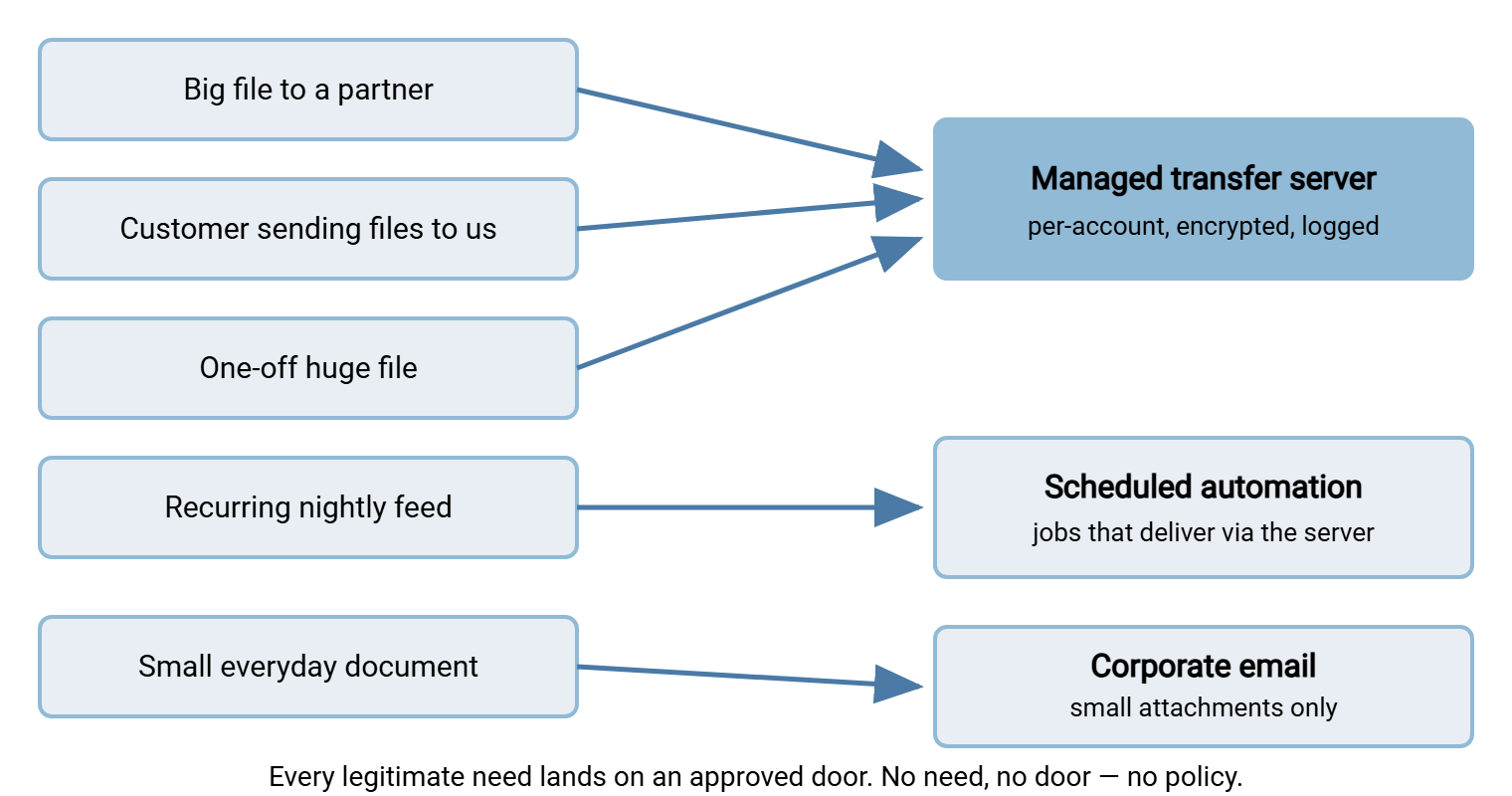
Sending a big file to a partner. The approved answer for most organizations is a managed transfer server — a machine you run. It has an account per outside party, encryption in transit, and a log of every session. This is exactly the role Sysax Multi Server plays on Windows. It speaks FTPS, SFTP, and HTTPS, so nearly any partner can connect with tools they already have. Accounts can come from its built-in user list, from Windows and Active Directory, or use public-key login. Every session lands in an activity log you can point to later. Which of those protocols to offer a given partner is its own small decision. Our guide to choosing a partner protocol walks through it.
Receiving files from customers. Same server, opposite direction — with one firm rule: each sender gets their own credentials and their own folder. The tempting shortcut is an open, anonymous upload area that "anyone can use," and it reliably becomes a liability. The reasons, and the safer patterns, are covered in locking down guest access. Per-sender accounts cost a few minutes each and mean every received file has a known origin. Yes, even the customer who sends one file a year.
The recurring feed. Scheduled jobs should never run from under someone's desk on personal credentials. The approved method is a proper automation tool on a server: Sysax FTP Automation is built for this. It provides scheduled and scripted transfers over the secure protocols, and folder monitoring that picks up files as they appear. It provides OpenPGP encryption for payloads that must be protected at rest on arrival. It also provides email notifications so a failed run tells someone instead of failing silently. The policy line is simple: "recurring transfers are set up by IT as scheduled jobs; ask us and we will build it."
The one-off huge file. This is the need that most often drives people to consumer sharing sites, because email refuses it and nobody planned for it. Route it to the same managed server: a temporary account or folder, created on request, removed afterward. Because the need is occasional, the policy should promise speed — "same business day" — or people will not wait. The service design that keeps such promises is the subject of making the secure path the easy path. If a transfer is so large or so unusual that even the server is the wrong answer, that is what the exceptions process is for.
Small everyday documents. Do not ban email attachments. A policy that forbids attaching an agenda to a meeting invite discredits itself in a day. Attachments are a perfectly reasonable method for small, low-sensitivity files to known recipients — the honest boundaries are laid out in when attachments are fine. The policy's job is to set the boundary (size, sensitivity) and name the server as the path for anything beyond it.
Internal moves. Files traveling between internal teams and systems usually belong on your existing shares and internal infrastructure rather than on the transfer server. The distinction between sharing infrastructure and transfer infrastructure is drawn cleanly in shares versus transfers. The policy needs only a sentence here, but the sentence prevents the odd habit of employees emailing files to themselves to move them between systems. Everyone has done this at least once; I have a mailbox folder named "me" to prove it.
The Decision Table
Condensed into the form it should take in the policy itself, the approved list is a table. It has need on the left, method on the right, one clarifying note each. Adapt the specifics; keep the shape.
| I need to… | Approved method | Notes |
|---|---|---|
| Send files to a partner, customer, or vendor | Company transfer server | Request an account for the recipient from IT; ready same day |
| Receive files from an outside party | Company transfer server | Each sender gets their own credentials and folder — never a shared login |
| Set up a recurring or automated feed | IT-managed scheduled job | Runs on a server with logging, retries, and failure alerts |
| Send one very large file, once | Company transfer server (temporary account) | Ask IT; account removed after delivery |
| Share a small document with a known contact | Corporate email attachment | Within the size limit and not for sensitive data — otherwise use the server |
| Move files between internal teams or systems | Internal network shares | Do not email files to yourself or route internal data through outside services |
The Forbidden List, With Reasons People Accept
Now the shadow side. Keep the forbidden list short — five or six entries cover nearly everything. Give each entry two things: a one-sentence reason a non-technical reader will believe, and the pointer to its approved alternative. Name categories, never brands: "consumer file-sharing sites" ages better and argues less than any product name, and the category is what you actually mean. (I have watched a policy outlive two renamings of the product it banned.)
Personal email accounts. Work files in a personal mailbox are outside every control you have. There is no log of what was sent, no way to retrieve or delete anything. The mailbox — with its archive of company data — remains in the employee's hands forever, including after they leave. Instead: corporate email for small files, the transfer server for the rest.
Personal cloud storage accounts. Same ownership problem, plus sharing links that outlive both the project and the employment. Files synced to a personal account are effectively donated to it. Instead: the transfer server, where accounts are created and closed by IT.
Consumer file-sharing sites. The organization has no agreement with the operator, no visibility into who downloaded what, and no control over link lifetime. Forwarded links keep working for anyone who receives them. There is also a quieter issue: you have no idea how the operator secures, retains, or mines what you upload. The questions our vendor assessment series teaches you to ask are all unanswerable here. Instead: the transfer server, including temporary accounts for one-offs.
Cleartext FTP. Plain FTP sends passwords and file contents unencrypted, readable by any equipment on the path. There is no version of "but it's convenient" that survives that sentence; the full case is in why retire FTP. Instead: the same workflows over SFTP or FTPS — same habits, encrypted wire.
Unmanaged USB media. Small, losable, unlogged, and invisible: a stick in a coat pocket is a transfer no system records. Some organizations need portable media for specific workflows. Those cases deserve encrypted, inventoried drives approved through the exceptions process, not a quiet drawer of anonymous sticks. Instead: the transfer server where connectivity exists; a documented exception where it truly does not.
Shared or anonymous logins on any transfer system. A method can be approved and still be misused. The sanctioned server with one login shared by ten customers has most of the forbidden list's problems — no attribution, no clean offboarding. Per-party credentials are part of the approved method, not an optional garnish. The authentication options for making that painless are surveyed in our transfer authentication series. When something does go wrong, a shared login tells you which company was involved and nothing else, which is roughly what you knew already.
Policy Language You Can Copy
The two-list core, written as it might actually appear in a policy, reads like this — plain sentences, needs first, every no paired with its yes. Swap in your tool names and limits.
APPROVED METHODS
- Files to or from anyone outside the company travel through the
  company transfer server. Ask IT for an account for your contact;
  accounts are ready the same business day.
- Recurring transfers are built by IT as scheduled jobs. Tell us
  the source, destination, and timing; we do the rest.
- Email attachments are fine for small, non-sensitive files to
  people you know. Over the size limit, or anything confidential:
  use the transfer server.
- Files moving between internal teams stay on internal shares.

FORBIDDEN METHODS (and what to use instead)
- Personal email accounts. The company cannot see, protect, or
  retrieve anything sent through them.
    -> Use corporate email or the transfer server.
- Personal cloud storage and consumer file-sharing sites. Links
  and copies outlive projects and employment.
    -> Ask IT for a transfer server account, even for one-offs.
- Plain (unencrypted) FTP. Passwords and files are readable in
  transit.
    -> The same transfer over SFTP or FTPS.
- USB drives and other portable media, unless issued and approved
  through the exceptions process.
    -> Use the transfer server; ask about exceptions if you truly
       have no connectivity.
If no approved method fits your situation, do not improvise:
request an exception (see Exceptions) and you will have an answer
within one business day.
Gotcha: the last three lines are not decoration. A policy whose lists end with silence teaches people to improvise at exactly the moment you most want to hear from them. Ending the core with the exception pointer turns your unknown gaps into requests instead of workarounds.
Edge Cases and the Living List
Two kinds of traffic will test your lists. The first is the genuine edge case. That might be the lab instrument that only speaks plain FTP, or the partner whose ancient system cannot do key-based login. It might be the site with no network where portable media is the only physical option. These are real, and pretending otherwise just drives them underground. Handle them as documented, time-boxed exceptions with compensating controls. The machinery for that is the subject of the exceptions process. For the stubborn legacy devices specifically, our containment guide shows what the compensating controls look like.
The second is drift. New needs appear: a new partner, a new business line, a tool the marketing team adopted while you were on holiday. The lists are living documents — expect to add a row to the decision table a few times a year. Expect the forbidden list to need a new entry when some new category of consumer service becomes popular. A once-a-year formal review, plus a habit of updating the table whenever an exception request reveals a recurring need, keeps the lists matched to reality. The cadence and checklist live in enforcing and updating your policy. A forbidden list nobody updates does not become wrong so much as quaint.
The Heart of the Document
Organize by need, because that is how your readers think. Give every legitimate need an approved landing place, and test completeness by walking real scenarios through the lists. Forbid by category, with a believable one-line reason, and never without naming the alternative. Every no needs a yes, built and working before the no is published. End the lists with the exception pointer so gaps surface as requests rather than workarounds. Then walk Tuesday's payment run through the finished lists and see where it lands.
The lists are the heart, but prose style decides whether anyone can use them at speed. That craft is next, in writing rules people actually follow. The email boundary is the line your users will test most often. So weaning off attachments is the practical companion for moving the over-the-limit traffic onto the server without a fight.
Frequently Asked Questions
Why not just block personal cloud sites at the firewall and skip the policy?
Are email attachments an approved method or a forbidden one?
Should we ban USB drives completely?
How many approved methods should the policy list?
What if a partner insists on a method our policy forbids?
Who decides what goes on the forbidden list?
From the Sysax team: we build secure file transfer software for Windows. Sysax Multi Server is an FTP, FTPS, SFTP, and HTTPS server. Sysax FTP Automation handles scheduled, scripted transfers. Free trials are on the download page.