
Documenting and Enforcing the Folder Taxonomy
A folder taxonomy that lives in one administrator's head is not a taxonomy. It is a habit, and habits leave when the person does. A taxonomy written down but never checked is slightly better: it is a wish. The tree still drifts, one reasonable exception at a time. The document ends up describing a server that stopped existing eighteen months ago. The only taxonomy that holds meets three conditions. It is written on a single page and enforced at creation by a script. Another script checks it every night and reports what does not match.
This article is that machinery. It gives you the one-page standard as a template and the drift-detection script for Windows and for Unix-like systems. It gives you an exceptions process that lets the tree bend without breaking. There is also a cleanup plan for a server that already looks like the one in this series' first article. The plan keeps the flows that still work running.
This article closes our Folder Taxonomy series. It assumes the reference tree, the reserved names, and the skeleton script from the earlier articles.
Why Trees Drift
Drift is the gap between the shape the standard describes and the shape the server actually has. It is never created deliberately. It accumulates from a folder made by hand at ten to five, and a partner client that creates dated subfolders by default. There is also a migration that needed somewhere to land. Add a "temporary" area for a project that ended without telling anyone, and a well-meant rename. Each is small. None is wrong on the day. Together they are the tree from why folder structure is a control. They arrive at that state without anyone noticing a transition.
Drift is inevitable and undetected drift is optional. That distinction is the whole design. You will not stop people creating folders. You can make sure every folder created outside the pattern is on a report the next morning, with a name attached. That catches the folder while it is still empty and easy to remove. A folder caught at one day old is a two-minute conversation. The same folder at two years old has a job pointed at it and a partner who was told the path. It is a project. The wider problem is consolidated servers sprawling again. Folder drift is its earliest symptom. That problem is covered in preventing re-sprawl.
The enforcement loop has four parts, and the diagram below shows how they fit. The standard says what the tree should look like. The skeleton script is the only way roots are created, so new roots match. The drift script compares the real tree to the standard every night and reports the difference. Each reported item is either fixed or recorded as an exception, and exceptions have expiry dates that put them back on the report.
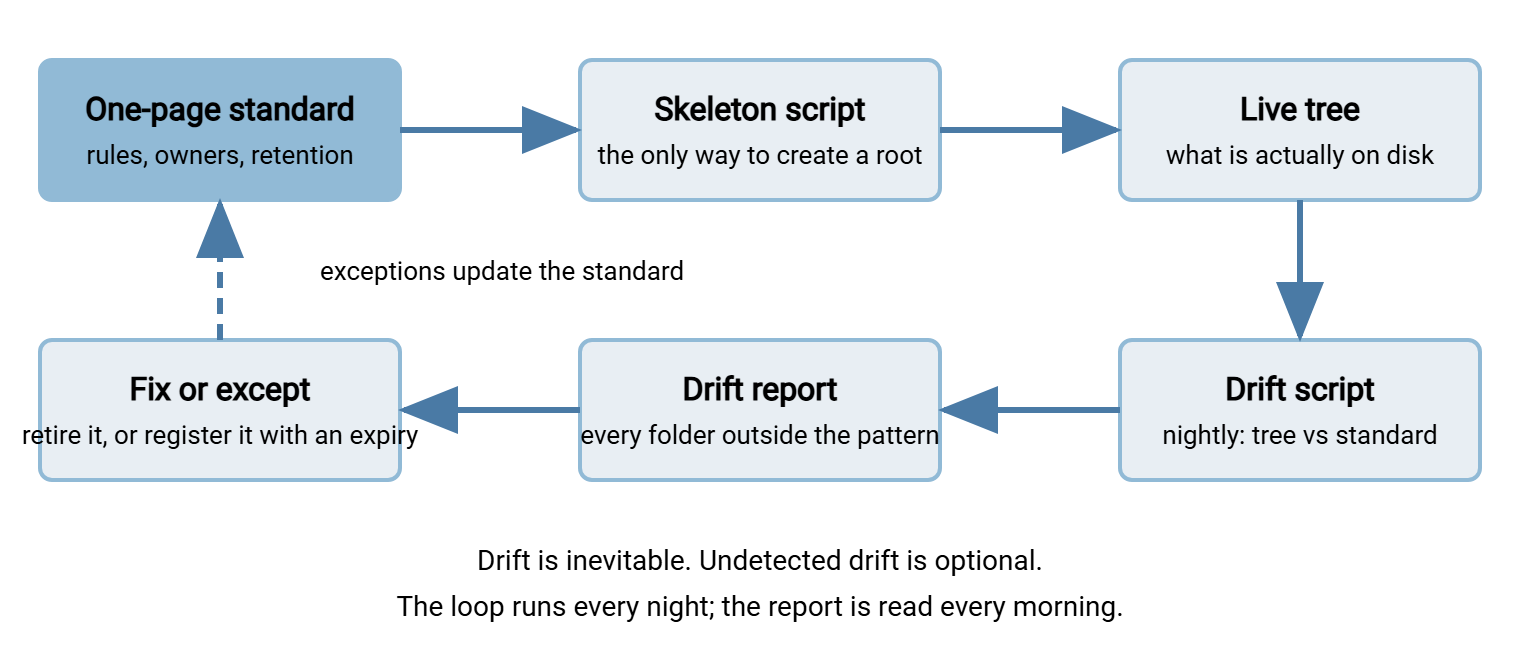
The One-Page Standard
The standard is one page because one page is what people read. It states the areas, the naming rules, the reserved names, and where the rights matrix and the scripts live. It also states the three tables that change over time: owners, retention, and exceptions. It does not explain itself. The explanations are the articles in this series, and the standard links to them. Here is the template, filled in for Meridian Parts, a synthetic distributor.
TRANSFER SERVER FOLDER STANDARD          owner: transfer team lead
server: sftp.example.com                 data root: D:\transfer
review: quarterly, and on every partner onboarding or offboarding

AREAS (nothing else exists at the top level)
  partners/   one root per external organization, from the register
  internal/   one root per department, group access, named owner
  projects/   one root per bounded piece of work, card required
  archive/    mirror of the live tree + YYYY/MM/, sweep only
  standard/   this document, the register, the scripts

NAMING (full rules: naming standard, article 1 of the series)
  lowercase a-z, 0-9, hyphen; no spaces, underscores, dates, names
  reserved, directly under every root: inbox outbox processed error
  direction is the server's point of view; inbox receives
  forbidden: new old temp tmp misc backup copy final test
  second flow = second root (acme-returns); never a deeper level
  depth: area/root/reserved; only archive adds date folders

CREATION AND CHANGE
  roots are created only by standard\New-PartnerRoot.ps1 -Kind
  a folder in use is never renamed; replace, migrate, retire
  drift check runs nightly; report to transfers@example.com
  anything on the drift report is fixed or registered within 5 days

OWNERS                     RETENTION (archive month folders)
  partners/acme    A. Owner   partners/acme        7 years
  partners/bluewater B. Owner partners/bluewater   10 years
  internal/finance C. Owner   internal/finance     7 years
  projects/*       per card   projects/*           1 year after end

EXCEPTIONS (each has an owner, a reason, and an expiry)
  partners/acme/inbox/daily/  partner client creates dated
    subfolders; job reads one level down; owner A. Owner;
    review YYYY-MM-DD
  internal/legacy-erp/        old system cannot be jailed;
    compensating control: read-only export account;
    owner C. Owner; review YYYY-MM-DD

SEE ALSO  rights matrix, skeleton script, archive layout, project
          card: the Folder Taxonomy series in the topic library
Three things about the page are deliberate. It names a person as its owner, because a standard with no owner is reviewed by nobody. The owners and retention tables are on the page rather than in a separate spreadsheet, because the drift script reads them. A script cannot read a spreadsheet someone keeps on their desktop. And the exceptions have review dates, so the standard is never "complete". It is current as of its last review, which is the most any document can claim. The habits that keep documents like this from rotting are in keeping transfer documentation current.
The Skeleton Generator Is the First Enforcement
The cheapest place to enforce a rule is the moment of creation. The skeleton script from per-partner folder structures is where that happens. It refuses a code that breaks the character rules and refuses to overwrite an existing root. It builds the four reserved folders with the right rights. A root it created cannot drift on day one, because it was never anywhere but on the pattern.
Two additions make the script serve the whole tree. A kind parameter, partner, department, or project, chooses the area and whether a card is required. And a check against the register: a partner code not in standard\partner-register.txt is refused. So the register is updated before the folder exists rather than, as usually happens, never. The rule in the standard is then honest: roots are created only by the script. Any root the script did not create fails the register check.
Drift Detection: The Script That Finds new2
The drift script walks the live tree and asks one question of every folder: is your path one of the shapes the standard allows? Folders that answer no are reported. That is the entire algorithm. It is short because the tree has a fixed depth and a small set of reserved names. Every design choice in the earlier articles was made partly so that this script could be short.
The Windows version uses Get-ChildItem to enumerate folders and a list of regular expressions for the allowed shapes. Paths are matched relative to the data root, case-sensitively, because Inbox is drift.
# Check-FolderDrift.ps1  (run nightly; output goes to the report)
$Base     = 'D:\transfer'
$Register = Get-Content (Join-Path $Base 'standard\partner-register.txt')
$Code     = '[a-z0-9]+(-[a-z0-9]+)*'
$Reserved = '(inbox|outbox|processed|error)'
$Allowed  = @(
    "^(partners|internal|projects|standard|archive)$",
    "^(partners|internal|projects)\\$Code$",
    "^(partners|internal|projects)\\$Code\\$Reserved$",
    "^archive\\index$",
    "^archive\\(partners|internal|projects)(\\$Code(\\(inbox|outbox)(\\[0-9]{4}(\\[0-9]{2}){0,2})?)?)?$"
)

Get-ChildItem -Path $Base -Recurse -Directory | ForEach-Object {
    $rel = $_.FullName.Substring($Base.Length + 1)
    $ok  = $false
    foreach ($pattern in $Allowed) {
        if ($rel -cmatch $pattern) { $ok = $true; break }
    }
    if (-not $ok) {
        "DRIFT         $rel"
    }
    elseif ($rel -cmatch "^partners\\($Code)$" -and $Matches[1] -notin $Register) {
        "UNREGISTERED  $rel"
    }
}

# Files where only folders belong: directly in partners\ or in a root.
Get-ChildItem -Path "$Base\partners", "$Base\partners\*" -File |
    ForEach-Object { "STRAY FILE    $($_.FullName)" }
Run against the tree from the first article, it reports acme_returns, ACME-test, dave, new, new2, old, temp_DO_NOT_USE, and the rest. There is one per line, with nothing to interpret. Run against a clean tree it prints nothing, and a nightly report that says nothing is the report you want. The stray-file check catches the other classic: a partner told to upload to their root instead of their inbox. Their files sit one level too high where no job will ever look.
The Unix-like version does the same with find and a single extended regular expression, using -printf '%P' to get paths relative to the data root.
#!/bin/bash
# check-folder-drift.sh  (run nightly; output goes to the report)
base=/srv/transfer
code='[a-z0-9]+(-[a-z0-9]+)*'
reserved='(inbox|outbox|processed|error)'
allowed="^(partners|internal|projects|standard|archive)$"
allowed+="|^(partners|internal|projects)/$code(/$reserved)?$"
allowed+="|^archive/index$"
allowed+="|^archive/(partners|internal|projects)(/$code(/(inbox|outbox)(/[0-9]{4}(/[0-9]{2}){0,2})?)?)?$"

find "$base" -mindepth 1 -type d -printf '%P\n' \
  | grep -Ev "$allowed" \
  | sed 's/^/DRIFT         /'

# Roots not in the register.
find "$base/partners" -mindepth 1 -maxdepth 1 -type d -printf '%f\n' \
  | grep -Fxv -f "$base/standard/partner-register.txt" \
  | sed 's/^/UNREGISTERED  partners\//'

# Files directly in partners/ or in a root.
find "$base/partners" -maxdepth 2 -type f -printf 'STRAY FILE    %p\n'
Both scripts are meant to be extended. The three extensions worth adding first are one-liners. The first checks for a project root whose card's end date has passed. The second checks for an archive root with no line in the retention table. The third checks for an exception whose review date has passed. That way, exceptions expire onto the report instead of into permanence. The table decodes the report for whoever reads it in the morning.
| Report line | Meaning | First action |
|---|---|---|
DRIFT |
Folder path matches no allowed shape | Find who created it; retire it or register an exception |
UNREGISTERED |
Partner root with no register entry | Add to the register with an owner, or retire |
STRAY FILE |
Live data where no job reads | Same day: find the sender, move the file into the right inbox |
EXPIRED |
Project past its end date, or exception past review | Contact the owner; sweep or renew once |
Schedule the check after the nightly archive sweep and send the output somewhere a human reads it every morning. An automation tool such as Sysax FTP Automation can run both as timed tasks. Making the message one that gets read is the subject of alerting that gets read. The script checks shape, not rights. A folder in the right place with the wrong permissions needs the scan in auditing permissions. Run both, and look first at the folder that fails both.
Remember: the standard is one page, and it is checked by a script every night. If it is longer than a page, nobody reads it. If it is not checked by a script, nobody follows it. Both conditions are necessary; neither is sufficient on its own.
The Exceptions Process
An exception is a documented departure from the standard, with an owner, a reason, a compensating control, and a review date. It is not a folder that someone has agreed to ignore. The difference is the review date. An exception without one is drift with a signature on it. That exception will still be there when the signature's owner has left.
The process is short, because a long one is bypassed. Someone requests the exception in writing, naming the folder and why the standard cannot be followed. The request says what control makes up for it and how long it is needed. The standard's owner approves or refuses. Approved exceptions go into the exceptions table on the standard. That table is on the page because the drift report is read against it. At each review date the owner confirms the exception is still needed, or it expires and the folder returns to the report. Most exceptions, reviewed honestly, turn out to have expired months earlier. The general shape of a workable exceptions process is in the exceptions process.
Two exceptions come up so often they are worth pre-deciding. A partner whose client insists on creating dated subfolders inside the inbox gets an exception that says "job reads one level down". The drift pattern for that root is widened to allow inbox/YYYYMMDD. A legacy system that cannot be jailed gets an exception naming the compensating control, usually a read-only export account and a tighter quota. Anything else is judged case by case, and the default answer is that the standard was written to be followed.
Cleaning Up an Existing Server Without Breaking Live Flows
Most readers are not building a server; they are inheriting one. The tree already looks like Meridian's, jobs point at folders nobody can name, and partners have been told paths that predate everyone in the room. The cleanup has to happen while the flows keep running. That means building the new tree beside the old one and moving flows across one at a time. Never rename anything in place.
- Inventory first. Run the drift script against the old tree; the report is your list of folders to account for. For each one, find the flow it belongs to and the job that reads or writes it. Find the partner or team on the other end, and the owner. Record these details in the flow inventory described in the transfer inventory. If you do not have one, this cleanup is how you build it. Folders with no flow, no job, and no owner go on a separate list, to be retired last.
- Build the new tree beside the old. Create
partners/,internal/,projects/, andarchive/under the same data root, empty. Use the skeleton script for each root as its flow is migrated. Nothing in the old tree changes yet. The drift script now reports every old folder, which is correct, and the report shrinks as you go. - Migrate one flow at a time. For each flow, create its root and repoint the job to the new paths. Change the partner account's home directory to the new root, and tell the partner what changed. With a jailed account, the partner's path often changes only from
/to/inbox. That is one line in an email, but a line that must be sent. Move in-flight files by copy, verify, then delete, never a bare move. The mechanics are in migrating folders and in-flight files. Schedule each migration as a change with a rollback of "point the job and the home directory back". That is covered in change rollout and rollback. - Watch the old folder before retiring it. Leave each old folder in place, empty, for one full cycle of the flow. For a monthly flow that means a month. Anything that appears in it is a job or a partner that was not migrated, and the stray-file check will show it. Only after a full empty cycle is the old folder archived under its old name and removed.
- Retire the orphans last. Folders with no flow, no job, and no owner are archived. They are kept long enough that anyone who depended on them will have noticed, and then deleted. Announce the date in advance, twice.
The plan is slow on purpose. Every step is reversible, and every old folder gets a chance to prove it is still used. The drift report shows how far you have got. The announcement in the last step matters more than it looks: someone always depended on an orphan. The announcement turns "you deleted my folder" into "I should have replied to that email". A cleanup done in one weekend by renaming things in place is faster, and Kestrel Payroll tried it.
The Weekend Cleanup
Kestrel Payroll, a synthetic payroll bureau, tidied its transfer server over one weekend by renaming every folder to the new standard in place. It did this without an inventory, because the tree was "obvious". On Monday three partners' uploads failed, because their clients were configured with absolute paths that no longer existed. A fourth partner's uploads did not fail. A nightly job with mkdir -p in it had recreated the old folder at midnight. The partner's files went there, where nothing read them, for five weeks. The drift script that Kestrel wrote afterwards would have reported the recreated folder the next morning. The cleanup that followed took two months, one flow at a time, and nothing failed.
The Version to Tell a Colleague
Write the taxonomy on one page with an owner, a retention table, and an exceptions table with review dates. Create roots only through the skeleton script, so new folders start on the pattern. Run a drift script every night that reports every folder whose path is not an allowed shape. Read the report every morning. Fix what it finds or register it with an expiry. And clean up an inherited server by building the new tree beside the old one and moving flows across one at a time. Watch each old folder for a full cycle before it goes.
The rules the standard summarizes are argued in why folder structure is a control. The script the standard relies on is in per-partner folder structures. The retention table the standard carries is used by the sweep in archives that stay navigable. Between them, the series describes a tree that a stranger can read, a script can check, and a partner cannot break. That is the most a folder structure has ever been asked to do.
Frequently Asked Questions
How often should the drift script run?
The drift report is long. Where do I start?
Can I just add the old folder names to the allowed patterns instead of migrating?
Who owns the standard when the transfer team is one person?
Does the drift script check permissions too?
From the Sysax team: we build secure file transfer software for Windows. Sysax Multi Server is an FTP, FTPS, SFTP, and HTTPS server. Sysax FTP Automation handles scheduled, scripted transfers. Free trials are on the download page.