
Archives That Stay Navigable
"Can you find the file Acme sent us on the fourteenth, three years ago?" Every transfer administrator gets this question eventually, from an auditor, a lawyer, or a colleague in finance who has just noticed a discrepancy. The answer is either "give me five minutes" or "give me a week". Which one you say was decided years earlier, by whoever built the archive.
An archive is only useful if someone can find things in it, and most transfer archives fail that test. They were built by a job that moved files "somewhere safe", one tidy-up at a time. The structure made sense to the person doing the moving and to nobody since. This article designs an archive that stays navigable. That archive has a tree that mirrors the live tree, date folders that sort, and a manifest in every folder. It also has hooks for retention and legal hold, and a restore path that cannot reintroduce a file into a live flow by accident.
It is part of our Folder Taxonomy series. It is about the shape of the archive. Moving old bytes to cheaper storage and deciding how long to keep them are the subjects of other series, linked where they apply.
What an Archive Is, and Three Things It Is Not
An archive, in this series, is the tree where files go after they have been processed. It is the record of everything that passed through the server, kept for as long as policy says, read rarely, restored occasionally. A file enters the archive exactly once, by a scheduled sweep, and leaves it exactly once, by a retention purge. Nothing else writes there.
It is not a backup. A backup is a copy of the server taken so that the server can be rebuilt after a disaster. It contains the live tree, the configuration, and the archive itself. The archive is part of what gets backed up, not a substitute for it. Confusing the two produces an organization that believes it can restore last month's partner file because "we have backups". The organization discovers on the day that the backup captured an empty inbox, correctly, because the file had already been processed.
It is not a storage tier. Moving old archive folders from fast disk to cheap disk or to object storage is a tiering decision. It is covered in archive tiers for transfer data. This article makes the archive findable; that one moves the bytes. The two cooperate through one rule: a tier move keeps the path. A month folder that moves to cold storage has the same relative path there that it had on the hot volume, so the manifest still points at it.
It is not a retention policy. How long each kind of file must be kept, and who decides, are governance questions answered in retention policy for transfer servers. The archive's job is to make whatever that policy says mechanically easy to carry out, which turns out to be a design constraint with teeth.
Parallel Structure: The Archive Mirrors the Live Tree
The single most important design rule is that the archive tree has the same shape as the live tree, with date folders added at the bottom. A file that was processed from partners/acme/inbox is archived under archive/partners/acme/inbox/YYYY/MM/. A file collected from internal/finance/outbox goes to archive/internal/finance/outbox/YYYY/MM/. The date placeholders are exactly that: the sweep fills in the year and month it ran.
D:\transfer\archive
├── partners
│   ├── acme
│   │   ├── inbox
│   │   │   └── YYYY
│   │   │       ├── MM
│   │   │       │   ├── manifest.tsv
│   │   │       │   ├── orders_YYYYMMDD_001.csv
│   │   │       │   └── orders_YYYYMMDD_002.csv
│   │   │       └── MM
│   │   └── outbox
│   │       └── YYYY
│   │           └── MM
│   └── northgate
│       └── inbox
│           └── YYYY
│               └── MM
├── internal
│   └── finance
│       ├── inbox
│       │   └── YYYY
│       │       └── MM
│       └── outbox
│           └── YYYY
│               └── MM
└── projects
    └── fin-erp-cutover
        └── inbox
            └── YYYY
                └── MM
Why mirror rather than, say, put dates first and partners underneath? Four reasons, and each is a job that gets shorter. Anyone who knows the live path can derive the archive path without a lookup. The sweep is one rule applied to every root, "move processed to the mirror path plus this month", rather than a list. Retention can differ per partner, because each partner's history is one subtree. And offboarding a partner leaves one subtree to hand to the retention policy, rather than a slice out of every month folder on the server.
The honest counter-case is an organization whose retention is the same for everything and whose only question is ever "delete everything older than seven years". Date-first would serve that slightly better. I have never met that organization. Every one I have worked with had a partner with a longer retention than the others, a legal hold on one flow, or an offboarding that needed one partner's history isolated. Partner-first handled all three without an exception.
Notice that processed and error do not appear in the archive. Files archived from a partner's processed folder go under inbox, because that is where they arrived and where anyone looking for them will look. error is not archived at all by the sweep. A rejected file is either fixed and resent, at which point the resend is archived, or deleted by the partner. If your policy requires rejected files to be kept, give them their own mirrored path and say so in the standard. That way, the sweep does not have to guess.
Date Folders That Sort
A date folder has one job: to sort correctly in every tool, in every locale, forever. That means four-digit year, two-digit month, two-digit day, largest unit first, zero-padded. YYYY/MM/ sorts. YYYY/MM/DD/ sorts. A folder named for a month and day without padding, such as 3-14, sorts after 10-2 and before 4-1. That is not an order. It is a lottery. The same rule applies to datestamps inside file names, which are the business of datestamp formats that sort. This series names the folders. That one names the files.
How deep to go depends on volume, and the choice is per root, recorded in the standard. A partner sending a handful of files a day fits comfortably in YYYY/MM/: a few hundred files per folder, easy to list. A partner sending thousands a day needs YYYY/MM/DD/, because a month folder with a hundred thousand entries is slow to list and slower to search. A useful ceiling is a few thousand files per folder; beyond that, add a level. Do not add the level everywhere "to be consistent". A daily folder with three files in it is a hundred empty-looking folders a year. Empty-looking folders are where people stop reading.
Which date? The date the sweep ran, taken from the server's clock, not a date parsed out of the file name. The file name is the partner's claim about when they made the file. The sweep date is your record of when you took it, and your record is the one the auditor wants. Choose one time zone for the archive, preferably the same one your logs use, and write it in the standard. An archive whose month boundaries move with daylight saving has a small number of files that are in the wrong month twice a year. Nobody will notice until they matter.
Manifests: The Index That Travels With the Files
A manifest is a small text file, one per archive folder, that lists every file the folder holds. It includes the facts a future reader will need: the name, the size, and a hash. It also includes when the file arrived, when it was processed, which job processed it, and where it came from. The manifest is written by the sweep at the moment it moves each file. So it is never out of date and never depends on a separate index being rebuilt. If the folder is moved to another tier, the manifest moves with it.
Tab-separated text is the right format. It is readable by a human in any editor, searchable with the oldest tools on any platform, and easy for a script to parse. This is the format the series uses.
# manifest.tsv  for  /archive/partners/acme/inbox/YYYY/MM/
# columns: file  size_bytes  sha256  received_utc  processed_utc  job  original_path
orders_YYYYMMDD_001.csv	48211	9f3a7c...e41b	YYYY-MM-DDT06:02:11Z	YYYY-MM-DDT06:03:40Z	acme-orders-import	/partners/acme/inbox/orders_YYYYMMDD_001.csv
orders_YYYYMMDD_002.csv	731	c08d15...77a2	YYYY-MM-DDT06:02:14Z	YYYY-MM-DDT06:03:41Z	acme-orders-import	/partners/acme/inbox/orders_YYYYMMDD_002.csv
returns_YYYYMMDD.csv	5120	41be90...0c3f	YYYY-MM-DDT18:30:02Z	YYYY-MM-DDT18:31:15Z	acme-returns-import	/partners/acme/inbox/returns_YYYYMMDD.csv
The hash column is what turns the manifest from a list into evidence. It lets you prove, years later, that the file in the archive is byte-for-byte the file that was processed. It also lets a restore be verified before it is sent. How to compute and check hashes is covered in checksum files and manifests. That article also shows what a manifest looks like when it is part of a transfer rather than an archive. The original_path column looks redundant, since the mirror rule implies it. It is there for the day the mirror rule is changed and the old folders are not.
Here is the sweep for one root, in shell, showing how the manifest line is written before the file is moved. The same logic in PowerShell is a dozen lines with Get-FileHash and Move-Item. A scheduled automation tool such as Sysax FTP Automation can run either as a timed task against every root in turn.
#!/bin/bash
# archive-sweep.sh <partner-code> <job-name>   (run nightly per root)
set -euo pipefail
code="$1"; job="$2"
src="/srv/transfer/partners/$code/processed"
dst="/srv/transfer/archive/partners/$code/inbox/$(date -u +%Y/%m)"
mkdir -p "$dst"
for f in "$src"/*; do
  [[ -f "$f" ]] || continue
  name=$(basename "$f")
  size=$(stat -c %s "$f")
  hash=$(sha256sum "$f" | cut -d' ' -f1)
  received=$(date -u -r "$f" +%FT%TZ)
  processed=$(date -u +%FT%TZ)
  printf '%s\t%s\t%s\t%s\t%s\t%s\t%s\n' \
    "$name" "$size" "$hash" "$received" "$processed" "$job" \
    "/partners/$code/inbox/$name" >> "$dst/manifest.tsv"
  mv "$f" "$dst/$name"
done
The order matters: write the manifest line, then move the file. If the sweep dies between the two, the manifest names a file that is still in processed. The next run will move that file, and the duplicate line is harmless. The other order leaves a file in the archive with no record of it, which is the state this whole article exists to prevent.
An index is the manifests concatenated, one file per root, rebuilt nightly. That makes "every file from Acme in a quarter" a single search rather than a walk. It is a convenience layer on top of the manifests, not a replacement. If the index is lost, it is regenerated from the manifests in minutes. Keep it under archive/index/ and treat it as disposable.
Retention Hooks: Making Policy Mechanical
The archive does not decide how long to keep anything. It arranges itself so that whatever is decided can be carried out by a script that never has to make a judgment. Three hooks do that.
The month folder is the unit of deletion. A purge job deletes whole YYYY/MM/ folders whose month is older than the root's retention period, and never deletes individual files inside one. This keeps the manifest and its files together to the end. It means a purge is a short list of folder removals that can be reviewed before it runs. The age-based mechanics and their safety rails are in age-based cleanup jobs.
A hold is a file, not a setting. When a legal hold or an investigation requires a subtree to be kept, a marker file named .hold is placed in the folder at whatever level applies. It has one line inside saying who placed it and why. The purge job skips any folder that contains a .hold or sits beneath one. That is the whole mechanism. It works because it is visible in a directory listing to anyone. It needs no special tool to set or check and travels with the folder to a cold tier. The governance around holds is in legal holds and exceptions.
Retention is recorded per root, in the standard, next to the owner. When the purge job runs it reads that table and nothing else. A root not in the table is not purged. The drift-detection script in the enforcement article reports it. An archive folder with no retention period is a folder that will be kept forever by accident.
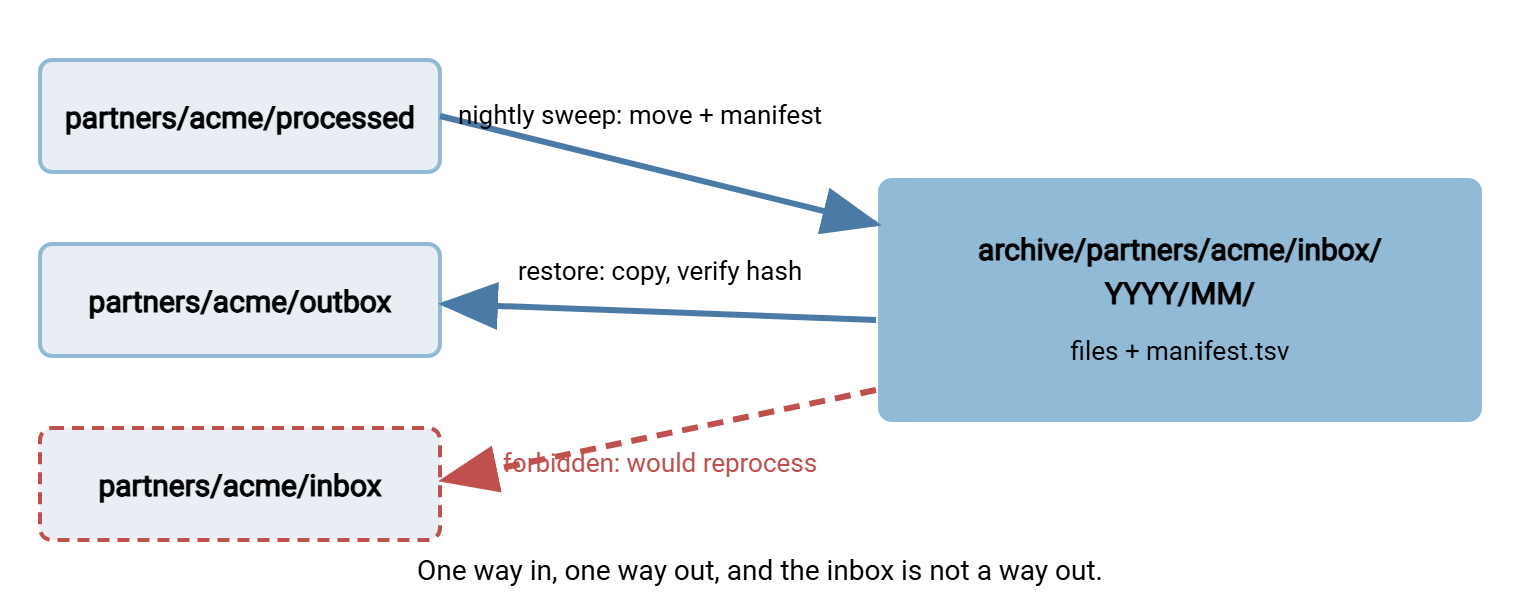
Remember: a restore is a copy, never a move, and it goes to the partner's outbox, never to the inbox. A file copied into an inbox is a new arrival as far as every job is concerned, and it will be processed again.
Restore Paths
A restore request arrives in one of two forms, and they need different answers. "Send us that file again" means the partner wants a copy. Find it in the archive, verify its hash against the manifest, copy it to the partner's outbox, and note the restore. "Process that file again" means your own side wants to re-run it. Copy it to the inbox, deliberately, having first checked what the consuming system does with a batch it has seen before. The second is the dangerous one, and the patterns for doing it without paying an invoice twice are in safe reprocessing patterns.
The diagram below shows the archive's two legitimate flows and the one that is forbidden. Files enter from processed by the sweep and leave to outbox by a restore. Nothing goes back to inbox unless someone has read the reprocessing article and means it.
Every restore is logged: who asked, which file, its hash, where it was copied, and when. The simplest log is a restores.tsv beside the index with one line per restore. The transfer server's own activity log then records the partner collecting it. A server with per-account activity logging such as Sysax Multi Server gives you the download side of that pair. Together the two lines are a complete answer to "did they get it".
The Archive Nobody Could Find Anything In
Bluewater Bank, a synthetic lender, received a regulator's request for every file exchanged with Kestrel Payroll over one quarter, two years back. The archive was a folder called archive_final, containing old_new2, backup_of_archive, and a folder named for a year that held files from three others. Three people searched for four days, matching file names against a payroll calendar by hand, and found roughly four fifths of what the regulator wanted. The remaining fifth turned up a month later in archive_final_2, which nobody had known existed because it was on a different volume. The bank rebuilt its archive as a mirror of the live tree with manifests. The next such request was answered with one search of one index file, in the time it took the regulator's email to be read twice.
The interesting thing about that story is not the four days. It is that the original archive had been built with care, by someone who knew exactly where everything was. They had left. An archive is navigable only if a stranger can navigate it, and every archive is eventually read by a stranger.
The Version to Tell a Colleague
The archive mirrors the live tree with YYYY/MM/ underneath, so anyone who knows the live path knows the archive path. Every folder carries a manifest with names, sizes, hashes, times, and the job that processed each file. The sweep writes the manifest at the moment of the move. Retention deletes whole month folders per root, and a .hold file stops it. A restore is a verified copy to the outbox, never to the inbox. Build it so a stranger can find things, because one day a stranger will.
The sweep this article describes is the last step of the file lifecycle in inbox and outbox conventions. It is also what expires a project root under internal, department, and project folders. The retention table and the check that every archive root has one live in documenting and enforcing the taxonomy.
Frequently Asked Questions
Should the archive be on the same volume as the live tree?
archive/ keeps the shape while the bytes live elsewhere.Why keep a manifest in every folder instead of one central database?
What if a partner sends a file with the same name twice in a month?
Is the archive date the file's date or the processing date?
How do I archive files from the error folder?
From the Sysax team: we build secure file transfer software for Windows. Sysax Multi Server is an FTP, FTPS, SFTP, and HTTPS server. Sysax FTP Automation handles scheduled, scripted transfers. Free trials are on the download page.