
Why Folder Structure Is a Security and Operations Control
Open the data folder of a transfer server that has been running for a few years. You will find a folder called new, a folder called new2, and a folder named after someone who left. Nobody planned this. Each folder was a reasonable answer to that afternoon's problem. Together they are the reason one partner can read another partner's files. They are the reason a nightly job has been quietly doing nothing since spring. And they are the reason nobody can find the batch a customer swears they uploaded.
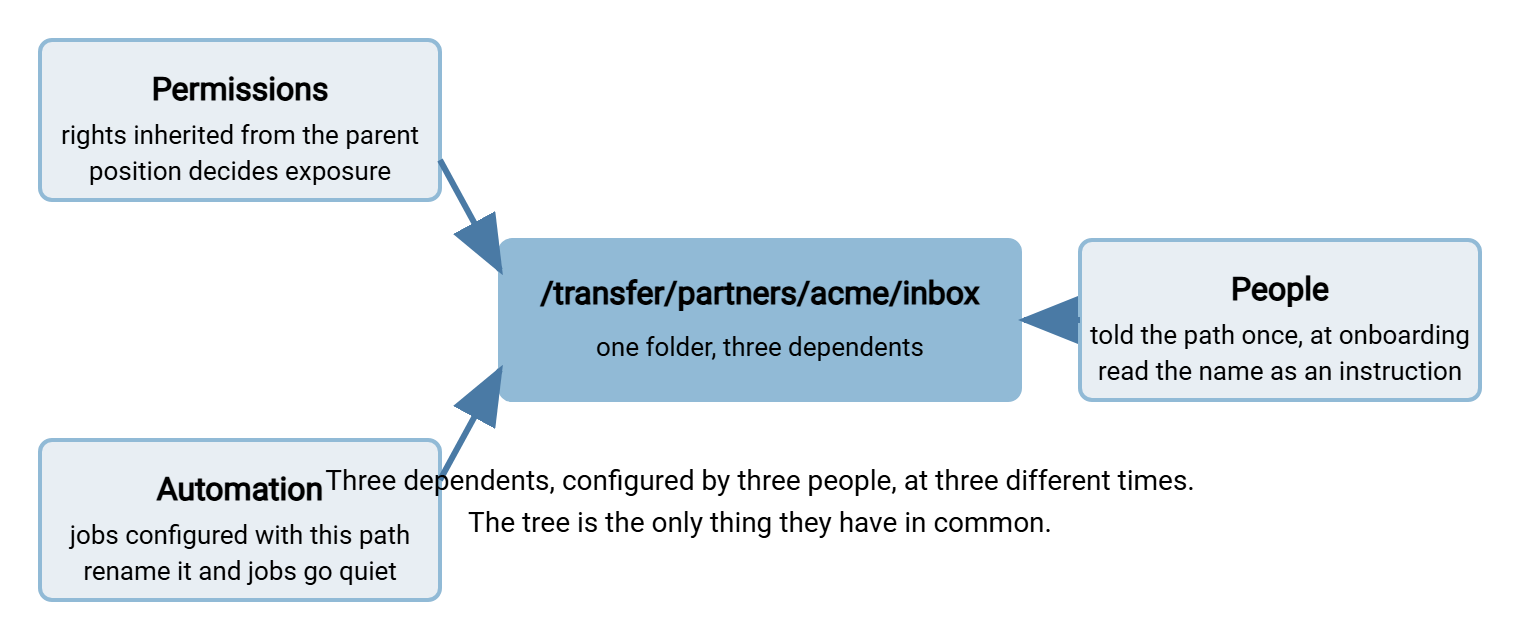
A transfer server's folder tree is not a filing cabinet. It is where three separate systems meet. Permissions are set on folders. Automation is pointed at folders. And people upload to whichever folder they were told about once. Get the tree wrong and all three go wrong at once, in ways that look unrelated until you draw them on a whiteboard.
This article opens our Folder Taxonomy series. It explains why structure is a control rather than housekeeping. It follows one synthetic server's slow descent into new2. And it ends with the reference tree and naming standard the rest of the series builds on.
A Folder Is Where Three Systems Meet
Two definitions first. The data root is the top-level folder under which every transferred file lives. For example, it could be D:\transfer on Windows or /srv/transfer on a Unix-like system. A control is anything that reliably stops a bad outcome whether or not a human is watching. A locked door is a control. A sign saying "please do not enter" is not.
Permissions follow folders. On every mainstream file system, rights are granted to a folder and flow down to whatever is created inside it. So a folder's position decides who can read it before anyone has consciously decided anything. Create it in the wrong place and it is exposed by default, silently.
Automation follows folders. A scheduled job or a watch-folder process is configured with a path: read from here, write to there. The job does not know what the folder is for; it knows where the folder is. Move or rename it and the job either fails loudly or, more often, succeeds at doing nothing.
People follow folders. A partner is told a path once, at onboarding, and uses it for the life of the relationship. A folder's name is read as an instruction: outbox means something, new2 means nothing, so people put anything in it. People follow folders with a loyalty the folders have rarely earned.
The diagram below shows the three forces converging on one folder. Each is configured by different people at different times. Each depends on the folder staying exactly where it is.
The Slow Descent Into new2
Meridian Parts, a synthetic distributor, built its transfer server with a tidy tree. It had two partners, Acme and Northgate Retail, each with a folder under the root. The first partner account was given the root itself as its home directory — the folder an account lands in after logging in. With one partner there seemed no reason to go deeper. Nobody wrote that decision down. Nobody thought of it as a decision.
The tree then grew the way trees grow: one reasonable folder at a time. Acme started sending returns as well as orders, so someone created acme_returns. Northgate needed files going both ways, so northgate_in appeared. A short argument followed about whether "in" meant into Meridian or into Northgate. It was settled by creating northgate_in2. An account manager wanted somewhere to drop one-off spreadsheets and got a folder with his surname on it. A migration needed a landing area, called new. When nobody could remember what was in new, the next migration went into new2.
Three years on, the data root looked like this. Every folder was created by a competent person for a sensible reason, and the tree explained nothing.
D:\transfer
├── acme
├── acme_returns
├── ACME-test
├── northgate
├── northgate_in
├── northgate_in2
├── northgate_out
├── dave
├── new
├── new2
├── old
├── temp_DO_NOT_USE
├── invoices (copy)
└── backup_of_transfer
Nobody at Meridian did anything wrong. That is the important part. A tree like this is not carelessness; it is the absence of a rule, so each afternoon's shortest path differed slightly from the last. The folder called temp_DO_NOT_USE was, at the time of the audit, the busiest folder on the server.
Permissions Follow Folders: How the Leak Happened
Inheritance is the rule that a newly created folder or file automatically receives the permissions of the folder it was created in. It is the most useful and most dangerous property of a file system, because it works silently in both directions. The right rights flow down to the right places. And the wrong rights flow down to everything else.
On Meridian's server, the root granted the first partner account read access, because the root was that account's home directory. Every folder later created under the root inherited that grant, new2 included. When a Northgate price file was parked in new2 during a migration, Acme's account could list the folder and read the file. No one had granted Acme anything; the tree had done it for them. The auditor's report used the word "commingled", which is not a word you want in a report about your server.
You can see inheritance directly. On Windows, icacls prints a folder's permissions, and every entry marked (I) was inherited rather than set on purpose. (OI) means the entry applies to files inside, (CI) to subfolders. The final letters are the access level: M modify, RX read and execute, F full control.
C:\> icacls D:\transfer\new2
D:\transfer\new2 MERIDIAN\svc_acme:(I)(OI)(CI)(RX)
                 MERIDIAN\svc_transferjobs:(I)(OI)(CI)(M)
                 BUILTIN\Administrators:(I)(OI)(CI)(F)

Successfully processed 1 files; Failed processing 0 files
Every line carries (I). Nobody set permissions on new2; it took what its parent offered. On a Unix-like system the same thing happens through the parent's mode bits and the creating process's umask, visible with ls -ld. The mechanics of both models are in permission models explained and umask and inheritance gotchas. This series says something simpler: where a folder sits decides what it inherits. So the shape of the tree is a permission decision whether or not you meant to make one.
The structural fix is to set rights at exactly two levels: the partner's root, and the inbox and outbox beneath it. Everything else inherits from one of those, and nothing is created by hand under the data root. A server with per-account home folders and folder-level permissions, such as Sysax Multi Server, handles the first half. Each partner account is pinned to its own root and cannot see the level above. Which folder gets which right is in per-partner folder structures. Laying out a tree so rights stay easy to reason about is in designing directory trees.
Automation Follows Folders: How the Job Went Quiet
A job is any unattended process that moves or handles files: a scheduled script, a watch-folder task, a server-to-server pull. Every job is configured with at least one absolute path and trusts it completely. It has no other way to know where the files are.
During a tidy-up at Meridian, an administrator renamed northgate_out to northgate-outbox, because the new standard said hyphens. It was a good rename. The nightly job that swept northgate_out was not updated, because nobody knew it existed. A contractor had created it in a scheduler on another machine. The job ran every night for five months, found nothing, and reported success each time, which was technically true.
The second failure runs the other way. A job that processes "everything in the folder" takes everything in the folder. When a folder is shared between a job and a human, the human eventually parks something there for a minute. And the job ships it. Our war-story series has the postmortem in the misdirected file. The cause is a folder with two purposes; the fix is a folder with one. That is what the hot folder pattern assumes. It is also what a folder-monitoring tool such as Sysax FTP Automation relies on when it triggers a task on file arrival. The task fires on whatever appears; the folder's job is to make sure only the right things do.
Two rules follow. A folder a job uses is never renamed; a replacement is created, the job is repointed, and the old folder is retired. And every job's paths are written down next to the job, so a rename is a change request, not an archaeological discovery. Silent success is the expensive failure; the monitoring that catches it is in freshness checks for expected files.
People Follow Folders: How the File Got Lost
Humans read a folder name as an instruction and act on it for years. The partner told "upload to northgate_in" in an onboarding email will upload there until the account is closed, whatever has been created since. The internal user who once found that temp_DO_NOT_USE accepts uploads will keep using it, because it works. Another reason is that nothing in the name says whose problem it will become.
Ambiguity is the enemy. When a Northgate order batch went missing at Meridian, there were four candidate folders: northgate, northgate_in, northgate_in2, and new2. It was in none of them. It was in dave, because the account manager had asked Northgate to send it to him "this once" eight months earlier. Northgate's system had sent everything there ever since. A folder called misc is not a folder; it is a landfill with a name.
The structural fix is that each flow gets exactly one folder in each direction, named from a fixed point of view. So there is never a second candidate. That is the subject of inbox and outbox conventions. The people-shaped fix is remembering that a folder named after a person outlives the person, as does the account tied to it. See our transfer user lifecycle series.
What a Messy Tree Actually Costs
Seen side by side, the failures share a cause; on the day they happen they arrive as unrelated tickets.
| What the ticket says | What the tree did | The structural rule that prevents it |
|---|---|---|
| A partner can see another partner's files | A folder was created under a parent with broad inherited rights | One root per partner; rights set at the partner root; nothing created by hand under the data root |
| The nightly job "succeeds" but nothing arrives | A folder in use was renamed or moved | Folders in use are never renamed; paths documented with the job; freshness checks alert on silence |
| A file went to the wrong place, or back to its sender | Direction words named from different points of view | Inbox and outbox always named from the server's point of view |
| A file the customer uploaded cannot be found | Several folders could plausibly hold it | One folder per flow per direction; reserved names; no personal or generic names |
| A cleanup job deleted live files | Live and archived files shared a folder, or a live folder had an "old" name | Archive is a separate tree mirroring the live one; cleanup rules attach to reserved names only |
The last row deserves a story, because it turns a messy tree from an embarrassment into an outage. Bluewater Bank, a synthetic lender, ran a cleanup script that deleted anything older than thirty days under D:\transfer\old. The folder had been renamed from acme by an administrator who assumed Acme had left. That was because the account manager who dealt with them had. Acme had not left; they had been quiet for a month. The script removed their entire pending batch early on a Sunday morning. The rebuild from Acme's copies took most of a week. The folder is called acme again, and the word old is on the forbidden list.
Remember: a folder's position in the tree is a permission decision. It is a path some job depends on, and an instruction some human will follow for years. You cannot move a folder without changing all three. Design the tree so you never need to.
The Reference Tree
The cure for Meridian's tree is a small number of rules that make the right folder obvious and the wrong folder hard to create by accident. Two more terms. A jail, also called a chroot from "change root", is a server setting. It makes an account's home directory look like the top of the entire server to that account, so it cannot navigate upward. Per-partner roots are designed to be jailed. A skeleton is the empty set of folders every new root starts with. It is created from a template rather than by hand, so that every root looks the same.
Here is the reference tree this series uses throughout. It has four areas under the data root, the same four reserved folders in every partner root, and an archive mirroring the live tree. Date folders are shown as placeholders.
D:\transfer
├── partners
│   ├── acme
│   │   ├── inbox         partner uploads; our jobs read and remove
│   │   ├── outbox        our jobs write; partner downloads
│   │   ├── processed     consumed from inbox, awaiting archive
│   │   └── error         rejected, with a reason file
│   ├── acme-returns      second flow, second root
│   │   ├── inbox
│   │   ├── outbox
│   │   ├── processed
│   │   └── error
│   └── northgate
│       ├── inbox
│       ├── outbox
│       ├── processed
│       └── error
├── internal
│   ├── finance           department root, named owner
│   └── logistics
├── projects
│   └── warehouse-move    start date, end date, cleanup
└── archive
    └── partners
        └── acme
            └── inbox
                └── YYYY
                    └── MM
Notice what is absent: no top-level folder a person created by hand. There is no folder named after a person, a date, or an adjective. And there is no folder whose purpose you have to ask about. A tree like this answers questions before they are asked, which is the most a folder can do for you. It also sits on its own volume, apart from the operating system and the logs. So a partner's large upload can never fill the disk the server boots from. The reasoning is in separating volumes and layout.
The Naming Standard You Can Steal
Everything above reduces to a short list of naming rules, deliberately strict, because every exception you allow on day one will have relatives by year three. The rules are numbered so a drift-detection script and a change request can refer to them.
TRANSFER SERVER FOLDER NAMING STANDARD

1. Characters. Lowercase ASCII letters, digits, and hyphen only.
   No spaces, underscores, accented characters, or dots.
2. Partner roots. The partner's short code from the partner
   register (acme, northgate, kestrel). Never a person's name.
3. Second flow, second root: <code>-<flow> (acme-returns),
   with its own account.
4. Reserved names, exact spelling, at the level shown:
     inbox, outbox, processed, error   (directly under a root)
     archive                            (top level only)
   Never used anywhere else in the tree.
5. Direction. inbox and outbox are named from the server's point
   of view. inbox receives; outbox is collected from. Always.
6. Forbidden anywhere: new, old, temp, tmp, misc, backup, copy,
   final, test, any personal name, any date or year.
7. Depth. Live folders go no deeper than area/root/reserved.
   Only the archive adds date levels beneath that.
8. Creation. Nothing is created by hand under the data root or
   under partners/. New roots come from the skeleton script.
9. Renaming. A folder a job or partner uses is never renamed.
   Create the replacement, move the flow, retire the old folder.
10. Ownership. Every root under internal/ and projects/ has a
    named owner. Project roots have an end date.
Rule 6 will provoke an objection: "but we need a test folder". You do, and it is a partner root called acme-test built from the same skeleton with its own account. So test traffic has the same shape as real traffic and can never be mistaken for it. Rule 3 provokes the other objection, that two roots for one partner is untidy. It is slightly untidy. It is also one jail, one credential, and one blast radius per flow, a trade I make every time. The one-page standard that wraps these rules with owners and an exceptions process is in documenting and enforcing the taxonomy.
The Version to Tell Your Manager
If someone asks why the folder tidy-up deserves a change ticket and a week of your time, the answer is this. Permissions are set on folders. Jobs are pointed at folders. And people are told folders. A tree that grew one shortcut at a time has already leaked a file, silenced a job, or lost an upload, and will do all three again. The fix is not a bigger disk or a better search; it is a small set of rules that make the right folder the only folder there is.
From here, the series continues with inbox and outbox conventions, which settles the direction problem for good. And per-partner folder structures turns the reference tree into a script. If your server already looks like Meridian's, the enforcement article covers cleaning up a live server without breaking the flows that still work.
Frequently Asked Questions
Is folder structure really a security control, or is this just tidiness?
What does the (I) flag mean in icacls output?
Why not just fix the permissions on each bad folder instead of restructuring?
Should partners ever be able to see each other's folders?
From the Sysax team: we build secure file transfer software for Windows. Sysax Multi Server is an FTP, FTPS, SFTP, and HTTPS server. Sysax FTP Automation handles scheduled, scripted transfers. Free trials are on the download page.