
Inbox and Outbox Conventions That Everyone Understands
Every partner onboarding produces the same email, usually around the third exchange: "When you say in, do you mean into you or into us?" It is a fair question. The word "in" has no meaning until you say who is standing where. A folder called in was named by someone who never wrote that down. Multiply by every partner, every job, and every administrator who has touched the server since. You have a tree in which the same word means opposite things in adjacent folders.
The fix is a convention: a small set of folder names with fixed meanings, named from one point of view that never changes. It includes a stated rule for who may write, read, and delete in each. Once the convention exists, the question in that email has a one-line answer, and the answer is the same for everyone.
This article is part of our Folder Taxonomy series. It sets out the convention, walks one file through its whole life, and states who may touch what. It tells the story of the ambiguity that once sent a payroll file back to the company that produced it.
The Perspective Problem
Direction words are relative. "In" means toward the speaker. A transfer has at least three speakers: the partner, the server, and the internal system that will consume the file. Each of them can honestly call the same folder "in" or "out". A folder name that depends on who is speaking is not a name; it is an argument waiting for a new hire.
The convention is to name direction from the server's point of view, always. An inbox is a folder where files arrive at the server. The partner writes into it and the server's own jobs read from it. An outbox is a folder where the server places files for collection. The server's jobs write into it and the partner reads from it. The server is the one participant that every party shares and the one whose role never changes, which is why its perspective wins.
Why not "upload" and "download"? Those words are relative too, to whoever is holding the client. A partner uploads into an inbox, which is fine. But an internal job that pulls files from a partner's server also "downloads". Now a folder called download might hold things we fetched or things waiting to be fetched. Server-perspective names do not have that problem. Nothing the server does is an upload or a download; things arrive or are collected.
The diagram below shows the convention from the server's point of view. The partner is on the left, the internal job on the right, and the four reserved folders between them. Every arrow is labeled with who moves the file.
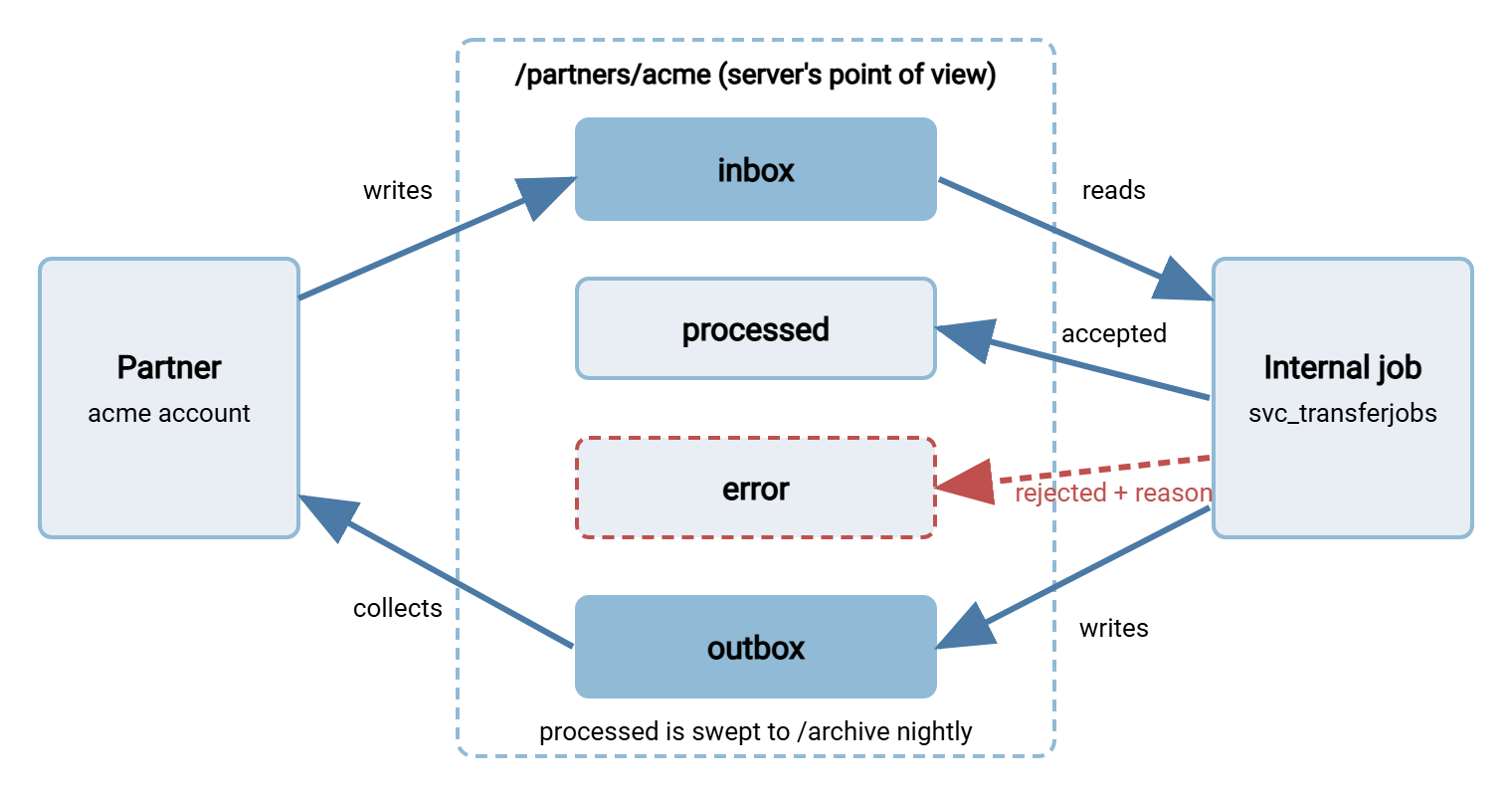
Notice that the partner touches exactly two folders, and touches each in only one direction. That is the whole convention. Everything else in this article is detail.
The Four Reserved Folders
A reserved name is a folder name with a fixed meaning that may be used only at a fixed place in the tree. This series reserves four of them directly under every partner root, plus archive at the top level. The table gives each folder's purpose, who writes to it, and who reads it. It also gives how long a file normally stays, which this series calls its dwell time.
| Folder | Meaning (server's view) | Written by | Read by | Dwell time |
|---|---|---|---|---|
inbox |
Files arriving at the server from the partner | Partner | Internal job, which removes what it takes | Minutes; empty when idle |
outbox |
Files the server has placed for the partner to collect | Internal job | Partner | Until collected, then aged out |
processed |
Inbox files the internal job accepted and consumed | Internal job (by moving) | Partner (read only), support staff | Until the nightly archive sweep |
error |
Inbox files the internal job rejected, plus a reason file | Internal job (by moving) | Partner, support staff | Until resolved; alert if older than a day |
Two things are deliberately missing. There is no temp folder, because in-progress uploads are handled by temporary file names inside the inbox rather than a separate place. The next section explains this. And there is no archive under the partner root. Archived files leave the partner's area entirely for a top-level archive tree that mirrors the live one. That keeps the partner's jail small and lets long-term storage live on another volume. Small servers sometimes keep an archive folder inside each root instead, and that works until it does not. The reasoning is in archives that stay navigable.
The names are singular, lowercase, and spelled exactly as shown. Inbox, inbound, in, and incoming are not the same folder as inbox, and a drift-detection script will not treat them as such. Reserved names are the one place in a taxonomy where pedantry is a virtue.
One File, Start to Finish
The clearest way to understand the four folders is to follow one file through them. Acme uploads a daily order batch to Meridian Parts, a synthetic distributor, over SFTP. Here is its life.
- Arrival. Acme's client writes the file into
/partners/acme/inbox/. A well-behaved client writes to a temporary name first, such asorders.csv.part. It renames the file to its final name only when the upload is complete. This matters because the next step is watching for new files, and a half-written file looks exactly like a whole one. The mechanics are in temp names and atomic renames. The convention here is that the inbox is the only folder where partial files may ever exist, and only under a temporary name. - Detection. An internal job notices the new file. It might poll the inbox on a schedule or react to a file-system event. Either way it ignores files still carrying a temporary suffix and files whose size is still changing.
- Validation. The job checks what it can: the name matches the expected pattern and the file is not empty. It checks that the format parses and the batch is not a duplicate. What the name pattern should be, and how a datestamp in it should sort, are questions for naming convention design and datestamp formats that sort. This series names the folders; that series names the files.
- Outcome. An accepted file is handed to the consuming system and then moved, not copied, to
processed/. A rejected file is moved toerror/together with a small text file of the same name plus.reason.txt. That text file says, in one line, what was wrong. The inbox is now empty again, which is its natural state. - Reply. If Meridian owes Acme anything in return, a confirmation, an acknowledgment, a price list, the job writes it into
outbox/. Again, it uses a temporary name and a final rename. Acme's client collects it on its next visit. - Archive. A nightly sweep moves everything in
processed/to the archive tree, into the date folder for the day it was processed. That sweep is a scheduled folder operation, the kind an automation tool such as Sysax FTP Automation runs as a timed task. The sweep is the only process that writes to the archive.
Six steps, and the partner was involved in two of them. The rest is the server keeping its own house, which is the point. The partner's experience is "I put a file in one folder and found a reply in another". That experience is identical for every partner you will ever onboard. (You will onboard more than you think.)
Who May Touch What
A convention that says what a folder means is half of the control. The other half says who may act on it, because a folder the wrong account can write to will eventually be written to. The table below is the rights matrix for one partner root. It states the intent. The mechanics of granting these rights are in least privilege in practice. The script that applies them to a new root is in per-partner folder structures.
| Folder | Partner account | Internal job account | Support staff |
|---|---|---|---|
inbox |
List, create, write, rename own files. Delete only if policy allows withdrawing an upload. | List, read, move out, delete | List, read |
outbox |
List, read, delete after collecting. Never write. | List, create, write, rename, delete | List, read |
processed |
List, read. Never write or delete. | List, move in, move out | List, read |
error |
List, read, delete after resolving. Never write. | List, move in, write reason files | List, read, delete |
Three rules hide in that table. The partner never writes anywhere except the inbox, so nothing a partner does can put a file in front of your outbound job. The internal job is the only account that moves files between folders, so the folder a file is in tells you what has happened to it. And nobody, not even support staff, edits a file in place. If a file needs fixing, it goes back through the inbox like any other. A server with per-account home folders and folder-level permissions, such as Sysax Multi Server, lets you express the partner column directly on the account. The account has the partner's root as its home so the rest of the tree is invisible to it.
The question everyone asks is whether the partner may delete from the inbox. My answer is yes, with one condition: the internal job must move files out of the inbox the moment it accepts them. That way, the window in which a partner can withdraw a file is the window in which nothing has happened to it yet. A partner who uploads the wrong file and cannot remove it will phone you. You will remove it for them, which is a worse control than letting them do it.
Remember: inbox and outbox are named from the server's point of view. Always. Not from the partner's, not from the job's, not from the perspective of whoever set up the account. The partner writes to inbox and reads from outbox, and that sentence is true for every partner on the server.
The Ambiguity That Sends Files Back to Their Sender
The cost of an ambiguous direction word is not confusion; confusion is cheap. The cost is a job that does the exact opposite of what its author intended, correctly, on schedule, for as long as nobody looks.
Kestrel Payroll, a synthetic payroll bureau, received payroll input files from Bluewater Bank and returned payslip data. Years earlier someone had created /bluewater/out as the folder Bluewater sent files out to, from Bluewater's point of view. Kestrel's import job collected from it. A new administrator, reading out as Kestrel's outbound folder, pointed the new export job at it. Bluewater's collection job, which also watched out, picked up Kestrel's export. Because the export contained Bluewater's own employee records in a familiar format, the job delivered it into Bluewater's payroll system as a new input batch. The duplicate check caught it, which was the only control that worked that afternoon, and the folder is now called inbox.
Read that story again and count the people who were wrong. None. The original creator used a consistent perspective. The new administrator used a consistent perspective. The two perspectives differed, the folder name could not say which one it meant, and a job cannot ask. Server-perspective naming does not make administrators smarter; it removes the question they would have had to be smart about.
The same failure has a quieter cousin: files that simply never arrive. A partner told to "collect from out" reads it as their outbound and starts uploading there instead. Nobody's job watches that folder for new files. So the uploads sit unnoticed until the partner asks why nothing has been acknowledged. There is a postmortem of that shape in the file that never arrived.
The Convention Card You Can Steal
The convention needs to live in two places: your taxonomy standard, and every partner connection guide. The partner-facing version should fit on one screen and use no words the partner needs to look up. This is the version I paste into connection guides, with only the root path changed per partner.
FOLDER CONVENTION FOR YOUR ACCOUNT

Your home folder:  /partners/acme
All folder names are from OUR server's point of view.

inbox/      Put files for us here. Upload to a temporary name
            (for example orders.csv.part) and rename when done.
            We collect files within a few minutes and move them
            out; an empty inbox means we have taken everything.

outbox/     Collect files from us here. Delete a file after you
            have collected it, or we remove it after 14 days.
            Do not upload anything to this folder.

processed/  Files we accepted from your inbox, kept for one day
            so you can confirm receipt. Read only.

error/      Files we could not accept, each with a
            <filename>.reason.txt explaining why. Fix the
            problem and upload again to inbox/. You may delete
            entries here once resolved.

Never:      create folders, upload to outbox/, or rename a file
            in processed/ or error/.

Questions:  transfers@example.com
Two design choices in the card are worth defending. It says "our server's point of view" in the second line, before any folder is named, because that sentence prevents the third-email question. And it tells the partner what an empty inbox means. A partner who sees an empty inbox and does not know we took the file will upload it again. Now you have a duplicate. The wider partner-facing document that this card belongs in, with host, port, and credentials, is the subject of our partner onboarding documentation series.
Edge Cases and How the Convention Handles Them
Every convention meets a partner who does not fit. Usually the convention still holds; it needs applying from the right side of the wall.
The partner wants files to go both ways through one folder. Refuse, politely, and explain why. A job watching that folder cannot tell a file the partner dropped from a file the job dropped. So it will eventually collect its own output. Two folders cost nothing. The refusal script is one sentence: "Our server uses separate inbox and outbox folders for every partner, so that files can never be confused with replies."
The partner's software hard-codes folder names you did not choose. This is more common than it should be. Your tree keeps its names and the partner's connection guide does the translation. If the partner's client insists on a folder called upload, the server's account configuration, not your folder tree, is where you map that. Do not create a second folder, and do not link one name to the other. A tree with two names for one folder has two chances to be wrong.
The flow is server-to-server, and you are the client. When your job logs in to a partner's server and pulls files, their folder names are theirs. You will meet every convention in this article reversed. Do not fight it. Your job pulls from whatever they call it into a staging folder on your side, and the staging folder follows your convention. The design of that neutral ground is covered in staging area design.
Acknowledgments. A partner often wants proof that a file was accepted. The acknowledgment is a file like any other, so it goes in the outbox for the partner to collect. Patterns for what it should contain are in acknowledgment patterns. What it should not be is a file dropped back into the inbox, because that is the story from the previous section with a different cast.
The error folder fills up. An error folder is a queue with no consumer, and queues with no consumer grow. Alert when any file in error/ is older than a day, and make a named person responsible for emptying it. The design of that alerting, and what to do with files that fail repeatedly, is in watch folder error design.
The Version to Tell a Colleague
Name direction from the server's point of view, every time. The partner writes to inbox and collects from outbox. The internal job is the only thing that moves files between folders, so the folder a file sits in says what has happened to it. The folder processed means accepted, error means rejected with a reason, and an empty inbox means everything has been taken. Put that on one card, paste the card into every connection guide, and the third email stops arriving.
The convention assumes each partner has a root of its own, built the same way every time. That is the subject of per-partner folder structures. The convention also assumes the nightly sweep has somewhere sensible to put things, which is archives that stay navigable. And if you want the argument for why any of this deserves a change ticket, start with why folder structure is a control.
Frequently Asked Questions
Why the server's point of view and not the partner's?
Should the partner be able to delete files from their inbox?
Do I need a separate temp folder for uploads in progress?
Where do archived files go, and why not under the partner root?
What goes in the reason file in the error folder?
From the Sysax team: we build secure file transfer software for Windows. Sysax Multi Server is an FTP, FTPS, SFTP, and HTTPS server. Sysax FTP Automation handles scheduled, scripted transfers. Free trials are on the download page.