
FTP in a Web Browser: What Still Works, What Doesn't, and the HTTPS Alternative
The instructions from the supplier say, "Download the price file from our FTP site," followed by an address beginning ftp://. You paste it into the browser's address bar and press Enter. The browser pauses, as if trying to recall an old acquaintance. Then it offers to search the web for the address you just typed. Ten years ago this worked. Nobody announced that it had stopped. It stopped, one browser update at a time.
This article explains what happened and what to do about it. It covers why browsers gave up FTP and what still opens an FTP site today. It untangles the phrase "FTP server with a web interface," which means two different things. It compares HTTPS with FTP, shows how browser-based file transfer actually works, and says who should be given a web page and who should keep a proper client. It ends with the settings to check before you offer a web interface to anyone.
It is part of our HTTP and HTTPS File Transfer series. The series covers the protocol in depth. This page starts from the question people actually ask, which is why the link no longer opens.
What Happened to FTP in the Browser
For most of the web's history a browser could act as a simple FTP client. It could open an ftp:// address, log in anonymously or with a user name, show a plain list of files, and download the one you clicked. It could not upload. It was a convenience for public download sites, and many people never knew they were using FTP at all.
All the major browsers have now removed that feature. The reasons were practical. Plain FTP has no encryption, so a browser that had spent years teaching users to look for the padlock was also quietly fetching files with no protection whatever. Very few people still used the feature. And the code was old, rarely exercised, and one more thing to keep secure. Browser makers weighed a little-used feature against the cost of maintaining it and removed it.
What happens now depends on the browser and the computer. Some browsers hand an FTP link to whatever program the operating system has registered for it. Some do nothing. Some treat the address as a search term, which produces the baffled pause described above. None of them will show you the file list. FTP in a web browser is over, and it is not coming back.
What Still Opens an FTP Site
The server at the other end has not changed. Only the browser has. You need a different client, and several are already on a Windows machine.
| Option | How | Limits |
|---|---|---|
| Windows File Explorer | Paste the ftp:// address into the File Explorer address bar, not the browser's |
Plain FTP only. No FTPS, no SFTP. Fine for public downloads |
| A graphical FTP client | Install one, enter the host, user name, and password | Needs installing. Supports FTPS and SFTP, uploads, and resuming |
| The command line | curl -O ftp://ftp.example.com/prices.csv, included in current Windows |
No window. Supports FTPS. Ideal for scripts |
| A web-based FTP site | A website that connects to the FTP server for you and shows the files in a page | Your password and files pass through a third party's server. See below |
The last row needs a warning. Search for "web based FTP" and you will find websites offering to act as an FTP client inside a browser page. They work. They work because you type your server's address, user name, and password into somebody else's website, and that website logs in on your behalf. Every file you move passes through their machine. For a public download site this hardly matters. For anything with a real password, you have just handed the credentials to a stranger in order to avoid installing a program. Browser extensions that promise FTP in the browser usually work the same way.
Connecting properly, with the settings each client needs, is covered in how to connect to an FTP server and test it.
FTP Server with a Web Interface: Two Different Things
The phrase "FTP server with a web interface" appears in product descriptions and in searches, and it is used for two unrelated features. Vendors rarely say which they mean. Sometimes they have not noticed there are two.
The first is a web-based administration interface. This is a web GUI for the person who runs the server. The administrator opens a browser, logs in to a management page, and creates users, changes settings, and reads logs there instead of in a desktop program. It is a convenience for the administrator. Ordinary users never see it. An "FTP server with web GUI" usually means this.
The second is a web file transfer interface, sometimes called a web client. This is for the users. They open a browser, go to an address such as https://transfer.example.com, log in with their account, and see their folder as a web page with upload and download buttons. No FTP client is involved. A "web-based FTP server" in this sense is not serving FTP to those users at all. It is serving the same files over HTTPS.
The two features are independent. A server can have either, both, or neither. Sysax Multi Server, for example, has both: web-based administration for the administrator, and HTTPS web file transfer for users, alongside FTP, FTPS, and SFTP for the same accounts and folders. When you evaluate a product, ask about each separately. "Does it have a web interface?" will get you a confident yes about whichever one the salesperson thought of first.
The diagram below shows the two web interfaces beside the other protocols. Only the first should be reachable from the internet.
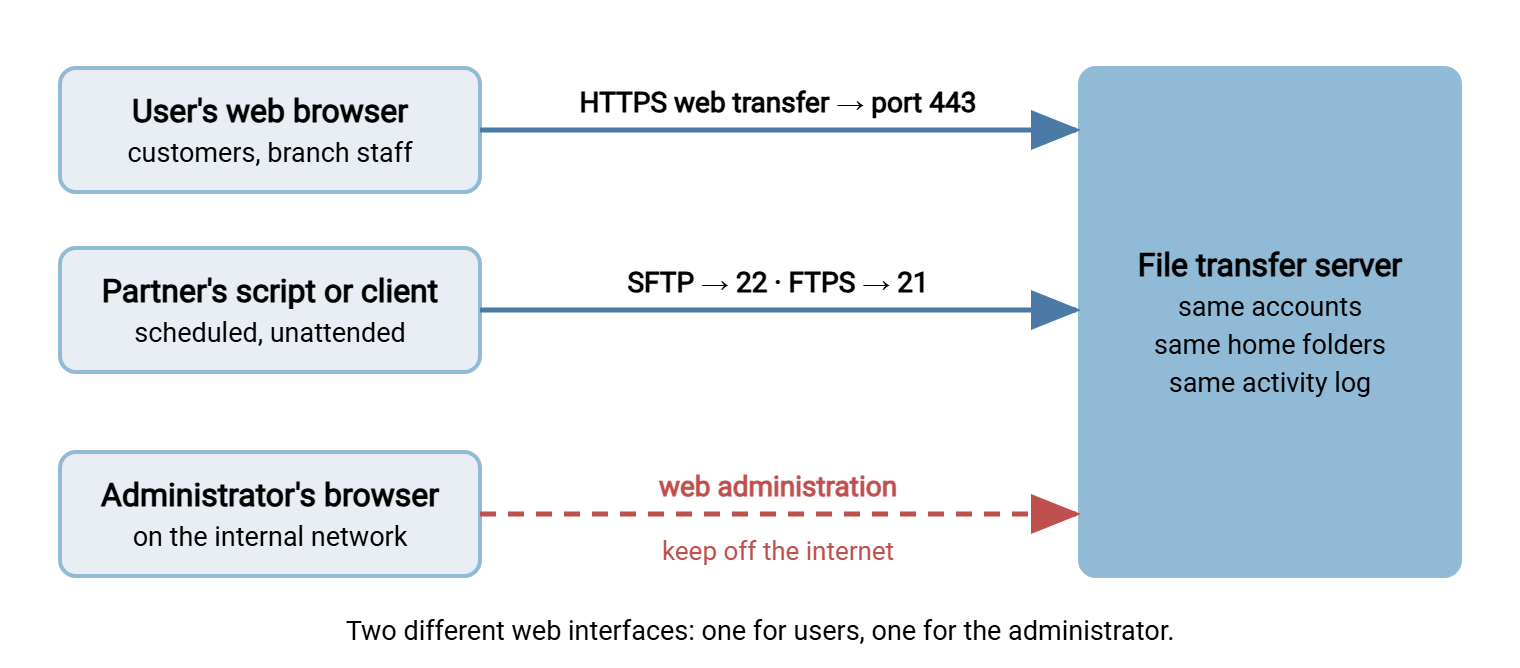
Remember: a web interface for administrators and a web interface for users are different features. The second one is what replaces "FTP in the browser," and it does not use FTP. It is HTTPS file transfer to the same server.
HTTPS vs FTP
Once the browser is the client, the comparison that matters is HTTPS vs FTP. HTTPS is the protocol of the secure web: HTTP carried inside TLS encryption, on port 443. Every browser speaks it, every firewall allows it, and every user has used it today.
| Question | FTP (and FTPS) | HTTPS web transfer |
|---|---|---|
| Encryption | None in plain FTP. TLS in FTPS, if required | Always, with TLS |
| What the user needs | An FTP client, installed and configured | A web browser |
| Ports and firewalls | Port 21 plus a passive port range; trouble with NAT | Port 443 only; allowed almost everywhere |
| Login options | User name and password | User name and password, and often a second factor on the login page |
| Automation | Simple and well supported by every scripting tool | Possible with curl or an API, but each server's web interface differs |
| Very large files | Resuming an interrupted transfer is standard | Depends on the server; browsers may not resume an upload |
| Whole folders at once | Yes, in any client | Usually file by file or by multiple selection |
The table has a clear shape. HTTPS wins everything to do with people: no software to install, no settings to get wrong, no firewall argument. FTP and its relatives win everything to do with machines: scripts, schedules, folders, and files too large to send twice. Neither is the better protocol. They are good at opposite things. The comparison with SFTP, which is the more usual rival, is in when HTTPS beats SFTP.
How Web-Based File Transfer Works
From the user's chair, browser-based transfer is a website. Underneath, it is a short and well-understood sequence.
- The browser connects to the server on port 443 and sets up TLS. The server presents its certificate, and the browser checks it. This is the padlock.
- The server sends a login page. The user's name and password travel back inside the encrypted connection.
- The server checks the account. It is the same account, with the same home folder and permissions, that the user would have over FTP or SFTP.
- The server sends a page listing the folder. Each file name is a link.
- A download is an ordinary web request for that link. An upload is a form submission that carries the file's contents in the body of the request.
- The server writes the file into the user's folder and records the transfer in its log, exactly as it would for any other protocol.
Two consequences follow. First, the files are in the same place whichever way they arrive. A partner's script can deliver a file by SFTP at night, and a person can collect it through the browser in the morning. Second, the web interface inherits the server's rules. If an account is confined to its folder and limited to read-only, that holds in the browser too. The mechanics of the upload itself are explained in how file upload works on the web, and the handling of big files in large files over HTTP.
What a Browser Is Bad At
The browser is a wonderful client for one person and one file. It has real limits beyond that, and it is better to know them before you promise anyone a web page.
Very large files. A browser upload is one long request. If the connection drops at ninety percent, most browsers start again from zero. Some servers work around this by splitting uploads into chunks that can be resumed, and some do not. Test with a file as large as the largest one your users will really send, over a connection as poor as theirs. A hotel wireless network is a more honest test than the office.
Many files and whole folders. A client can send a folder of four hundred files with one drag. In a browser that is often four hundred selections, or a compressed archive the recipient then has to unpack.
Long sessions. Web logins time out, and they should. A user who starts a large upload and goes to lunch may return to a login page and no file.
Anything unattended. A web page is built for a person. Scripts can drive it, but every server's pages are different, and a redesign of the page breaks the script. The browser will also never retry on its own at two in the morning.
There is one thing the web does that a client cannot. A server can produce a download link for a single file: a private web address that lets the recipient fetch that one file without having an account at all. Good implementations make the link hard to guess and let it expire. It is the right tool for sending one large file to one outside person once, and it saves creating an account that somebody will have to remember to delete.
Who Should Get the Browser, and Who Should Not
The useful question is not which protocol is better. It is who is at the other end.
Give the browser to people. That means customers who send you a document twice a year, staff in branch offices, and anyone whose job title does not include the word "systems." They will not install a client. If made to, they will configure it wrongly, and each of them will telephone you about it. A web page they can reach with a link is the only version of file transfer they will reliably use.
Give SFTP or FTPS to systems. That means partners' servers, nightly jobs, and anything that runs unattended. A script wants a stable protocol with a predictable set of commands, not a web page designed for eyes and a mouse. Scheduled transfers belong in an automation client such as Sysax FTP Automation, speaking SFTP or FTPS to the same server.
Northgate Retail had this the wrong way round for a year. Sixty store managers were asked to upload a weekly set of display photographs to head office. They were sent a nine-page guide to installing and configuring an FTP client. Three of the sixty did it. The rest emailed the photographs, in batches, to a marketing assistant who uploaded them herself every Monday. When head office switched on the web interface and sent each store a link and a login, fifty-eight stores uploaded in the first week. Nothing about the server had changed except the door. The nine-page guide was retired without ceremony.
Designing for outside users is covered in customer upload portals, and one-off sharing between individuals in secure links and expiry.
Setting Up the Web Interface on a Transfer Server
If your server offers HTTPS web transfer, switching it on is short work. It needs four things that FTP did not.
- Enable the HTTPS protocol in the server's settings and confirm the port, normally 443.
- Install a TLS certificate issued by a recognized certificate authority for the exact host name users will type. A self-signed certificate produces a browser warning that users will, correctly, be alarmed by.
- Allow inbound TCP port 443 on the Windows firewall and the edge firewall. That is the whole firewall request. There is no passive range.
- Check that port 443 is not already in use on the machine by a web server. If it is, give one of them a different address or port.
Then test it as a user would, from outside the network, and go through this list before anyone is sent the address.
WEB INTERFACE CHECKLIST           Address: https://____________________

CONNECTION
[ ] Padlock shows with no warning; certificate matches the host name
[ ] Plain http:// either redirects to https:// or is switched off
[ ] Old TLS versions are disabled

LOGIN
[ ] Each user has their own account; no shared logins
[ ] Repeated wrong passwords lock or delay the account
[ ] The session times out after a period of inactivity
[ ] A second factor is enabled where policy requires it

FILES
[ ] A user sees only their own folder and cannot move above it
[ ] Read-only accounts show no upload or delete option
[ ] Upload size limit is known and written down: ______
[ ] An interrupted large upload: what happens? ______

EVIDENCE
[ ] A browser upload appears in the server log with user, address, and time
[ ] A failed login appears in the log
[ ] The administration interface, if web-based, is NOT reachable from outside

FOR USERS
[ ] One page of instructions: the address, how to log in, how to upload
[ ] A named contact for when it does not work
The line about the administration interface is the one to check twice. The page your users log in to should be on the internet. The page you configure the server from should not. If both are web pages on the same machine, make sure only one of them is reachable from outside. Building an internal version of the same idea is covered in building a safe internal file drop over HTTPS.
The Version to Tell a Colleague
Web browsers no longer open FTP sites. The feature was removed because plain FTP is unencrypted and almost nobody used it. To reach an FTP site now, use File Explorer for plain FTP, a proper client, or curl. Avoid websites that offer FTP in a page, because your password passes through them. An "FTP server with a web interface" may mean a web page for administrators or a web page for users, and only the second replaces FTP in the browser. That second kind is HTTPS file transfer: port 443, a browser, the same accounts and folders. Give the browser to people and keep SFTP or FTPS for systems.
To decide flow by flow, read when HTTPS beats SFTP. For scripted HTTPS transfers, the curl and wget cookbook has the commands.
Frequently Asked Questions
Can I open an FTP site in a web browser?
Why did browsers remove FTP?
What is an FTP server with a web interface?
Is HTTPS better than FTP for file transfer?
Are web-based FTP websites safe to use?
What port does a web file transfer interface use?
From the Sysax team: we build secure file transfer software for Windows. Sysax Multi Server is an FTP, FTPS, SFTP, and HTTPS server. Sysax FTP Automation handles scheduled, scripted transfers. Free trials are on the download page.