
Share Links, Expiry, and Access Control Done Right
Paste the link into the reply and press send. The file is on its way to a lawyer who has never heard of your portal and never needs to. That is the whole trick, and it is a good one. The private download link is the load-bearing invention of person-to-person sharing. It lets an outside recipient receive a file with no account and no software. That is the requirement the whole replacement-for-attachments effort hangs on. The link does this while keeping the file itself on a server you control. But a link is also a strange kind of credential, and treating it casually is how sharing services earn their incidents. There are links that never die, links forwarded to audiences nobody intended, links whose downloads no one can reconstruct afterward. A link does not know who is holding it, and it is not going to ask.
This article is about doing links properly. It explains what a link actually grants and what makes one safe to mint. It covers how expiry defaults quietly do most of the governing and what revocation must mean. It also covers how notifications and logs turn a handoff into something you can prove later. It is part of our Person-to-Person Sharing series. It assumes the service shape described in designing the internal sharing service: an HTTPS portal on infrastructure you run.
Some of what follows, automatic expiry sweeps, download notifications, single-use behavior, varies widely between platforms. Where your chosen service automates a control, set its defaults deliberately; where it does not, this article shows the operational stand-in. Either way, these are design decisions for whatever service you build or buy, and they deserve to be written down before the first link goes out. The first link always goes out sooner than the document does.
What a Link Really Is
A share link is a bearer credential: whoever holds it can use it. The server cannot tell the intended recipient from anyone the link was passed along to. The security industry calls this shape a capability URL — the address itself is the permission. The honest mental model is a claim ticket at a coat check: possession is authority. The ticket says nothing about who is holding it. Losing it means someone else can claim your coat.
This is not a flaw to be engineered away. It is precisely the property that makes links frictionless for outside recipients. The requirements analysis in the adoption checklist explains why that frictionlessness is non-negotiable. The design consequence is different. Because possession is authority, every other control has to live server-side, where you still have a say. Those controls determine how hard the link is to guess and how long it works. They also determine how quickly it can be killed and how completely its use is recorded. Those four dials are the rest of this article.
The Anatomy of a Safe Link
Not all links are created equally well. A safe one has five properties, and they are worth verifying on any platform you evaluate:
- An unguessable token. The link's identifying part must be a long random string — the kind that cannot be stumbled into by trying neighboring values. The cautionary pattern is the sequential identifier. If your file is at
/share/507, someone else's is at/share/508. A patient script can walk the whole namespace. Randomness long enough to make guessing astronomically futile is the entry requirement. - HTTPS only. The link travels through email systems and the download travels the open internet. TLS keeps the payload and the token itself off the wire in readable form. How that protection works is covered in how TLS protects transfers. A portal that answers on plain HTTP, even just to redirect, is leaking tokens.
- Scoped to exactly one share. A link grants one file (or one deliberately assembled bundle) — never a folder listing, never a browsable area, never "this user's other files." Scope creep in links is how a routine share becomes a data exposure.
- Download-only by default. Upload rights are a different, riskier grant with their own abuse patterns — see upload drop abuse — and should never ride along on a sharing link unasked.
- Served from your domain. The hostname is part of the trust story. Recipients learn that files from your organization come from one consistent address. That is also what makes the phishing conversation trainable.
If this shape feels familiar from the cloud world, it should. Object storage systems use the same idea under the name presigned URLs — a time-limited, signed address that grants exactly one operation. The mechanics are explored in presigned URLs, and the design instincts transfer directly.
How Links Escape
Design for the audience you did not intend, because links travel. The recipient forwards the message to a colleague — sometimes appropriately, sometimes not. The link lands in a ticket system, a chat archive, a meeting notes document, and outlives the conversation around it. And one escape route surprises nearly everyone: security scanners fetch links. Many mail-filtering systems open URLs in incoming messages to check them for malice. That means a link can be "visited" by machinery before any human sees it. A naive single-use link — dead after the first access — can be killed by the recipient's own mail filter. That is why strict one-download designs cause mysterious support tickets. It is also why access counting needs more nuance than a simple counter. The mail filter is your most reliable recipient. It reads everything first.
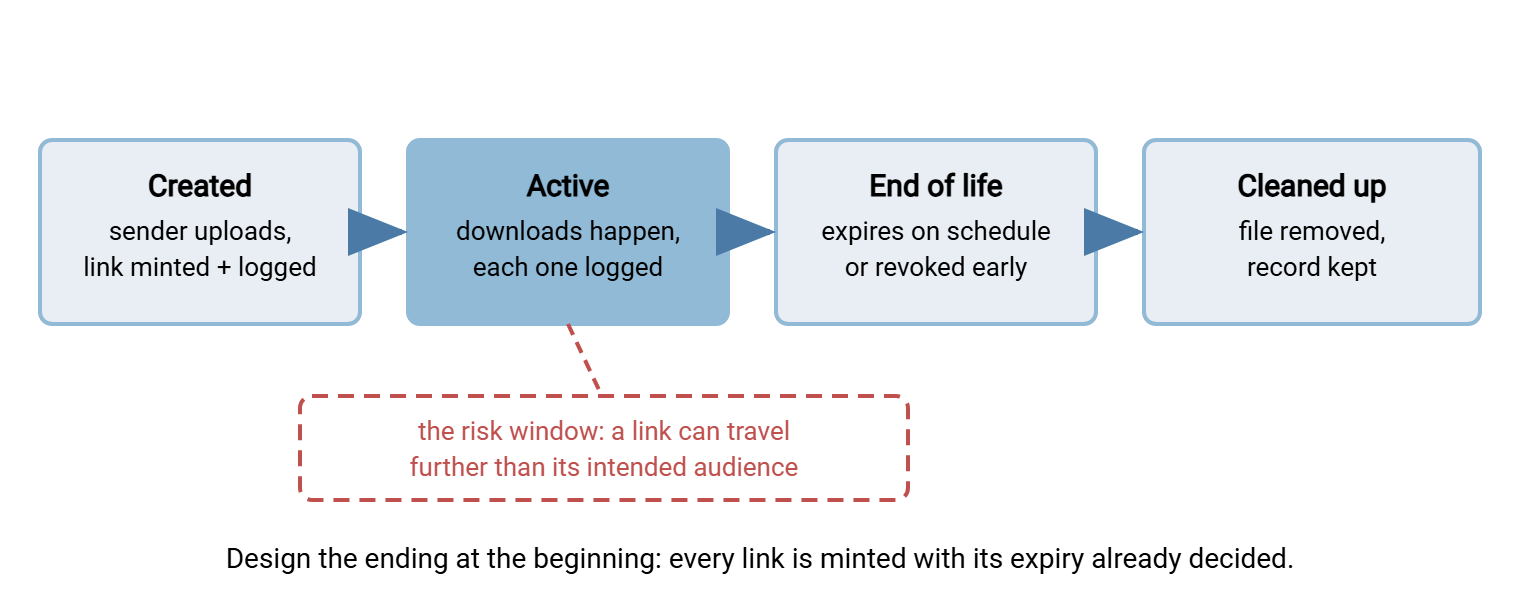
The lesson is not to abandon links; it is to stop pretending the link's secrecy is the whole control. Assume a wider audience than addressed, then rely on the server-side dials: short lifetimes, revocability, passwords for the sensitive cases, and logs that show you exactly what happened. The lifecycle below is the frame for all four.
The diagram shows a share link's life from minting to cleanup, with the active window marked for what it is. During that period, the link may be traveling further than anyone intended.
Expiry: The Default Does the Governing
The most useful single fact about expiry is that the default matters far more than the maximum. Users do not configure options; they accept what the form offers. If the form offers "expires in seven days" pre-selected, then seven days is what ninety-odd percent of shares will do. Your entire estate of links then inherits a short, predictable life without anyone being trained, reminded, or scolded. Governance by default is the only kind that scales to people who are busy — which is everyone.
Here are sensible starting values, stated in words and adjusted to your reality. Start with a default of seven days. That is long enough to survive the recipient's vacation-adjacent Monday, short enough that a forgotten link is not a standing exposure. Set a maximum of thirty days for self-service shares, with anything longer treated as a different thing entirely. A standing exchange belongs in a managed flow or a guest account, not an immortal link. For the sensitive cases, use the shortest lifetime the recipient can work with, chosen at sharing time. A "never expires" option should not exist on the form. If someone needs permanence, they need a different service, and the request itself is useful signal.
Acme's first sharing service had a "never expires" option on the form, one radio button below "seven days", and the two were the same size. Nine months later a support engineer was searching an old ticket for something unrelated. The engineer found a link to a customer's contract export, pasted into a comment, still live. The download log showed two fetches on the day it was created and nothing since, which was the good news. The bad news was that nobody could say how many other tickets held the same kind of link. They removed the option, set thirty days as the ceiling, and ran a one-off query for every share older than that. Sixty-one links died that afternoon, and nobody missed a single one.
Design one distinction carefully: link death and file death are two events. When a link lapses, access ends. The file's removal can follow on its own schedule — immediately, or after a short grace period during which the sender can re-share without re-uploading. What must not happen is the third possibility: expired links whose files linger indefinitely in the share area, invisible and unmanaged. Expiry is your storage cleanup mechanism as much as your security control. If your platform sweeps lapsed shares automatically, verify it. If it does not, an operational sweep does the same work honestly. That is a scheduled job that removes share files past their date, built like any other age-based cleanup job. The guide automated purge policies covers how to build such cleanup without surprises. An expired link with a living file is not expired. It is merely unlisted.
Passwords and Second Channels
For sensitive content, add a second factor to the link: a password the recipient must enter before the download starts. The entire value of this control depends on one discipline — the password travels by a different channel than the link. Link by email, password by phone call, text message, or chat. If both ride in the same message, the "protection" is a formality: anyone who obtained the email has both halves. It is the key taped to the lock.
Be honest about the friction ledger. A password adds a step for the recipient and a task for the sender. That is exactly the kind of cost that erodes adoption if imposed everywhere. So make per-share passwords easy and encouraged for sensitive files, not mandatory for all files. (The requirements article's warning about universal gates applies in full.) For the outside collaborator you exchange sensitive files with every month, a password-per-link ritual is the wrong tool anyway. That relationship has outgrown links and earned a guest account with real authentication, per the identity ladder in the service design article.
Revocation: When a Link Escapes
Sooner or later a link goes where it should not — the wrong reply-all, the misaddressed message, the recipient who forwarded a confidential file to a distribution list. Revocation is what makes that moment a non-event instead of an incident. It only means something when it is server-side and immediate. The share is disabled at the source, and every copy of the link everywhere in the world stops working at once. No amount of asking people to delete an email accomplishes this; killing the thing the link points at does. I have sent the please-delete-this-message email. Nobody has ever replied to confirm.
This is the quiet, decisive advantage of hosting the shared files yourself. A mis-sent attachment is unrecallable forever; a mis-sent link to your own server dies the moment you disable the share. With Sysax Multi Server, for example, the Enterprise edition provides sharing files as private download links, served from your own Windows server. The shared file sits on infrastructure you administer. So ending a share is an action you take on your own system, not a request you send to someone else's.
Two design points complete the control. First, who can revoke: the sender can, self-service, from their list of active shares. They will notice their own mistakes first, and must not need a ticket to fix one. Any administrator can also revoke, for the cases that arrive via the help desk. Second, the drill after revoking: read the download log for that link. If nothing was downloaded between the mistake and the revocation, the story ends there, documented. If something was, you know when and from where, and you can escalate proportionately. That includes the privacy procedures in personal data transfer incidents when the file contained personal information. Revocation without a readable log is only half a control.
Notifications: Closing the Loop the Sent Folder Never Closed
Email trained everyone to treat "sent" as "delivered," which it is not. A sharing service can do better, and should. This is one of the few places the new way genuinely beats the habit rather than merely matching it. The design that works:
- Notify the sender on first download. One message: your file was retrieved, when, and (where meaningful) from where. This single behavior ends the "did you get it?" follow-up email, and senders come to love it. It is a feature worth advertising during rollout.
- Summarize, don't spray. Multiple downloads roll up into a digest rather than a message per fetch. Notification fatigue teaches people to ignore exactly the signal you want them to see. Remember, too, the scanner-prefetch problem from earlier. A fetch by mail-filter machinery should not masquerade as the recipient's download. That is why "first download" logic deserves scrutiny on any platform you evaluate.
- Nudge before expiry when nothing happened. A share approaching its end with zero downloads usually means the message went to spam or the recipient missed it. Telling the sender while the link still lives converts a silent failure into a quick re-send.
Where the platform provides download visibility, surface it; where it provides only logs, even a simple administrator report of undownloaded shares catches the silent failures. And when a handoff needs to be provable rather than merely known — a regulated delivery, a contractual submission — the stronger patterns in proof of delivery patterns pick up where notifications leave off.
Logging Every Handoff
The log is what makes link-based sharing governable at all. Record, for every share, who created it, when, and for which file (name, size). Record the lifetime it was minted with and any later changes — extension, revocation, by whom. Record every access: timestamp, source address, and outcome. Together those fields answer the question that decides audits and incidents alike: who had access to this file, and who actually exercised it? The general discipline of choosing fields is covered in what to log. The sharing-specific rule is that the record outlives the file. Shares expire in days. But the evidence of what was shared and downloaded must persist on your retention schedule, because questions arrive months later.
This is also where per-account authentication pays off downstream. Because every share was created by an authenticated individual, the log's "who" column contains a name, not a shared login. Multi Server records every user action to both a log file and a database. That means these questions get answered with a query rather than an archaeology project. Set the log's own retention deliberately — the governance article returns to how long — and treat the log as the permanent artifact of a deliberately impermanent system. Archaeology is a fine discipline and a poor incident response.
Remember: a share link is a bearer credential. Its safety never comes from the secrecy of the URL alone. It comes from the server-side dials: unguessable tokens, HTTPS, short default lifetimes, real revocation, and a log of every access that outlives the file itself.
The Link Policy One-Pager
Everything above compresses into a policy you can adopt, adapt, and publish next to the service. It doubles as an evaluation sheet for any platform you are considering:
SHARE LINK POLICY - DEFAULTS AND RULES
Link form:        long random token, HTTPS only, served from our domain,
                  one share per link, download-only
Default expiry:   seven days (pre-selected; user can shorten)
Maximum expiry:   thirty days self-service; longer = guest account or
                  managed flow, not a link
Sensitive files:  shortest workable expiry + password delivered by a
                  second channel (never in the same message as the link)
Never offered:    links that never expire; links to browsable folders
Revocation:       sender self-service from their active-shares list;
                  administrators can revoke any share; effect immediate
After revoking:   read the download log for that link; escalate only if
                  an unexpected download occurred before revocation
Notifications:    sender notified on first download; digest thereafter;
                  sender nudged if expiry nears with zero downloads
Cleanup:          lapsed share files removed within one day
                  (platform sweep or scheduled job - verified, not assumed)
The record:       creation, changes, revocations, and every download
                  logged and retained on schedule; the log outlives the file
Where This Leads
Done right, links give you the paradoxical combination this pillar keeps promising. They are easier than attachments for the people using them, and dramatically more governable for the people answerable for them. The link is minted with its ending decided and its audience assumed to be wider than addressed. Its death switch is within the sender's reach, and its whole biography is in a log you keep. It still does not know who is holding it. Now it does not need to.
Two follow-ons complete the picture. The retention of share records, the handling of sensitive content, and the audit questions this machinery must answer are the subject of governing ad-hoc sharing without killing it. And none of these controls matter until people actually use the service — the switch itself is engineered in rolling out the sharing service so people switch.
Frequently Asked Questions
Is "anyone with the link" sharing ever acceptable for business files?
What is a good default expiry for share links?
Why did my single-use link die before the recipient ever clicked it?
Does revoking a link delete the file too?
How long should we keep the logs of shares and downloads?
From the Sysax team: we build secure file transfer software for Windows. Sysax Multi Server is an FTP, FTPS, SFTP, and HTTPS server. Sysax FTP Automation handles scheduled, scripted transfers. Free trials are on the download page.