
Keeping Partner Documentation Current
A connection guide is a set of claims about a server: this address, this port, this fingerprint, this folder. Every claim was true on the day it was written. Servers change. A guide that was not changed with them becomes a confident, well-formatted description of a machine that no longer exists. Partners follow it anyway, because they have no way to know. The result is a ticket that begins "we followed your guide". Drift is the gap between what the documents say and what the server does. It grows silently until a partner finds it.
This article is about closing that gap on purpose rather than by accident. It covers a versioning scheme that says which copy is current. It covers the change notice, the short message that tells partners what will change, when, and what to do. There is a template for the hardest case. There is a bundle that puts current documents where every partner's automation already looks. The article also covers a review cadence tied to the changes that cause drift, and the retirement of documents when a partner leaves. This article closes our Partner Onboarding and Support Documentation series. Everything it maintains was built in the earlier articles.
Why Documents Drift, and How You Find Out
Drift has a short list of causes, and every one of them is a change you made deliberately. A server migration changes the address. A certificate renewal changes the certificate fingerprint. A host key rotation changes the host key fingerprint. A firewall redesign changes the passive port range. A folder tidy-up renames /inbound to /inbox. A reorganisation changes the support mailbox. None of these is an accident, and every one has a change ticket somewhere. The documents drifted because the ticket did not mention them.
You find out from partners. The migration is finished on Saturday, and on Monday three tickets say "Connection refused". The key is rotated on Wednesday, and on Thursday a payroll job says "Host key verification failed". The partner is not complaining about the change. They are complaining that the first they heard of it was their job failing at five in the morning. (The change notice was drafted. It was in someone's folder called "to send".)
The principle that fixes this is simple to state: the documents are part of the change. A change to the server's address, ports, keys, certificates, folders, naming rules, or contacts has three requirements. It is not complete until the guide has been bumped and the partners have been told. The bundle they can reach must also have been updated. Put those three steps in the change template as mandatory fields, and drift stops being a surprise.
Versioning the Guide
Every document a partner holds carries a version number and a review date in its header. For example: "Guide version: v3, last reviewed YYYY-MM-DD". The version is a plain integer that increments on every change to the content. The review date is the last time someone tested the guide against the live server, whether or not anything changed. They answer different questions. The version tells a partner whether their copy is current; the date tells you whether anyone has checked it lately. Do not use a date as the version. Two reviews without changes would produce two versions of the same text, and partners would ask what changed. Nothing changed. That is what the date is for.
Add a changelog at the foot of the generic guide, one line per version, most recent first. For example: "v3: new host key fingerprint. v2: passive range widened to 50000–50200. v1: initial." A partner comparing v2 in their ticket with v3 on the page can see in one line whether the difference matters to them. Keep every old version in the partner record. When a partner says "we set this up from v1", you want to be able to read v1.
Record which version each partner holds. The flow inventory has a column for it, next to the partner's contact mailbox. That column turns a change into a mailing list: filter on "holds v2", and those are the partners who need v3. Without it you send every notice to every partner. Partners who receive notices about changes that do not affect them learn to stop reading notices. The generic guide is versioned. The partner copies inherit the number when regenerated, and the inventory records who has which. That is the whole scheme.
Remember: version numbers on the document, review dates in the header, holdings in the inventory. A partner with v2 in their hand and v3 on your page knows to ask. A partner with two undated copies knows nothing.
The Change Notice
A change notice is a short message with a fixed shape. It says what is changing, when, and what the partner must do. It says what they will see if they do nothing, which document version reflects the change, and who to ask. It goes to the mailbox the partner gave on the intake form for this purpose, not to whoever signed the last email. It carries an identifier so that a partner quoting "CN-014" and a support person reading "CN-014" mean the same thing. Send it with enough lead time for the partner's own change process, which is usually slower than yours.
The template below is the hardest case, a host key rotation. It is the one where the partner must act, the action is easy to get wrong, and the failure if they do nothing is total. Adapt the shape for the easier cases; the six headings do not change.
Subject: [Acme file transfer] Change notice CN-014: new SFTP host key on YYYY-MM-DD
To:      the change-notice mailbox from your intake form (field E2)

WHAT IS CHANGING
On YYYY-MM-DD at 06:00 UTC, sftp.example.com will present a new ED25519 host key.
The host name, IP address, port, username, folders, and naming rules do not change.

NEW FINGERPRINT (valid from the change time)
SHA256:Qm8vT2yLpR5eWc7NkA1xHdJ9sZ3bFgUo6iYt4Kn0MeV

CURRENT FINGERPRINT (valid until the change time)
SHA256:l3Kq9ZtXpV4bLwE2nRcYhD8sJfUa0GiOx5MvNTeQ7k4

WHAT YOU MUST DO
After the change time, remove the stored entry for our server and reconnect:
    ssh-keygen -R sftp.example.com
On reconnection, confirm the fingerprint shown matches the NEW fingerprint above before
accepting it. Graphical clients: accept the changed key only if it matches the NEW fingerprint.
Scheduled jobs that run unattended will need the same update in their stored host key list.

WHAT YOU WILL SEE IF YOU DO NOTHING
From the change time your client will refuse to connect, with "Host key verification failed"
or a changed-host-key warning, and uploads will stop until the step above is done.

DOCUMENTS
Your connection guide is now version v3 (attached). The README in your /outbox will be
updated at the change time and will carry the new fingerprint.

QUESTIONS
transfer-support@example.com, 08:00-18:00 UTC, Monday to Friday. Please quote CN-014.
Two features of that notice are worth copying even when the change is trivial. The "what you will see if you do nothing" section is the one partners read first. It tells them whether the notice is about them. And the new and current fingerprints appear together. That way, a partner who reconnects too early, or too late, can tell which key they are looking at. A notice with only the new value leaves a partner staring at a warning. They have no way to know whether it is your change or somebody else's server.
For key changes specifically, the safest sequence is to send the notice, wait the lead time, and make the change. Then answer the tickets from partners who did not read it. Some server and client combinations can announce a new host key automatically during a session. But partners run every client ever written, and you cannot rely on it. The rotation itself, and the inventory of who trusts which key, is covered in key rotation and inventory.
Which Change Needs Which Notice
Not every change needs the full template, but every change on this list needs a notice. The lead time depends on what the partner has to do. The table is the reference; keep it next to the change template so the person raising the ticket can read off the lead time.
| Change | Lead time | Partner must | Unwarned, they see |
|---|---|---|---|
| Server IP address | Ten working days; run both addresses in parallel where you can | Update outbound firewall rules; confirm they connect by name | Connection timed out or Connection refused |
| SFTP host key | Five working days | Remove the stored key, verify the new fingerprint, accept | Host key verification failed |
| FTPS certificate, same issuer | Before expiry; notify anyway | Usually nothing; clients that pin the fingerprint must update it | Certificate mismatch warning in pinning clients |
| FTPS certificate, new issuer or self-signed | Ten working days | Trust the new issuer or the new fingerprint | TLS verification failure; connection refused by their client |
| Passive port range | Ten working days | Open the new range outbound | 425 Can't open data connection |
| Folder path or naming rule | Ten working days; accept both for a period | Change their job configuration | Permission denied, 550, or files ignored |
| Support mailbox or hours | Five working days; forward the old mailbox for a year | Update their contacts | Unanswered mail during an outage |
| Service retirement | Thirty working days minimum | Stop their job; move to the replacement | Connection refused, permanently |
Address and port changes involve the partner's firewall team, who have their own queue. That is why those rows carry the longest lead times. How to run that conversation is in firewalls and partner coordination. Certificate rows depend on knowing the expiry date well in advance, which is the job of certificate expiry monitoring. And a migration, which changes several rows at once, has its own partner communication plan in partner coordination in migrations.
A Bundle Where Partners Already Look
The weakest link in any notice is the mailbox it goes to. People leave, mailboxes are renamed, and a notice that reached the right address six months ago reaches nobody today. So put the current documents somewhere the partner's automation already visits: their own /outbox on your server. A plain text file, README-CONNECTION-v3.txt, contains the current guide, the current fingerprints, and the open change notices. Every job that collects from the outbox downloads it. Any admin who logs in wondering what changed finds it. It is the one document you can be certain the partner can reach. If they cannot reach it, that is the ticket.
Name the file with the version so that a listing shows it at a glance. Remove the previous version when you add the new one, so there is never a choice. Regenerating it for every partner is a loop over the partner list, filling the same placeholders the guide uses. On a server with per-account folders, such as Sysax Multi Server, each partner's outbox is a known path and the loop is a short script. If you also run a partner portal or a page on your website, put the same content there. But treat the outbox README as the copy that counts, because it is the one that rides the channel itself.
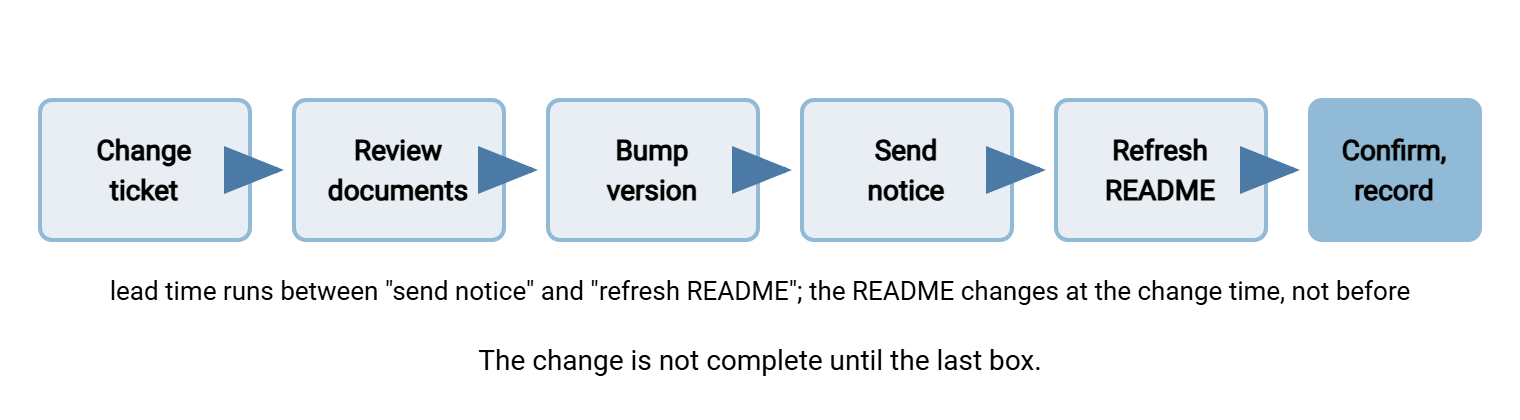
The diagram below shows the sequence a change follows from ticket to closed loop. The ticket triggers the document review, the guide version is bumped, and the notice goes out. The README is refreshed at change time, the partner confirms, and the inventory records the new holding.
A Review Cadence Tied to Changes
Most reviews should be triggered, not scheduled. The trigger is the change ticket. Any ticket touching the server's address, ports, certificates, keys, folders, naming rules, or contacts has "partner documents reviewed" as a mandatory field. It cannot close with the field blank. That one rule catches nearly all drift, because nearly all drift comes from a ticket.
Add one scheduled review for the drift that has no ticket. Examples are the server rebuilt from an old image, the certificate auto-renewed by a tool nobody remembers installing, and the folder someone renamed by hand. Once a quarter, run your own test procedure from outside against a test account, using only the current guide. The procedure is the review. If every step passes, update the review date and stop. If a step fails, you have found drift before a partner did. In that case, the fix is a version bump and a notice on your schedule rather than theirs.
Between quarters, a small script can watch the values most likely to drift. The one below compares the fingerprint and address on the guide with what the live server presents, and complains if they differ. Run it weekly from a machine outside your network, so it sees what partners see.
#!/bin/sh
# docdrift.sh - does the live server still match the connection guide?
HOST="sftp.example.com"
GUIDE_FP="SHA256:l3Kq9ZtXpV4bLwE2nRcYhD8sJfUa0GiOx5MvNTeQ7k4"
GUIDE_IP="203.0.113.10"

LIVE_FP=$(ssh-keyscan -t ed25519 "$HOST" 2>/dev/null | ssh-keygen -lf - | awk '{print $2}')
LIVE_IP=$(dig +short "$HOST" | head -n 1)

STATUS=0
[ "$LIVE_FP" = "$GUIDE_FP" ] || { echo "DRIFT: fingerprint guide=$GUIDE_FP live=$LIVE_FP"; STATUS=1; }
[ "$LIVE_IP" = "$GUIDE_IP" ] || { echo "DRIFT: address guide=$GUIDE_IP live=$LIVE_IP"; STATUS=1; }
[ $STATUS -eq 0 ] && echo "guide matches live server"
exit $STATUS
The script is deliberately small. It fixes nothing; it tells you that the guide and the server disagree. That is the one fact nobody otherwise learns until a partner does. Wire its exit code into whatever alerts you already read. The same watch, extended to certificate and key expiry across the whole server, is described in certificate and key expiry watch. The general discipline of documents that stay true is the subject of keeping documentation current in the flow-documentation series.
Rule of thumb: if a change ticket can close without anyone opening the guide, the guide will drift. Make the review a field on the ticket, not a memory in a person.
Retiring Documents When a Partner Leaves
When a partner relationship ends, their documents are not deleted; they are retired, which is a different thing. Their copy of the guide, intake form, test evidence, and the notices they received are the record of what was agreed and proven. That record is asked for after the relationship ends more often than during it. An audit may ask for it, or there may be a dispute about a file that did or did not arrive. The partner's successor may ask how it used to work. Mark the record "retired" with the date, and keep it as long as you keep the flow's logs. Close the inventory row rather than removing it.
Three things are removed rather than retired. The README comes out of the outbox, because the folder is about to go. The partner's public key comes off the account and the account is disabled, in the sequence set out in retiring keys at offboarding. And the partner's mailbox comes off the notice list. That way, a bank that stopped trading with you two years ago does not receive CN-031 and wonder whether it was a mistake. The partner side of that process covers the notice, the last-file date, and the account closure. It is described in partner offboarding in our B2B series. Here, the only rule is that the documents outlive the connection.
A Short Story About the Mailbox That Left
Northgate Retail renewed its FTPS certificate in good time, but the new certificate came from a different issuer. Northgate sent a proper change notice ten working days ahead. It went to the mailbox on Kestrel Payroll's intake form, which belonged to an admin who had left Kestrel three months earlier. On the Monday after the change, Kestrel's payroll job failed at five in the morning with a certificate verification error. Kestrel's new admin had never heard of Northgate's notice. She logged in by hand to see what was wrong. In the outbox she found README-CONNECTION-v4.txt and read the new fingerprint. She updated the job and had it running before anyone at Northgate was awake. Northgate's intake form now says "shared mailbox preferred" under the change-notice field. The README has been in every partner's outbox ever since.
The notice was right, the lead time was right, and the mailbox was wrong. A single copy of the truth in a place the partner cannot lose is worth more than a perfect email to an address nobody reads.
The Version to Tell a Colleague
Documents drift because servers change and the change ticket did not mention the documents. The fix is to make the documents part of the change. Bump the guide's version. Send a change notice with what, when, what to do, and what you will see if you do nothing. Refresh a README in every partner's outbox at the change time. Record which version each partner holds so notices go only to those affected. Run your own test procedure quarterly and a drift script weekly to catch the changes with no ticket. When a partner leaves, retire their documents and keep them; remove only the README, the key, and the mailbox.
The guide being maintained here is built in writing a partner connection guide people actually read. The FAQ and the macro that answer "Host key verification failed" after a rotation are in the partner FAQ and error decoder. The reason all of this is worth the effort is counted, in emails, in why partner onboarding takes six weeks. Two occasions stress partner communication hardest. The articles partner communications when retiring plain FTP and partner communication during disaster recovery both use the same notice shape under more pressure.
Frequently Asked Questions
How much lead time is enough for a change notice?
Can we avoid host key rotation notices entirely by never rotating?
Is the outbox README safe? Anyone with the account can read it.
What if a partner ignores the notice and their job breaks?
Should the review date change if the review found nothing wrong?
From the Sysax team: we build secure file transfer software for Windows. Sysax Multi Server is an FTP, FTPS, SFTP, and HTTPS server. Sysax FTP Automation handles scheduled, scripted transfers. Free trials are on the download page.