
Why Partner Onboarding Takes Six Weeks (and How to Make It Two)
A trading partner is any outside organization that sends files to you or collects files from you on a regular basis. Examples are a supplier pushing order confirmations, a payroll bureau pulling timesheets, a bank returning statements. Onboarding is everything that has to happen between "we have agreed to exchange files" and the first real file arriving where it should. The technical part is small: an account, a folder, a firewall rule, and a five-minute test. The calendar part is enormous, and the gap between the two is filled with email.
This article walks through one synthetic onboarding, day by day, counting the emails. Then it names the three loops that cause the delay and shows which document removes each one. By the end you will be able to see where the weeks are going in your own backlog. You will have a two-week timeline to copy. It is the opening article of our Partner Onboarding and Support Documentation series. The rest of the series writes the documents this one only names.
The Six-Week Timeline, Counted in Emails
Here is how it usually goes. Acme runs a file transfer server. Meridian Parts, a new supplier, will push a daily order file to Acme over SFTP. Nobody has written anything down, because the last onboarding was eight months ago and everyone remembers it as "fine". The table counts working days and emails. The names are invented; the sequence is not.
| Day | What happened | Emails so far |
|---|---|---|
| 1 | Purchasing forwards a thread: "Meridian will be sending us order files. Can you set them up?" No protocol, no contact, no direction of travel. | 1 |
| 2 | Acme asks for a technical contact, the protocol, and whether Meridian will push or Acme will pull. | 2 |
| 5 | Meridian replies (their admin was on leave): "SFTP is fine, we will push. What is your address?" | 4 |
| 6 | Acme sends host, port, username, and a password, all in one email. Asks for Meridian's public IP address for the firewall. | 6 |
| 9 | Meridian tries anyway: "Connection timed out." The firewall is still closed; no IP was supplied. | 9 |
| 12 | Meridian sends an IP. It is the contact's laptop. Their network team supplies the real outbound address two days later. | 13 |
| 15 | Firewall opened. Meridian's security team asks for the server's host key fingerprint before their automation may connect. | 17 |
| 19 | Fingerprint sent. Meridian reports "Permission denied (publickey)". Their job uses an SSH key; the account was built for a password. | 21 |
| 23 | Key installed. Login works. Meridian asks where to put the files. Acme says "the inbox". | 25 |
| 26 | orders.csv lands in the account's root folder. Acme's pickup job watches /inbox for MERIDIAN_ORDERS_*.csv. Nothing happens. Two more emails work out why. |
29 |
| 29 | Folder and naming rules agreed. Both sides need a change window for the live run; both change boards meet weekly. | 32 |
| 31 | First real file arrives and is picked up. | 34 |
Thirty-one working days, thirty-four emails, one "quick sync" that took forty minutes, and a file that would have transferred in under a second. Nobody in this story did anything wrong. Everybody answered the question they were asked, promptly by the standards of a shared inbox. The delay is not in the people; it is in the shape of the conversation. Almost every email did one of three things. It asked for a fact that could have been requested on day one. Or it corrected an assumption one side had made silently. Or it reported that an instruction did not work as written. Those are the three loops, and once you can see them you cannot stop seeing them.
Loop One: Missing Facts
The first loop is the slowest and the easiest to remove. Every onboarding needs the same dozen facts, and an undocumented onboarding collects them one email at a time. Direction: does the partner push files to you or pull them from you? Protocol: SFTP, FTPS, or something else? Authentication: password or key? The partner's public IP address, so it can be added to the allowlist, the list of source addresses your firewall or server permits while refusing everyone else. A technical contact who is not the salesperson. The file names to expect. The schedule.
Each fact costs a round trip, and between two busy organizations a round trip is two to three working days, not minutes. Twelve facts collected one at a time is the first month of the six weeks. (The IP address alone took three attempts, which is about average.)
The fix is a single document that asks for all of the facts at once: the intake form. Intake is the step where you collect what you need from the partner before you build anything. A good intake form turns twelve round trips into one. It also asks the questions the partner would not think to answer, such as "what address will the connection actually come from?" rather than "what is your IP?" The form is built, field by field, in the partner intake form and onboarding checklist.
Loop Two: Mismatched Assumptions
The second loop is quieter, because nobody notices it until something fails. Acme assumed password login; Meridian assumed keys. Acme meant /inbox; Meridian heard "the inbox" and used the folder they landed in. Acme's job expected MERIDIAN_ORDERS_ and a date; Meridian's export writes orders.csv, as it always has. None of these was stated, because to the person holding it, it was not an assumption. It was how things are.
Assumption loops are more expensive than fact loops because they are discovered by failure rather than by question. The failure produces an error, the error an email, the email a diagnosis. The diagnosis produces a change on one side or the other, and then you test again. A fact loop costs one round trip. An assumption loop costs two or three, plus the debugging in between, plus a small dent in each side's confidence in the other.
Two documents remove assumption loops, and they work as a pair. The first is the connection guide: one page, written by you. It states every detail of connecting to your server so precisely that nothing is left to assume. Host name, port, protocol, authentication method, the server's fingerprint, the exact folder paths, the file naming rule, size limits, and who to contact. The second is the intake form again, because its questions force the partner to state their assumptions too. "Will you authenticate with a password or an SSH key?" prevents "Permission denied (publickey)" three weeks later. The guide is written in writing a partner connection guide people actually read.
A word about fingerprints, since they cause a loop of their own. An SFTP server proves its identity with its host key, a cryptographic key pair that belongs to the server itself. The fingerprint is a short summary of that key, a string beginning SHA256:, which a human can compare by eye. A careful partner will ask for it before trusting your server, and their automation will refuse to connect until told to trust it. If the fingerprint is on your connection guide, the request never has to be made. If not, it is a round trip that lands just after the firewall is finally open and everyone thought they were done. The mechanics are in host keys and known_hosts.
Loop Three: Untested Instructions
The third loop survives even when the first two have been fixed, because it lives inside the documents themselves. An instruction that has never been followed by a stranger is a guess about what a stranger will do. "Upload to the inbox" is clear to the person who created the inbox. "Connect on the usual port" is clear to nobody, and I have seen it in a real guide, written by someone who meant well.
Untested instructions produce a particular kind of email: "we followed the guide and it did not work". That email is worse than a missing fact. Now you must work out whether the partner misread the guide, the guide is wrong, or the server has drifted away from what the guide describes. All three happen. The third is the most common wherever a guide has existed for a while, because servers get rebuilt and guides do not.
I once handed a partner a guide that told them to upload to /inbound. The folder was called /inbox. It had been renamed during a tidy-up, and the guide had been written the week before the tidy-up, by me. The partner's admin spent an afternoon on it and was extremely polite about it, which somehow made it worse.
The document that removes this loop is the self-serve test procedure. It gives numbered steps a partner's junior admin can follow alone, ending in a test file whose fate you have specified in advance. The procedure tests the guide as much as the connection. Suppose the guide says /inbox and the procedure says "upload the test file to /inbox and confirm it is listed". Then either both are right or the procedure fails in a way that tells you which sentence to fix. It also gives the partner a definition of "pass". So the email you get is "step 7 passed" rather than "it seems to be working, I think?" The procedure is built in a test procedure partners can run without you.
Remember: the six weeks are not spent transferring files. They are spent collecting facts one at a time, discovering assumptions by failure, and debugging instructions nobody has tested. Each of those has a document that removes it, and the documents are short.
Why a Loop Costs Days and Not Minutes
"Email is slow" is not quite the reason, so it is worth being precise. An email arrives in seconds. The delay is in everything around it. The person who received it cannot answer, so it is forwarded. The person who can answer is on leave, or has your question at position forty in a queue. The answer needs a fact from the network team, which has its own queue. When the answer comes back it lands in your queue, and now you are the one at position forty. Ten round trips at two and a half days each is five weeks before anyone has scheduled the go-live. The critical path is made entirely of waiting.
This is why the fix is documentation rather than urgency. You cannot shorten a round trip by asking people to reply faster; they already reply as fast as their day allows. You can only reduce the number of round trips. Send everything the partner needs in the first message and ask for everything you need in the same one. Two round trips instead of twelve. That is the entire mechanism.
The Document Set and the Loop Each One Removes
The list below is the whole series in one place. Each document exists to remove one loop, which is why each is shaped the way it is.
- Intake form removes missing facts and the partner's unstated assumptions. Eight to twelve round trips saved.
- Connection guide removes your unstated assumptions: paths, names, ports, fingerprints. Four to six round trips saved.
- Self-serve test procedure removes untested instructions and "is it working?" Two to four round trips saved.
- FAQ and error decoder removes the same ten questions from every partner and the pasted error strings. One to three per onboarding, dozens over a year.
- Maintenance routine and change notices stop the guide drifting away from the server it describes, which is how the loops come back.
The diagram below shows the two shapes of the same onboarding. The upper track is the undocumented version, looping back three times before it reaches "live". The lower track is the documented version. The intake form, the connection guide, and the test procedure each absorb a loop, and the path runs straight through.
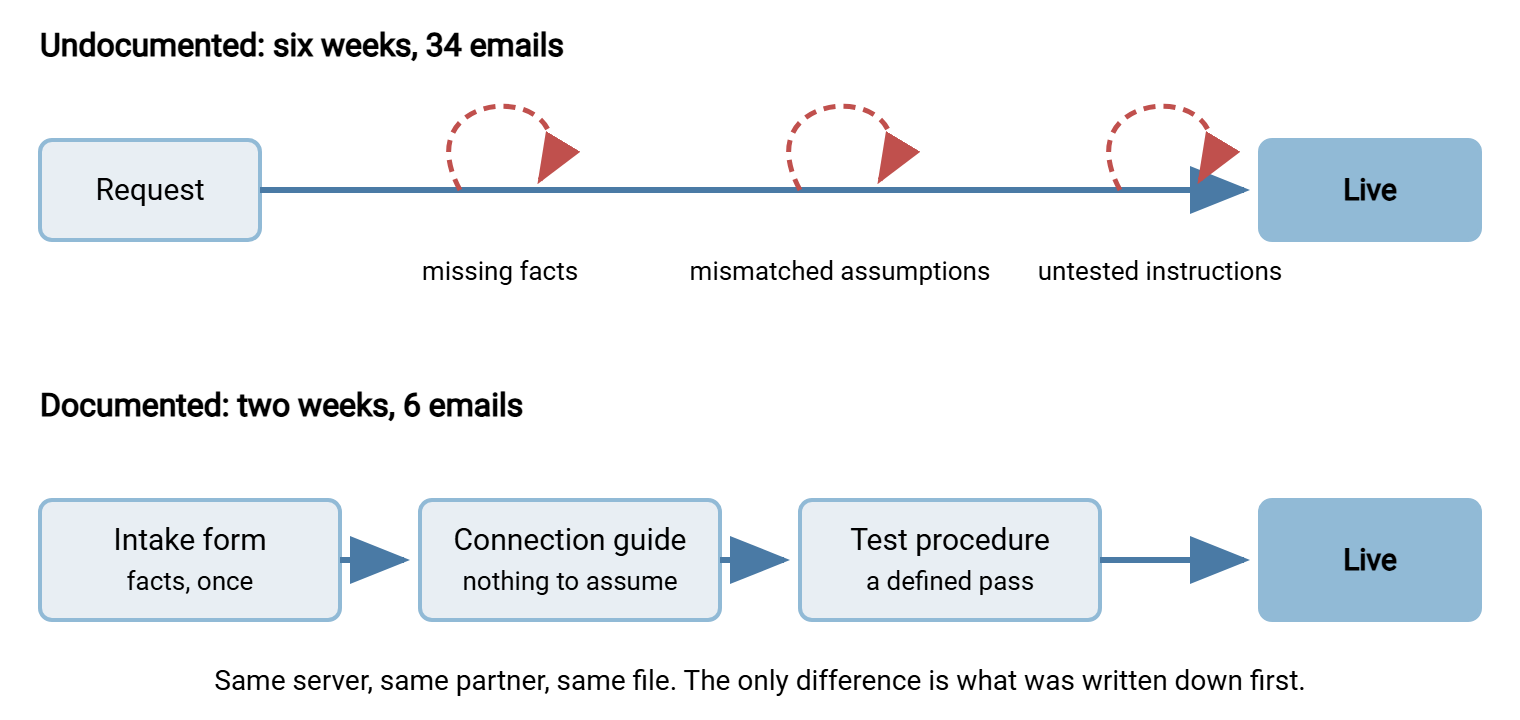
The Same Onboarding in Two Weeks
Now the documented version. Acme has an intake form, a connection guide with blanks for the partner-specific values, and a test procedure. Nothing else has changed: same server, same Meridian Parts, same order file. The timeline below is the template to copy; days are working days and include slack for both sides' queues.
| Day | Acme does | Meridian does | Emails |
|---|---|---|---|
| 1 | Sends the intake form and the generic connection guide in one message, asking for the form back by day 3. | Routes the form to their admin and network team. | 1 |
| 3 | — | Returns the form: push, SFTP, key authentication, public key attached, outbound address 198.51.100.24, contact, schedule. | 2 |
| 4 | Creates account meridian with the key and folders /inbox and /outbox; adds the address to the allowlist. Fills the blanks in the guide and sends it with the test procedure. |
— | 3 |
| 5–6 | — | Runs the test procedure, uploads the named test file to /inbox, and sends the pass evidence: a session transcript and the file listing. |
4 |
| 7 | Confirms the real job picked up the test file. Proposes the go-live date. Records the flow in the inventory. | Books their change window. | 5 |
| 10 | Watches the first live file arrive. Sends the "you are live" confirmation. | Switches the scheduled job to the live file name. | 6 |
Ten working days, six emails, and three of those days are slack for change windows. The test happened on day five instead of day twenty-six. It happened without you, because the partner had a procedure and a definition of pass. Notice what did not happen: nobody sent a password by email, nobody asked for the fingerprint, nobody discovered a folder name by trial. Those questions were answered before they were asked.
If your organization is the one connecting outward, the same documents work in reverse. Ask the partner for their connection guide; if they have none, send them your intake form filled in from your side. A scheduled client such as Sysax FTP Automation needs exactly the facts a good guide contains: host, port, protocol, credentials, fingerprint, and folder paths. It needs them once, at setup, not spread over a month of replies.
A Short Story About a Guide That Was Not Tested
Northgate Retail had a connection guide, which put them ahead of most. When they onboarded Kestrel Payroll, they sent it on day one and felt good about it. Kestrel's admin followed it exactly and reported "Connection refused". Nine emails followed, in which each side's network team examined its own firewall and found it blameless. On day twelve someone at Northgate noticed that the guide listed a server decommissioned during a migration the previous year. The guide's author had since left, and nobody had been told the guide existed. The new address fixed it in ten minutes. Kestrel's admin said it was no trouble, which was generous.
That is the untested-instruction loop in its purest form, and it teaches the rule this series rests on. A document you have not tested since the last change will be tested by a partner, on their time, with your reputation. The maintenance side is covered in keeping partner documentation current.
Where to Start If You Have Nothing
You do not need all five documents to see the benefit. Write them in the order that removes the most days first, starting this afternoon.
- The connection guide. One page, filled in for your server, with placeholders for the partner-specific values. It removes your own assumptions, which you can fix without anyone's help.
- The intake form. Every question you asked the last partner, in the order you should have asked them.
- The test procedure. Follow your own guide from a machine and network that are not yours, writing down each step. The steps are the procedure; whatever went wrong is a correction to the guide.
- The FAQ. The last five questions partners emailed you, plus one entry per new question from now on.
- The maintenance routine. Add one line in the change process. Any change to the server's address, ports, certificates, or keys triggers a guide review and a partner notice.
Two of these can be done before lunch. The rest accumulate from real onboardings, one question at a time, which is how the six weeks accumulated, only in reverse.
Remember: the intake form asks, the connection guide tells, the test procedure proves. Send the first two in one email on day one, and the third as soon as the account exists.
The Version to Tell a Colleague
Partner onboarding takes six weeks because it is conducted as a conversation. Conversations between organizations move at two or three days per exchange. The delay comes from three loops: facts collected one at a time, assumptions discovered by failure, and instructions nobody tested. Each loop has a short document that removes it. Once the documents exist the same onboarding takes two weeks with slack to spare. The server never was the bottleneck. The empty page was.
The next articles write the documents in the order you will need them. The documents are the connection guide, the intake form and checklist, and the self-serve test procedure. For the wider program these documents serve, standards, agreements, and credentials across many partners, see the partner onboarding runbook in our B2B series. If your partners speak AS2 rather than SFTP, the equivalent loops are in trading partner onboarding for AS2.
Frequently Asked Questions
Is six weeks really typical, or is that an exaggeration?
Which document should I write first if I only have time for one?
Why not just get everyone on a call and sort it out in an hour?
What is a fingerprint and why does the partner keep asking for it?
We are the partner connecting to someone else's server. Does this apply to us?
From the Sysax team: we build secure file transfer software for Windows. Sysax Multi Server is an FTP, FTPS, SFTP, and HTTPS server. Sysax FTP Automation handles scheduled, scripted transfers. Free trials are on the download page.