
Why Users Default to Attachments (and What That Teaches You)
Ten to five, and the scanned exhibits are due at outside counsel by five. The folder is fifty megabytes, the mail client is already open, and the lawyer's address is sitting in autocomplete. You know how this ends, because you have read the mail logs. Ask an administrator how files move around the organization and you will hear about the managed side: transfer jobs, partner connections, scheduled batches. Ask how files move between people. That could be a contract to outside counsel, a budget spreadsheet to a colleague, a design file to a printer. The honest answer almost everywhere is email attachments. They carry sensitive documents past every control you have built. They multiply copies into mailboxes you will never audit. They keep doing it no matter how many security briefings the company runs. The briefings, to be fair, are very well attended.
The standard response treats this as a user failing: more training, a sterner policy, a reminder about the policy. This article takes the opposite view. The attachment habit is not a discipline problem. It is the most accurate requirements document you will ever get for free, and it arrives unprompted, in your own mail logs, every afternoon. Every time someone attaches a file instead of using the sanctioned alternative, they are telling you, precisely and honestly, what the alternative got wrong. Learn to read the habit and you will know what a replacement has to do before anyone will switch to it.
This is the opening article of our Person-to-Person Sharing series, which is about building a sharing service people adopt voluntarily. By the end of this piece you will be able to run a friction audit on your current sanctioned path. You will be able to name the seven requirements hiding inside the attachment habit. You will also be able to explain to management why the next attempt must be judged on ease of use first and everything else second. That last conversation is the hard one. The other two are arithmetic.
The Habit Is Optimization, Not Ignorance
People do not attach files because they do not know better. Most of them know perfectly well. They sat through the awareness training; many could recite the risks back to you. They attach anyway, because the attachment is the path that works at the moment of need — a file, a recipient, a deadline. It takes the least thought, the fewest steps, and offers the highest certainty of success. Choosing it is not carelessness. It is optimization, performed instantly, by someone whose job is the deadline and not your architecture.
People under time pressure behave like water: they follow the gradient. A policy is a sign next to the river politely asking it to flow uphill, and it does not matter how well the sign is worded. If you want the water somewhere else, you dig a lower channel. That is the entire strategy of this series compressed into one sentence. The sanctioned path must be at least as easy as attaching a file, or the sanctioned path loses. Not slightly harder with better security. At least as easy — and then secure underneath.
The framing matters because it changes what a project measures. A security-first project asks "is the new service safe?" and ships something safe that nobody uses. That means the organization's real sharing system is still email, and nothing has improved. An adoption-first project asks "will a busy person in another department pick this without being forced?" and layers the security beneath that bar. Safe-but-unused is a failure state that looks like success in a status report; name it early so nobody declares victory over an empty portal. An empty portal has never once contradicted a status report.
The Friction Audit: Count the Steps Honestly
Before designing anything, run this exercise for real, with a stopwatch. Take a genuine task — "get this fifty-megabyte folder of scanned exhibits to an outside lawyer today." Walk it down both paths, counting every step, every decision, and every wait. Count from the user's chair, not the administrator's. And count the recipient's side too, because the sender owns the recipient's pain. If the lawyer cannot open the share, the sender's task is not done, and the sender knows it. Fear of stranding the recipient is one of the strongest quiet forces holding the attachment habit in place. I have watched a sender re-attach the file within a minute of the words "the link won't open", and I would have done the same.
The attachment path is short in a way administrators routinely underestimate. Compose, drag the file in, send. Three actions, perhaps fifteen seconds, and the only decision involved is choosing the recipient — a decision the sender was making anyway. Nothing to learn, nothing to configure, no new browser tab, no credentials to remember. For the recipient it is shorter still: the file is already there, inside the inbox they already live in, stapled to the message that explains it.
Now walk a typical first-generation sanctioned path — the kind many organizations stood up with good intentions and then quietly watched fail. The comparison below is a composite of real deployments, and if it feels uncomfortably familiar, that is the point:
| Step | Attaching a file | A typical first-generation portal |
|---|---|---|
| 1 | Open a new message; drag the file in | Remember the portal exists; dig its address out of an old email |
| 2 | Type the recipient's name | Log in — discover the password expired; reset it; log in again |
| 3 | Press send — done, back to work | Upload the file; puzzle through unfamiliar options |
| 4 | — | Copy the link; switch back to email; paste it; send |
| 5 | — | Recipient hits a login page; emails back asking for an account; waits |
| Total | Three actions, no waits, no accounts, no learning | Eight-plus actions, one password reset, one stranded recipient |
The lesson is not that this portal was badly engineered — it may have been excellent software. The lesson is arithmetic: the sanctioned path costs more than the habit at every step. It delivers its benefits (auditability, control, compliance) to someone other than the person paying the cost. Nobody volunteers for that trade. The diagram below shows the same arithmetic as a picture. The short path ends with the sender back at work. The long path ends with the recipient stuck at a login wall.
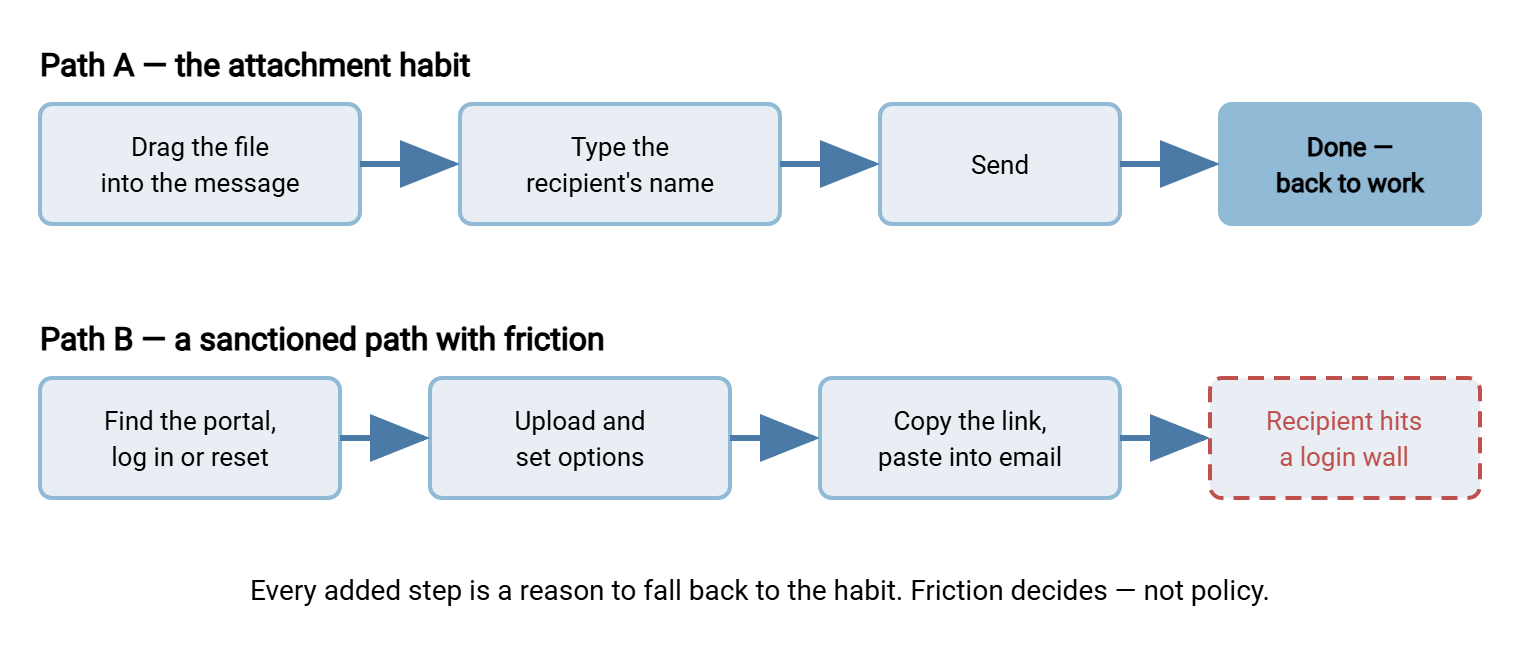
Meridian Parts ran this audit a year after their first portal went live. A mail filter report had prompted it, showing drawing files still leaving as attachments every afternoon. The administrator timed both paths with a real drawing and a real supplier. The attachment took twenty seconds. The portal took four minutes and a password reset. The supplier's first reply was a question about how to log in. Nobody had done anything wrong; the portal had been built to a security checklist, and the checklist had no row for minutes. They wrote the two numbers on the whiteboard in the project room and left them there for the rest of the project. The second portal was designed to the smaller one.
When you run this audit on your own environment, write the numbers down. Memory rounds friction down and virtue up, and the whiteboard does neither. They become the design budget for the replacement: every step in the new path must justify itself against the three-step baseline. The follow-up article on requirements for a sharing service people adopt turns that budget into a concrete, copyable checklist.
Seven Things Attachments Get Right
Treat the habit as a specification and it decomposes into seven distinct strengths. A replacement does not need to beat all seven, but it must consciously match or compensate for each one. Each is a separate reason for someone to fall back to email. Seven reasons, and the sender only needs one.
1. Zero learning. Every employee, contractor, customer, and auditor already knows how to attach a file. The skill came free with knowing email at all. A replacement starts with a training bill; attachments never did. The closer the new flow feels to "pick file, pick person, go," the smaller that bill gets.
2. Any recipient, anywhere. An email address is the one identifier every business counterpart possesses. The sender never wonders whether the recipient "has" email, holds an account, or installed the right software. Cross-company sharing just works — which is exactly where internal-only tools break down and where many sanctioned paths quietly give up.
3. It lives where the work happens. The conversation about the file and the delivery of the file are one act, in one window. Nobody switches applications, and nobody decides "is this a portal-worthy file?" It is a small decision, but small decisions are precisely the friction that kills adoption at scale.
4. The file carries its context. The message explains the file; the file evidences the message. They arrive together and get found together, months later, by searching the mail. A bare link in a separate system loses that pairing unless your service is designed so links travel inside normal messages — which, fortunately, they can.
5. No gatekeepers. Attaching requires no ticket, no approval, no provisioning, and no waiting for anyone in IT. It is fully self-service at the exact moment of need. Any replacement that inserts a human approval into routine sharing has already lost the fight for daily behavior. The approval will arrive. The deadline will not wait for it.
6. It feels reliable. Press send and the mail client says sent; the sent folder holds a permanent copy as a receipt. Delivery may or may not have truly succeeded — anyone who has met a silent size bounce knows it sometimes does not. The feeling of certainty is strong either way. This is one place a good sharing service can genuinely beat the habit, with real download confirmations instead of assumed ones.
7. Free at the point of use. No quota warning, no cost prompt, no "you have three sends remaining." The marginal attachment costs the sender nothing they can see. Replacements with visible per-use limits teach users to ration them — and rationed tools become last resorts.
Notice that none of these seven are security properties. That is the trap of the whole subject: the incumbent wins on everything users experience, and loses only on things users never see. Which is why the replacement conversation has to start with the user's experience, not with the encryption story. Encryption is a fine story. Nobody with a deadline has ever asked to hear it.
Where the Habit Genuinely Breaks
None of this makes attachments good file transfer. They are, by any engineering measure, a poor one — our email-attachments series makes the full case in why email is a bad file transfer tool. The short version, from the administrator's chair:
- The size ceiling. Mail systems cap message sizes, and caps differ at every hop. A file that fits your outbound limit can still bounce at the recipient's — sometimes silently. Our guide to attachment size limits explains why the practical ceiling is lower than anyone thinks.
- Copies multiply beyond recall. One attachment to five recipients becomes a dozen copies across mailboxes, phones, and backup systems, each outside your control forever. The journey of an attachment traces exactly where they all end up.
- No revocation. Sent to the wrong person? There is no taking it back. A mis-sent attachment is an incident; a mis-sent link to a service you control can be killed in seconds. We explore that difference in share links, expiry, and access control.
- No audit trail. "Who has the salary file now?" is unanswerable once it left as an attachment. For anything regulated, that silence is the expensive part.
- Version chaos. Every reply-all spawns another divergent copy of the spreadsheet, and reconciling them becomes somebody's afternoon.
One asymmetry explains most of the user behavior here: of these failures, users personally experience only the first one. The bounce is visible and immediate. The copies, the missing audit trail, and the compliance exposure are invisible to the sender and land on other people, later. When you ask users to adopt a harder path, you are asking them to pay friction today to solve problems they will never personally have. That request fails not because people are careless but because the incentive points the other way — and no amount of scolding rotates an incentive.
Remember: users experience the attachment habit's benefits and almost none of its costs. Any replacement strategy built on lecturing people about costs they never feel will fail. Build a path that is easier at the moment of use, and let the security ride along invisibly.
The Workarounds Are Requirements Too
The habit's second gift is what people do when the attachment path fails them. Watch what happens after a size bounce, because every workaround is a requirement written in behavior instead of words.
Some users split the file into a chain of compressed archives and send five emails — telling you they need large-file capacity with less ceremony. Some sign up for a consumer file-sharing site on a personal account and mail the link. They are telling you they need a link-based handoff that works for any outside recipient. They are also telling you they will accept a browser step when the payoff is obvious. Some copy the file into a personal cloud account that follows them between employers. They are telling you the sanctioned world offered them no self-service space of their own. And some walk a USB stick down the hall, which is a whole risk category of its own. Our companion series on governed alternatives to USB drives and shared-folder chaos reads those habits the same way this article reads attachments.
This is shadow IT — technology adopted by users without IT's knowledge or approval. The productive way to see it is as unmet demand with excellent market research attached. People do not work around tools that meet their needs. An inventory of your organization's sharing workarounds, gathered without blame, is a straight list of the requirements your service must satisfy on day one. (The moment it feels like a witch hunt, the data dries up.)
Reading the Habit as a Requirements Document
Put the strengths and the workarounds together and the requirements list almost writes itself. Each observed behavior translates into a property the replacement must have:
- Works in the browser with nothing to install — because zero-learning, zero-setup is the standard the habit set, for senders and recipients alike.
- Outside recipients need no account and no software — because "any recipient, anywhere" is non-negotiable for person-to-person sharing.
- The handoff travels inside a normal email — a link pasted where the attachment would have gone — because sharing lives in the conversation, not beside it.
- Self-service and instant — no approvals, no tickets, no waiting, or the moment of need will be served by the habit instead.
- Comfortably handles files far beyond mail limits — the bounce is the one failure users already resent; relieving it is your best selling point.
- Confirms delivery honestly — download receipts that beat the sent-folder illusion, giving users something the habit never gave them.
- No visible rationing — quotas and counters teach avoidance.
Underneath that list sits a second one users will never ask for: encrypted transport, real authentication, per-person accountability, logging, retention. That is the security floor, and the discipline of this series is refusing to trade the two lists against each other. The adoption list makes the service used, and the floor makes it defensible. You need both at once. We learned to hold both lists at once the slow way, one quiet portal at a time. The next article, requirements for a sharing service people adopt, develops both lists in full.
What a Matching Service Looks Like
The shape that satisfies the translated requirements is a web transfer portal: a service on your own infrastructure. A sender signs in with the account they already have, uploads a file over HTTPS, and hands the recipient a private link. That link downloads in any browser. The rhythm matches the habit — pick file, get link, paste into the message you were writing anyway. Every transfer now happens on a server you administer, under identities you manage, leaving a log you can answer audits from. The log, unlike the sent folder, does not need to be believed.
This is not exotic infrastructure. A Windows file transfer server such as Sysax Multi Server already serves HTTPS web-based transfers. Users upload and download from any web browser with nothing to install. The server authenticates each person against its own accounts or Windows/Active Directory, and records every action to a log file and database. Its Enterprise edition adds sharing files as private download links, which is precisely the attachment-shaped handoff described above. Because it runs on your own Windows server, the shared files stay on infrastructure you control rather than on a consumer service's terms. How to assemble those pieces — placement, storage, identity, and coexistence with your managed transfer estate — is the subject of designing the internal sharing service.
And because tools do not adopt themselves, the rollout is its own discipline. It means seeding champions, catching users at the moment a bounce makes them receptive, and retiring the old way gently. That playbook is in rolling out the sharing service so people switch. And since a free trial of Sysax Multi Server sits on the download page, staging a small pilot costs you an afternoon, not a budget line.
Attachments You Should Leave Alone
The goal is not zero attachments. A three-page agenda to a colleague, a public brochure to a customer — these are fine as attachments and always will be. Forcing them through a portal is friction with no payoff, and users will correctly ignore you. Our companion piece when attachments are fine draws the line in detail. Draw it explicitly in your policy too, so the rule reads as judgment rather than dogma. Dogma is easy to write and easier to ignore.
The flows worth repointing are the ones where the habit's weaknesses actually bite. These include large files, sensitive content, regulated data, anything that may need revoking, and anything an auditor might ask about. Target those, concede the rest, and your credibility with users — the scarcest resource in any adoption effort — stays intact for the arguments that matter.
The Takeaway: The Habit Is the Spec
Users default to attachments because attachments are genuinely excellent at the parts of sharing that users can see. That means no learning, no accounts, no gatekeepers, no visible cost, context and file traveling together. The habit persists through every policy cycle because policies do not change gradients — easier paths do. Read honestly, the habit hands you a complete specification. Match its ease and relieve its one visible failure. Add the invisible floor of authentication, logging, and control. Deliver the handoff as a link that pastes wherever an attachment would have gone. At ten to five, it is the only specification anyone will consult.
From here, continue with the adoption requirements checklist to turn this analysis into acceptance criteria, or jump ahead to designing the internal sharing service. For the deeper case against the habit itself, why email is a bad file transfer tool is the companion read. When you are ready to move people, the gradual approach in weaning your organization off attachments pairs with this pillar's rollout article.
Frequently Asked Questions
Why do users keep emailing files when we already have a secure portal?
Are email attachments actually insecure, or is that overblown?
Should we just block outgoing attachments?
What is shadow IT?
What is the first practical step toward replacing attachments?
From the Sysax team: we build secure file transfer software for Windows. Sysax Multi Server is an FTP, FTPS, SFTP, and HTTPS server. Sysax FTP Automation handles scheduled, scripted transfers. Free trials are on the download page.