
Designing the Internal Sharing Service
The whiteboard has a box marked "portal", an arrow marked "HTTPS", and a question mark where the storage should be. Someone has written "directory?" in the corner and underlined it twice. This is where most sharing services begin, and it is not a bad place to begin. First, the requirements must be settled: browser-based, nothing to install, outside recipients welcome, big files handled. Underneath is a security floor of authentication, logging, and controlled storage. Once those are settled, someone has to turn the checklist into an architecture. That means five concrete decisions. Decide what platform shape to run and where shared files physically live. Decide how insiders and outsiders are identified and where the service sits on the network. Finally, decide how it coexists with the transfer infrastructure you already operate. The question mark is decision two. The underlining is decision three.
This article walks through each decision in the order you will actually face them. It includes an honest comparison of the four ways organizations typically build the service. A fill-in-the-blanks design worksheet waits at the end. This article is part of our Person-to-Person Sharing series. If you have not read the requirements article, start there. Every choice below is justified against that checklist, especially its first rule. Any design that adds friction over an email attachment will not be adopted, however elegant its diagram. The diagram will be admired. Mostly by the people who drew it.
You Are Building a Service, Not Installing a Server
The distinction matters from day one. A server is a box that runs. A service is a thing people rely on. It has an owner, a front door, a help page, and someone who answers when it breaks. Concretely, the sharing service is six components, and your design has to account for all of them:
- The front door: an HTTPS web portal where senders upload and recipients download — the only part users ever see.
- Identity: how the service knows which person is acting — directory accounts for insiders, links or guest accounts for outsiders.
- Storage: a dedicated area where shared files rest between upload and expiry.
- The record: logging of every upload, share, and download, flowing somewhere queryable.
- Cleanup: the process that removes lapsed shares so the service never becomes an accidental archive.
- Ownership: a named administrator and a one-page help route — because the first stranded recipient defines the service's reputation.
Miss any one of these and the gap surfaces as an adoption problem. No cleanup becomes a full disk becomes failed uploads. No ownership becomes an unanswered ticket becomes "the portal never works, just email it." That verdict, delivered once in a corridor, has a half-life of about a year.
The Shape of the Service
The diagram below shows the architecture that satisfies the requirements checklist with the fewest moving parts. It has one HTTPS front door on a server you run. Employees can reach it and sign in with the directory account they already have. Outside recipients can reach it too, following a private link and signing in to nothing. Behind it are a dedicated share storage area and a log that records every action.
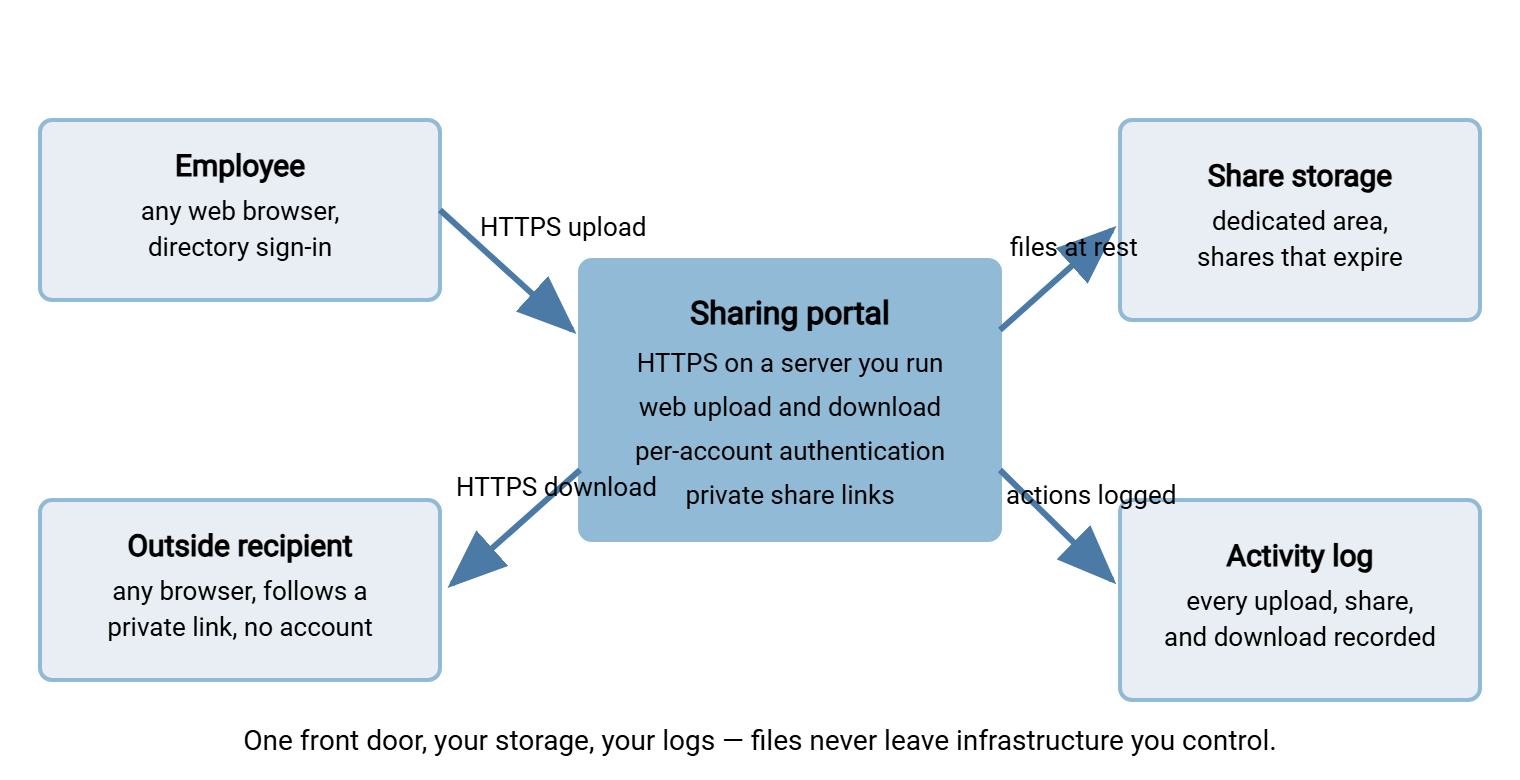
Every architecture decision that follows is a refinement of this picture. Note what is deliberately absent: no client software, no VPN requirement, no second system the sender must visit. The link the portal produces travels inside a normal email, so the sharing rhythm users already have — write message, add file, send — survives intact. The shape also scales gracefully. The pilot version and the whole-company version differ in disk size and monitoring, not in architecture. That means nothing built for the pilot is thrown away later. A pilot you have to rebuild was a prototype with better naming.
Four Ways to Build It, Compared Honestly
Organizations end up with one of four shapes. Each can be made to work. They differ in where the files live and how much effort the standing-up takes. They also differ in how good the audit story is when someone asks hard questions later.
| Option | Where files live | Effort to stand up | Outside recipient experience | Audit story |
|---|---|---|---|---|
| Web portal on a transfer server you host | Your server, your disk, your jurisdiction | Moderate: install, certificate, placement, accounts | Good: browser link, no account | Strong: full logs on your infrastructure |
| Hosted commercial sharing service | Provider's infrastructure, provider's terms | Lowest: sign up and configure | Often excellent | Varies by plan; you audit their reports, not their systems |
| Sharing features of a collaboration platform | Inside the platform, mixed with everything else | Low if already deployed | Often clumsy: guest invitations, sign-in walls | Settings and logs scattered across the suite |
| Custom-built web application | Wherever you put it | Highest, and never really finished | As good as you build it | As good as you build it — and you maintain it forever |
Each option deserves an honest word. The hosted services are genuinely easy and often lovely to use. The cost is that your files rest on infrastructure you neither control nor can fully inspect. For regulated or sensitive content, that turns every audit question into a vendor-management question. The collaboration-platform route looks free but tends to fail the outside-recipient test. Guest access flows are where those platforms are weakest. The collaboration platform's shares also scatter into a governance surface nobody owns. Building your own is a real option for teams with web-security depth. But an internet-facing upload endpoint is a serious thing to own forever. The reasoning for that whole decision class lives in our build vs buy for transfer infrastructure series. Forever, in this context, means well past the departure of whoever wrote it.
The first option is this series' reference shape because it keeps the two properties hardest to retrofit. Those are files on infrastructure you control, and one complete log. It is also less work than it sounds when the portal is a built-in capability of a transfer server rather than a separate product. Sysax Multi Server, for example, serves HTTPS web-based transfers out of the box. Users upload and download from any web browser, nothing to install. This runs alongside the SFTP and FTPS duties you may already run it for. Its Enterprise edition adds sharing files as private download links. That is the person-to-person handoff this whole series is about.
Where Shared Files Live
Give shares their own dedicated storage area — a separate disk or volume. It should not be a corner of an existing file server and emphatically not inside your managed transfer folder tree. The separation is not tidiness; it is what makes three hard things easy later:
- Sizing and containment. Ad-hoc sharing is bursty and big. On its own volume, a viral month of sharing fills the share disk and degrades the share service. It does not take a partner feed or a nightly batch down with it.
- Retention that matches the workload. Shares are transient by design: uploaded, downloaded, expired, gone. Batch and partner files often carry multi-year retention duties. One volume per retention story keeps the cleanup automation simple and safe — a theme developed in where transferred files accumulate.
- Meaningful permissions. Per-user areas under the share root mean one person's shares are never visible to another's account. The portal's view of "my files" also maps to a real folder boundary rather than a filtering rule.
Size the volume with honest arithmetic: expected active sharers, times a generous typical share, times the expiry window. Add headroom for the one team that discovers the service during a video project. I have sized this volume twice and been wrong in the same direction both times. The arithmetic itself is worked through in capacity planning basics. Then decide the backup posture deliberately. Backing up a transient share area can quietly resurrect expired shares inside backup sets. So many designs exclude it from long-term backups entirely and accept that a lost share is re-shared, not restored. Whichever you choose, write it down — this is exactly the kind of question governance for ad-hoc sharing will ask you later.
Meridian Parts learned the separation rule in the second week of their pilot. To save provisioning a volume, the share area had been created as a folder under the managed transfer root. It sat two levels above the supplier watch folders. A permissions slip let one engineer's browser upload land a half-written drawing file inside a supplier's outbound folder. The nightly job picked it up and sent it. The supplier's polite reply the next morning asked why the drawing had no title block. Nothing confidential had moved and nothing was lost, but the room went quiet for a moment. The share area got its own volume that week, and the worksheet at the end of this article gained a line for it.
Identity: Insiders and Outsiders Are Different Problems
Insiders: the directory does the work
Every internal sender should be an individually authenticated account. The fastest route to that — for both adoption and hygiene — is the directory you already run. Day-one access with existing credentials removes the provisioning step that kills adoption. Automatic disablement when someone leaves closes the hole that ad-hoc services are notorious for. On a Windows estate this is a configuration choice rather than a project. Multi Server's per-account authentication can be backed by Windows/Active Directory accounts. That way, the sharing service inherits joiner and leaver handling from processes HR already triggers. Resist shared or departmental accounts entirely. The moment two people share a login, your log's "who" column becomes fiction. Then the audit story built in the next sections falls over. A "who" column that reads "finance-shared" has answered nothing.
Outsiders: a ladder, not a wall
Outside parties need an on-ramp that costs them nothing, so design outsider access as a ladder and default to the lowest rung that meets the need:
- Private download links — the default. The outsider clicks, the browser downloads, no account exists. All control lives server-side: the link can expire, be revoked, and have every use logged. What a link really grants and how to bound it is the entire subject of share links, expiry, and access control done right.
- Guest accounts — for the repeat outside collaborator (the retained counsel, the long-term contractor) who exchanges files monthly. A real account with a real lifecycle: named sponsor, expiry date, periodic review. The hygiene rules are in locking down guest access.
- Inbound drops — when outsiders must send files to you. That flips the risk model. Uploads from strangers need size and type limits, malware scanning, and an eye on abuse, as described in upload drop abuse. And when the outsiders are customers at scale, it becomes a different design problem with its own series: customer-facing file exchange.
Network Placement and the Front Door
The service must be reachable from the open internet — outside recipients are the point — so place and dress it accordingly. Three decisions:
Placement. An internet-reachable service belongs in a screened position, not on the flat internal network: a DMZ. This is the isolated network segment that sits between the internet and your internal network. That way, a compromise of the exposed service does not become a compromise of everything. The reasoning and patterns are in why a DMZ for transfer. If you are a small shop without a formal DMZ, small-org DMZ alternatives shows proportionate substitutes. Expose HTTPS and nothing else; management interfaces stay internal.
The certificate. Recipients will judge the download page in two seconds, and a browser security warning is an instant fail. Use a certificate from a public certificate authority — one every browser already trusts — on a hostname under your organization's own domain. The mechanics are in getting certificates. The certificate's renewal needs a named owner, per certificate and key expiry watch. The design requirement is short: no warnings, ever, for any recipient. A certificate warning is the portal introducing itself as a scam.
The name. Pick a short, guessable hostname under your domain and never change it. The address is part of the product: it appears in thousands of emails, and its familiarity is what makes recipients comfortable clicking. Rename it and you have run a phishing campaign against yourself.
Coexisting with the Managed Transfer Estate
Most organizations standing up a sharing service already run managed transfers — partner feeds, nightly batches, automated drops. Sharing is a different workload wearing the same clothes, and the design must keep them from interfering. Person-to-person shares are human-triggered, transient, and unpredictable. Managed flows are scheduled, contractual, and automated. This is the distinction our fundamentals series draws in transfer vs sync vs share. Concretely:
- Separate folder trees. Humans must never upload into automation watch folders — a half-typed filename or an in-progress upload can trigger a job on a partial file. Share storage and flow storage do not overlap, ever.
- Separate accounts and permissions. Human sharers get no rights over partner or batch areas, and service accounts get none over the share area. Blast radius stays small in both directions.
- Shared logging pipeline. Logging is the one thing that should converge. Portal activity flowing into the same log collection and review you use for managed transfers gives you a single answer to "what moved yesterday?"
- Same server or separate? A small organization can host both workloads on one well-secured server with disciplined separation of areas and accounts. A larger one usually gives sharing its own instance so bursty human traffic, patching windows, and storage growth never threaten contractual flows. Both are legitimate — decide on load and blast radius, not fashion.
Remember: the sharing service exists so humans stop improvising file movement. It fails at that job if it creates new collisions with the automation estate. Keep the storage, accounts, and permissions separate, and let only the logging converge.
Front-Door Details That Decide Adoption
Architecture diagrams hide the four small things users will actually judge, so pin them to the design before anything ships. First comes the upload experience at your promised sizes. Verify, with a genuinely large file on ordinary wireless, that the portal shows progress and fails loudly rather than freezing. "It just hung" is how adoption dies in week one. Upload behavior is a platform behavior you test, not a promise you accept. Second, the download page's contents: your organization's name, who shared the file, its name and size, one obvious button. A recipient should understand and trust the page in a glance. Third come defaults: expiry, notifications, and permissions pre-chosen sensibly, so the routine share asks the sender nothing. The stopwatch tests from the requirements article exist precisely to catch a portal that interrogates its users. Fourth comes the help route: a one-page "how to share a file" guide at a memorable internal address. It is linked from the portal's sign-in page and names a real owner. That is because the first confused user must find an answer faster than they can fall back to an attachment.
The Design Worksheet
Here is the whole architecture as a worksheet. Filling in every line — with real values, not intentions — is a fair definition of "design complete":
SHARING SERVICE DESIGN WORKSHEET
Platform shape:        [ portal on hosted transfer server / hosted service /
                         collaboration platform / custom build ]
Public hostname:       ______________________ (under our domain, permanent)
Certificate:           public CA, expiry monitoring owned by ______________
Network placement:     [ DMZ / screened segment / alternative: ___________ ]
                       exposed: HTTPS only; admin access: internal only
Share storage:         volume/path: ____________  size: ______  headroom: ____
Backup posture:        [ excluded from backup / backed up, expiry-aware ]
Insider identity:      directory-backed accounts via ______________________
Outsider access:       default: private links; guest accounts require sponsor
                       + expiry; inbound drops: limits + scanning
Default share expiry:  ____________ (see the links-and-expiry article)
Logging destination:   ____________________ (file + database, reviewed by ___)
Cleanup process:       [ platform automatic / scheduled job: _____________ ]
Service owner:         ______________  help route: ____________________
A Reference Sketch, and What Comes Next
Put together, the small-to-midsize reference design reads like this. One Windows server in a screened segment runs a transfer server with its HTTPS web portal exposed. The portal uses a permanent hostname under your domain and a certificate from a public CA. Insiders sign in with directory accounts; outsiders receive private download links. Shares rest on a dedicated volume with a default expiry and an automatic sweep. Every upload, share, and download is logged to file and database. These logs are reviewed with the rest of the transfer estate's logs. One named administrator owns the whole thing, help page included.
The design is only half the battle, and the smaller half at that. Next comes the part users feel most directly — getting share links, expiry, and revocation right. Then comes the part most projects skip: a rollout that actually moves people off attachments. If you are weighing candidate platforms against this architecture, run them through the acceptance tests in the requirements article before any of the diagrams above get committed to hardware. The whiteboard can be wiped now. The question mark did its job.
Frequently Asked Questions
Can the sharing service run on the same server as our SFTP flows?
Why not just use the sharing built into our collaboration platform?
Does the share storage area need to be backed up?
What is a DMZ and do I really need one for this?
Should the portal be behind our VPN instead?
From the Sysax team: we build secure file transfer software for Windows. Sysax Multi Server is an FTP, FTPS, SFTP, and HTTPS server. Sysax FTP Automation handles scheduled, scripted transfers. Free trials are on the download page.