
Cleaning Up Temp Files, Partials, and Orphans
List a busy partner folder at three in the afternoon and read it honestly. Half the entries end in .part. Three are .done markers whose data left last week. One is a lock file from a job that crashed in the spring, and four are folders with nothing in them. Not everything on a transfer server is a file somebody meant to keep. Uploads get interrupted and leave a half-written file behind. Clients write to a temporary name and never get around to the rename. Marker files outlive the data they described. Lock files survive the crash of the job that created them. Empty folders accumulate from sessions that created them and uploaded nothing. None of this is data, and all of it eats space, confuses collectors, and makes directory listings lie.
The age-based cleanup job from the previous article cannot handle these on its own, because age is the wrong question. A temporary file from a stalled upload is worth removing after a day; a completed file with the same age is not. Age alone cannot tell them apart. This article is about recognizing each kind of leftover by evidence. That means age, whether anything has it open, whether its size is still changing, and what its name says. Then comes removing it in a way that can never delete something still being written. That last requirement is the whole design; the rest is detail.
This article is part of our Quotas and Automated Cleanup series, and it sits downstream of another one. Our partial-file safety series covers how partial files come to exist in the first place, and how well-designed uploads avoid leaving them. Start with why partial files happen. This article is about cleaning up after the ones that happen anyway, which is every flow, eventually.
The Leftovers, Named
Each kind of leftover has a different cause and a different safe way to recognize it, so the vocabulary matters. Most were temporary once. Several have since had birthdays.
- A temporary file is one an uploader writes under a working name —
report.csv.part,report.csv.filepart,.report.csv.tmp,~report.csv. The uploader renames it to its final name when the upload completes. If the upload never completes, the temporary name stays. This is the easiest leftover to recognize, because the name announces it. - A partial file is an incomplete upload that carries its final name, because the client wrote directly to that name and the connection dropped. It looks exactly like a real file, only shorter. This is the hardest leftover, and often the right answer is to quarantine it, not delete it.
- An orphan is a file whose partner is missing. A marker file such as
report.csv.donewith noreport.csvis an orphan. So is a data file whose expected marker never arrived. So is a temporary directory created for an upload session that ended without producing anything. - A zero-byte file is a file with no content — usually an upload that was opened and abandoned before any data arrived. Beware: some marker files are legitimately zero bytes.
- A stale lock is a lock file left by a job that crashed. Lock files exist so two runs of a job do not overlap; a stale one blocks every future run until someone removes it.
- An empty directory is what remains after an uploader created a folder and never filled it, or after a cleanup removed everything inside.
The table below is the policy this article builds: how each leftover arises, what evidence identifies it, and how old it must be before removal. Adapt the ages to your own flows.
| Leftover | Evidence required | Minimum age | Action |
|---|---|---|---|
| Temporary name | Name matches a known pattern; not open; size stable | 1 day (3 to 7 if clients resume) | Quarantine, then purge |
| Partial with final name | Server log shows a dropped session for that upload; size below expected | 1 day | Quarantine and notify the sender |
| Orphaned marker | Marker present, data file absent | 1 day | Quarantine |
| Data without marker | Flow requires a marker and none arrived | 7 days | Quarantine and notify |
| Zero-byte file | Size 0; not a marker name; not open | 1 day | Quarantine, then purge |
| Stale lock | Process named in the lock is not running | Twice the job's longest normal run | Delete and alert |
| Empty directory | Empty; not a structural folder such as inbox or outbox | 7 days | Delete |
The Rule That Overrides Everything Else
Never remove a file that something is still writing. Every other rule in this article is subordinate to that one, because deleting an in-flight upload does not merely lose the file. It corrupts a transfer that the sender believes succeeded. The damage surfaces hours later as a support ticket with no obvious cause.
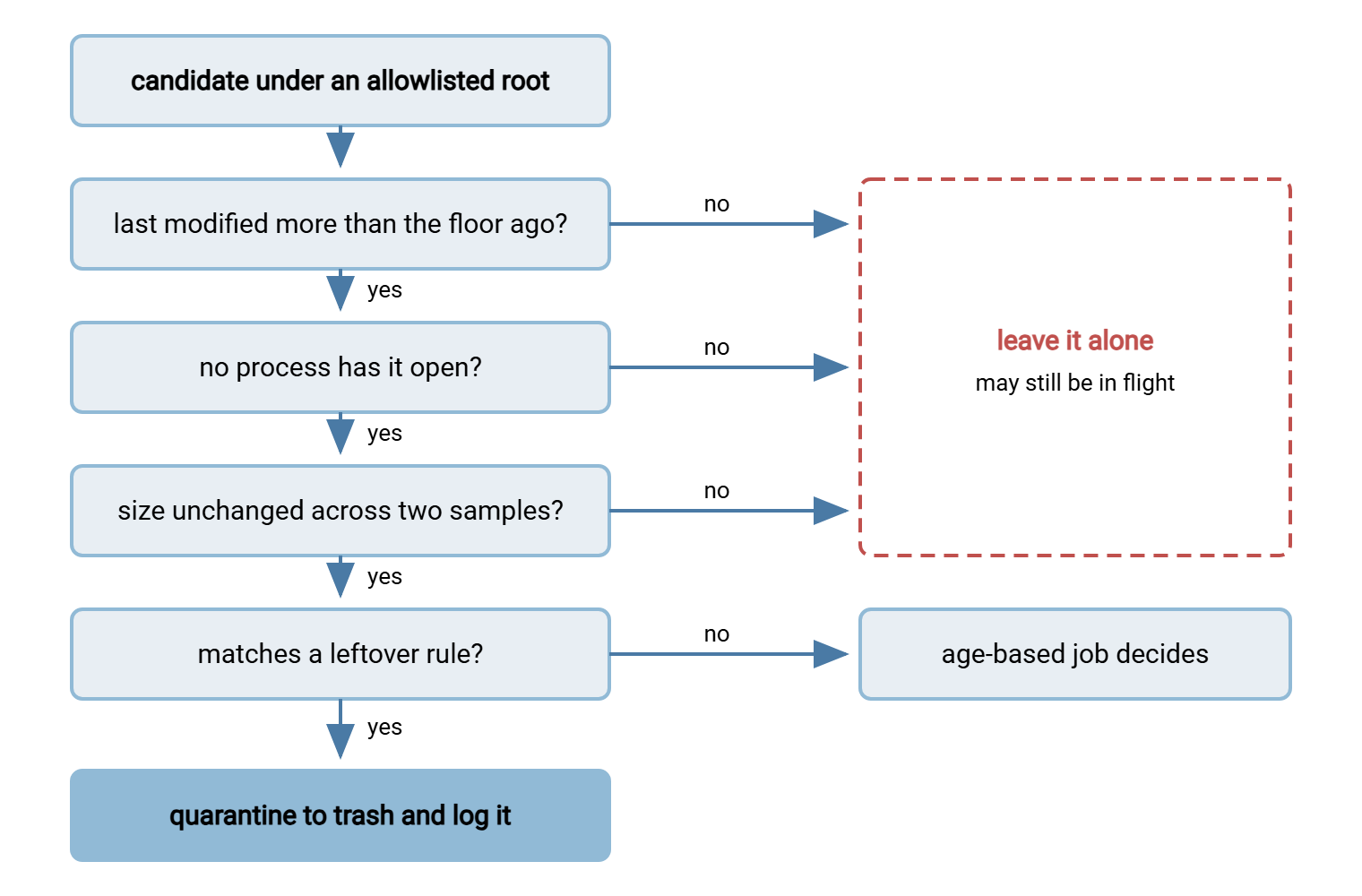
No single test proves a file is finished, so the sweep requires several to agree, in this order:
- Age since last modification is beyond a floor. An upload in progress is being modified every few seconds; a file untouched for a day is either finished or abandoned.
- No process has the file open. An upload in progress holds an open handle. An abandoned one, after the session times out, does not.
- Size is stable across two samples a few minutes apart. Cheap, and it catches the slow uploader whose handle check somehow passed.
- The name or state matches a leftover rule from the table. A file that passes the first three tests but matches no rule is simply an old file, and belongs to the age-based job, not this one.
The diagram shows the order. A file that fails any of the first three tests is left alone; only one that passes all three and matches a rule is quarantined.
Detecting an Open Handle
The open-handle test is the one most administrators skip because it seems hard. It is not. I skipped it for years on exactly that assumption.
On Linux, lsof lists the processes that have a given file open, and fuser does the same more tersely. Either exits with a non-zero status when nothing has the file open, which makes them easy to use in a script:
$ fuser -v /srv/xfer/partners/acme/outbox/extract_YYYYMMDD.csv.part
                                      USER        PID ACCESS COMMAND
/srv/xfer/partners/acme/outbox/extract_YYYYMMDD.csv.part:
                                      acme      18342 F.... sftp-server

$ lsof -t /srv/xfer/partners/acme/outbox/extract_YYYYMMDD.csv.part
18342
$ echo $?
0
The F in the access column means the process has the file open. The command column says it is an SFTP session, and the PID identifies which one. An abandoned upload shows nothing here — the session died and its handle went with it. In a script, if lsof -t "$F" >/dev/null; then skip; fi is the whole test.
On Windows, the reliable test is to try opening the file with exclusive sharing. If any other process has it open in any mode, the attempt fails with an IOException, which is precisely the answer you want. (The built-in openfiles command only reports local handles after a system-wide setting is enabled and the server rebooted, so scripts should not depend on it.)
function Test-FileOpen([string]$Path) {
    try {
        $fs = [System.IO.File]::Open($Path, 'Open', 'ReadWrite', 'None')   # 'None' = share with nobody
        $fs.Close()
        return $false          # we got exclusive access: nothing else has it open
    } catch [System.IO.IOException] {
        return $true           # someone else holds a handle
    }
}

PS> Test-FileOpen "D:\xfer\partners\acme\outbox\extract_YYYYMMDD.csv.part"
True
One caution for both platforms: a client that lost its network connection may leave the server-side session alive until the server's idle timeout expires. In that case, the handle stays open until then. That is why the age floor comes first. A file untouched for a day whose handle is still open is a stuck session worth investigating, not a file to delete.
Recognizing Each Leftover Safely
Temporary names
Find out what temporary naming your uploaders actually use. Look at a busy outbox during the day, or at the server log, and list the patterns explicitly. Common ones are *.part, *.filepart, *.tmp, *.partial, names beginning with a dot or a tilde, and a client-specific prefix or suffix. Every client has its own convention, and each is confident it is the standard. Conventions and the atomic rename that should follow are covered in temp names and atomic renames.
The minimum age depends on whether clients resume. If a partner's tool can resume an interrupted upload, its .part file is not garbage; it is a checkpoint. In that case, removing it after a day forces a full re-send. For those flows, use a floor of three to seven days and say so in the partner agreement. We learned that one the slow way, by making a partner re-send a very large file. Where resume is not in use, one day is generous. Our resume and checkpoint restart series explains which clients do what.
Partials with final names
A file that was written straight to its final name and cut off is indistinguishable from a complete file by name or age. The evidence has to come from elsewhere: the transfer server's log. A server that logs each session, such as Sysax Multi Server, records whether the upload for that name ended in a completed transfer or a dropped connection. That log line is the proof. A second signal is size: if the flow provides an expected size or a checksum manifest, a mismatch identifies the partial. Without either, the honest answer is that a cleanup job cannot know. In that case, the file should be left for a human or for the flow's own validation step.
When the log does prove a partial, quarantine it and tell the sender. Do not silently delete it: the sender believes the file arrived, and only a notification corrects that belief.
Orphaned markers and unmarked data
Flows that use marker files — an empty report.csv.done that says "report.csv is complete" — produce two kinds of orphan. A marker with no data file usually means the data was collected and removed but the marker was forgotten. After a day, that marker is safe to quarantine. A data file whose marker never came, in a flow that requires one, means the sender's job failed between the two writes. In that case, wait longer — a week — because the sender may still complete the pair. Then quarantine and notify. The design of marker flows is in marker and control files.
Zero-byte files
An empty file older than a day with no open handle is almost always an abandoned upload. But check the name against the marker patterns first, because marker files are often zero bytes by design. A sweep that removes every empty file removes every .done marker on the server, and every collector that waits for markers stops collecting.
Stale locks
A lock file should contain the process ID and host of the job that created it. A lock is stale when two conditions hold. That process no longer exists — kill -0 "$PID" on Linux or Get-Process -Id $pid on Windows answers that. The lock is also older than the job could plausibly run. Remove it and alert, because a stale lock means a job crashed, and someone should know. Lock design is covered in locking and overlap prevention.
Empty directories and abandoned session folders
Uploaders that create a folder per session, or per date, leave empty directories behind. Remove them only when they are empty and older than a week. Never remove the structural folders — the partner root, inbox, outbox, archive — even when empty, because collectors and permissions depend on them. The find incantation is find "$ROOT" -mindepth 2 -type d -empty -mtime +6 -print (then -delete). The -mindepth 2 option skips the structural folders directly under the root. The -empty option matches only directories with nothing in them. The -mtime +6 option means at least seven days since the directory last changed.
Gotcha: a directory's modification time changes whenever a file inside it is created or removed. A folder that became empty when the age-based job removed its last file has a fresh modification time. So it will not match -mtime +6 for another week. That is fine — it is a feature, not a bug — but it explains why empty folders linger a while after a cleanup.
A Leftover Sweep for Linux
The script below implements the table's temp-name, zero-byte, and empty-directory rules with the open-handle and size-stability tests. It quarantines into the same per-run trash design as the age-based job. It is a dry run unless DRY_RUN=0.
#!/usr/bin/env bash
# sweep-leftovers.sh  -  quarantine temp names and zero-byte files; remove empty dirs.
set -euo pipefail
DRY_RUN="${DRY_RUN:-1}"
ALLOWED=(/srv/xfer/partners/acme/outbox /srv/xfer/partners/northwind/outbox)
TEMP_FLOOR_MIN=1440           # 1 day, in minutes (use 4320-10080 where clients resume)
MARKERS='\.(done|ok|ready)$'  # zero-byte names that are markers, never garbage
LOG=/var/log/xfer-sweep.log
RUN="sweep-$(date +%m%d-%H%M)-$$"
log() { printf '%s %s %s\n' "$(date '+%b %d %H:%M:%S')" "$RUN" "$*" | tee -a "$LOG"; }

quarantine() {   # $1 = file, $2 = reason
    if lsof -t "$1" >/dev/null 2>&1; then log "SKIP open-handle $1"; return; fi
    local s1 s2; s1=$(stat -c %s -- "$1"); sleep 120; s2=$(stat -c %s -- "$1")
    [ "$s1" = "$s2" ] || { log "SKIP size-changing $1"; return; }
    if [ "$DRY_RUN" = 1 ]; then log "WOULD-QUARANTINE $2 $1 size=$s1"; return; fi
    local rel="${1#"${ROOT:?}"/}"; mkdir -p "$ROOT/.trash/$RUN/$(dirname "$rel")"
    mv -n -- "$1" "$ROOT/.trash/$RUN/$rel" && log "QUARANTINED $2 $1 size=$s1"
}

for ROOT in "${ALLOWED[@]}"; do
    [ -d "${ROOT:?}" ] || { log "SKIP root missing: $ROOT"; continue; }
    # Temporary names, untouched for at least the floor.
    find "$ROOT" -path "$ROOT/.trash" -prune -o -type f -mmin +"$TEMP_FLOOR_MIN" \
        \( -name '*.part' -o -name '*.filepart' -o -name '*.tmp' -o -name '.*' \) -print0 |
    while IFS= read -r -d '' F; do quarantine "$F" temp-name; done
    # Zero-byte files that are not markers.
    find "$ROOT" -path "$ROOT/.trash" -prune -o -type f -empty -mmin +"$TEMP_FLOOR_MIN" -print0 |
    while IFS= read -r -d '' F; do
        [[ "$F" =~ $MARKERS ]] && { log "SKIP marker $F"; continue; }
        quarantine "$F" zero-byte
    done
    # Empty directories below the structural level, a week old.
    if [ "$DRY_RUN" = 1 ]; then
        find "$ROOT" -mindepth 2 -type d -empty -mtime +6 -not -path "$ROOT/.trash/*" -print | sed 's/^/WOULD-RMDIR /' | tee -a "$LOG"
    else
        find "$ROOT" -mindepth 2 -type d -empty -mtime +6 -not -path "$ROOT/.trash/*" -print -delete | sed 's/^/RMDIR /' | tee -a "$LOG"
    fi
done
The two-minute settle wait runs once per candidate, which is fine for the handful of leftovers a healthy server produces. If a sweep regularly finds dozens, record every size first, wait once, and compare. A dry run reads like this, and the SKIP lines are as important as the rest — they are the rails working:
Mar 14 03:00:02 sweep-0314-0300-20417 SKIP open-handle /srv/xfer/partners/acme/outbox/extract_YYYYMMDD.csv.part
Mar 14 03:02:04 sweep-0314-0300-20417 WOULD-QUARANTINE temp-name /srv/xfer/partners/acme/outbox/.invoice_YYYYMMDD.pdf.tmp size=734003200
Mar 14 03:02:04 sweep-0314-0300-20417 SKIP marker /srv/xfer/partners/acme/outbox/orders_YYYYMMDD.csv.done
Mar 14 03:04:06 sweep-0314-0300-20417 WOULD-QUARANTINE zero-byte /srv/xfer/partners/acme/outbox/manifest.csv size=0
WOULD-RMDIR /srv/xfer/partners/acme/outbox/session-4f2a
The Windows equivalent follows the same shape with Get-ChildItem and the Test-FileOpen function above. It uses a two-minute Start-Sleep between two Length readings, and Move-Item into the trash folder. The age-based article's PowerShell script is the template to extend. Whichever platform, the trash purge from that article handles what the sweep quarantines — one trash design, one purge, one log. Two trash designs is how you end up with three.
Quarantine, Report, Then Purge
Leftovers go to the trash folder rather than straight to deletion for the same reason aged files do: a week of reversibility costs nothing. But the report matters more here than for aged files, because a leftover is evidence of something going wrong upstream. A hundred .part files from one partner in a week means that partner's uploads are failing. A daily orphaned marker means a collector has a bug. A stale lock means a job crashed. The sweep's summary — counts by reason, by partner — belongs in front of a person. The patterns that turn those counts into alerts are covered in monitoring quotas and cleanup jobs. Read that way, the trash folder is the most honest report on the server.
Northgate Retail learned how much leftovers weigh when the disk alert on their transfer server fired and nothing in the live folders explained it. (The hunt itself is the subject of finding what ate the disk.) The first dry run of a sweep like the one above listed just over four hundred .part files under one partner's folder. The oldest was nearly a year old. Together, they held more space than that partner's real data. The partner's upload tool had been dropping the connection at the same point for a year. It had been retrying from the start under a fresh temporary name and eventually succeeding, so nobody on either side had complained. The sweep quarantined the lot, the disk alert cleared, and the partner fixed the timeout the same week. Those files had never been in flight; nobody had ever asked them.
Wrapping Up
Leftovers are recognized by evidence, not age alone. That might be a temporary name, an empty file that is not a marker, or a marker with no data. It might be a lock whose process is gone, or a directory with nothing in it. Before touching any of them, the sweep proves the file is not in flight — old enough, no open handle, size stable. Then it quarantines rather than deletes, so a wrong guess is a move back. Partials with final names are the exception: only the server log can identify them, and they deserve a notification, not a silent removal.
The companion article, age-based cleanup jobs that do not bite, supplies the trash-and-purge design and the safety rails this sweep reuses. For the upstream fixes that stop leftovers being created — temp names, atomic renames, settle checks — the partial-file safety checklist is the place to start. The aim is a folder listing you can read at three in the afternoon and believe.
Frequently Asked Questions
How can I tell whether a file is still being uploaded?
How old should a .part file be before I remove it?
Is it safe to delete every zero-byte file?
How do I recognize a partial upload that has its final file name?
Why do empty folders survive a cleanup for another week?
From the Sysax team: we build secure file transfer software for Windows. Sysax Multi Server is an FTP, FTPS, SFTP, and HTTPS server. Sysax FTP Automation handles scheduled, scripted transfers. Free trials are on the download page.