
Timing and Handoffs Between Independent Systems
Two systems that exchange files share exactly one thing: the file. They do not share a scheduler, a clock, a maintenance calendar, or an operator. The producer's job fires when the producer's scheduler says so. The consumer's job fires when the consumer's says so. The handoff between them works only because someone once arranged the two timetables. The arrangement means that, on a normal night, the file exists before anyone comes looking for it.
That phrase — on a normal night — is where cross-system timing problems live. The arrangement is not a mechanism; it is an inference. Data grows and the producer runs long. A clock drifts. A daylight-saving shift moves one side's local time and not the other's. A reboot swallows a scheduled run. Nothing is broken on either system, and yet the consumer processes yesterday's file, or nothing. The failure surfaces two systems downstream at nine in the morning.
This article — part of our Server-to-Server Exchange Patterns series — is about making handoffs survive abnormal nights. It covers the four handoff patterns and when each fits, and how much slack a timetable needs and how to budget it. It covers the ways clocks and timezones quietly lie, and what timing looks like when handoffs stack into chains.
Schedule Coupling, and Why It Breaks
Schedule coupling is the default arrangement: the consumer's start time is chosen relative to the producer's expected finish. The extract job on billing-02.example.com finishes around 02:10, so the collection job on the staging leg runs at 02:30. The ERP load starts at 03:00. Nobody wrote the dependency down; it is encoded as a twenty-minute gap between two numbers in two schedulers on two machines.
The arrangement has one failure mode with many triggers: the gap stops being enough. The classic version is gradual. An extract that took eighteen minutes for years takes thirty-five as data grows, then sixty on the night of a quarter-end batch. The 02:30 collection now runs while the file is half-written or absent. One abrupt version is a retry (the producer failed at 02:05 and succeeded at 02:40 on its second attempt). Others are a slow network, a backup window colliding, or the producer's server rebooting for patches at exactly the wrong moment.
What makes schedule coupling dangerous rather than merely fragile is that its failures are silent by default. The consumer's job at 02:30 does not error when the file is missing. Worse, it may find and happily process the previous day's file if names or folders allow it. The defenses are threefold, and they compound. Give the timetable real slack (a later section budgets it). Make every file's completeness and identity unambiguous (temp names and datestamps). Add a check that notices absence. But the deeper fix is to stop inferring readiness from the clock and start signaling it — which is what the handoff patterns are about.
The Four Handoff Patterns
Every cross-system handoff, whatever the tooling, is one of four patterns. They differ in how the consumer learns the file is ready — and in how gracefully they absorb a producer running late.
Pattern 1: the blind schedule. Producer runs at one time, consumer at a later time, and the gap is the whole mechanism. Cheapest to build, fine for forgiving flows, and the source of most timing incidents. If you use it, use it honestly: size the gap against the producer's worst night, not its typical one. Pair it with a freshness check so absence gets noticed.
Pattern 2: schedule plus completeness signal. The consumer still runs on a schedule, but before consuming anything it verifies the file is complete and current. It can do this because the producer uploads under a temporary name and renames only when done (the atomic rename pattern). Or the producer writes a small marker file after the data file. Also, the file's name carries its date token so yesterday's file cannot impersonate today's. This removes the worst outcomes — consuming partial or stale files — but a late producer still means a missed cycle.
Pattern 3: the polling window. The consumer wakes at the earliest plausible time and checks repeatedly — every ten minutes, say — for the ready file. It consumes the file as soon as it appears and raises an alarm only when the window closes empty. This is the workhorse pattern for batch handoffs. It tolerates a producer that is minutes or an hour late and converts "file never came" into a defined alert at a defined time. It needs nothing but a loop and a clear window end. Its only real cost is polling's inherent latency and a little scheduler configuration.
Pattern 4: the event trigger. The arrival itself starts the next step. On the receiving endpoint, a watch folder or server-side trigger fires when the upload completes. The mechanics are covered in the hot folder pattern. The handoff latency drops from minutes to seconds. This is the right pattern when files appear at unpredictable times or when downstream steps should begin immediately. It demands the most care in return: an arrival trigger must fire on complete arrivals only. This is exactly the ground covered by arrival contracts and debouncing. On a Windows receiving endpoint, the editions of Sysax Multi Server with event triggers can run a program or script the moment a file arrives on the server — validation, a move, a notification. On the client side, folder monitoring in Sysax FTP Automation watches a local directory and launches the transfer as soon as a new file lands in it.
| Pattern | Handoff latency | Tolerates late producer? | Build cost |
|---|---|---|---|
| Blind schedule | The full gap | Only within the gap — silently otherwise | None |
| Schedule + completeness signal | The full gap | Fails safe (skips), but misses the cycle | Low — naming discipline |
| Polling window | Up to one poll interval | Yes, across the whole window, with an alarm at the end | Low-moderate |
| Event trigger | Seconds | Yes — fires whenever arrival happens | Moderate — debouncing care |
A sensible estate mixes them: event triggers where latency matters, and polling windows for the nightly batch handoffs. It uses completeness signals everywhere as cheap insurance — and blind schedules only where a miss is genuinely harmless.
Slack: Budgeting the Space Between Deadlines
Slack is the deliberate spare time between one side's worst realistic finish and the other side's start. The word worst is the entire discipline. Most timetables are built from typical durations because those are the ones people remember. A slack budget is built from three harder numbers: the worst observed duration, the time one full retry cycle takes, and the downstream deadline worked backwards.
Here is the budget for a nightly flow, in a form you can copy:
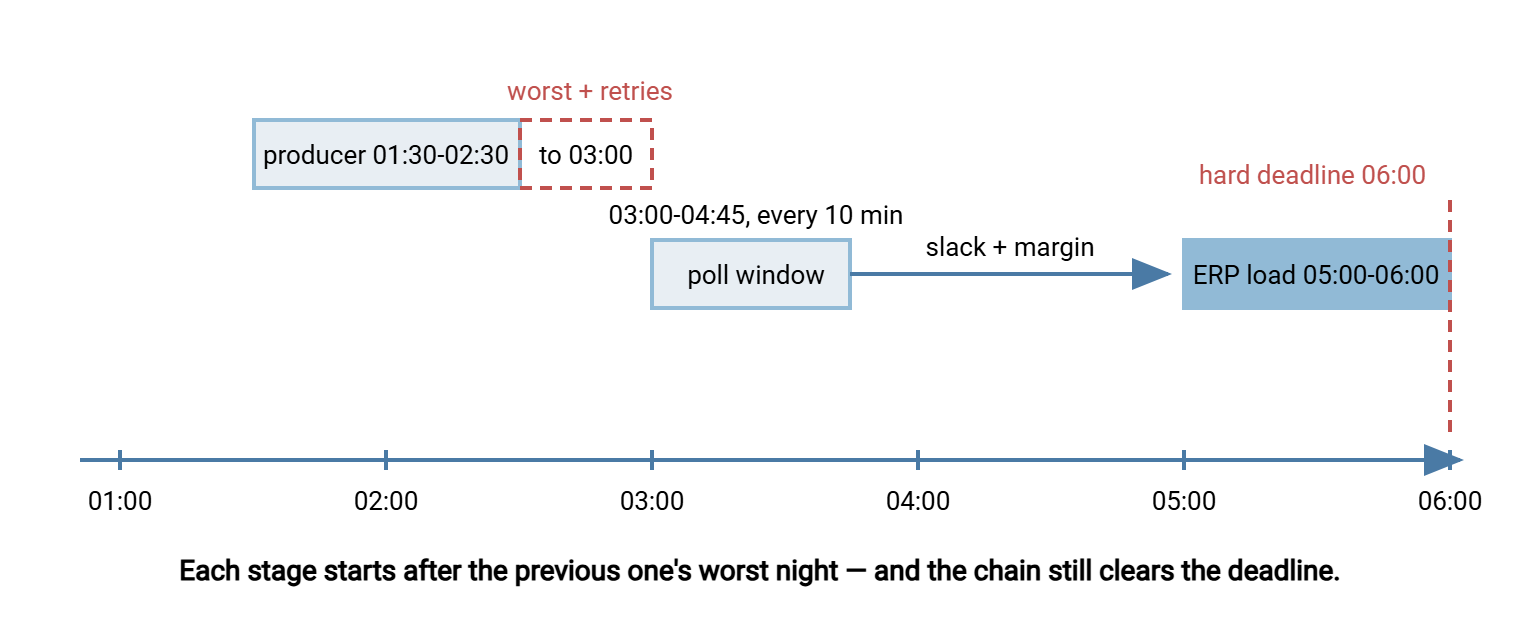
SLACK BUDGET — billing extract to ERP load, nightly
Hard deadline:            ERP figures ready by 06:00
ERP load takes:           worst 55 min  ->  ERP load must start by 05:00
Collection leg takes:     worst 10 min  ->  collect by 04:45 (15 min margin)
  => consumer polling window: 03:00 to 04:45, poll every 10 min

Producer job starts:      01:30
Producer duration:        typical 20 min, worst observed 60 min -> done by 02:30
One retry cycle:          3 attempts x 10 min spacing ~= 30 min -> done by 03:00
  => producer's committed deadline: file on staging by 03:00

Slack in the design:      poll window opens at 03:00 (producer's worst + retries),
                          window closes 04:45, deadline margin 15 min at each hop
Escalation:               04:45 empty window -> page both teams, decision by 05:00
                          (run ERP load with yesterday's file, or hold)
Three habits make budgets like this trustworthy. First, use observed worsts, not guesses — arrival times live in transfer logs, and an hour with those logs beats any estimate. Second, include a full retry cycle on the producing leg. A transient failure at 02:00 that succeeds on the third attempt is a routine night, not an incident, and the timetable should absorb it. The interplay is covered in retry strategies and backoff. Third, write the escalation line: the moment slack runs out, a human gets a page and a pre-agreed decision. That is because the worst version of a timing failure is one where nobody has decided what to do at 05:00.
The diagram below shows the same budget as a timeline — the poll window opening after the producer's worst night plus retries, and the whole chain still clearing the deadline.
Clocks Lie: Drift and Timezone Honesty
Everything so far assumed both machines agree what time it is. They often do not, in two distinct ways.
Clock drift is the mundane one: an unsynchronized clock wanders, seconds becoming minutes over months. A scheduler on a drifted machine fires early or late relative to the rest of the estate, quietly eating slack from one side of every gap. Drift also corrupts evidence — comparing a file's timestamp from one system with a log entry from another is only meaningful if both keep honest time. The fix is not vigilance but plumbing. Every machine in a transfer chain synchronizes to a time service (NTP — the standard protocol that keeps computer clocks aligned). A machine that cannot be synchronized gets extra slack on both sides of its handoffs.
Timezones are the interesting one. Schedulers fire in local time. When producer and consumer sit in different zones, the words "the file lands at 02:30" are dangerously incomplete — whose 02:30? Twice a year, daylight-saving shifts make it worse: one side's local schedule jumps an hour. The other side's may not (different regions shift on different dates, or not at all). For a few weeks the carefully budgeted gap is an hour shorter — or the handoff order silently inverts. Every administrator who runs cross-zone flows eventually collects a story about the night an hour vanished.
The defenses are conventions, and they cost nothing when adopted early:
- One reference timezone per estate — usually the hub's or head office's. Every folder contract, deadline, and escalation time is written in it, with local translations noted where operators need them.
- Date tokens in file names follow the reference zone, so the file named for a given day means the same day on every system. The conventions in datestamp formats that sort apply directly. Midnight-crossing flows are the trap: a job finishing just after midnight local time can stamp "today" what the consumer considers "yesterday."
- Logs carry one consistent zone across the estate, so reconstructing a night's timeline does not require arithmetic at 07:00 during an incident.
- Schedule nothing inside the shift hours. Keep jobs out of the small window where local clocks jump, and review cross-zone timetables in the weeks the two regions are out of step.
Remember: slack budgets are written in ideal time, but schedulers fire in local time on imperfect clocks. NTP everywhere, one reference timezone in every contract, and no scheduled work during shift hours — those three conventions are cheaper than any incident they prevent.
Chains: When Handoffs Stack
Real flows are rarely one handoff. The warehouse extract feeds the ERP, whose processed output feeds the BI load. That means two handoffs, three schedulers, and an end-to-end deadline that must contain every stage's worst night plus every gap. Chains change the timing math in three ways.
First, slack compounds or it doesn't exist. If each hop is budgeted against its worst case, the chain's total duration looks alarmingly long on paper — and that paper number is the truth. Chains that look efficient are usually chains where someone budgeted typical durations, meaning the end-to-end deadline holds only when every stage has a good night simultaneously.
Second, misfires propagate. A missed run is invisible at the hop where it happened and expensive three hops later. That can happen because a reboot swallowed a scheduled task, or a scheduler was down at fire time. Two disciplines contain it. The first is schedulers configured to run missed jobs on recovery (the subject of surviving reboots and misfires, with platform specifics in cron vs Task Scheduler). The second is a freshness check at every hop — not just the end. That way, a missing intermediate file raises its alarm at 02:40, not at 08:00. The technique is in freshness checks and expected files.
Third, the chain needs an owner. Each hop's team knows its own timetable; nobody necessarily owns the sum. Someone must hold the end-to-end picture — the map of stages, budgets, and escalation lines — and decide the catch-up story. When the chain misses a night entirely, does the next run process two days of data, or does someone re-fire the stages by hand in order? Deciding that in daylight, before the first miss, is most of the value. In estates where the whole night is one interlocking chain of feeds and loads, this becomes its own operational world. Our nightly batch ecosystems series lives there.
Watching the Timetable
A timing design is finished when its failures are observable. That means three modest pieces of machinery. A freshness check per handoff, alarming when a window closes empty — never on individual retries, which are routine. Notifications must reach the right team at the moment of the escalation line. The initiating side's tooling usually provides this, as with the email notifications Sysax FTP Automation sends when a scheduled transfer task fails. And there is an occasional timetable audit. Once a quarter, pull the actual arrival times from the transfer logs, compare them to the budget, and re-tune.
The audit needs almost no tooling — just arrival timestamps collected over time. A month of lines like these tells you more about a flow's real behavior than any design document:
Mar 10 02:14  invoice file arrived  (budgeted by 03:00)
Mar 11 02:19  invoice file arrived
Mar 12 02:52  invoice file arrived  <- retry night, still inside budget
Mar 13 02:16  invoice file arrived
Mar 14 03:41  invoice file arrived  <- budget breached, poll window absorbed it
A creeping trend in those numbers is the early warning that a producer is slowing down. The Mar 14 entry is a prompt to ask why before the window stops absorbing it. Producers slow down gradually; slack erodes silently; the audit is how the timetable stays honest as the estate ages.
The Timetable Is a Contract
Between independent systems, timing is not configuration — it is agreement. The producer commits to a delivery deadline that includes its worst night and a retry cycle. The consumer commits to a collection window with an alarm at the end. Both write the times in one reference zone, on clocks kept honest by NTP. Every gap in between is slack somebody budgeted on purpose. Choose the handoff pattern per flow — polling windows for the batch work, event triggers where minutes matter. Put the deadlines into the folder contract where both teams can see them.
A natural companion to this article is staging area design, where the folder contract lives. Another is push or pull, which decides who owns the retries that slack must absorb. Then there are the reference designs, where these budgets appear in complete worked estates.
Frequently Asked Questions
How much gap should I leave between a producer job and a consumer job?
What is a polling window?
Are event-driven handoffs better than scheduled ones?
Do both systems really need NTP?
How do daylight-saving changes break file transfer schedules?
From the Sysax team: we build secure file transfer software for Windows. Sysax Multi Server is an FTP, FTPS, SFTP, and HTTPS server. Sysax FTP Automation handles scheduled, scripted transfers. Free trials are on the download page.