
Triaging What You Find: Which Shadow Shares Actually Matter
Discovery leaves you with a register of forty-odd rows, each one a team and a consumer sharing service they use. It also leaves you with a strong urge to fix the first row you happen to read. Resist it. Some rows are marketing brochures on a link anyone could open, which is fine, because brochures are meant to be opened. Some rows are fourteen months of payroll exports on a link owned by someone who left in the spring. Those two rows do not deserve the same afternoon. The only way to know which is which is to score every row before touching any of them.
Triage is sorting by urgency so that the most dangerous thing gets attention first. The word comes from emergency medicine and the meaning has not changed. This article gives you a triage method for shadow shares. It includes a data classification pass that takes five minutes per row, an exposure check, and an ownership check. It also includes a risk matrix that turns the answers into a score and a tier. It is the third article in our Shadow File Sharing series and it assumes you have a discovery register from the second.
Score Everything Before You Fix Anything
The rule of triage is that scoring comes first and fixing comes second, for all rows, without exception. Fixing the first row you read feels productive and costs you the afternoon the payroll row needed. Forty rows take about two hours to score if the contacts answer their phone. The scoring itself asks only four questions of each row. What kind of data is in it? Who can reach it? Who holds the keys? How much moves through it and how often?
Ask the contact in the register, not the logs, because the logs know the domain and the volume and nothing else. The conversation is short and it is not an interrogation: "We are working out which shares to move first. Can you tell me roughly what is in yours and who it is shared with?" Most people answer in under five minutes and are faintly pleased to be asked.
A Quick Data Classification Pass
Data classification is sorting information into a small number of categories by how much harm its exposure would cause. That lets rules be attached to the category instead of to each file. If your organization already has a scheme, use it. If it does not, the four classes below are enough for triage and are the ones most schemes boil down to anyway.
| Class (score) | What it means | Examples from a shadow share |
|---|---|---|
| Public (1) | Already published or intended to be; exposure causes no harm | Brochures, press images, the public price list |
| Internal (2) | Not for outsiders, but exposure is embarrassing rather than damaging | Draft artwork, meeting notes, internal newsletters |
| Confidential (3) | Exposure damages the business or a partner: money, contracts, plans | Supplier price lists, forecasts, unreleased designs, customer lists |
| Regulated (4) | Personal, financial, or health data that law or contract says must be protected; exposure may have to be reported | Payroll exports, HR files, card data, patient or client records |
Classify the typical contents of the row, not every file in it, and when the contact hesitates between two classes, take the higher one. Personal data hides in unlikely places. A spreadsheet called suppliers.xlsx that contains the home addresses of sole traders is regulated data whatever the file name says. Our article on recognizing personal data is the guide to that trap. The article approved and forbidden methods shows how a transfer policy attaches rules to each class once you have one.
Exposure: Who Can Reach It
The second question is how far the share reaches. Consumer tools offer a ladder of settings that most users never look at after the first click. From narrowest to widest:
- Named people only (score 1). Each recipient has an account on the service and was added by name. The narrowest setting, and the one users pick least, because it makes the recipient sign up.
- Anyone in the organization (score 2). Some services can restrict a link to accounts on the company's own email domain. Better than open, but "the organization" includes the intern and the contractor.
- Anyone with the link (score 3). The web address is the only key. Whoever has it has the file. This is the default on many consumer services, because it is the setting that makes sharing feel effortless. It is the setting you will find on most rows.
- Public or indexed (score 4). The share is listed on a public page or has been picked up by a search engine. Rare, and worst.
Anyone-with-the-link deserves a plain explanation, because users hear "the link is long and random, so it is basically private" and believe it. The link is as secret as every place it has ever been pasted. It sits in the sender's sent folder and the recipient's inbox. It sits in the helpdesk ticket where someone asked why it would not open and the proxy log you read last week. It also sits in the browser history of the laptop the recipient will eventually sell. A long random string is a good lock on a door that everyone has been handing out keys to.
Check exposure without downloading anything. Ask the contact to open the sharing settings and read them to you. This is faster than any other method and teaches them where the setting lives. If you want independent confirmation, open the link in a private browser window with no login. If the file appears, it is anyone-with-the-link at least. Note what you saw and when, and close the window.
Watch for the standing link: one share address, created once, reused for every exchange with a partner for months or years. It is the most common shape in a register, because it is the least effort. It is also the widest exposure, because every file ever dropped into it is reachable by everyone who ever received the address. A standing link to a folder scores as the folder's most sensitive file, not its average one. Ask the contact when the link was created; the answer is often a year they have to think about.
Ownership: Who Holds the Keys
The third question is who can change the share. For consumer tools the answer is whoever owns the account, which is nearly always a person rather than the company. That has two consequences worth scoring. A personal account means the company has no administrator, no reset, and no way to remove data if the owner is unavailable. So add two points to any row held in one. An orphaned share is a link whose owner has left the organization. Nobody can revoke it, retrieve what is in it, or even list what is in it, so add four. It is the single largest modifier in the matrix, because the share is now a document nobody can edit and everybody can read.
Finding out whether the owner has left is a directory lookup. In a Windows domain with the Active Directory PowerShell module installed, one line answers it:
Get-ADUser -Identity pmehta -Properties Enabled, LastLogonDate | Select-Object Name, Enabled, LastLogonDate
A disabled account, or one with no logon for months, means the row is orphaned even if the person's name is still on the contact column. Look also for the team login: a single consumer account whose password is on a sticky note in the buying department. It is used by eleven people, owned in practice by whoever set it up and left. Score a team login as a personal account with an unknown owner. Add the orphan modifier if the person who registered it has gone. Record the registered email address in the register, because that address is the only handle anyone will ever have on the account. Our user lifecycle series deals with the general problem of accounts outliving their owners. A personal sharing account is the special case where the company never had the account at all.
The Other Party, the Volume, and the Frequency
Two smaller modifiers finish the score. The first is who is on the far end. A share with a supplier under contract is a different risk from a share with a regulator. Both differ from a share whose other end is the employee's own home computer. If the far end is in another country and the data is regulated, note it. Our article on data sovereignty explains why that combination gets its own attention. Add two points where the other party is outside any contract or in a jurisdiction the data should not be in.
The second is how much and how often. A share that moves forty gigabytes a month is a working process; one that moved three files last year is a habit. Frequency multiplies the chance that today is the day something goes wrong, so add two points for anything monthly or more. Volume does not change the score, but it decides how long migration will take, and it goes in the register for that reason.
The Risk Matrix
The matrix multiplies data class by exposure to give a base score from one to sixteen, then adds the modifiers. The diagram below shows the base grid. The darker the cell, the more urgent the row. The red-dashed cells are where a row lands in Tier 1 before any modifier is applied.
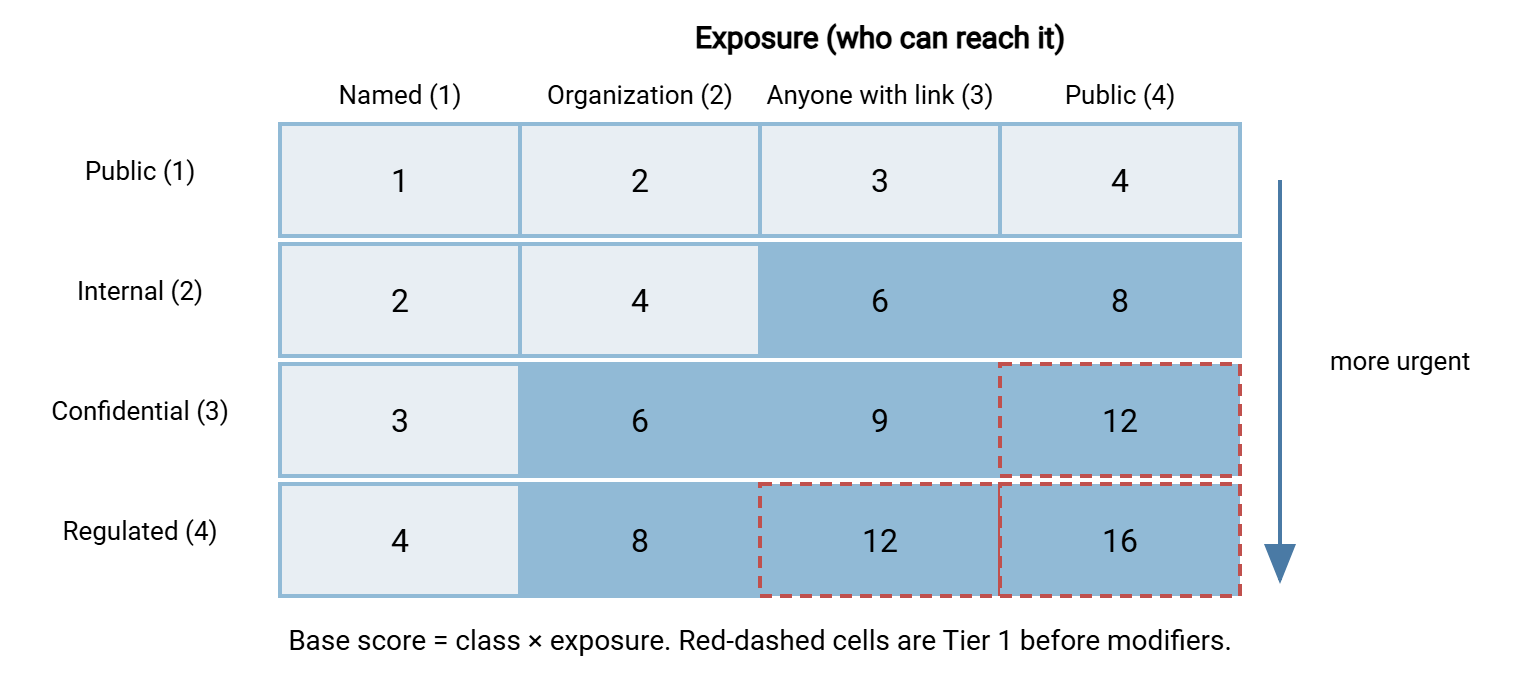
The scoring rules, in one place so you can paste them into the register's header:
SHADOW SHARE RISK SCORE

Base     = data class (1-4)  x  exposure (1-4)          range 1-16
Add +4   owner has left the organization (orphaned share)
Add +2   held in a personal account (no company administrator)
Add +2   other party outside any contract, or in a jurisdiction
         the data should not be in
Add +2   used monthly or more often
Unknown  class or exposure scores 3 until someone finds out

Tier 1   score 12 or more   act this week
Tier 2   score 6 to 11      migrate in the first migration window
Tier 3   score 5 or less    migrate with everyone else; monitor meanwhile
Here is the register from the discovery article with the scores filled in. A fifth row has appeared, because triage conversations always surface one more share that discovery missed.
| ID / team | Class | Exposure | Modifiers | Score | Tier and action |
|---|---|---|---|---|---|
| DR-01 Marketing artwork | Internal (2) | Anyone with link (3) | Personal account +2 | 8 | Tier 2: first migration window; pilot candidate |
| DR-02 Buying price lists | Confidential (3) | Anyone with link (3) | Weekly +2 | 11 | Tier 2, top of the list; needs an inbound path for 200 suppliers |
| DR-03 Finance forecasts | Confidential (3) | Named (1), password on link | Personal account +2, monthly +2 | 7 | Tier 2: migrate; company must own the auditor share |
| DR-04 Unknown domain | Unknown (3) | Unknown (3) | none known | 9 | Tier 2 by default; identify the machine's team this week and re-score |
| DR-05 Payroll exports | Regulated (4) | Anyone with link (3) | Owner left +4, personal +2 | 18 | Tier 1: today. Retrieve, revoke, assess exposure |
Notice that DR-04 scored higher than DR-01 while containing, as far as anyone knows, nothing. That is deliberate. Unknown is not the same as harmless. The matrix refuses to let an unexplained domain sink to the bottom of the list simply because nobody has looked at it yet.
What Each Tier Means in Practice
Tier 1 rows are handled this week, in a fixed order: retrieve, then revoke, then assess. Retrieve means get a copy of everything in the share onto company storage first. Ideally, put it into a per-account folder on the sanctioned transfer server if it exists yet. Otherwise, put it into a locked-down folder on a file server with a name like quarantine-DR-05. Revoke means change the sharing setting to named people or delete the link, done by the owner with you on the phone. Assess means deciding, with whoever owns privacy or compliance, whether the data was actually exposed and whether that has to be reported. Our article on personal data transfer incidents walks through that decision.
When the owner has left and the account is personal, you cannot revoke anything yourself. It is better to say so plainly than to pretend. Ask HR whether the former employee can be contacted. Tell the other party that the link is retired and where the new one will be. Treat the share as potentially exposed from the day the owner left. Most former employees, when asked politely, delete the folder the same afternoon. They had forgotten it existed and would rather not be the person who still has the payroll.
Tier 2 rows are the working processes with real risk. They are migrated in the first migration window, in score order, using the method in Migrating Users Off Consumer Tools Gently. Do not revoke a Tier 2 share before the sanctioned path exists. You would be recreating the Northgate Retail story from the first article, in which blocking a domain produced two more domains and a personal mailbox. Tier 3 rows wait for the general migration and get watched in the meantime.
Do not delete anything before it has been copied and the copy has been opened. Not the obvious duplicates. Not the folder the contact says is empty. Nothing. Consumer services delete cleanly and permanently. A Tier 1 share that is revoked before it is retrieved turns a risk into a loss, with the added feature that you caused it.
The Row That Had Excellent Uptime
Kestrel Payroll, a fictional outsourced payroll bureau, found DR-05 during triage rather than discovery. A payroll clerk had, years earlier, set up a folder on a personal cloud drive, shared as anyone-with-the-link. That let a client drop its monthly export without needing an account. The clerk left. The client kept dropping. When triage asked who owned the folder, the answer was a person who had been gone for fourteen months. The folder held fourteen exports of names, salaries, and bank details. They were reachable by anyone holding an address that had been forwarded around two organizations. The folder had, to be fair, excellent uptime.
The fix took a day. HR reached the former clerk, who deleted the folder within the hour and was mostly relieved. The client was given a per-account upload folder on the company's transfer server, where every drop is logged. The privacy officer decided, on the evidence, that notification was not required. The row had scored eighteen. It was the only Tier 1 row in the register, and without scoring it would have been reached in week six, alphabetically, after Marketing.
Handing the Tiers Onward
Triage produces three things the rest of the series consumes. The Tier 1 rows are handled now, and the retrieved data needs a home with named accounts and an activity log. A transfer server such as Sysax Multi Server, with per-account folders and logging of every upload and download, is the kind of place it should land. The Tier 2 and Tier 3 rows, read together, are the requirements list for Building a Sanctioned Path That's Just as Easy. Their score order is the migration order for the article after that.
Add four columns to the register before you hand it on: class, exposure, score, and the date scored. The date matters more than it looks, because a score is a snapshot of a conversation. A row scored in the spring by a contact who left in the summer is a row that needs scoring again. The method here is a narrow cut of general risk assessment, tuned for one problem. The general version, which handles any transfer workflow, is in our article on transfer risk assessment. Re-score when the sanctioned path launches, when a contact leaves, and at each periodic re-discovery. Scores decay in one direction only, and it is not downward.
Frequently Asked Questions
Is "anyone with the link" really that risky if the link is long and random?
We have no data classification scheme. Can we still triage?
What if the contact will not say what is in the share?
Does a Tier 1 finding have to be reported as a breach?
How often should we re-score?
From the Sysax team: we build secure file transfer software for Windows. Sysax Multi Server is an FTP, FTPS, SFTP, and HTTPS server. Sysax FTP Automation handles scheduled, scripted transfers. Free trials are on the download page.