
Why Shadow File Sharing Happens (and Why It Is Not Malice)
Somewhere in your organization, right now, a company file is leaving through a consumer sharing service registered to somebody's personal email address. The person sending it is not a spy. They are a marketing coordinator with a deadline, a sales rep in a car park, or a payroll clerk whose monthly export bounced off the email size limit again. Shadow IT is the general name for technology people use for work without the IT department's knowledge or approval. The term shadow file sharing covers the cloud-shaped corner of it where files move through tools you did not choose and cannot see.
This article is about why that happens. Until you understand the why, every fix you attempt will be a block that gets routed around. By the end you will be able to read a shadow tool as a requirements document and name the friction that pushed people towards it. You will also be able to explain to a manager why "they broke the policy" is the least useful sentence in the conversation. It is the first article in our Shadow File Sharing series; the others build on it.
What Priya Needed on Tuesday Afternoon
Every shadow tool begins with a real task that the official path could not do in time. Priya Mehta is the marketing coordinator at Meridian Parts, a fictional maker of industrial fasteners. On a Tuesday afternoon she has nine hundred megabytes of print-ready catalog artwork. It must reach the print supplier by five o'clock or miss its slot on the press. She attaches it to an email. The mail server rejects it: attachments over twenty-five megabytes are not allowed.
She asks the IT chat channel how to send a large file to a supplier. The honest answer is: raise a ticket. We create an SFTP account for the supplier. The supplier installs a client. We send them the host name and password by a separate route. And the ticket queue is currently running at three working days. Priya has ninety minutes. She opens a browser and drags the folder into a consumer sharing service she already uses for holiday photos. She copies the link and pastes it into an email. Eleven minutes. The catalog prints on time.
That is the entire story of shadow sharing. The tools change; the story does not. Nothing in it is malicious. Priya used her real name, sent the link from her work email, and would have told anyone who asked. Was it against policy? Almost certainly. Had she read the policy? It is fourteen pages long and lives on an intranet page last updated by someone who has since left. So, in fairness to Priya, the answer is no.
The Friction Equation
Friction is every step, wait, and unknown between a person and the thing they need to do. People do not choose between the secure path and the insecure path. They choose the path with less friction, weighed against the deadline. The secure path can win that comparison, but only if it is designed to; it never wins by default.
The diagram below compares the two paths Priya faced. The official SFTP route as it existed at Meridian Parts is on top, the consumer tool below. The number of boxes is the whole argument.
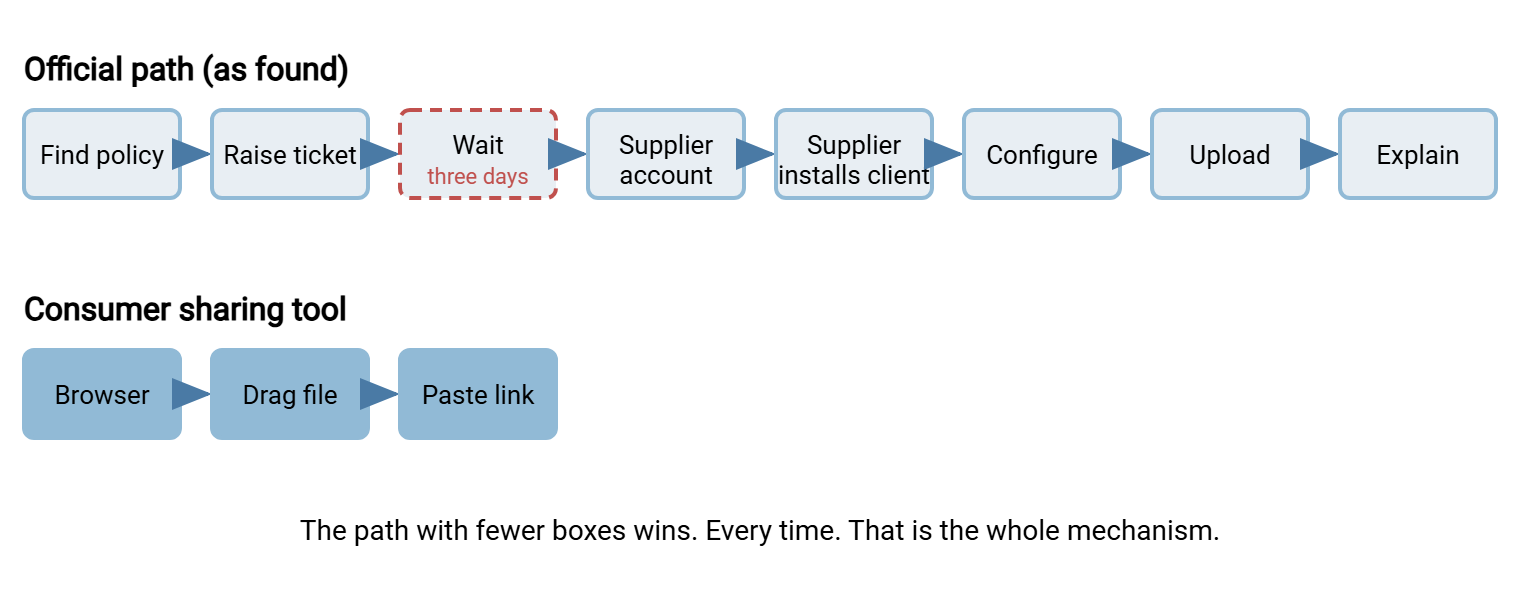
Count the boxes and then notice the one drawn in red. The number of steps hurts, but the killer is the wait, because the wait is uncertain. "Three days" in a ticket queue means somewhere between three days and never. A person with a deadline will not bet it on an unknown. They will take the eleven-minute path they can see to the end of. A ticket queue is where requests go to mature.
Friction also includes the steps the user has to inflict on the other party. Priya's supplier would have needed an account, a client, and a phone call to explain the host name. The consumer tool asked for a click. When you tally friction, count both ends; the sender is often choosing the path that spares the recipient. The ledger below is the tally for Priya's Tuesday. It is the table to fill in for your own official path before you defend it.
| Friction | Official path (as found) | Consumer tool |
|---|---|---|
| Steps for the sender | Eight | Three |
| Longest wait | Ticket queue, unknown, quoted as three days | The upload progress bar |
| Burden on the recipient | Account, client install, host name, password by phone | Click the link |
| Works from a phone or home | No | Yes |
| Time from need to file sent | Three days or more | Eleven minutes |
The Four Needs Behind Every Shadow Tool
Underneath every shadow sharing account there is one of a small number of needs. It pays to name them, because the sanctioned path has to meet each one explicitly. I have never met a fifth that could not be filed under these four.
- Send something too big for email to someone outside. Marketing artwork to a printer, a video to an agency, a database export to a consultant. The email size limit is the biggest recruiter for shadow tools. Our article on attachment size limits explains why raising it does not help.
- Receive something from someone outside who has no account with you. A candidate's portfolio, a customer's log bundle, a supplier's invoice batch. The official route usually assumes you can create an account for the outsider, which takes a ticket, which takes three days. See the first need.
- Reach your own files from somewhere else. A phone in a client's car park, a home laptop, another office. If the only way to reach a file is a mapped drive on a corporate desktop, people will copy it somewhere they can reach.
- Work on the same file with someone at the same time. This is honest collaboration, and a file transfer service does not solve it. When you meet it, note it and pass it to whoever owns collaboration tools. Do not pretend a download link is a shared document.
Each need has a department that feels it most. Marketing lives in need one, recruiting and support in need two. Sales and field engineering live in need three, project teams in need four. Need one alone will account for most of the traffic in your proxy logs.
What Consumer Tools Get Right
The consumer tools won for good reasons, and pretending otherwise makes the sanctioned path worse. They were designed for the sender's afternoon rather than the auditor's quarter, and the sender's afternoon is where the decision gets made. What they get right, in the order users mention it:
- The recipient needs nothing. No account, no client, no instructions. A link and a browser. This is the feature users will not give up, and the one most official paths lack.
- It works in a browser. Nothing to install, nothing to ask the desktop team for, nothing that breaks when the laptop is rebuilt.
- The link is the unit of sharing. Link sharing means the file stays in one place and the sender hands out a web address that opens it. It fits in an email or a chat message, goes to five people at once, and can be revoked without recalling anything.
- It is immediate. Drag, watch the progress bar, copy the link. No ticket, no wait, no unknown.
- It works from a phone. A sales rep can send a quote from the car park.
- It forgives mistakes. Sent the wrong file? Delete it and send another. No support call.
- It is self-service from the first minute. Sign up, verify an email address, start sharing. Nobody approves anything.
Read that list again as a requirements document and you have the outline of the sanctioned path. Building a Sanctioned Path That's Just as Easy is this list turned into a checklist with a column for "do we do this yet". The consumer tools spent years discovering what senders want. You can have the results for the price of paying attention.
What They Get Wrong (and Why the User Cannot See It)
The consumer tools also fail the organization in ways that are invisible from the sender's chair. Every one of those failures lands on your desk eventually. Understanding them lets you explain the risk without exaggerating it, which is the only way a manager will believe you.
- The account belongs to a person, not the company. When Priya leaves Meridian Parts, every link she ever shared goes with her, and so does the ability to revoke them. There is no administrator, no reset, no "transfer ownership to her manager". Our user lifecycle series covers what happens to files when people leave. A personal sharing account is the case where nothing happens, because nobody can.
- The default sharing setting is often "anyone with the link". An anyone-with-the-link share means the web address itself is the only key. Whoever has the address has the file. And links get forwarded, pasted into tickets, and stored in browser history and proxy logs.
- There is no record. No log of who downloaded what, when, from where. When the auditor asks where last month's payroll export went, the answer is a shrug and a browser history.
- The terms are personal terms. A personal account is governed by consumer terms of service and hosted wherever the provider hosts it. There is no contract between the provider and your organization. See where your data actually travels.
- Company data mixes with personal data. The customer list sits in the same account as the holiday photos. And the holiday photos decide when the account gets deleted, shared with a family member, or synced to a home PC.
Notice that none of these affect the sender's afternoon. The catalog printed. Nothing visibly broke. The consequences arrive months later, to a different person, as a question nobody can answer. It is not Priya's job to see that far ahead. It is yours.
The Evidence That It Is Not Malice
Shadow sharing happens in the open, and that is how you can tell it from the real thing. People who are stealing data do not paste the link in an email from their work account. Nor do they ask the helpdesk how to open a supplier's link. Malicious exfiltration hides. Shadow sharing waves at you from the CC line. Insider risk is real and has its own shape, covered in our article on insider risk in file transfer. Conflating the two insults the many to catch the few, and does not even catch the few.
What happens when you treat it as malice anyway is instructive. Northgate Retail, a fictional chain of home-improvement stores, noticed share-example.net in the proxy logs. It blocked the domain on a Friday afternoon without telling anyone. By Monday the buying team, who used it to exchange price lists with two hundred suppliers, had moved to drop.example.org. By Wednesday, after that was blocked too, they were sending the price lists from a personal email account, split into fourteen attachments each. The block removed one domain from the logs and added two, plus a personal mailbox nobody could see at all. Nobody at Northgate had asked the buying team what they were trying to do.
That last sentence is the lesson. Blocking has a place in this series, but the place is last, after the alternative exists. Blocking first does not remove the need. It relocates it, usually somewhere worse.
Reframing: From Violation to Requirement
The reframe that makes the rest of this series work is simple. Every shadow tool is a requirement that someone wrote in the only language available to them. Priya's account says "I need to send a gigabyte to an outsider today from a browser, and the outsider must not need an account". That is a good requirement, better specified than most that arrive through the official channel. The only thing wrong with it is that nobody in IT had read it.
So read it. You might find a shadow tool through the discovery methods in the next article or because someone simply tells you. When you do, capture it on a card like the one below before you do anything else. The card is deliberately short, because you will fill in dozens and the person answering has a job to get back to. Here is Priya's; blank the answers and it is your template.
SHADOW SHARING REQUIREMENT CARD                 Card no: SS-014

Team / person:        Marketing / P. Mehta
Tool used:            share-example.net (personal account)
What they needed:     [x] send out  [ ] receive in  [ ] reach my files
                      [ ] co-edit   [ ] other
Who is on the other end:  Print supplier (one contact, changes yearly)
Typical size / how often: 500 MB to 2 GB, four to six times a year
Where the official path lost:
   [x] too many steps   [x] unknown wait   [x] recipient needed account
   [x] no browser option [ ] no phone option [ ] did not know it existed
What the shadow tool does that we do not (yet):
   Link the printer can open with no account; drag-and-drop in browser
Data involved (best guess, to be classified later):
   [ ] public  [x] internal  [ ] confidential  [ ] regulated/personal
Date captured: YYYY-MM-DD      Captured by: J. Okafor (IT)
Twenty of these cards, sorted by "what they needed", are a specification. Forty are a business case. Our business case series shows how to turn the stack into funding. "Forty teams have told us what they need and are currently getting it from a stranger's server" is a sentence budget holders understand.
Remember: a shadow tool is a requirement you have not met yet. The person using it has already done your requirements gathering, tested a competitor, and proven there is demand. Treat the finding as a gift, write it on a card, and save the policy conversation for after the sanctioned path exists.
The Older Shadows: Email, USB Sticks, and Rogue Folders
Consumer cloud sharing is the newest shadow path, not the only one. Email attachments are the oldest, so old that most organizations forgot to notice. The article why email is bad file transfer makes the case. And why users default to attachments reads that habit the way this article reads cloud tools. USB sticks and the shared folder called temp2 that everyone writes to are the physical and on-network shadows. They have their own series starting at why USB and share chaos keep winning.
The cloud-shaped shadow differs from its relatives in one way that matters here: it leaves the network. You cannot inventory a folder you cannot see. The good news is that every one of those transfers passed through your web proxy or DNS resolver on the way out and left a trace. Discovery, the next article, is built on those traces.
How to Talk About It Without Starting a War
Vocabulary decides whether users will talk to you. Say unsanctioned, meaning "not the path we support", rather than "unauthorised", meaning "forbidden", which makes the person a suspect. Never say "rogue". Call the alternative the sanctioned path: the way we support, will fix when it breaks, and can answer for in an audit. The difference between the words is the difference between a conversation and an HR meeting.
Then ask the two questions in the right order. First: "What were you trying to do?" Second: "What did we make hard?" Only after both are answered, and written on a card, does the third question arrive. It is: "would you try the sanctioned path if it were as easy?" The answer is nearly always yes, provided the word "if" is honored. A path that lets a supplier receive a file with only a browser passes the test. That is the way a web-based HTTPS transfer server such as Sysax Multi Server works with a private download link. A path that starts with "first, install this client" does not. The user will nod politely and go back to the tool that works.
Two other people need to hear the reframing. They are the manager who wants a name to blame and the security colleague who wants a domain to block. Give the manager the card and the colleague the migration plan, and the war usually fails to start. Teaching users the new path is covered in our training and adoption series.
Where This Leads
Here is the one-minute version for the hallway. Shadow file sharing is what happens when a real need meets an official path with too many boxes and an unknown wait. The consumer tools win because they were designed for the sender's afternoon. They fail because they are owned by a person, default to anyone-with-the-link, and keep no record. The sender can see none of that. Treat every shadow tool as a requirement written in the only language available, put it on a card, and build the path that reads the card.
The next step is to find out how much shadow sharing you actually have, without turning colleagues into suspects. That is Discovering Shadow Sharing Without a Witch Hunt. After that comes sorting what you found by real risk, and then building the path that makes the cards obsolete.
Frequently Asked Questions
Is shadow file sharing the same thing as shadow IT?
If it is not malicious, why does it matter?
Should we just raise the email attachment limit instead?
Can we block the consumer sharing domains at the proxy right now?
What is a "sanctioned path"?
From the Sysax team: we build secure file transfer software for Windows. Sysax Multi Server is an FTP, FTPS, SFTP, and HTTPS server. Sysax FTP Automation handles scheduled, scripted transfers. Free trials are on the download page.