
Partner Test Windows and Test Endpoints
"Does Tuesday at two work for you?" "Two your time, or two ours?" A partner test begins, more often than not, with that exchange, and the calendar is the easy part. You can stage your own half of a transfer flow as thoroughly as you like. The other half belongs to someone else. A trading partner's server, firewall, folder rules, and file parser are outside your staging environment. The only way to know that a change survives contact with them is to test against them. Do it carefully, at an agreed time, with files that can never be mistaken for real ones.
This article is about making that test routine rather than an event. It covers why partner tests differ from every other kind. It shows how to set up a permanent test account and folder on both sides. It explains what a test endpoint is and when you need one. It covers how to name test files so that nobody's automation can ever process them by mistake. It shows how to schedule and run a joint test in thirty minutes (in one agreed time zone). It covers what evidence to keep, and what to do when the partner changes something without telling you. It is part of our Testing and Staging Transfer Changes series. The first-time setup of a partner is a different exercise, covered in the partner onboarding runbook.
The partner's administrator, in my experience, wants the test to pass as much as you do. What stands between the two of you is a calendar, a time zone, and a test account nobody has set up yet. This article removes the third, so that the first two are the only problems left.
Why Partner Tests Are Different
A partner here means any organization whose server you connect to, or who connects to yours, to exchange files. It could be a supplier, a bank, a logistics firm, or a customer. A partner test is any exchange of files with them whose purpose is to check that something works rather than to move real data. A test window is the agreed period during which that exchange happens, with people on both sides watching.
Three things make partner tests unlike tests in your own staging environment:
- You cannot see the other side. The partner's log is not yours to read. When a file is rejected, you learn what they choose to tell you, when they choose to tell you.
- Their production is real. The partner's server is not a staging server. A test file that lands in the wrong folder there is an incident for them, not for you, and it costs their trust.
- Their schedule is not yours. The person who can read their log works different hours, possibly in a different time zone, and has other partners to look after.
The consequence is that partner testing needs infrastructure that exists all the time. That means a test account, a test folder, and an agreed naming rule. Then, when a change needs testing, the only thing to arrange is a time. Partners who have to set up a test account from scratch for every change will, reasonably, stop agreeing to tests.
The Permanent Test Account and Folder
On your server, every partner gets two accounts: their production account and a test twin. The test account has the same folder layout, the same permissions, the same IP allow list, and the same protocol settings as the production one. The test is meant to exercise all of those. The test account differs in exactly three ways: a name that says what it is, its own credentials, and a home folder that no production automation ever looks at.
| Attribute | Production account | Test account |
|---|---|---|
| Username | acme |
acme-test |
| Home folder | /partners/acme/ with inbound, outbound |
/partners/acme-test/ with the same subfolders |
| Permissions | Write-only inbound, read-only outbound | Identical |
| IP allow list, protocol, ciphers | Partner's addresses, SFTP, current policy | Identical |
| Credentials | Production key or password | Separate key or password, never shared |
| Watched by production jobs? | Yes — inbound feeds the loader | Never |
"Never watched" is the property that makes the account safe, and it must be true by construction, not by convention. The watch-folder job that picks up /partners/acme/inbound is configured with that exact path. It does not use a wildcard like /partners/*/inbound that would sweep the test folder in too. On a server with per-account permissions and an activity log, such as Sysax Multi Server, the test account's confinement to its own folder tree and its own log trail are ordinary settings. The log is where the test evidence will come from later.
Ask the partner for the same arrangement on their side: a test login for you, with the same rules as your production login. Their automation must ignore its inbound folder. Well-run partners already have one — often called a UAT or acceptance environment. That means a copy of their system used for exactly this purpose. The connection sheet from onboarding should record its address, account, and folder paths next to the production ones. Whatever the sheet does not record gets rediscovered the afternoon before a window.
Test Endpoints and Hostnames
A test endpoint is an address the partner can connect to, or that you connect to, for tests. There are two ways to provide one, and they test different things.
- Same host, test account. The partner connects to
sftp.example.comas usual but logs in asacme-test. This exercises the real network path, the real firewall rules, the real server settings, and the real host key. That is everything except the change itself, which has to be already in production. It is the right endpoint for testing partner-side changes and for confirming that nothing on the path has broken. - A separate test hostname.
sftp-test.example.comresolves to your staging server, described in building a transfer staging environment. This lets a partner try a server-side change — a new cipher policy, an upgraded build — before it reaches production. The cost is real. The partner must allow a second address through their firewall and accept a second host key. Both take a ticket on their side.
Most estates want both, used for different change classes. A partner change or a job change is tested on the production host with the test account. A setting or server change is tested first on the test hostname, then on the production host with the test account after rollout. Both endpoints, with their addresses and host key fingerprints, belong in the partner's connection sheet alongside the production entry. Any change to them is itself a partner change that needs notice. The coordination of allow lists on both sides is covered in our Firewalls, NAT, and File Transfer series.
Naming Test Files So They Can Never Be Mistaken
A test file that reaches production processing — yours or the partner's — is the failure this whole arrangement exists to prevent. One safeguard is not enough, because each one fails in a known way. A naming rule fails when somebody forgets it. A folder rule fails when a job is misconfigured. A content check fails when the parser is lax. Three layers together do not fail quietly. A file called test.txt is not a layer.
- The name. Every test file begins
TEST_, in capitals, agreed with the partner in writing and recorded in the connection sheet. The rest of the name follows the production convention exactly. That way, the test proves that the convention is handled:TEST_shipments_YYYYMMDD.csvagainstshipments_YYYYMMDD.csv. - The content. Records in a test file carry identifiers from a reserved range that production validation rejects. Examples include shipment IDs beginning
TEST-, and customer IDs above a threshold the real system never issues. The generator in synthetic test files and test data does this by default. A test file that somehow reaches a loader is then rejected on its content, not just its name. - The processing guard. Production automation refuses
TEST_files explicitly, and the test folder is never watched. The refusal is logged and routed, not silent, so that a test file arriving in production is a visible event.
The guard is a few lines wherever files enter processing. In a PowerShell pre-processing step for a watch folder it looks like this:
# guard-testfiles.ps1 : run before any production processing of the inbound folder
$inbound    = 'D:\partners\acme\inbound'
$quarantine = 'D:\partners\acme\test-quarantine'
Get-ChildItem -Path $inbound -File -Filter 'TEST_*' | ForEach-Object {
    $stamp = Get-Date -Format 'yyyyMMdd-HHmmss'
    Move-Item -Path $_.FullName -Destination (Join-Path $quarantine "$stamp-$($_.Name)")
    Add-Content -Path 'D:\logs\test-guard.log' -Value "$stamp TEST file in production inbound: $($_.Name) (moved to quarantine)"
}
# any TEST_ file reaching this folder means the partner tested against the wrong account: tell them.
In a job definition the same rule is an exclusion mask — TEST_* in the "ignore files matching" setting. It also needs a separate job that sweeps the quarantine folder and sends a notification. Where the guard sits in a longer pipeline, and how files are routed to different destinations by name, is the subject of routing files to destinations.
The diagram below shows the arrangement on your server. The production account's inbound folder feeds the watch job and the loader. The test account's inbound folder feeds nothing. A guard stands between the production folder and processing in case a test file arrives in the wrong place.
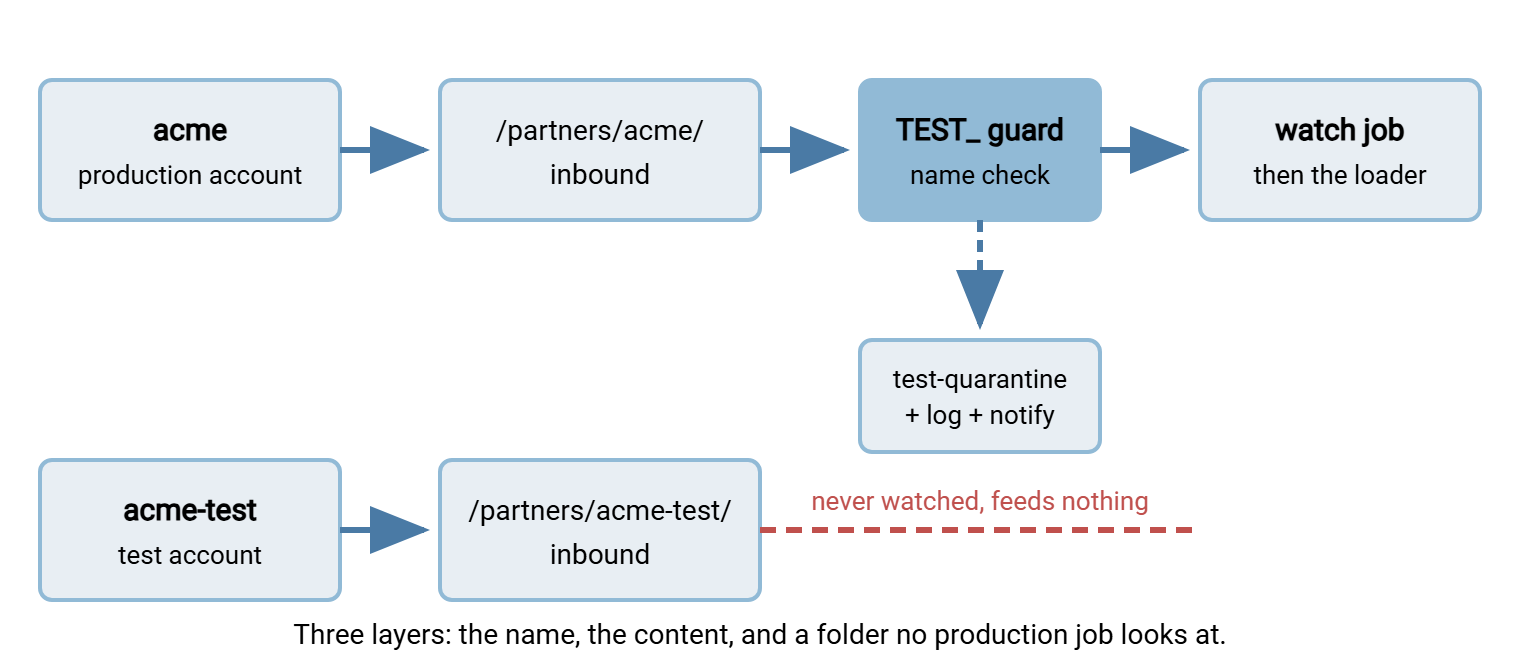
Remember: the test account's inbound folder is safe because nothing reads it. The TEST_ prefix is safe because production refuses it. The reserved identifiers are safe because the loader rejects them. Each layer covers the others' failure. Remove one and you are relying on nobody ever making a mistake — which is not a plan.
Scheduling a Joint Test
A joint test is a short, scripted exchange with a person at each end. It succeeds or fails within half an hour. The request that sets it up contains everything the partner needs to say yes without a meeting. The template below is the whole request; fill it in and send it.
Subject: Test window request - Acme shipments feed - [change reference]

What is changing:   our SFTP server is moving to a new cipher policy (no file format change)
What we need:       a 30-minute window with someone able to watch your SFTP log
Proposed window:    Tuesday 14:00-14:30 our time (13:00-13:30 UTC; 09:00-09:30 your time)
                    Alternatives: Wednesday same slot, Thursday same slot
Endpoints:          you -> sftp-test.example.com, account acme-test (host key fingerprint below)
                    us  -> your test endpoint, account example-test (as per connection sheet)
Files we will send: TEST_shipments_YYYYMMDD.csv  (52,118 bytes)  sha256: 3b7f...c9a1
                    TEST_1MiB-random.bin         (1,048,576 bytes) sha256: e02d...77b4
Files we ask of you: one TEST_ file of your choice, name and sha256 sent in advance
Steps:              1. you connect, list inbound and outbound     2. you upload your TEST_ file
                    3. we confirm its hash                          4. we upload our two files
                    5. you confirm both hashes                      6. both sides delete test files
Pass means:         all three hashes match; no errors in either log
If it fails:        nothing changes in production; we investigate and propose a new window
Contacts on the day: [name, phone, email] on our side; please name yours
Host key fingerprint of sftp-test.example.com: SHA256:Qm4k...(full fingerprint here)
Three details carry most of the value. The window is stated in both time zones and in UTC. A test that one side joins an hour late is a test that did not happen. The file names and hashes are sent in advance, so "did you get it?" becomes "does the hash match?" — a question with a yes-or-no answer. And "pass means" is written before the test, so that nobody argues afterwards about whether a warning in the log counts. I have watched more partner tests die of time zones than of firewalls.
Meridian Parts learned the UTC line the slow way. Their first joint test with a new logistics partner was agreed for "Tuesday at 14:00." Both sides turned up on time, in their own time zones, five hours apart. Each watched an empty log for thirty minutes. Each concluded the other side had been called away. The change waited a week for a second window. The second request stated the slot in both local times and in UTC. The partner's administrator joined to the minute, and all three hashes matched inside twenty minutes. Their request template has carried the UTC line ever since. Nobody at Meridian has watched an empty log for a partner who was watching one too.
Keep the step list short and the same every time. Partners come to recognize the routine, and a routine test is one they agree to readily. Your side may be running the test from a scheduled tool rather than by hand. In that case, a script-editor debugger steps through the connect, list, upload, and download one line at a time. Sysax FTP Automation has one. It lets you pause after each step and read the response before moving on. That is exactly the pace a joint test needs.
Evidence to Keep
A test that leaves no record proves nothing a month later. A partner may insist the change was never tested, or an auditor may ask how you know the feed still works. The record is small, and most of it is produced by the test itself. Memories differ after a month; logs do not.
| Item | Source | Why it matters |
|---|---|---|
| The request and the partner's acceptance | Email or ticket | Shows what was agreed, when, and by whom |
| Your server log for the window | Transfer server activity log, filtered to the test account | Login, listing, upload, download, and any error, with timestamps |
| Your client log for the window | The tool you connected with, verbose mode | What their server said to you, including the negotiated settings |
| Hashes, sent and confirmed | The request, and the partner's confirmation message | Proof that content arrived intact in both directions |
| The result line | Written by you, agreed by them | "Pass" or "fail" against the pre-written definition, plus anything odd |
Store the bundle with the change record and with the partner's entry in the flow inventory. That way, the next person to touch this feed finds the last test and its result without asking. Our Documenting Transfer Flows series describes where that inventory lives. The habit of filtering a server log to one account and one window is covered in what to log. The same bundle, kept for every exchange rather than just tests, becomes the evidence pack that settles disputes about production files too.
When the Partner Changed Something Without Telling You
It will happen. A partner rebuilds a server, rotates a key, moves to a new address, tightens a cipher policy, or renames a folder. The first you hear of it is a failed job at 02:10. The symptom usually names the change:
| What you see | What probably changed | First move |
|---|---|---|
| "Host key verification failed" / "remote host identification has changed" | Server rebuilt or key rotated — or an attacker in the path | Do not accept the new key. Phone the known contact and read the fingerprint to them |
| "No matching cipher" / "no matching key exchange" / TLS handshake failure | Their security policy tightened | Test with the test account and a client that offers modern settings; confirm the new policy in writing |
| Connection timed out or refused | New address, or their firewall lost your allow-list entry | Resolve the name, compare with the connection sheet, ask which changed |
| Authentication failed | Credential rotated or account disabled | Try the test account; if it also fails, the account policy changed, not your credential |
| "No such file or directory" on a path that worked yesterday | Folder renamed or restructured | List the parent folder with the test account; compare with the sheet |
| Transfer succeeds; partner reports the file was rejected | Their parser or format expectation changed | Send a TEST_ file through the test account and ask for the rejection reason verbatim |
The test account is the instrument in every row. It lets you reproduce the failure, try a candidate fix, and confirm the partner's new state without touching the production job until you know what to change. The host key row deserves emphasis. A changed host key is either a rebuild the partner forgot to announce or a man-in-the-middle. The client cannot tell which. Never accept a new key because a job is late. Verify the fingerprint through a channel the attacker cannot control — a phone call to a known number. This is described in host keys and known_hosts. Once the cause is known, the fix goes into production as a change of its own, with a record, following rolling out transfer changes safely.
Afterwards, two follow-ups. First, ask the partner — politely, in writing — for advance notice of future changes, and offer the same in return. The expectations worth agreeing are set out in partner SLAs and expectations. Second, make sure the failure would have been noticed sooner. A freshness check raises an alert when an expected file has not arrived by its usual time. That turns "we found out at 09:00" into "we found out at 02:30." The second hour is worse for sleep and better for everything else.
The Partner Test Kit
Everything in this article amounts to a small permanent kit per partner. When all of it exists, testing a change with that partner is a thirty-minute appointment rather than a project.
PARTNER TEST KIT - one per partner, kept with the connection sheet
[ ] Test account on our server (name, folder tree, permissions identical to production)
[ ] Test account on their server (address, account, folders, host key fingerprint)
[ ] Test endpoint(s): production host + test account; test hostname -> staging, if used
[ ] TEST_ prefix agreed in writing; reserved identifier range agreed
[ ] Production guard in place: TEST_ excluded, quarantine folder, notification
[ ] Standard test files: one typical CSV, one hash file, with hashes recorded
[ ] Test request template filled with this partner's contacts and time zone
[ ] Evidence folder: last test's request, logs, hashes, result line
[ ] Freshness check on the production feed, so an unannounced change is noticed early
Start with the two accounts and the prefix. They are the parts that take a partner's cooperation, and they are the parts that make everything else possible. After that, the only thing left to negotiate is Tuesday. The rest of this series covers what the kit connects to. That includes the staging server behind the test hostname, the synthetic files in the standard set, and the rollout procedure the test is part of.
Frequently Asked Questions
What is a partner test window?
Why not just send a small real file and see if it works?
Does the test account need the same permissions as the production one?
A partner's host key changed overnight. Can I just accept the new one to get the job running?
What evidence should I keep from a partner test?
From the Sysax team: we build secure file transfer software for Windows. Sysax Multi Server is an FTP, FTPS, SFTP, and HTTPS server. Sysax FTP Automation handles scheduled, scripted transfers. Free trials are on the download page.