
Anatomy of a Dropped Session: Reset, Timed Out, and Closed by Remote Host
A transfer that dies halfway leaves behind one line of text: Connection reset by peer, or Connection timed out, or Connection closed by remote host. Most people treat the three as synonyms for "the network broke." They are not. Each describes a different event on the wire. Each event can only be caused by certain parties. Learn to read them and a dropped session stops being a mystery and becomes a witness statement.
This article is the foundation for the rest of our Timeouts, Keepalives, and Dropped Sessions series. It explains what a session is made of and the three ways a connection can end. It covers four suspects: client, server, firewall, or address-translation device. You will learn which can produce each ending, and how to read one drop from both sides of the wire. By the end you will be able to look at an error message and a pair of log excerpts. With reasonable confidence, you will be able to say who hung up and why.
What a Session Is Made Of
Every file transfer protocol you are likely to run — FTP, FTPS, SFTP, HTTPS — rides on TCP. This transport layer turns a stream of packets into a reliable, ordered conversation between two programs. A TCP connection is identified by four numbers: the client's address and port, and the server's address and port. Both ends keep a small record of it in memory, and so does every stateful device in between.
A session is the application's idea of the conversation: the login, the working directory, the transfer in progress. For SFTP and HTTPS, one session lives on one TCP connection. FTP and FTPS are different, and the difference matters enormously for this series. An FTP session uses a control connection. This is the long-lived conversation on port 21 where commands and reply codes travel. The session also uses a separate, short-lived data connection for each file or directory listing. Our article on FTP's control and data channels covers the mechanics. The point to hold onto here: the control connection sits completely idle while a large file flows over the data connection. No packets travel in either direction on the control connection. An idle connection is exactly what timers on firewalls and servers are built to kill.
Two more terms you will meet constantly. A connection is idle when no data has crossed it for some period. Every timeout in this series is measured against idle time, not total time. A connection is half-open when one end believes it is still established and the other has forgotten it. That is why a drop is often discovered long after it happened.
The Three Ways a Connection Ends
TCP has exactly three exits, and every dropped-session error message maps to one of them. The diagram shows all three.
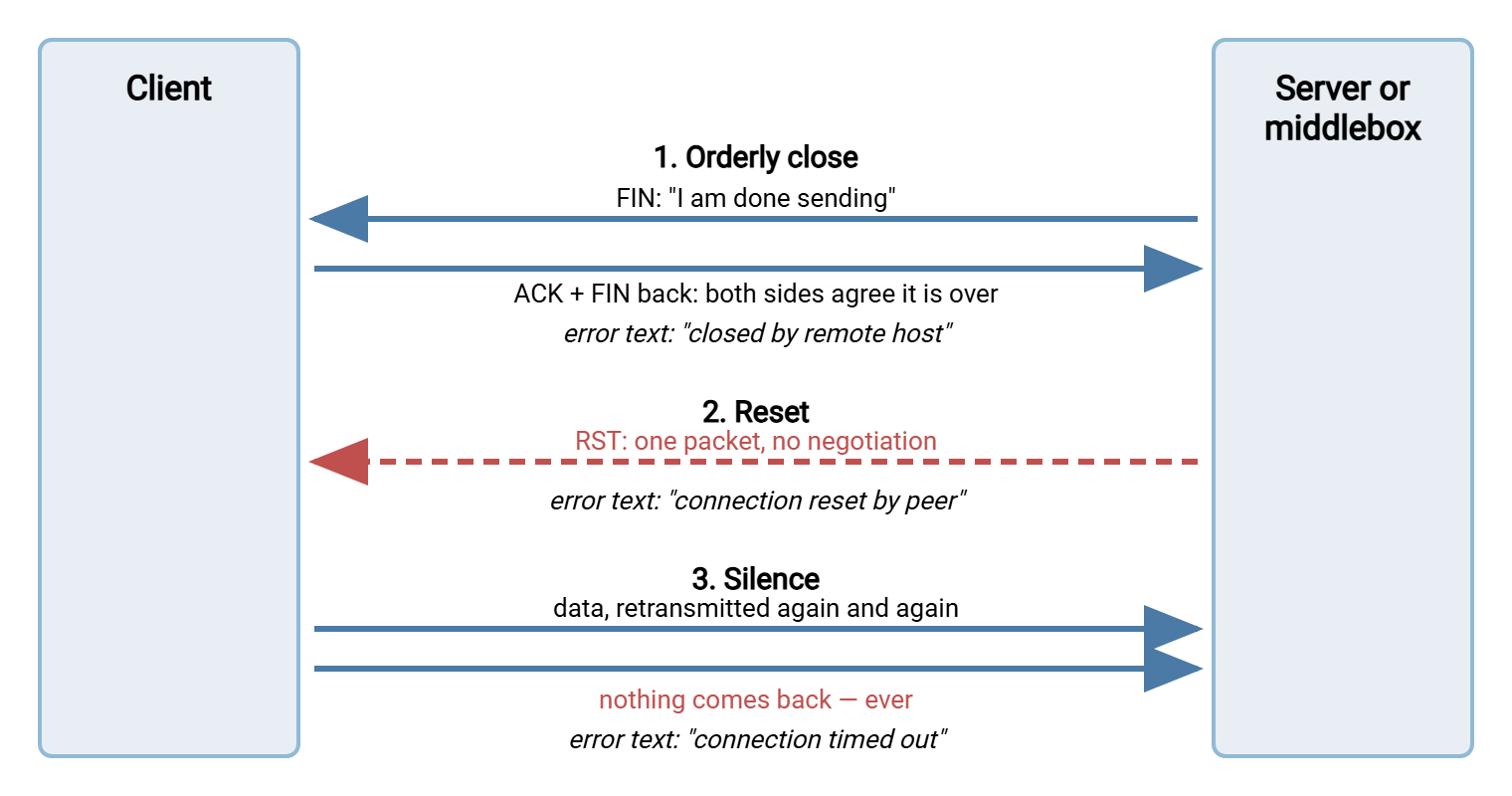
Ending one: the orderly close (FIN)
When a program is finished with a connection, its operating system sends a packet with the FIN flag set. That means "finish, I have nothing more to send." The other side acknowledges it and, when it is also done, sends its own FIN. This is the polite ending, "goodbye" on both ends of a phone call. Applications see it as an end-of-file and report something like Connection closed by remote host. The important inference: a FIN can only come from a real endpoint that decided to close. Firewalls and NAT devices do not send FINs; they forward packets or stop forwarding them. So "closed by remote host" nearly always means the other program chose to hang up, usually because one of its own timers expired.
Ending two: the reset (RST)
The RST flag means "abort." There is no negotiation; the sender discards its record of the connection and the receiver is expected to do the same. An operating system sends a reset when a packet arrives for a connection it has no record of. This can happen after a reboot, or when a stray packet reaches a server that has forgotten the connection. The operating system also sends a reset when a program closes a socket with unread data waiting. Some firewalls also send resets deliberately when they tear a session down, one to each end. The application reports Connection reset by peer on Linux, or Windows error 10054, "an existing connection was forcibly closed by the remote host." The inference is weaker than for a FIN. A reset can come from the far endpoint or from a middlebox impersonating it. Much of this article is about telling those apart.
Ending three: silence (timeout)
The third ending is no packet at all. The client sends data, waits for an acknowledgment, retransmits, waits longer. TCP keeps trying for a surprisingly long time. On Linux, the default retransmission schedule works out to a little over fifteen minutes before the connection is declared dead. Windows gives up after fewer retransmissions and reports the failure sooner. Only then does the application see Connection timed out — Linux error 110, Windows error 10060. Silence has a signature: the transfer hangs before it fails, and the failure arrives minutes after the hang began. A reset fails instantly. "It just sat there and then eventually errored" is silence. Silence is the trademark of a middlebox that dropped its state entry without telling anyone.
Remember: FIN means an endpoint chose to close. RST means somebody — endpoint or middlebox — slammed the door. Silence means something that no longer remembers the connection is throwing the packets away. Match the error text to the ending before you blame anyone.
Decoding the Error Text
Different tools phrase the same three endings differently. The table collects the messages you will actually see, what each means on the wire, and where to look first.
| Message you see | What happened on the wire | Look first at |
|---|---|---|
Connection closed by remote host, Connection closed by 203.0.113.10 port 22, 421 Timeout |
A FIN arrived, or the application-level "goodbye" did. The far program closed deliberately. | The far endpoint's idle timer or session limit; its log will say why. |
Connection reset by peer, Connection reset by 203.0.113.10 port 22, Windows 10054 |
An RST arrived. Either the far host no longer knew the connection, or a middlebox sent the reset on its behalf. | Whether the far log shows the session ending at the same moment. If not, a middlebox reset it. |
Connection timed out, Operation timed out, Windows 10060 |
Nothing came back for the whole retransmission period. Packets are being silently dropped. | Stateful firewalls and NAT devices on the path; their idle timers expired. |
Broken pipe, client_loop: send disconnect: Broken pipe |
The local program tried to write to a connection its own operating system already knows is dead. | The event just before it — usually a reset that arrived while the program was busy. |
421 Service not available, closing control connection |
An FTP server announced it is closing, then closed. Idle timeout, connection limit, or shutdown. | The FTP server's log and its idle or session settings. |
Two refinements make the table sharper. First, the phrase by peer or by remote host means the local operating system received the packet from the network. So the local program did not cause the drop — although it may have been idle long enough to provoke it. Second, notice which message appears first. A reset followed seconds later by a broken pipe is one event, not two. The broken pipe is just the program discovering the reset when it next tried to send. Our guide to reading transfer logs is a good companion for that habit.
The Four Suspects
Only four parties can end a session, and each has a limited set of methods. Knowing the methods lets the error text point at the culprit.
The client
The client can drop its own session in three ways. A user or script can close it (FIN). The process can crash or be killed (the operating system sends FIN or RST on its behalf). Or a client-side timeout can fire. Client timeouts surprise people. Most transfer clients have a "response timeout": how long to wait for the server's reply to a command. Many have a "stalled transfer" setting. When one expires, the client closes the connection itself and reports a timeout, even though the network dropped nothing. Suppose the client says "timed out" and the server log says "client disconnected" at the same second. Then the client's own timer is the culprit.
The server
The server drops sessions through its idle timeout (no command received for N minutes), a maximum session duration, or a stall timer. A connection limit that evicts sessions or a restart can also drop them. Servers almost always close politely. The good ones say why first. An FTP server sends 421 Timeout or similar before closing the control connection. An SSH server writes the reason to its own log. Idle timeouts are also a deliberate security control; the operational tradeoff is discussed in idle timeouts on server, client, and everything between. A server that logs each session's beginning and end to a file or database, as Sysax Multi Server does, gives you a timestamp. You need it to compare against the client's view. Without it you are guessing.
The firewall
A stateful firewall keeps a state table: a list of connections it has seen and decided to allow. Every entry has an idle timer. When the timer expires, the entry is deleted. Most firewalls do this silently. The next packet from either side is discarded as if it belonged to an unauthorized new connection: the silence ending. Some send a reset to both endpoints when they expire an entry: the reset ending on both sides at once. A firewall cannot produce a FIN. Rule design and NAT behavior are covered in our firewalls and NAT for file transfer series; here it is enough to know the two signatures.
The address-translation device
A NAT device — the router that lets many private addresses share one public address — keeps a translation table with the same idle timers and the same silent expiry. Its special cruelty: once the entry is gone, packets from the inside may be translated onto a new public port. They arrive at the server as an unknown connection and draw a reset. So a NAT expiry can show up as silence or as a reset, depending on which side sends the next packet. The full story, including why long transfers die at suspiciously round minute counts, is in address table expiry: the silent killer of long transfers.
One Drop, Seen From Both Ends
Theory becomes useful when you put two logs side by side. A worked example comes up constantly: a nightly FTP upload of a large file from a branch office to head office. It passes through a branch firewall whose idle timer for TCP sessions is one hour. The file takes two hours to send. The data connection is busy the whole time, so its state entry is refreshed continuously. The control connection sends nothing for two hours, so its entry expires after one.
The client's log, from the branch side:
Mar 14 01:02:11 Connected to ftp.example.com (203.0.113.10)
Mar 14 01:02:11 230 Login successful.
Mar 14 01:02:12 PASV
Mar 14 01:02:12 227 Entering Passive Mode (203,0,113,10,195,87)
Mar 14 01:02:12 STOR backup-set-a.tar
Mar 14 01:02:12 150 Ok to send data.
Mar 14 03:05:40 Transfer complete: 61.4 GB sent
Mar 14 03:05:40 (waiting for server reply)
Mar 14 03:20:51 Error: Connection timed out
Mar 14 03:20:51 Job failed: upload of backup-set-a.tar
The login and the STOR command happen in the first second. The 150 reply is the server saying "go ahead, send the data." Then nothing on the control connection for two hours while the data connection does the work. At 03:05:40 the client finishes sending and waits for the 226 Transfer complete reply that travels over the control connection. It never arrives. Fifteen minutes later — the retransmission period — the client gives up with Connection timed out. That gap between "finished" and "failed" is the silence signature. The file was entirely sent; the job failed anyway because the client could not confirm it.
The server's log, from head office:
Mar 14 01:02:11 [branch07] Connection from 198.51.100.24
Mar 14 01:02:11 [branch07] User logged in
Mar 14 01:02:12 [branch07] STOR /inbound/backup-set-a.tar
Mar 14 03:05:41 [branch07] Upload complete, 61.4 GB, 226 sent
Mar 14 03:05:41 [branch07] Session idle
Mar 14 03:20:41 [branch07] Idle timeout, closing control connection
Mar 14 03:20:41 [branch07] Session closed
From the server's point of view everything worked. It received the whole file and sent 226 at 03:05:41. But that reply had to travel back through the branch firewall, whose state entry for the control connection expired around 02:02. The firewall discarded the reply as an unknown packet. The server, hearing nothing further, waited out its own fifteen-minute idle timer and closed the control connection with a FIN. The firewall discarded that too. Neither side ever learned what the other did. The file is fine; the job is marked failed; the operator retries it in the morning and sends sixty gigabytes again.
The clue that names the firewall is the combination. The server reports a normal completion and a normal idle close. The client reports silence. The timestamps line up with a one-hour gap from the last control-connection packet. Only a device in the middle that forgot the connection produces that pattern. The same example, with the settings that fix it, is developed later in this series.
Half-Open: When Nobody Knows It Is Dead
The example also shows the half-open state in action. From 02:02 onward the control connection was dead as far as the firewall was concerned. Yet both endpoints carried on believing in it for another hour. Nothing forces a TCP endpoint to notice a dead connection until it tries to send; an idle connection can stay half-open indefinitely.
Three things bring a half-open connection to light. The first is an attempt to send. This triggers a reset (if the far side has forgotten the connection) or silence (if a middlebox is eating the packets). The second is a TCP keepalive. This is a tiny probe packet the operating system can send on an idle connection to check that the other side still answers. It is off by default for most programs, with two hours between probes when it is on. The third is an application keepalive, such as the SSH protocol's alive messages or an FTP NOOP command. This is a real message the far program must answer. A keepalive does two jobs. It detects a half-open connection early. And — if sent often enough — it stops the idle timers from expiring in the first place. Turning each kind on is the subject of keepalives: TCP, SSH, FTP NOOP, and HTTP.
Reading the Drop: A First-Pass Decision Table
Put the pieces together and you get a first-pass diagnosis you can do in a minute. You need the error text and the far side's log. The fuller method — three logs, time-of-day patterns, a packet capture — is in diagnosing intermittent drops; this is the quick version.
| What the client saw | What the server log shows | Most likely culprit |
|---|---|---|
| Closed by remote host, instantly | "Idle timeout" or "session limit" at the same second | Server timer — deliberate, documented, adjustable |
| Timed out, after a long hang | Normal activity, then its own idle close much later | Firewall or NAT state expiry between the two |
| Reset by peer, instantly | Also a reset at the same second, or nothing at all | Middlebox sending resets on expiry, a NAT mapping that expired, or a server restart |
| Drop at exactly the same minute count every time | Anything | A configured timer somewhere — find the device whose default matches |
The last row is the most useful tell in the whole subject. Networks do not fail at exactly sixty minutes, or thirty, or five, by coincidence. A drop that lands at the same round number every time is a timer, and every timer belongs to a device with a configuration page.
Gotcha: the party that reports the error is almost never the party that caused it. "Connection reset by peer" on the client does not mean the server reset it. And "client disconnected" on the server does not mean the client chose to leave. Both messages describe what arrived, not who sent it.
Where This Leaves You
A dropped session is three facts, not one. The first is how the connection ended (FIN, RST, or silence). The second is who is capable of that ending. Endpoints can do all three; middleboxes can only reset or go silent. The third is when it happened relative to the last packet on that connection. The error text gives you the first fact. The far side's log gives you the second. A clock gives you the third. With those, the four suspects narrow to one far more often than a message as vague as "connection reset by peer" would suggest.
One caution: Connection refused is not a drop. It means the server answered the very first packet with a reset. Nothing is listening, or a firewall rejects rather than drops. So the session never existed. Once a real drop is confirmed, whether to retry at all is the subject of transient vs permanent failures. Picking up where the transfer stopped belongs to our resume and checkpoint restart series.
The rest of this series takes each suspect in turn. Start with idle timeouts on both ends for the server and client timers. Move on to address table expiry for the middleboxes. Then go to keepalives per protocol for the fix that keeps all of them satisfied.
Frequently Asked Questions
Does "connection reset by peer" mean the server reset my connection?
Why did my transfer hang for fifteen minutes before it failed?
What is a half-open connection?
The file arrived completely but the job still failed. How is that possible?
From the Sysax team: we build secure file transfer software for Windows — Sysax Multi Server, an FTP, FTPS, SFTP, and HTTPS server, and Sysax FTP Automation for scheduled, scripted transfers. Free trials are on the download page.