
Keepalives: TCP, SSH, FTP NOOP, and HTTP
"Turn on keepalives" is the standard advice for any transfer that dies mid-way, and it is good advice. But there are at least four different things called a keepalive. They live in four different places, and turning on the wrong one does nothing. A TCP keepalive that the application never asked for is never sent. An SSH keepalive fixes SFTP and does nothing for FTP. And the HTTP header with "keep-alive" in its name is not a keepalive at all.
This article sorts them out. It explains the two fundamentally different kinds of keepalive, then walks through the actual settings for each. It covers the operating-system TCP keepalive on Linux and Windows, and the SSH alive messages on both client and server. It explains the FTP NOOP command, and what HTTP's keep-alive really means. It closes with the cases where a keepalive makes things worse and a short table for choosing values. It is part of our Timeouts, Keepalives, and Dropped Sessions series, and assumes you know why idle connections die. If not, start with address table expiry.
Two Kinds of Keepalive
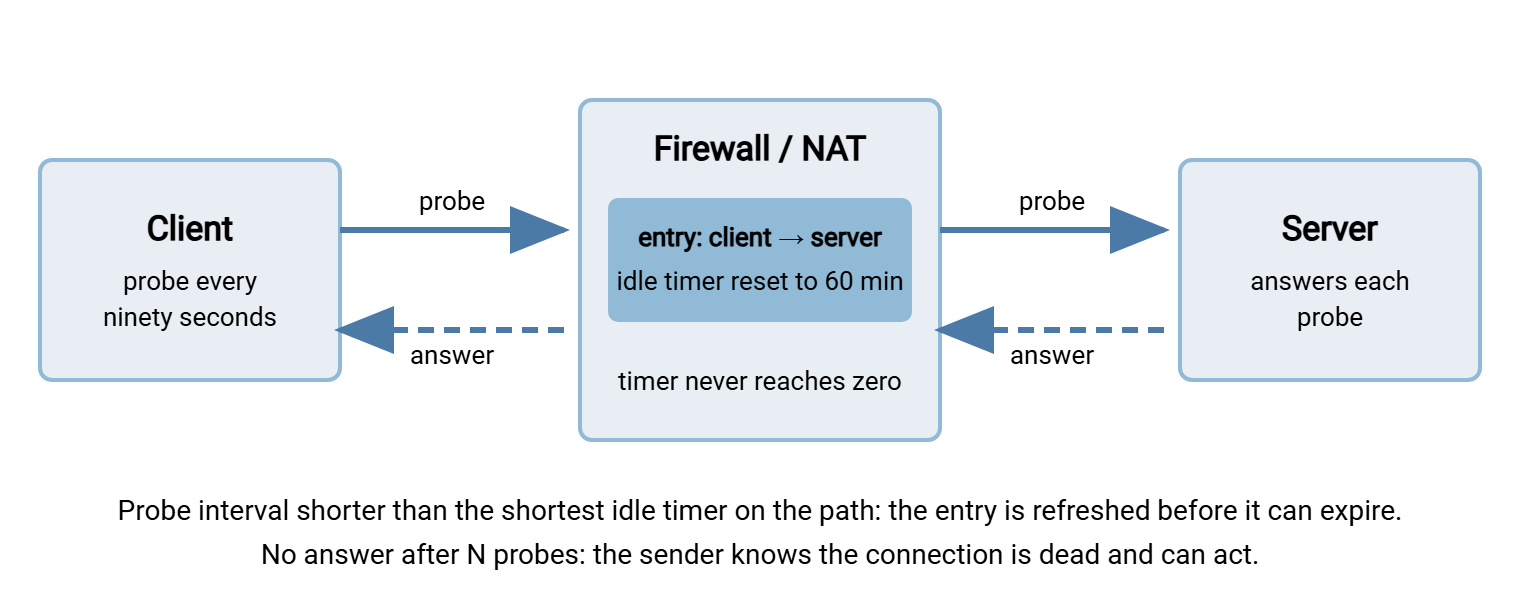
A keepalive is a packet sent on a connection just to prove the connection still works and keep it from being forgotten. Every keepalive does two jobs at once. It refreshes the idle timers on every stateful device along the path. It also detects a connection that has died, because a dead connection will not answer. The two kinds differ in who sends them and who answers.
A TCP keepalive is sent by the operating system, not by the transfer program. It is a tiny, empty TCP segment that the operating system at the far end acknowledges automatically. The FTP or SSH program on either side never sees it. It proves that the far machine is up and the path is open. It does not prove that the far program is still running, healthy, or paying attention; a hung server process answers TCP keepalives perfectly. One more thing to know: the operating system only sends TCP keepalives on connections where the program asked for them. The program does this by setting an option on the socket. The system-wide timers described below govern the schedule, but the program flips the switch.
An application keepalive is a real protocol message — an SSH alive request, an FTP NOOP — that the far program must receive and answer. It proves the far program is alive, not just the far machine. It travels inside whatever encryption the protocol uses, so a middlebox cannot fake a reply. Its drawback is that it depends on the protocol having such a message. The program must also be in a state where it can answer one.
The diagram shows the shared job of both kinds: each probe crosses the middlebox, resets the entry's idle timer, and draws an answer that confirms the path.
TCP Keepalives on Linux
Linux exposes the TCP keepalive schedule as three kernel settings, all in seconds. The defaults explain why "keepalives are on" so often means nothing in practice:
net.ipv4.tcp_keepalive_time— how long a connection must be idle before the first probe. Default two hours. Almost every middlebox timer is shorter than that, so the default probe arrives long after the connection has already been forgotten.net.ipv4.tcp_keepalive_intvl— the gap between probes once probing has started. Default seventy-five seconds.net.ipv4.tcp_keepalive_probes— how many unanswered probes before the connection is declared dead. Default nine.
Despite the ipv4 in the name, these values govern IPv6 connections as well. A set of values that keeps a one-hour firewall timer refreshed and detects a dead peer within a few minutes:
# apply now
sysctl -w net.ipv4.tcp_keepalive_time=120
sysctl -w net.ipv4.tcp_keepalive_intvl=30
sysctl -w net.ipv4.tcp_keepalive_probes=5

# make it survive a reboot
cat > /etc/sysctl.d/60-keepalive.conf <<'EOF'
net.ipv4.tcp_keepalive_time = 120
net.ipv4.tcp_keepalive_intvl = 30
net.ipv4.tcp_keepalive_probes = 5
EOF
sysctl --system

# confirm a live connection is actually using keepalive
ss -tno state established '( dport = :21 or dport = :22 )'
The last command is the one people skip. Its output includes a timer:(keepalive,1min48sec,0) field for connections on which keepalive is enabled. It shows a different timer, or none, for connections where the program never asked. If your transfer client's connection shows no keepalive timer, the kernel settings are irrelevant to it. Find the client's own "TCP keepalive" option. Or, for SSH-based tools, rely on the application keepalive described below.
TCP Keepalives on Windows
Windows keeps the equivalent values in the registry, in milliseconds, under HKEY_LOCAL_MACHINE\SYSTEM\CurrentControlSet\Services\Tcpip\Parameters:
KeepAliveTime(DWORD) — idle time before the first probe. Default two hours, expressed as 7,200,000 milliseconds. The value is usually absent from the registry, which means the default applies.KeepAliveInterval(DWORD) — gap between probes once probing has started. Default one second.- The number of probes is fixed on current Windows releases — ten — and is not a registry setting.
To set a two-minute idle time and a five-second probe gap from an elevated command prompt:
reg add HKLM\SYSTEM\CurrentControlSet\Services\Tcpip\Parameters /v KeepAliveTime /t REG_DWORD /d 120000 /f
reg add HKLM\SYSTEM\CurrentControlSet\Services\Tcpip\Parameters /v KeepAliveInterval /t REG_DWORD /d 5000 /f
rem values are milliseconds; a restart is required for them to take effect
The same caveat applies as on Linux: the registry sets the schedule for sockets that have keepalive enabled. The program decides whether its socket does. Windows programs can also override the registry per socket with their own idle time and interval. That is what "TCP keepalive" checkboxes in transfer clients and server products usually do. When a product offers its own keepalive interval, prefer it to the registry — it takes effect without a restart and affects only that product. On a shared server, changing the registry alters keepalive timing for every service on the machine, which is rarely what you intend.
Remember: on both operating systems the default first probe waits two hours. No probe is ever sent unless the program enabled keepalive on its socket. "Keepalives are on by default" is true and useless. Set the idle time to a couple of minutes, and confirm the program is actually using it.
SSH Keepalives for SFTP and SCP
The SSH protocol has its own alive mechanism, and OpenSSH exposes it on both sides with mirror-image settings. Each side sends a request through the encrypted channel after a period of silence and expects an answer. After a set number of unanswered requests, it disconnects.
# client side: ~/.ssh/config (or /etc/ssh/ssh_config)
Host sftp.example.com
    ServerAliveInterval 60      # default 0 = never send
    ServerAliveCountMax 3       # default 3; disconnect after 3 unanswered
    TCPKeepAlive yes            # default yes; enables OS-level probes too

# server side: /etc/ssh/sshd_config
ClientAliveInterval 60          # default 0 = never send
ClientAliveCountMax 3           # default 3
TCPKeepAlive yes                # default yes
Three things about these settings are worth being precise on. First, TCPKeepAlive yes is the default on both sides and merely turns on the operating-system probe on the SSH socket. The probe then follows the two-hour system schedule unless you changed it. The setting that actually helps is the alive interval. Second, the alive messages are encrypted and require the far SSH program to respond. So they detect a hung server process or a killed client, not only a dead network. Third, only one side needs to send them for the middlebox timers to stay fresh. Setting both is belt and braces and detects failure from whichever side notices first.
Graphical SFTP clients wrap the same mechanism in a checkbox. WinSCP, for example, offers keepalives in its connection settings with a configurable number of seconds. A plain sftp or scp command accepts the options inline with -o ServerAliveInterval=60. More client-side configuration patterns are in SSH config for transfers.
FTP's NOOP Command
NOOP — "no operation" — is the FTP command that asks the server to do nothing and say so. The server replies with a 200-series line, typically 200 NOOP ok. Sent every minute or two on an otherwise idle control connection, it refreshes every middlebox timer. It also resets the server's own idle timer, because it is a genuine command. Between transfers, it is the ideal FTP keepalive.
During a transfer it is less reliable, and this is the FTP-specific trap. While a STOR or RETR is in progress, the server is waiting to send the transfer's final reply. Many servers will not process a NOOP until that transfer is done. The NOOP packet still crosses the firewall and refreshes the entry — that part works. But a client that then waits for the 200 reply may hit its own response timeout. It may abort a transfer that was going fine. Client behavior differs. FileZilla, for instance, has a setting to send keep-alive commands while the connection is idle. It does not send them during transfers, precisely to avoid this. For the control connection during a long transfer, the safe option is the TCP keepalive, which needs no reply from the FTP server at all.
Command-line FTP tools handle this differently again. curl enables TCP keepalive on its connections by default with a sixty-second idle time, adjustable with --keepalive-time. lftp does not so much keep a connection alive as recover it. It reconnects automatically after a failure according to net:reconnect-interval-base and continues the transfer. Both approaches are covered in curl for file transfer. The reply codes you will see in the log are decoded in FTP commands and reply codes.
HTTP Keep-Alive Is Not a Keepalive
An HTTP client can send Connection: keep-alive, and a server can answer with a Keep-Alive: timeout=5, max=100 header. Despite the name, nothing here probes anything. The header means persistent connection: "you may send another request on this same TCP connection instead of opening a new one." The timeout value is the server announcing how many seconds it will hold an idle connection open before closing it. No packets are sent to keep the connection alive; the server simply waits, then hangs up.
For file transfer over HTTPS this matters in two ways. A single large upload or download keeps the connection busy, so no keepalive is needed while bytes are moving. The risks are request timeouts and the idle timers on proxies and load balancers in front of the server. Those devices see nothing unusual about a five-minute pause. And if a client holds a connection open between requests for longer than the announced timeout, the next request fails. It must be retried on a fresh connection — which well-written clients do automatically. If you need an HTTPS connection to survive a genuine idle period, the tool is the TCP keepalive, exactly as with FTP. The wider handling of big files on this protocol is in large files over HTTP.
When Keepalives Make Things Worse
A keepalive is a small, regular promise that the connection is real. Kept carelessly, that promise creates its own problems.
- Too aggressive, and blips become disconnects.
ServerAliveInterval 5withServerAliveCountMax 1means a five-second network hiccup ends the session. That could be a wireless roam, a VPN re-key, or a busy server. Without keepalives, the session would have recovered unnoticed. Interval times count should be at least a minute or two; you are trying to detect death, not stutter. - They defeat the server's idle limit. A server's idle timeout is a security control against abandoned sessions. A client sending
NOOPevery thirty seconds is never idle, so an SFTP window left open on an unlocked desk stays open all weekend. Keepalives belong on automation accounts and known long jobs, not as a default for every interactive user. The account-level view of this is in account and jail hardening. - They hold connection slots. Every session kept alive occupies a slot in the server's connection limit and a state entry in every device on the path. A hundred automation clients each keeping an idle session alive all day can exhaust a per-user or global limit. Busy real transfers then run into that limit. Sizing for that is covered in our server capacity and concurrency series.
- They cannot resurrect an expired NAT mapping. A probe from the server toward a client whose NAT entry is already gone has nowhere to go. Keepalives prevent expiry; they do not undo it, so the interval must be shorter than the timer, not merely "on."
- The wrong layer proves the wrong thing. A TCP keepalive answered by a machine whose SFTP service has hung keeps the middleboxes happy and the client waiting forever. When you care whether the program is alive, use the application keepalive.
Gotcha: a server that has just enabled keepalives for the first time will see idle sessions start to disappear. Sessions that were half-open for hours are finally detected and closed. That is the keepalive working, not breaking. Expect the connection count to drop and the "connection limit reached" complaints to stop.
Choosing Values
Two rules cover nearly every decision. The interval must be shorter than the shortest idle timer on the path. Use half of it, if you know it; two minutes, if you do not. The interval times the probe count is how long a dead connection goes undetected. So keep the product to a few minutes for automation that needs to fail fast and retry. Use longer for interactive sessions that should tolerate a flaky link. The table gives starting points.
Then prove it. Take a transfer that reliably fails — the seventy-minute upload that dies every night — and run it once with the keepalive enabled and nothing else changed. If it succeeds, you have both the fix and the evidence that the cause was an idle timer. If it still fails at the same minute mark, the probes are not reaching the wire. The program did not enable keepalive on its socket, the interval is longer than the timer, or the keepalive is on the wrong connection. That last one is a common mistake with FTP. The client keeps the data connection alive, and the silent control connection is the one that needed it.
| Situation | TCP keepalive | Application keepalive |
|---|---|---|
| FTP or FTPS, long transfers through a firewall or NAT | On, idle two minutes, probes every thirty seconds — protects the silent control connection | NOOP between transfers only |
| SFTP or SCP automation | Default is fine; the SSH alive messages do the work | ServerAliveInterval 60, ServerAliveCountMax 3 |
| SFTP server you run, partners' clients you cannot change | On at the server, idle two minutes | ClientAliveInterval 60, ClientAliveCountMax 3 |
| HTTPS upload or download tool | On, sixty seconds (curl's default) | None exists; retry on a fresh connection |
| Interactive users on a hardened server | Server-side only, to detect vanished clients | Off at the client, so the idle limit still works |
Wrapping Up
Keepalives come in two kinds. The TCP keepalive is sent by the operating system, invisible to the program, and useless at its two-hour default. Set the idle time to a couple of minutes on Linux with the tcp_keepalive settings or on Windows with KeepAliveTime. Confirm the program actually enabled it. The application keepalive is a real message — SSH's alive requests, FTP's NOOP — that proves the far program is alive and works inside encryption. HTTP's keep-alive is neither; it is a persistent connection with an announced expiry. Pick the interval to beat the shortest timer on the path. Keep interval times count to a few minutes. Switch keepalives off where a server's idle limit is doing security work.
The next article, tuning both ends for long transfers, assembles these settings into complete configurations for common setups. The article on idle timeouts on both ends covers the timers the keepalives are racing against. When a session dies anyway, a scheduled job with retry and error handling — what Sysax FTP Automation provides for scripted transfers — reruns it. The keepalive is what keeps the rerun from being necessary.
Frequently Asked Questions
I set tcp_keepalive_time but my transfers still drop. Why?
Is TCPKeepAlive yes in ssh_config enough?
Does the HTTP Keep-Alive header keep my connection from timing out?
Should I send NOOP during an FTP transfer?
Which side should send keepalives, client or server?
From the Sysax team: we build secure file transfer software for Windows — Sysax Multi Server, an FTP, FTPS, SFTP, and HTTPS server, and Sysax FTP Automation for scheduled, scripted transfers. Free trials are on the download page.