
Tuning Both Ends for Long Transfers
The earlier articles in this series each took one timer apart. This one puts them back together. A long transfer survives when every timer on the path is ordered correctly relative to the others. Keepalives must be faster than the devices that forget. Clients must be more patient than the servers that are slow. Servers must be more patient than the scripts that pause. The transfer dies when any one of these timers is out of order. Tuning is not about finding the magic number for one setting. It is about arranging a handful of numbers so that none of them fires first.
This article gives you the ordering principle and a short worksheet for gathering the numbers it depends on. It gives four worked configuration sets for the situations that come up most. These cover FTP through a branch firewall, SFTP automation between sites, and HTTPS uploads behind a load balancer. They also cover a server whose partner clients you cannot change. The article ends with resume and retry as the backstop for the day the alignment fails anyway. It is part of our Timeouts, Keepalives, and Dropped Sessions series; the individual settings are explained in keepalives per protocol and idle timeouts on both ends.
The Alignment Principle
Four relationships have to hold. Each pairs something you control with something you must stay ahead of, and each is a "must be shorter than" rule.
- Keepalive interval must be shorter than the shortest middlebox idle timer on the path. The keepalive refreshes the firewall and NAT tables; if it arrives after the entry has expired, it refreshes nothing.
- The server's slowest reply must be shorter than the client's response timeout. After a big upload the server may scan, hash, or move the file before replying. A client that gives up during that pause fails a transfer that succeeded.
- The longest gap between commands must be shorter than the server's idle limit. A script that pauses ten minutes between files on one session needs a server that tolerates ten minutes of silence — or a script that reconnects.
- Dead-connection detection — keepalive interval times probe count — must be shorter than the retry budget. A job with a two-hour window cannot spend fifteen minutes discovering that its connection died forty minutes ago.
The diagram shows the four pairs as a ladder. Read each row left to right: the left value has to stay below the right one.
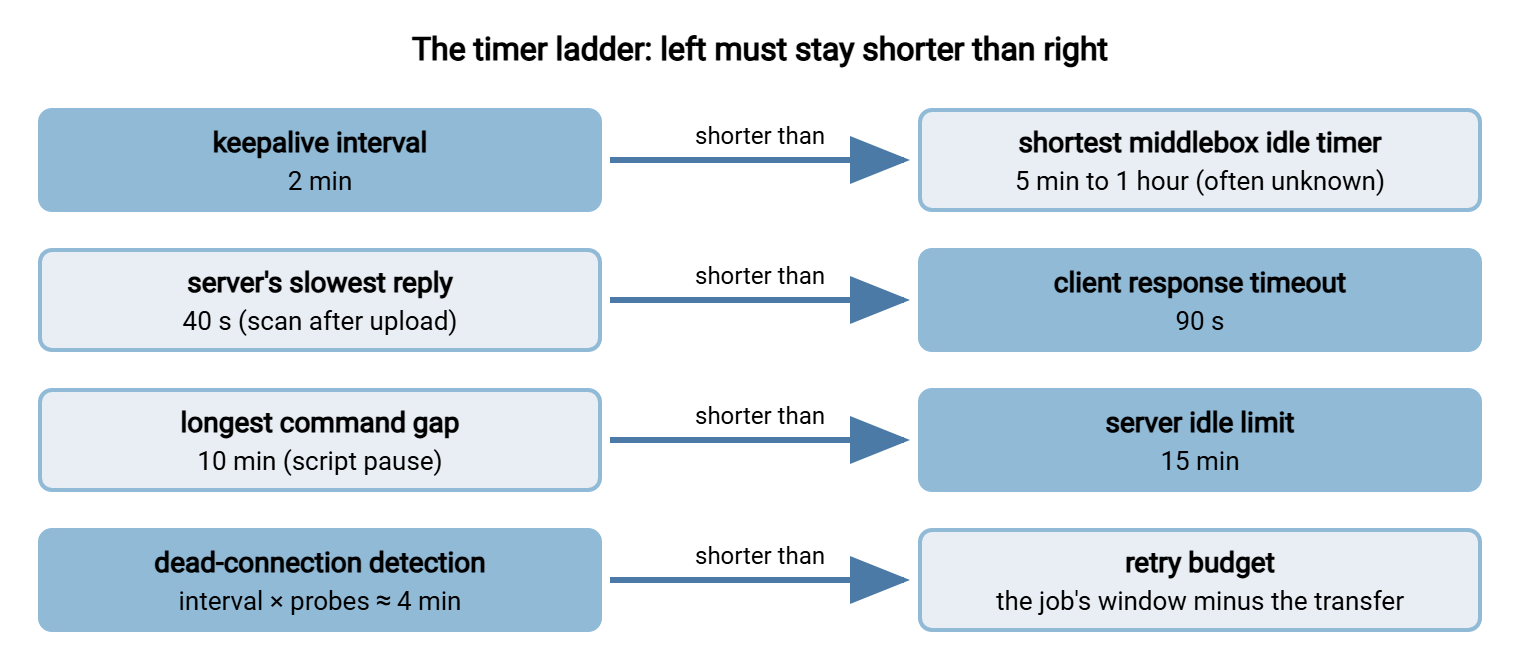
The shaded boxes are the values you set. The plain ones are constraints you measure or, failing that, assume. Rule one is the one most often broken, because the right-hand value is usually unknown. Nobody at the branch office knows the firewall's timer, and nobody is going to find out by Friday. The safe assumption is that the shortest timer on any path is about five minutes. That makes a two-minute keepalive the default for every long-running connection you care about.
Gather the Numbers First
Tuning without measurement is guessing with extra steps. Five numbers, most of them available from logs you already have, turn the ladder into specific settings. Fill in the worksheet before touching a configuration file.
| Number | Where to get it | Drives |
|---|---|---|
| Longest transfer duration | Server log: time between "transfer started" and "complete" for the largest file on the slowest link | Whether the control connection needs a keepalive at all; stall timers |
| Server's slowest reply | Gap between last byte received and final reply sent — visible in a verbose client log or a packet capture | Client response timeout (set to double) |
| Longest gap between commands | Read the script; time any processing that happens while the session is open | Server idle limit, or the decision to reconnect per file |
| Shortest middlebox timer | Ask the firewall owner; otherwise infer it from the failure threshold (transfers under N minutes work, over N fail) | Keepalive interval (set to half) |
| Retry budget | The job's deadline minus its normal duration | Probe count, stall timeout, number of retries |
If the failure threshold is the only clue you have about the middlebox timer, treat it with the correction from address table expiry. Subtract the retransmission delay from the reported failure time. Measure from the last packet on the connection that died, not from the job's start.
Set 1: FTP or FTPS Through a Branch Firewall
The canonical case. A Windows client at a branch office uploads a file that takes two hours through a firewall whose TCP idle timer is one hour. The data connection is busy and safe; the control connection is silent and dies at the one-hour mark, so the server's 226 reply never arrives. The numbers from the worksheet show the longest transfer takes two hours. The slowest reply takes forty seconds (the server scans uploads). There are no command gaps. The middlebox timer is one hour, and the retry budget is four hours.
CLIENT (Windows)
  In the transfer client: enable "TCP keepalive" (or "send keepalives") on the connection
  Registry, if the client relies on system defaults (values in milliseconds, restart needed):
    reg add HKLM\SYSTEM\CurrentControlSet\Services\Tcpip\Parameters /v KeepAliveTime /t REG_DWORD /d 120000 /f
    reg add HKLM\SYSTEM\CurrentControlSet\Services\Tcpip\Parameters /v KeepAliveInterval /t REG_DWORD /d 5000 /f
  Response timeout: ninety seconds   (server's scan takes forty)
  Stall timeout:    five minutes     (abandon a transfer with no bytes moving)
  Transfer mode:    passive

SERVER (FTP/FTPS)
  Control idle timeout: fifteen minutes, suspended while a data transfer is active
  Data stall timeout:   five minutes
  Passive port range:   defined, opened on the server firewall, external address set

FIREWALL (request, not required)
  Raise TCP idle timer to three hours for traffic to the server's port 21 and passive range,
  or enable the FTP helper so the data connection's activity refreshes the control entry
With only the client changes applied, the control connection now carries a probe every two minutes. The firewall entry is refreshed sixty times during the upload, and the 226 arrives. The after-fix client log looks like this — note the reply arriving forty-one seconds after the last byte, comfortably inside the ninety-second timeout:
Mar 21 01:02:12 STOR backup-set-a.tar
Mar 21 01:02:12 150 Ok to send data.
Mar 21 03:04:58 Data connection closed, 61.4 GB sent, waiting for reply
Mar 21 03:05:39 226 Transfer complete.
Mar 21 03:05:39 QUIT
Mar 21 03:05:39 221 Goodbye.
The firewall request is listed last on purpose. It is the most complete fix: it protects every client behind that firewall, not just the one you configured. But it needs another team, a change window, and agreement on which ports to relax. Rule design for that conversation is in our firewalls and NAT for file transfer series. The client-side keepalive is the fix you can make today.
Set 2: SFTP Automation Between Sites
A Linux job pushes a nightly export to an OpenSSH server in another data center. Then it spends ten to twenty minutes generating a second file before pushing it on the same session. The transfers themselves are safe — one busy connection — and the drops happen during the generation pause. Numbers: longest gap twenty minutes, middlebox timer unknown, retry budget one hour.
CLIENT  ~/.ssh/config
  Host export.example.com
      ServerAliveInterval 60        # alive message after sixty quiet seconds
      ServerAliveCountMax 3         # dead after three unanswered (about three minutes)
      ConnectTimeout 20

SERVER  /etc/ssh/sshd_config
  ClientAliveInterval 60            # server probes too; either side keeps the path fresh
  ClientAliveCountMax 3

JOB     reconnect per file instead of holding one session through the pause
  sftp -b put-first.txt  svc_export@export.example.com
  generate second file (twenty minutes)
  sftp -b put-second.txt svc_export@export.example.com
Two fixes are shown because they address different risks. The alive messages keep the session refreshed through an unknown middlebox timer, so the single-session design would now survive. The reconnect-per-file pattern removes the idle period altogether. That also means a session is never sitting open with nothing to do. That pattern is the better design regardless, and one that plays well with a server whose idle limit is a security control. Batch-mode scripting details are in SFTP automation.
Note what is absent from this set: no operating-system TCP keepalive settings. The SSH alive messages are real packets and refresh the middlebox tables just as well. They travel inside the encryption and need no socket option from the program. For SSH-based transfers, the alive interval is the only keepalive you normally need. The kernel or registry values matter only for protocols that lack an application-level equivalent during transfers. In practice, that means FTP.
Set 3: HTTPS Uploads Through a Load Balancer
A script uploads large files to an HTTPS endpoint sitting behind a load balancer. Load balancers are built for web requests, and their idle timers are short — a minute to a few minutes is common. A big upload is continuously busy, so the timer is not the problem while bytes flow. The failures come when the server takes a long time to process the upload before answering. The balancer, seeing an idle connection, closes it. Numbers: slowest reply three minutes (server-side processing), middlebox timer sixty seconds, retry budget thirty minutes.
curl --upload-file export.zip https://intake.example.com/upload/export.zip \
     --keepalive-time 30 \          # TCP probe after thirty quiet seconds (default sixty)
     --speed-time 300 --speed-limit 1000 \   # abort if under 1 KB/s for five minutes
     --retry 5 --retry-delay 60 \   # five attempts, a minute apart
     --continue-at - \              # resume from where the server has the file, if supported
     --max-time 7200                # hard ceiling on the whole attempt: two hours
The keepalive handles the balancer's timer during the server's processing pause, provided the balancer honors TCP keepalives as activity — most do, some do not. Where it does not, the fix moves to the balancer's configuration or to the application design. The configuration fix is to raise the idle timeout for the upload path specifically. The application fix is for the server to acknowledge the upload immediately and process it afterward. That avoids holding the connection through minutes of work. Resumable and chunked upload designs, which make the retry cheap, are covered in large files over HTTP.
Set 4: Partner Clients You Cannot Change
You run the server. Two hundred partners connect with whatever clients they have, behind whatever firewalls they have. A handful of them complain that large uploads "fail at the end." You cannot install a keepalive on their side. Numbers: slowest reply on your side ten seconds, partner middlebox timers unknown, and the goal is to protect everyone without a single partner conversation.
SERVER, SFTP (OpenSSH)      ClientAliveInterval 60 / ClientAliveCountMax 3
SERVER, FTP/FTPS            enable TCP keepalive on control connections in the server's settings,
                            or set the OS keepalive idle time to two minutes:
                              Linux:   net.ipv4.tcp_keepalive_time = 120
                              Windows: KeepAliveTime = 120000 (ms; restart required)
IDLE LIMITS                 fifteen minutes for interactive accounts; thirty for partner
                            automation accounts, scoped to those accounts only
POST-UPLOAD PROCESSING      move scanning and hashing off the reply path — acknowledge
                            first, process afterward — so the final reply is never slow
LOGGING                     record each session's start, each transfer, and the session end
                            with its reason, so a partner's "it failed" can be matched to
                            "upload complete, session idle-closed forty minutes later"
A middlebox entry is refreshed by packets from either direction. So a server-side keepalive every two minutes protects every partner whose firewall timer is longer than two minutes. That is nearly all of them, with no change on their end. The logging line is the other half. Suppose a partner still reports a failure. A server that writes each session's start, transfers, and end to a file or database, as Sysax Multi Server does, gives you timestamps. You can answer with those rather than opinions. On the Windows side, the registry change affects every keepalive-enabled socket on the machine. So prefer a per-service keepalive setting when the server product offers one.
Remember: whichever end you control is the end you tune. Client-side keepalives fix one client; server-side keepalives fix every client at once. Firewall changes fix everything behind that firewall but need another team. Do the one you can do today, then request the one that lasts.
Resume and Retry: The Backstop
Alignment will fail sometimes. A partner's firewall has a two-minute timer nobody expected. A mobile link drops for real. A server restarts for patching in the middle of a transfer. The goal of the backstop is to make a drop cost minutes instead of hours, and it has three parts.
Resume means continuing a transfer from where it stopped rather than from byte zero. FTP has the REST command for downloads and APPE for appending to a partial upload. SFTP can open a file at an offset. HTTP has range requests and, on the upload side, whatever resumable scheme the server supports. Every protocol can do it, but not every client and server does. It must be verified after the fact: the resumed file must be checked against the original. Our resume and checkpoint restart series covers each protocol's mechanics and the verification step.
Retry with backoff means the job tries again after a drop, waits longer between each attempt, and stops after a sensible number. Immediate, infinite retries hammer a server that is already struggling and can turn one drop into a locked-out account. The pattern — and the difference between a failure worth retrying and one that is not — is laid out in retry strategies and backoff. A scheduling tool with built-in retry and error handling, which is what Sysax FTP Automation provides for scripted transfers, removes the need to write that logic by hand.
Partial-file safety means the receiving side never mistakes a half-arrived file for a complete one. Upload to a temporary name and rename on completion, so a downstream process cannot pick up the fragment left by a drop. The technique is in temp names and atomic renames. Without it, the backstop that saved the transfer can still corrupt the workflow.
Verifying the Tuning
A tuning change is a hypothesis until a previously failing transfer succeeds. Four checks close the loop:
- Confirm the keepalive is on the wire. On Linux,
ss -tno state establishedshows akeepalivetimer on the connection. On Windows, a short packet capture during an idle period shows the probes. A setting that never reached the socket has fixed nothing. - Rerun the known failure. The transfer that died every night at the same minute is the best test you have. Run it once, unchanged except for the tuning, and watch both logs for the final reply.
- Test the idle case deliberately. Open a session, leave it idle for longer than the suspected middlebox timer plus ten minutes, then issue a command. If it answers, the keepalive is beating the timer.
- Write the numbers down. The worksheet values, the settings chosen, and the reason for each belong in the flow's runbook. That way, the next person who inherits the job does not rediscover the firewall timer during an outage. Our documenting transfer flows series describes where that record lives.
Gotcha: a successful test on the office network proves nothing about the branch. Middlebox timers are properties of the path, so test from the place the job actually runs, through the devices it actually crosses.
Wrapping Up
Long transfers survive when the timers are ordered. The keepalive is faster than the middleboxes, and the client is more patient than the server's slowest reply. The server is more patient than the script's longest pause. Dead-connection detection is quick enough to leave room for a retry. Measure the five numbers, set the shaded values on the ladder, and apply the configuration set closest to your situation. Tune the end you control first and request the middlebox change second. Then make the inevitable exception cheap with resume, backoff, and temporary file names.
When a job still drops and the timing is not the same twice, the problem is no longer alignment but diagnosis. That method — three logs, time-of-day patterns, a packet capture — is the subject of the final article, diagnosing intermittent drops.
Frequently Asked Questions
What keepalive interval should I use if I don't know the firewall timer?
Should I tune the client or the server?
Is raising every timeout to a very large value a reasonable shortcut?
If I have resume and retry, do I still need keepalives?
How do I know my tuning worked?
From the Sysax team: we build secure file transfer software for Windows — Sysax Multi Server, an FTP, FTPS, SFTP, and HTTPS server, and Sysax FTP Automation for scheduled, scripted transfers. Free trials are on the download page.