
Consolidating Authentication at the Gateway
Run the doors inventory from earlier in this series and one column reliably comes back the ugliest: where do the accounts live? Five external services, five separate account stores. There are local users on the SFTP box, a database behind the customer portal, and half-remembered logins on the vendor's FTPS server. Somewhere, there is an account named after an employee who left. Every store has its own password rules, its own idea of lockout, and its own blind spot in the offboarding process. When a partner contract ends, someone has to remember every door that partner ever had a key to. Someone, eventually, doesn't.
Consolidating authentication is the half of the gateway pattern that pays off fastest. You get one place where outsiders prove who they are and one policy that decides what proof is acceptable. You get one log of every attempt, and one switch that turns a partner off everywhere at once. This article — part of our Transfer Gateways and Reverse Proxies series — works through the design in the order you will face it. It covers what changes when authentication moves to the door and how far to integrate with your central directory. It covers expressing per-partner policy and taking custody of the keys and certificates that now concentrate at the gateway. Then comes the decision everyone trips over — what identity the gateway uses onward, toward the internal systems behind it.
What Actually Changes When Auth Moves to the Door
In the many-doors world, "our external authentication policy" is a fiction — what exists is five separate implementations that drifted apart years ago. Consolidation replaces the fiction with a single enforcement point, and four concrete things follow:
- One account store. Every external party — partner, customer, vendor — exists exactly once. Creating, disabling, and reviewing accounts is one procedure in one interface, not five procedures in five.
- One policy engine. Password strength, key requirements, lockout thresholds, allowed source addresses: defined once, applied to everyone, with per-account exceptions that are visible instead of accidental.
- One authentication log. Every success and failure across all external exchange lands in a single stream. That transforms attack detection. A password-spraying run against your estate now shows up as one pattern in one log instead of five faint traces in five formats. The detection craft itself is covered in monitoring authentication attacks.
- One off switch. Offboarding a partner becomes disabling one account, with certainty, today — the difference between a clean exit and the forgotten-credential findings that turn up in audits.
There is a fourth change, subtler and just as valuable: lockout and throttling become coherent. In the scattered world, each door counted failures on its own. An attacker who spread guesses across five services stayed under every individual threshold while making five times the attempts. At a consolidated door, the counting happens in one place. So slow, distributed guessing finally accumulates into a visible, blockable pattern. The lockout policy you think you have is the one every external account actually gets.
None of this requires exotic architecture. If your front door is a consolidated multi-protocol server, that server's account system is the central store. If your front door is a terminating gateway in front of internal services, the gateway authenticates and the question of onward identity arises. That is the subject of the final section. Only a pure passthrough proxy leaves authentication where it was, on the backends. That is a legitimate choice from the reverse proxy article, but it forfeits this article's benefits, and you should choose it knowing that.
Directory Integration, Honestly
The first design fork: should gateway accounts live in a local store on the gateway itself, or integrate with your central directory — the Windows-domain-style identity system your organization already runs?
Directory integration is the reflex answer, and for internal users it is simply correct. Employees who fetch files through the gateway should authenticate with the same identity they use everywhere else. That way, joiners, movers, and leavers are handled by the processes that already exist. Disable the person in the directory and their transfer access dies with everything else — no separate offboarding step to forget.
For external parties, honesty requires more nuance, because putting outsiders in your corporate directory has real costs. Partner accounts in the main directory can inherit access nobody intended (group memberships, default permissions aimed at employees). They complicate directory hygiene reports ("why do we have forty enabled accounts for people who don't work here?"). They couple partner authentication to infrastructure that partner traffic otherwise never touches. The workable patterns, in rough order of prevalence:
- A fenced-off area of the directory — a dedicated organizational unit and group with a strict naming convention (
ext-partnerA-sftp) and explicitly minimal membership. The rule is that external accounts get transfer access and nothing else. Best when directory tooling and reporting are already strong. - A local store on the gateway for externals only — partner accounts live and die at the door, fully decoupled from corporate identity. Simpler blast radius, one more lifecycle to run — so pair it with the review discipline from the partner credential lifecycle.
- Both, deliberately: directory for internal users, local for externals. This hybrid is common, sensible, and only becomes sprawl if a third store quietly appears.
A server product that speaks all three dialects makes the hybrid practical. Sysax Multi Server, for example, authenticates accounts against its own built-in store, against Windows or Active Directory accounts, or with SSH public keys, per account. So internal staff can ride the directory while each partner gets a fenced local identity with key authentication, all on the same front door.
Per-Partner Policy at the Door
Central authentication is not just one list of accounts — it is the place where differentiated policy finally becomes enforceable. Partners are not interchangeable: an EDI counterparty moving payment files warrants stricter proof than a marketing vendor dropping artwork. At a consolidated door you can write that difference down as configuration. The dimensions worth deciding per partner or per class of partner:
- Authentication method: SSH public key, password, client certificate, or a combination. The strength ladder and its tradeoffs are mapped in authentication methods compared. Automated partner traffic should sit on keys or certificates, not passwords typed by no one.
- Source restrictions: which network addresses the account may even attempt from — enforced at the door for everyone, tightened per account for the partners whose addresses you know.
- Protocol and area: which protocol the account may use, and which folder or tenant area it is confined to. That is per-account isolation, so a compromised partner credential explores an empty room, not the estate.
- Lifecycle terms: expiry or review dates for the account and its credentials, set at onboarding rather than negotiated at incident time.
Written as a matrix, the policy stops being tribal knowledge. A worked example for a small estate:
| Account class | Method required | Source restriction | Protocol & area | Review |
|---|---|---|---|---|
| EDI partner (automated) | SSH public key only | Partner's two known address ranges | SFTP; own folder pair (in/out) | Key rotation yearly; account at contract renewal |
| Vendor (human, occasional) | Password + strict lockout | None (travels) | HTTPS portal; upload-only drop | Quarterly dormancy check |
| Internal operations staff | Directory identity | Internal networks only | SFTP; operational areas per role | Inherited from directory lifecycle |
The matrix belongs in your runbook, and each row's terms belong in the partner's onboarding document. The broader relationship mechanics are the territory of our B2B partner exchange series. The gateway's job is to make every cell enforceable rather than aspirational.
Custody: The Keys and Certificates Now Live With You
Consolidation concentrates more than accounts — it concentrates credential custody. The gateway becomes the registry of every partner's SSH public key. It holds the estate's external TLS certificates and the door's own host key. It is the place where client certificates are trusted if you use mutual TLS. Concentration is the benefit and the duty in one:
- Partner public keys are registered once, against one account, through one procedure. That replaces the old scatter where a key change meant finding every box that partner touched. Run the registry with the discipline of distributing authorized keys: verified receipt of new keys, dated entries, removal on rotation rather than accumulation.
- The door's own identity — its TLS certificates and SSH host key — is what every partner pins. Renewals and rotations are now single events with estate-wide blast radius, so they get calendars, owners, and announced change windows, never surprises.
- Client certificates, where partners authenticate with mutual TLS, add a small certificate authority's worth of duties — issuance, expiry, revocation — described in client certificates and mutual TLS. Take them on deliberately or not at all.
- Private keys never leave. The gateway's private keys exist on the gateway and in your recovery store, nowhere else — not in email, not in the wiki, not "temporarily" on an admin workstation.
Custody concentration also changes how rotations feel. Rotating a certificate or host key used to be a per-box chore with per-box risk. Now it is a single, estate-wide event — which cuts both ways. Do it well and every partner benefits at once; fumble it and every partner fails at once. So rotations get rehearsed on a test endpoint first, scheduled into announced windows, and paired with a rollback plan. That is exactly how you would treat any other change with a blast radius of "everyone."
Remember: after consolidation, the gateway's credential registry is the single source of truth about who can open your front door. Treat changes to it like production changes — logged, reviewed, attributable. An attacker who can quietly add one public key to one account has a permanent invisible entrance.
Onboarding One Partner at the Consolidated Door
The payoff of all this design shows up the first time you onboard a partner and the whole exercise fits one checklist against one system. A version worth copying into the runbook:
Partner onboarding at the gateway
 1. Pick the account class from the policy matrix; note any approved deviation
 2. Create the account in the designated store (fenced directory OU or local)
 3. Receive the partner's PUBLIC key; verify its fingerprint out-of-band
    (phone or the partner portal - never trust the email alone)
 4. Register the key; set source-address restrictions to the partner's ranges
 5. Confine the account: protocol(s) allowed, its own folder area, quota if used
 6. Record lifecycle terms: key rotation date, account review date, contract end
 7. Have the partner run a REAL test: connect, upload, download, delete rights
    as agreed - from their production network, not just yours
 8. Confirm both sides see the test in their logs; file the evidence
 9. Add the account to the reconciliation and review lists - done
Nine steps, one afternoon, one system — and every line lands in exactly one place instead of being smeared across five servers and three teams. When the partner leaves someday, step 9 is what guarantees you will find everything steps 2 through 5 created.
Pass Through or Re-Authenticate: The Onward Identity Decision
Now comes the decision that only exists once a gateway stands in front of internal systems. The partner has proven their identity at the door. But the gateway must open its own connection onward, and that connection needs an identity too. There are three honest designs, and the diagram shows them side by side.
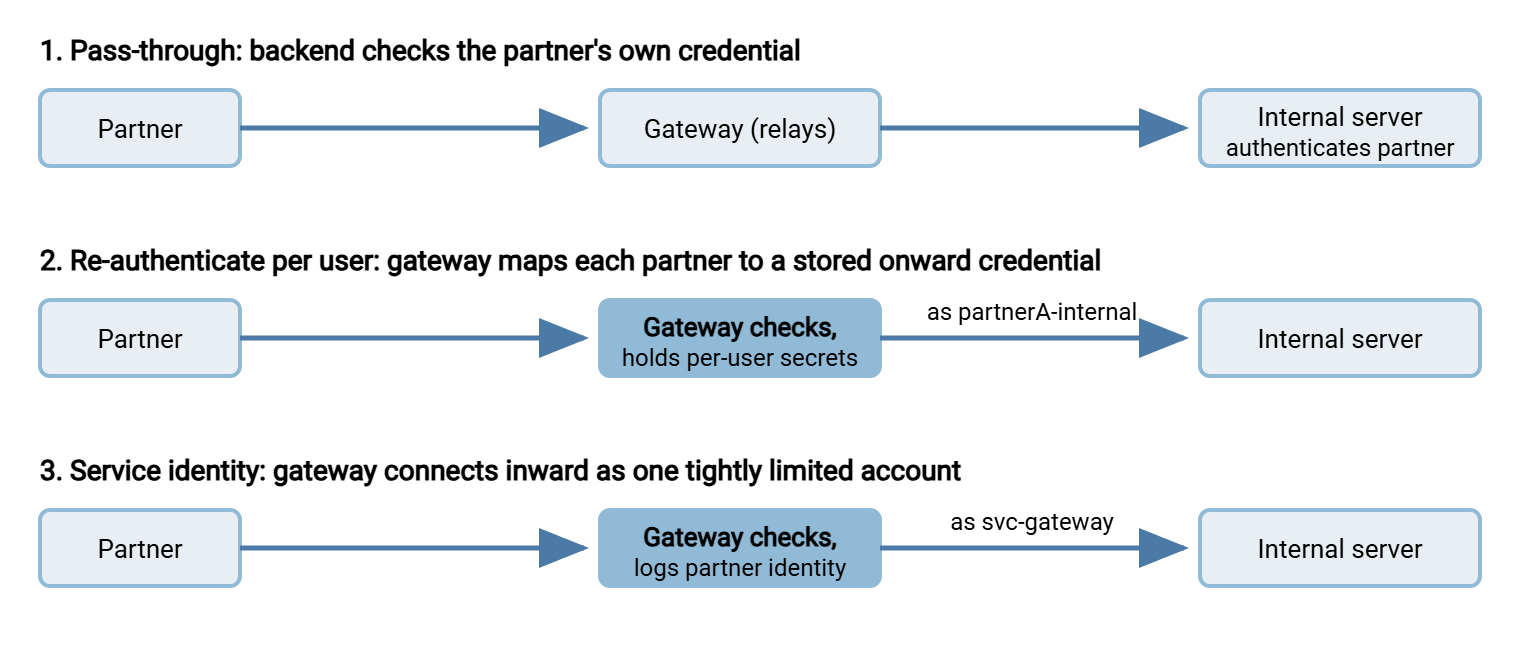
Pass-through keeps authentication on the internal server. The gateway relays the session (this is the passthrough proxy of the previous article) and holds no secrets at all. Simple and pure — but the "one store, one policy, one off switch" benefits stay unrealized, and the internal server remains the thing partners really talk to.
Re-authenticating per user gives the cleanest end-to-end story. The internal server still sees "partner A" and enforces partner A's permissions. The price is the heaviest custody: the gateway now stores an onward credential for every external account. That doubles the secrets to rotate and audit. It earns its complexity where internal systems must make per-partner authorization decisions themselves.
A service identity is the pragmatic middle and the most common choice. The gateway authenticates the partner, records who it was, and moves files inward under one service account per flow or tenant. Custody is minimal — one onward credential per backend, not per partner. Two disciplines keep it honest. First, the service account must be ruthlessly limited on the backend, because it acts for everyone. The reasoning is the blast radius of one account. Second, partner identity now exists only in the gateway's logs. So those logs must capture it faithfully, or "who sent this file?" becomes unanswerable one hop inland. On a Multi Server backend, that pairing looks unremarkable in the best way. The service identity gets one tightly scoped account with its own folder isolation. The activity log — written to file and database — records everything that identity did. That record is joined to the gateway's record of which partner was behind each session.
| Design | Secrets at the gateway | Backend sees | Choose when |
|---|---|---|---|
| Pass-through | None | Real partner identity | End-to-end auth is required; central auth benefits waived knowingly |
| Re-auth per user | One onward credential per external account | Mapped per-partner identity | Internal systems enforce per-partner authorization themselves |
| Service identity | One onward credential per backend or tenant | The gateway's service account | Default: minimal custody, if gateway logs carry identity and the account is confined |
Getting There Without a Flag Day
Consolidation does not require an estate-wide cutover weekend — and should not get one. Accounts migrate with their doors as each external service moves behind the gateway in the staged waves of the adoption path. Its accounts are recreated (or directory-mapped) at the door, and its partners are notified. The old store rides along in read-only parallel until the wave's grace period ends. Two habits make the difference between a migration and a mess. Keep a running reconciliation of accounts-old versus accounts-new per wave, so nothing falls between stores. And resist creating "temporary" accounts outside the new store during the transition. Every one of them is a seed of the next sprawl. Internal automation is part of the same sweep. Scheduled jobs that used to log into retired doors get their connection profiles pointed at the gateway once per wave. That is a five-minute change in an automation tool like Sysax FTP Automation, where the profile is stored once and every scheduled task inherits it.
The Short Version
Scattered account stores are the sharpest recurring cost of a many-doors estate, and the first thing a gateway should consolidate. Put internal users on your directory. Put external parties in a fenced directory area or a disciplined local store. Write per-partner policy as an enforceable matrix — method, sources, protocol, area, review date — instead of tribal memory. Accept that consolidation concentrates custody. Partner keys, door certificates, and the host key partners pin now live in one registry that deserves production-change discipline. And decide the onward identity question on purpose. Choose pass-through when end-to-end authentication is genuinely required, or per-user re-authentication when internal systems authorize partners themselves. A confined service identity — with partner names preserved in the gateway's logs — is the pragmatic default.
From here: reverse proxies in front of transfer services explains the terminate-versus-passthrough machinery this article's decision rides on. And the one-front-door concept holds the wider consolidation case. When you are ready to move accounts for real, the adoption path sequences the waves.
Frequently Asked Questions
Should partner accounts go into our corporate directory?
Can different partners use different authentication methods at the same gateway?
What happens to the accounts on the old servers after consolidation?
Is multi-factor authentication realistic for automated partner transfers?
Who generates the SSH key pair — us or the partner?
From the Sysax team: we build secure file transfer software for Windows. Sysax Multi Server is an FTP, FTPS, SFTP, and HTTPS server. Sysax FTP Automation handles scheduled, scripted transfers. Free trials are on the download page.