
Reverse Proxies in Front of File Transfer Services
The idea usually arrives from the web side of the house. The web team has run every site behind a reverse proxy for years — one public address, certificates in one place, backends invisible. Someone reasonably asks: why not put the file transfer services behind it too? It is a good question with an unhelpfully uneven answer. For HTTPS transfer, proxying is mature and works beautifully. For SFTP and FTPS, the honest story is different, because those protocols were never designed to be inspected and forwarded the way web traffic is.
This article — part of our Transfer Gateways and Reverse Proxies series — walks through how reverse proxying actually behaves for each transfer protocol. It covers what the proxy can and cannot see, where TLS termination helps and what it costs, and why FTPS is the awkward one. It explains how to keep the real client addresses that your logs and firewall rules depend on. By the end you will be able to say, per protocol, exactly what a proxy in front of your transfer estate would buy you. You will also know what it would quietly take away.
What a Reverse Proxy Actually Does
A reverse proxy is a service that stands in for your real servers. Clients connect to the proxy believing it is the server. It holds the public address and name, accepts the connection, and then opens its own, second connection to a backend server on the inside. Data is relayed between the two. (The "reverse" distinguishes it from a forward proxy, which sits in front of clients going out; a reverse proxy sits in front of servers facing in.)
The mechanical detail that drives everything else in this article: there is no single connection "passing through" the proxy. There are two connections spliced together — client-to-proxy, and proxy-to-backend. Every question about proxying transfer protocols comes down to what happens at the splice point. Does the proxy merely copy encrypted bytes between the two connections, or does it decrypt, understand, and re-speak the protocol? Those are the two modes — passthrough and termination — and they trade against each other everywhere below.
HTTPS: The Protocol Proxies Were Built For
Start with the easy case, because it sets the benchmark. HTTPS transfer — browser upload portals, REST-style file APIs, WebDAV — rides on HTTP, and HTTP was effectively co-designed with proxies. A reverse proxy in front of an HTTPS file service is a solved problem:
- TLS terminates at the proxy. The proxy holds the certificate and private key for the public name, performs the TLS handshake, and sees the plaintext HTTP request. Certificates for every external name live in one place — which is exactly the central-certificate duty described in installing and chaining certificates. The proxy then re-encrypts on a fresh TLS connection to the backend. Or, on a trusted internal segment, it forwards in the clear — a placement decision, not a default.
- Routing by name and path. The proxy reads the request. So it can send
upload.example.comto one backend andportal.example.comto another, from a single public address. This is the per-request intelligence transfer protocols will not give you. - The client address survives in a header. The backend sees the proxy's address on the network connection — that is unavoidable, since the proxy genuinely is the one connecting. The mature convention is for the proxy to add a forwarded-for style header to each request carrying the original client address. The backend logs that address instead. One rule keeps this honest: the backend must accept that header only from the proxy itself, because anything a client sends can be forged.
Two file-transfer-specific cautions even in this happy case. Large uploads stress proxies in ways ordinary web pages do not. Some proxy configurations buffer an entire request body before forwarding. That turns a multi-gigabyte upload into a disk-space and latency problem at the proxy. Look for streaming or unbuffered forwarding options and raise the request-size and timeout limits deliberately. And an idle-connection timeout tuned for web pages will sever a slow upload mid-transfer; transfer endpoints need patient timeouts.
SFTP and FTPS Are Not HTTP
Here is where honest architecture writing has to slow down. SFTP and FTPS do not gain any of the above automatically, because the properties that make HTTP proxy-friendly are missing:
- No readable envelope. An arriving SFTP connection is SSH: encrypted almost from the first byte. There is no equivalent of a host header or server-name indication for the proxy to route on. The proxy cannot see the username, the files, or anything else without terminating the SSH session itself.
- No header mechanism. There is nowhere in SFTP or FTPS to tuck a "real client address" note for the backend. The forwarded-for trick simply does not exist here.
- FTPS is two channels, not one. An FTPS session is a control connection plus separate, dynamically negotiated data connections — a shape that fights every middlebox it meets.
So the realistic options for putting something in front of SFTP and FTPS are the following three, each legitimate, none free.
Option one: TCP-level passthrough
The proxy accepts the TCP connection on port 22 (or 990/21) and copies bytes, unread, to a configured backend. The encryption — SSH or TLS — runs end to end between the real client and the real backend server. This is the simplest and most honest mode, and its properties follow directly:
- Zero session visibility. The proxy can log that an address connected, when, and how many bytes moved — nothing more. No usernames, no filenames, no failed-login detail. All protocol-level logging stays on the backend.
- The backend sees the proxy as the client. Every session appears to come from the proxy's address, unless you add one of the source-address mechanisms covered below. Until you do, backend IP allow rules and lockout counters are effectively blind.
- Identity stays put — a quiet benefit. Because the SSH session terminates on the real backend, partners keep seeing the backend's host key. Its fingerprint — the thing careful partners pin, as described in host keys and known_hosts — does not change when the passthrough tier appears.
- Routing is per-address, not per-user. One public address and port maps to one backend. Ten backends need ten public addresses or ports; the proxy cannot route by who is logging in, because it cannot see who is logging in.
Option two: a protocol-aware SFTP gateway
There is a product category — call it a protocol-aware SFTP gateway — that terminates the SSH session at the edge. It presents its own host key, authenticates the user itself, and then opens its own onward connection to an internal server. Because it understands the session, it can do what passthrough cannot. It can route by username, apply per-account policy, and log logins and file operations at the edge. It can even speak a different protocol inward (that trick has its own article — protocol bridging).
The costs are the mirror image. End-to-end encryption becomes two hops, with the gateway briefly holding plaintext at the splice. The gateway now possesses serious secrets — its host key, the credential store or the means to check credentials, possibly onward credentials to the backend. That shapes where it may safely stand and what may live on it. That placement argument belongs to keeping data and credentials out of the DMZ. And partners now pin the gateway's host key, so introducing one is a fingerprint change you must announce. After that, in fairness, the gateway holds that fingerprint stable no matter how often the backends change.
FTPS: the awkward one
FTPS inherits FTP's two-channel design: commands travel on the control connection. Every directory listing or file transfer opens a fresh data connection to a port negotiated inside the session. TLS is wrapped around all of it. Behind a proxy this bites twice. First, a passthrough proxy must forward not just the control port but the entire passive port range. The backend must advertise the proxy's public address in its PASV replies. Otherwise, clients will try to open data connections to an address they cannot reach. Second, the control channel is encrypted. So the network gear that historically peeked at FTP commands to open data ports on the fly cannot help. This is the very problem, in a new costume, described in FTPS, firewalls, and NAT. A protocol-aware tier can only manage FTPS data channels by terminating TLS so it can read the negotiation. There is no third path; anyone who claims effortless FTPS proxying has not tried it. Many estates conclude, reasonably, that the gateway era is the right moment to steer external parties toward SFTP or HTTPS and let FTPS live out its contract quietly.
Terminate or Pass Through: The Central Decision
Every option above is a position on one axis: where does the encrypted session end? The diagram shows the two answers side by side. Passthrough has one end-to-end encrypted session relayed at the proxy. Termination has two separate encrypted sessions meeting at the gateway.
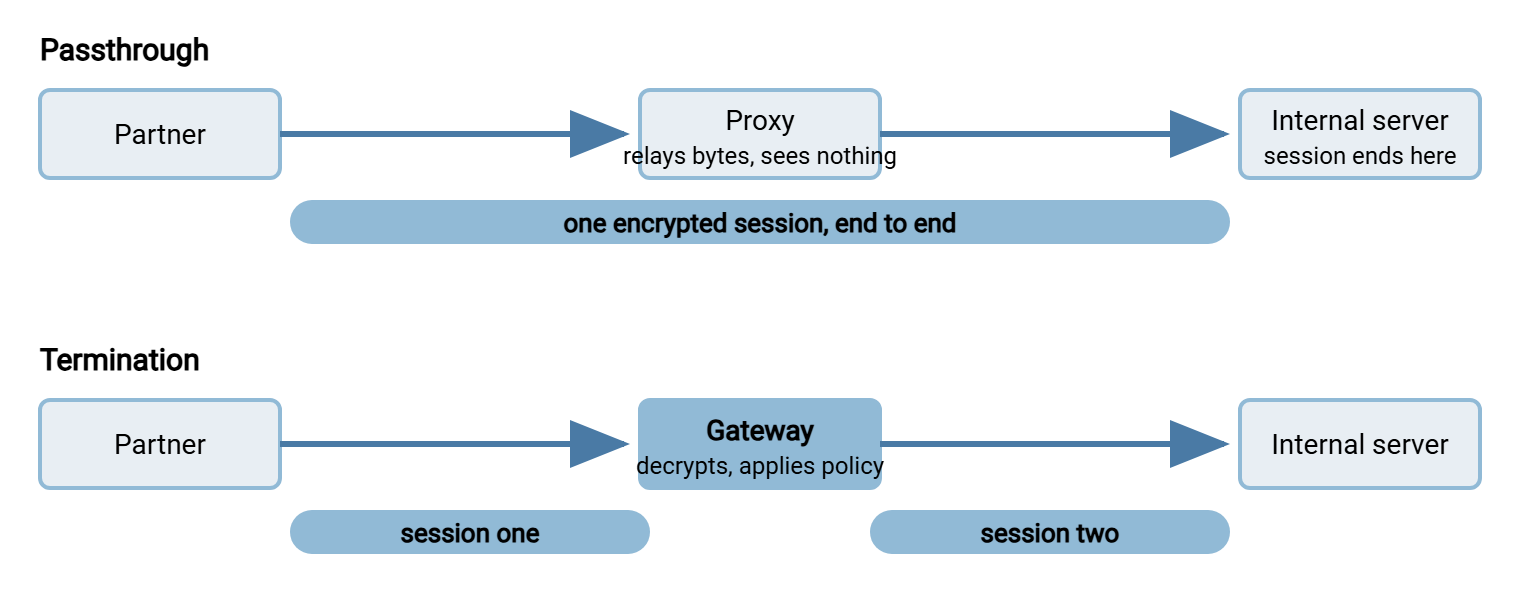
Neither answer is "more secure" in the abstract; they defend different things. Termination trades end-to-end confidentiality for control at the edge: central certificates, per-user policy, edge logging, and the ability to inspect or translate. Passthrough trades control for purity: nothing between the client and the backend can read the traffic — including your own gateway, for better and worse. State the tradeoff plainly in your design document and nobody gets surprised later:
- Choose termination when the gateway must make decisions that require seeing the session — per-partner routing, edge authentication, protocol translation, upload inspection. Holding certificates and keys at the edge must also be acceptable to your placement policy.
- Choose passthrough when end-to-end encryption is contractually or philosophically required, or when the edge must hold no secrets. Also choose it when you want a proxy tier's address indirection without trusting new software with session contents.
- Mixing is normal. Terminate HTTPS at the edge while passing SFTP through to a hardened internal server; the decision is per protocol, not per estate.
The Per-Protocol Reality, on One Table
| Protocol | How well it proxies | What the proxy can see | Real client address | Watch out for |
|---|---|---|---|---|
| HTTPS | Excellent — proxying is native territory | Everything, if terminating: names, paths, sizes | Forwarded-for style header, trusted from the proxy only | Upload buffering, body-size limits, impatient timeouts |
| SFTP (passthrough) | Fine as TCP relay | Connections and byte counts only | Lost unless a preamble or network-level mechanism adds it | Backend allow rules and lockouts see only the proxy |
| SFTP (protocol-aware gateway) | Good, via a dedicated product category | Full session: users, logins, file operations | Seen and logged at the gateway itself | Host-key change on introduction; secrets now at the edge |
| FTPS | Poor to fiddly — two channels fight the middle tier | Nothing without terminating TLS on both channels | Same options as SFTP, applied per channel | Passive range forwarding; advertised address in PASV replies |
Keeping the Real Client Address
Why fight for the client's true address at all? Because three controls quietly depend on it. IP allow rules restrict a partner account to the partner's network — the backbone of IP allowlisting. The lockout and throttling logic counts failures per source. One proxy address turns those into a single shared bucket (one attacker can lock out everyone, or no one). Then there are audit answers, where "who connected?" should not end at your own proxy. When a proxy tier appears, every one of those either moves to the tier that still sees real addresses, or the address must be carried forward. The honest menu, described generically because the mechanisms go by many names:
- Header-based forwarding — the HTTP family's solution, available only where the proxy terminates and speaks HTTP. Configure the backend to trust the header exclusively from the proxy's address.
- A proxy-protocol style preamble — the proxy prefixes each forwarded TCP connection with a tiny declaration of the original source address, and the backend strips and records it. It works for any TCP protocol, including SFTP passthrough — but both ends must speak it. A backend expecting the preamble rejects bare connections. A backend that accepts it from arbitrary sources can be fed forged addresses. Enable it strictly on the proxy-to-backend path.
- Network-level preservation — the proxy or load-balancing tier forwards packets with the original source address intact, and the network routes return traffic back through it. Transparent to the backend, invisible in the protocol, and entirely a network-engineering exercise: the return path is where these designs succeed or fail.
- Accepting the loss, deliberately — run allow rules, throttling, and connection logging at the edge tier that sees real addresses. Treat backend logs as recording "via gateway." Honest and common; just write it down so nobody later reads backend logs as if they showed the world.
Remember: whichever mechanism you pick, exactly one tier should be the authoritative record of "who connected from where." Every alarm, allow rule, and audit answer should point at that tier. Split the truth across two tiers and each will contradict the other during an incident.
Designing the Pair: Proxy Plus Backend
A proxy tier never replaces the transfer server behind it. Someone still has to authenticate users, enforce per-account folders, and write the transfer log. The cleanest mental model is a division of labor. The proxy owns exposure (public addresses, certificates if terminating, connection filtering). The backend owns substance (accounts, isolation, storage, protocol-level logging). A Windows server such as Sysax Multi Server slots into that backend role directly. It speaks SFTP, FTPS, FTP, and HTTPS with per-account authentication and folder isolation. It keeps activity logs to file and database that remain your protocol-level record in passthrough designs. And — the detail that matters in FTPS chains — it lets you configure the passive port range and advertised address explicitly. That way, PASV replies match what the outside world can actually reach through the proxy. The movement behind that pair — collecting what partners dropped and routing it onward to internal systems — never needs to touch the proxy at all. A folder-monitoring automation tool such as Sysax FTP Automation handles it entirely on the inside.
Before committing to any proxy-in-front design, settle these on paper:
Proxy-in-front checklist — settle each line before build
[ ] Per protocol: terminate or pass through?  (HTTPS / SFTP / FTPS each get an answer)
[ ] If terminating: where do certificates and host keys live, and who renews them?
[ ] If passthrough: where do protocol-level logs come from?  (answer: the backend)
[ ] Client addresses: header, preamble, network-level, or edge-logging-only?
[ ] IP allow rules and lockout counters: enforced at which tier?
[ ] FTPS: passive range forwarded end to end, advertised address correct?
[ ] Partner impact: does any fingerprint or certificate they pin change?
[ ] Timeouts and size limits raised for multi-gigabyte transfers?
Any line answered with a shrug will resurface as an outage or an audit finding — usually within the year, usually at night.
The Short Version
Reverse proxying is two spliced connections, and everything follows from whether the splice reads the traffic. HTTPS proxies natively: terminate at the edge, keep certificates central, carry the client address in a header trusted only from the proxy. SFTP offers a fair choice. TCP passthrough gives you end-to-end encryption and a blind proxy, with the address preserved only by preamble or network mechanisms. A protocol-aware gateway gives you edge visibility and policy, at the price of secrets and a fingerprint change at the edge. FTPS fights the whole idea with its negotiated data channels and is often the protocol you migrate away from rather than proxy. There is no universally right mode — only a per-protocol decision made with open eyes.
Where to go next in this series: the one-front-door concept if you want the consolidation case this machinery serves. Read consolidating authentication at the gateway for what termination makes possible at the account layer. Read protocol bridging for gateways that change the protocol entirely between outside and inside.
Frequently Asked Questions
Can I put my existing web reverse proxy in front of an SFTP server?
Does TLS termination at the proxy break encryption?
Why do my backend logs show every login coming from one address?
Will partners notice when we put a proxy in front?
Is FTPS behind a proxy worth the trouble?
From the Sysax team: we build secure file transfer software for Windows. Sysax Multi Server is an FTP, FTPS, SFTP, and HTTPS server. Sysax FTP Automation handles scheduled, scripted transfers. Free trials are on the download page.