
Issuing Credentials and Surviving the First Login
The account exists. The folders exist. The approvals are in the ticket. All that remains is to get the password, or the key, to the one person who should have it. This is the step where a careful morning's work is most often undone by a single reply-all. "Can you just email me the password?" is the most common sentence in transfer administration, and answering it well is a skill.
This article is about delivery, not choice. Which authentication method an account should use is a separate decision. The options are password, SSH key, certificate, with or without a second factor. That decision is covered in our authentication series. Here the method is already chosen. The questions are how the secret travels safely and what to check when the person logs in for the first time. Another is what to say when someone asks you to skip the safe route. There is also the question of where multi-factor authentication fits on a transfer server. This is the second joiner-stage article in our User Lifecycle series, following provisioning.
What Travels, and in Which Direction
A credential is whatever proves to the server that the person logging in is who the account says they are. The three common kinds move in different directions, and that changes everything about how you deliver them. A password is a secret you generate on your side and must carry to the user without anyone else seeing it. An SSH key pair is two linked files. The private key is the secret and never leaves the machine that generated it. The public key is not secret at all and is the only part that travels. A client certificate works on the same principle: the private key stays put and a signed public document moves.
That asymmetry is the most useful fact in this article. With a password, the secret crosses the gap between you and the user, and the delivery channel has to be trustworthy. With a key or certificate, nothing secret crosses the gap at all. The user generates the pair, keeps the private half, and sends you the public half. That public half could be printed on a poster without harm. Delivery of a key is therefore mostly a verification problem, and delivery of a password is mostly a secrecy problem.
| Credential | What travels | Direction | Is it secret? | Delivery concern |
|---|---|---|---|---|
| Password | The password itself | You to user | Yes | Secrecy of the channel; forced change on first use |
| SSH key | Public key only | User to you | No | Verifying it came from the right person |
| Client certificate | Signing request, then the signed certificate | Both ways | No | Verifying the request; matching it to the account |
Certificates have their own issuance mechanics, which are covered in client certificates and mutual TLS. The rest of this article concentrates on passwords and keys, which is what nearly every transfer account uses.
Why Not Email
Email is the worst possible channel for a secret, and it is worth being precise about why, because "it's insecure" persuades nobody. An email is copied at least four times before it is read: your sent folder, your mail server, their mail server, their inbox. It is indexed by search on both ends, quoted in full in every reply, and forwarded to a colleague "so they have it too". It survives in backups for as long as the retention policy says, which is longer than the account will. And when the recipient leaves their company, their mailbox is handed to their manager, complete.
None of that is hypothetical. Our war-story series has a postmortem, the leaked credential. In it, a service password traveled from a batch file to a shared drive to a ticket to a synced folder before anyone noticed. Email is simply the most efficient version of that journey. A password sent by email has not been delivered to a person. It has been published to a small, slowly growing audience.
The same applies to chat tools, ticket comments, and shared documents. The test is simple: if you can scroll back and read the secret next week, so can someone else.
The Out-of-Band Handoff
Out-of-band means using a different channel for the secret than for everything else. The account name, host, port, folder path, and server fingerprint go by email. None of them are secret and the user needs them in writing. The password goes by a channel that does not store it. Splitting the two means an attacker who reads the email gets a username with no password. One who overhears the phone call gets a password with no idea where to use it.
The diagram below shows the split. One channel carries everything that is safe to write down; the other carries the one thing that is not.
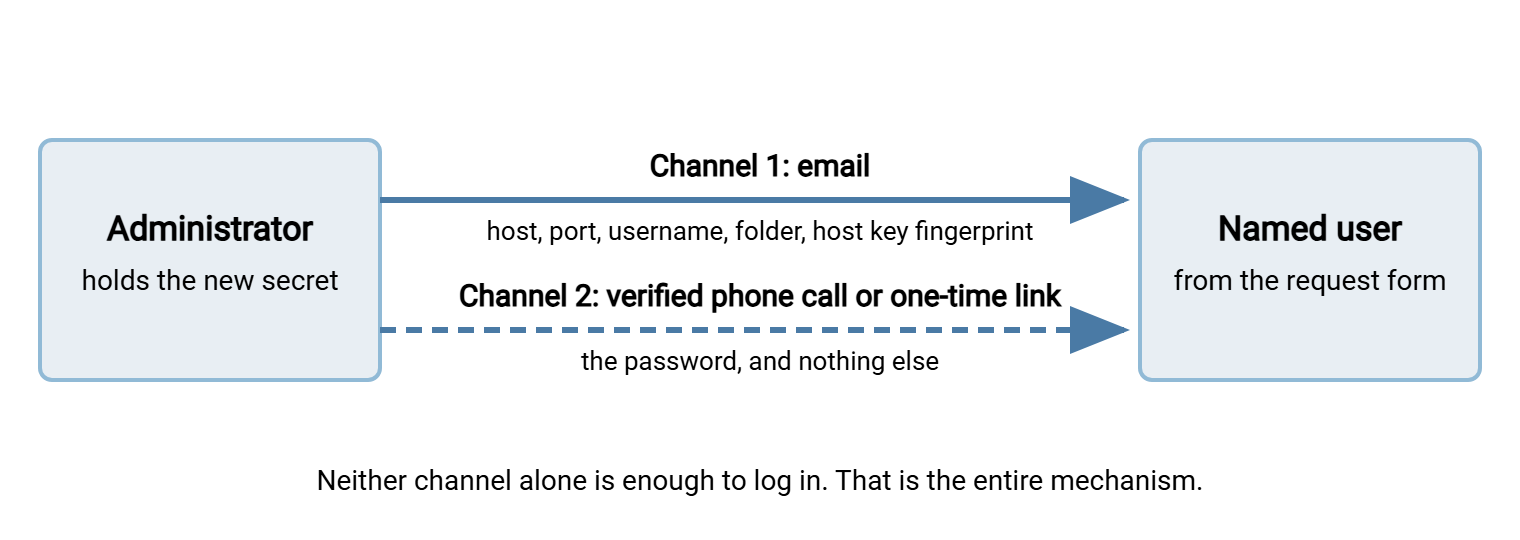
Four channels work for the secret, in rough order of preference. First, a one-time secret link: a page that shows the password once and then destroys it, offered by most password managers. Send the link by email; it is useless after the first view. If the recipient reports it was already blank when they opened it, someone else got there first. In that case, you rotate. Second, a phone call to a verified number: the number already on file for the partner's technical contact. Never use a number supplied in the same email chain that asked for the password. Third, split delivery: half the password by one channel and half by another, clumsy but workable when nothing better exists. Fourth, in person, which is the oldest method and still has no known vulnerabilities apart from the car park.
Two rules apply whichever channel you use. Deliver to the named individual on the request form, not to a shared mailbox, a manager, or whoever answers the phone. And set the password to expire at first use where the server supports it. That way, the delivered value works once and the user chooses their own immediately. Where the server cannot force a change, set a short expiry and tell the user to change it on first login anyway.
Template: The Handoff Email
Since the email carries everything except the secret, it can be a template. The version below tells the recipient what to expect and gives them every non-secret detail in copyable form. It states how the secret will arrive so that a phone call from you is expected rather than suspicious. Adjust the field values; keep the structure.
Subject: Your transfer account is ready - acme-in

Hello Dana,

Your account on our transfer server has been created. The details you
need are below. The password is NOT in this email; I will phone you at
the number we have on file (ending 4471) between 14:00 and 15:00 today
to give it to you. Please do not share it with anyone, including us.

  Host:           transfer.example.com
  Port:           22 (SFTP)
  Username:       acme-in
  Your folder:    /inbox/acme  (write and list only)
  Host key fingerprint (SHA256):
                  SHA256:9GxT...redacted...Q2s=
  Connects from:  203.0.113.0/24 only (your IT confirmed this range)

On first login your client will show the fingerprint above and ask you
to confirm it. If the fingerprint it shows is different, stop and call
me. You will be asked to set a new password immediately; the one I give
you by phone works once.

Connection guide: (link to your one-page guide)
If anything fails, send me the exact error message and the time; I can
match it against the server log.

Regards,
Priya Nair, Transfer Administration
Two lines in that template do more work than the rest. The host key fingerprint is a short summary of the server's own identity key, shown by the client on first connection. It lets the user confirm they have reached your server and not an impostor. This only works if they received it through a channel the impostor does not control. Our host keys and known hosts article explains the mechanism. And "the password is not in this email" trains the recipient for every future exchange. They stop asking, and eventually they start refusing passwords by email from everyone else too.
Public Keys: The Handoff That Goes the Other Way
When the account authenticates with an SSH key, the user generates the key pair on their own machine and sends you the public half. Your job is to check three things before installing it. First, that it is actually a public key: a single line beginning ssh-ed25519 or ssh-rsa followed by a block of characters and an optional comment. Second, that it is not the private key: a multi-line block beginning -----BEGIN OPENSSH PRIVATE KEY----- or similar. Third, that it came from the person on the request form.
If someone sends you a private key, do not install it, do not use it, and do not lecture. Tell them plainly that the file they sent is the secret half. It has now been in email and should be treated as compromised. Ask them to generate a new pair and send only the file ending in .pub. This happens more than you would think, and never out of carelessness. The two files have similar names, and nobody explained which was which. The generating and storing keys article is a good link to include in your reply.
Verifying that the public key came from the right person is the same out-of-band idea in reverse. Compute the key's fingerprint and read it to them over the phone:
ssh-keygen -l -f acme-in.pub
256 SHA256:Lp2v...redacted...8kA= dana@acme-laptop (ED25519)
The -l flag prints the fingerprint rather than the key, and -f names the file. The output gives the key length, the fingerprint, the comment the user attached when generating it, and the key type. The user runs the same command on their copy; if the fingerprints match, the key in your hands is the key they made. Then install it in the account's key settings. For a product that manages its own users, that is per-account in the server console. On an OpenSSH host, it is in authorized_keys; see distributing authorized keys. Note the fingerprint in the ticket. It is not secret, and it is the fastest way to answer "is this still the same key?" a year later.
Kestrel Payroll once onboarded a new client whose administrator emailed the private key and its passphrase, together, to Kestrel's shared support mailbox. Fourteen people could read that mailbox. The Kestrel engineer on duty installed the public half and moved on, because the login worked. An internal audit three months later found the private key in the mailbox. The client's change process for issuing a replacement took six weeks. During that time, the compromised key stayed in use because switching it off would have stopped payroll. The engineer now has a template reply for private keys. It is very polite.
The First Login
The first login is a test, and you should be watching it. Agree a time with the user, have the server log open, and check four things while they connect. Did the login succeed from the expected source address? Did the client show the host key fingerprint, and did it match? Were they forced to set a new password? And can they write to their folder and nothing else? The last check proves least privilege is real rather than assumed, and it takes thirty seconds. Ask them to try uploading to a path they should not have.
On an OpenSSH-based server the last few log lines for the account tell you most of this at once:
grep 'acme-in' /var/log/auth.log | tail -n 5

Mar 14 14:07:31 sftp01 sshd[5120]: Failed password for acme-in from 203.0.113.7 port 50122 ssh2
Mar 14 14:08:02 sftp01 sshd[5124]: Accepted password for acme-in from 203.0.113.7 port 50131 ssh2
Mar 14 14:08:02 sftp01 sshd[5124]: pam_unix(sshd:session): session opened for user acme-in by (uid=0)
Read it as a story. One failed attempt, thirty seconds later a success, both from the address the partner's IT supplied. The failure is a typo, not an attack: same address, same minute, then success. Had the failures continued, the account would have hit the lockout threshold. That is why you warn new users in advance that a few wrong attempts will lock them out for a while. The lockout and throttling design article is where those thresholds are set. A first login is the moment they are most often felt. Servers that log to a file or database in their own format show the same sequence in different words. The reading transfer logs article covers several of them.
When all four checks pass, paste the log lines into the ticket and mark the handoff step complete. Then note the date and the channel you used for the secret. Never note the secret. A ticket that says "password delivered by phone to D. Reyes at the number on file, changed at first login 14:08" is complete evidence. A ticket that contains the password is a second leak waiting for its audience.
The Polite Refusal Script
Someone will ask you to skip all this. The request will sound reasonable, be urgent, come from someone more senior than you, and arrive at the end of the day. The way to survive it is to have the answer written before the question arrives, so you are reading rather than improvising. A refusal with an alternative is a plan. A refusal without one is a wall, and walls get escalated.
WHEN A PARTNER OR USER ASKS FOR THE PASSWORD BY EMAIL

  "Happy to get you going today. I don't send passwords by email, because
   it stays readable in both our mailboxes long after either of us has
   left. I'll phone you at [number on file] at [time]; if that number is
   wrong, ask your IT contact to send me the right one. Everything except
   the password is in the email I've just sent."

WHEN A MANAGER ASKS FOR SOMEONE ELSE'S PASSWORD

  "I can't give out a password for an account in someone else's name,
   because the log would show them doing whatever is done with it. If
   [name] is away, I can create an account for you in your own name in
   about fifteen minutes with the same access, and close it when they're
   back. Shall I do that?"

WHEN A TEAM ASKS TO SHARE ONE ACCOUNT

  "One login for several people means the log can't tell us who did
   what, which is a problem for you the day a file goes wrong. Separate
   accounts take me the same time to create. Send me the names and I'll
   have them ready by [time]."
Each script does the same three things. It says yes to the underlying need. It gives the reason in one sentence about the requester's interest rather than policy. It names the alternative with a time. Nobody has ever escalated a refusal that ended with "I'll have them ready by three". The framing matters. "The log would show them doing whatever is done with it" persuades a manager in a way "it's against policy" never will. That is because it is true and it is about them.
Multi-Factor Where the Platform Offers It
Multi-factor authentication (MFA) means the login requires a second proof beyond the password: a code from an app, a hardware token, a push notification. On a transfer server it is straightforward for humans using a web interface and awkward for everything else. A scheduled job cannot read a code off a phone at two in the morning. And most SFTP clients have no way to prompt for one. So the honest rule is: MFA for interactive human logins wherever the platform supports it. For service and partner accounts, use the compensating pair of a key instead of a password plus a source IP restriction. Together, they achieve much of the same effect. The options, and where each protocol supports them, are in MFA for file transfer.
On a server such as Sysax Multi Server, that compensating pair is two ordinary per-account settings. They are public-key authentication for the account, and an IP allow list restricting where it may connect from. Set both at provisioning time, from the template. That way, the first login is already constrained to the partner's address range and the password never exists at all. Issuing credentials gets easier when there is nothing secret to issue.
Remember: the secret and the instructions never travel together. Email carries the host, the username, the folder, and the fingerprint. A channel that does not store anything carries the password. And a key needs no secret channel at all, only a phone call to confirm the fingerprint. Record the handoff in the ticket. Never record the secret.
What Comes Next
A credential issued this way arrives with the person who should have it and is verified on the first login. It leaves a ticket that proves both without containing anything an attacker could use. That is the joiner stage complete. From here the account lives its life. Its owner may change job, which is the mover problem in role changes and permission creep. One day its owner leaves. At that point, the password you so carefully delivered must be revoked, along with every key and shared secret the person touched. That is covered in offboarding that actually closes the account.
And the next time someone asks you to email the password, you will already have the reply open. It ends with a time.
Frequently Asked Questions
Is it safe to email the username if the password goes by phone?
What if the partner has no phone number on file?
The user's client says the host key fingerprint does not match. What do they do?
Someone sent me their private key by mistake. Can I just delete the email?
Can a scheduled job use MFA?
From the Sysax team: we build secure file transfer software for Windows. Sysax Multi Server is an FTP, FTPS, SFTP, and HTTPS server. Sysax FTP Automation handles scheduled, scripted transfers. Free trials are on the download page.