
Designing a Sanctioned Path for Every Risky Habit
"It's quicker on the stick." Those four words are said without heat by someone who has done it that way for six years. They are the entire brief for this article. If you have followed our Governed Alternatives series this far, you are holding two documents. One is an inventory of how files really move in your organization. The other is a ranking of which flows would hurt most if they went wrong. This article is where those documents earn their keep. The exercise is a mapping. For every risky habit, name the need it meets. Then design a governed path that meets the same need. Prove, honestly, that the new path is as easy as the old one or easier.
That last requirement is the whole discipline, so it deserves restating as the series axiom. A sanctioned path that adds friction is a policy violation waiting to happen. Users adopted the stick and the junk share because those tools won a convenience contest. A replacement that loses the same contest will lose the same way, and no memo will save it. I have written that memo. It did not save it. The good news is that "as easy or easier" is an engineering requirement like any other: specific, testable, and achievable. This article treats it that way.
The As-Easy-or-Easier Test
The test sounds obvious and is almost always run wrong, so define it precisely. You compare two experiences: the habit as actually practiced, and the sanctioned path as actually delivered. Do not use the habit as policy imagines it (slow, guilty, error-prone). Do not use the path as the design document promises it will be someday. The comparison runs from the user's chair, on their busiest day, and it counts four kinds of friction:
- Setup friction: everything that must happen before the first use — accounts requested, software installed, approvals granted. The habit's setup cost is usually zero, because it was paid years ago.
- Per-use friction: the steps, clicks, waits, and decisions of one ordinary use. Count them for real, with a stopwatch and a straight face. "Copy to stick, walk over" is two steps; if your replacement is six, it loses.
- Recipient friction: what the other end must do. This is where replacements most often fail secretly. The sender's experience improved while the recipient acquired an account, a password, and an installation. Users protect their recipients fiercely, and they are right to.
- Failure friction: how often the path fails and how the failure feels. A path might die at two gigabytes, time out over VPN, or lock the account on a mistyped password. That teaches users, in one lesson, to go back to the stick.
A path passes the test when it matches the habit on all four and beats it on at least one. Ties are losses in practice: switching costs something. So the new path needs a visible win — faster, works from home, recipient loves it — to pay for the change. When you find that win, write it down in the user's own vocabulary; it becomes the headline when you introduce the path. It will be a better headline than anything you would have written.
Run the comparison physically, not on a whiteboard. Sit beside a user and have them perform the habit while you count. Then have them perform the candidate path while you count again. The whiteboard version reliably forgets real steps. Those include the VPN that must come up first, the password that has expired again, and the wait while a page loads on the warehouse machine. Every forgotten step is a point of quiet failure later. Ten minutes of watching beats an hour of imagining. The whiteboard has never once had to wait for the VPN.
Remember: run the test from the user's chair, against the habit as practiced. The moment you catch yourself arguing "but the governed path is safer" as a point in the convenience comparison, stop. Safety is why you want the path. It buys the user nothing on a busy Tuesday, and it is not a substitute for being easy.
The Mapping Exercise
With the test defined, the exercise itself is five steps per habit, starting from the top of your risk ranking:
- State the need testably. Pull the requirement from your inventory and sharpen it until a candidate path could pass or fail it. "Estimating needs to send drawing packages to outside fabricators, up to a few gigabytes, with no account or software on the fabricator's end."
- Draft the governed candidate. Choose the lightest governed mechanism that meets the need — not the grandest. Most habits map to one of a half-dozen standard replacements, listed in the table below.
- Run the test. Walk both experiences step by step, all four frictions. Involve one real user from the habit's home team; they will spot the friction you cannot see.
- Fix the path until it passes. Every failure names a design change. An install requirement becomes a browser interface. A new password becomes directory-integrated login. A manual upload becomes an automated pickup. If it cannot be made to pass, that is real information — see the honest-failures section below.
- Write the row. Habit, need, sanctioned path, and how it passes. The finished table becomes the backbone of your transfer policy and your migration plan.
To see the five steps working, walk one habit through them. The estimating team at Calder Fabrication — our synthetic but representative company — sends drawing packages to outside fabricators on sticks handed to drivers. Step one, the need: "a package of up to a few gigabytes reaches a named fabricator the same day. Nothing is installed and no account is created on their end." Step two, the candidate: a browser sharing page on the company's transfer server that produces a download link to email. Step three, the test — and it fails on first pass. The upload page requires a second login users forget. The fabricator's link expires before their site office gets to it. Step four, the fixes: use directory-integrated login so there is no second password. Match the expiry window to how fabricators actually work rather than to a security default. Re-test: sender's steps are now "upload, send link" versus "copy, label, find a driver." That is faster the same day and dramatically faster when the driver run has already left. Step five, write the row. Total elapsed design time: an afternoon, most of it spent listening.
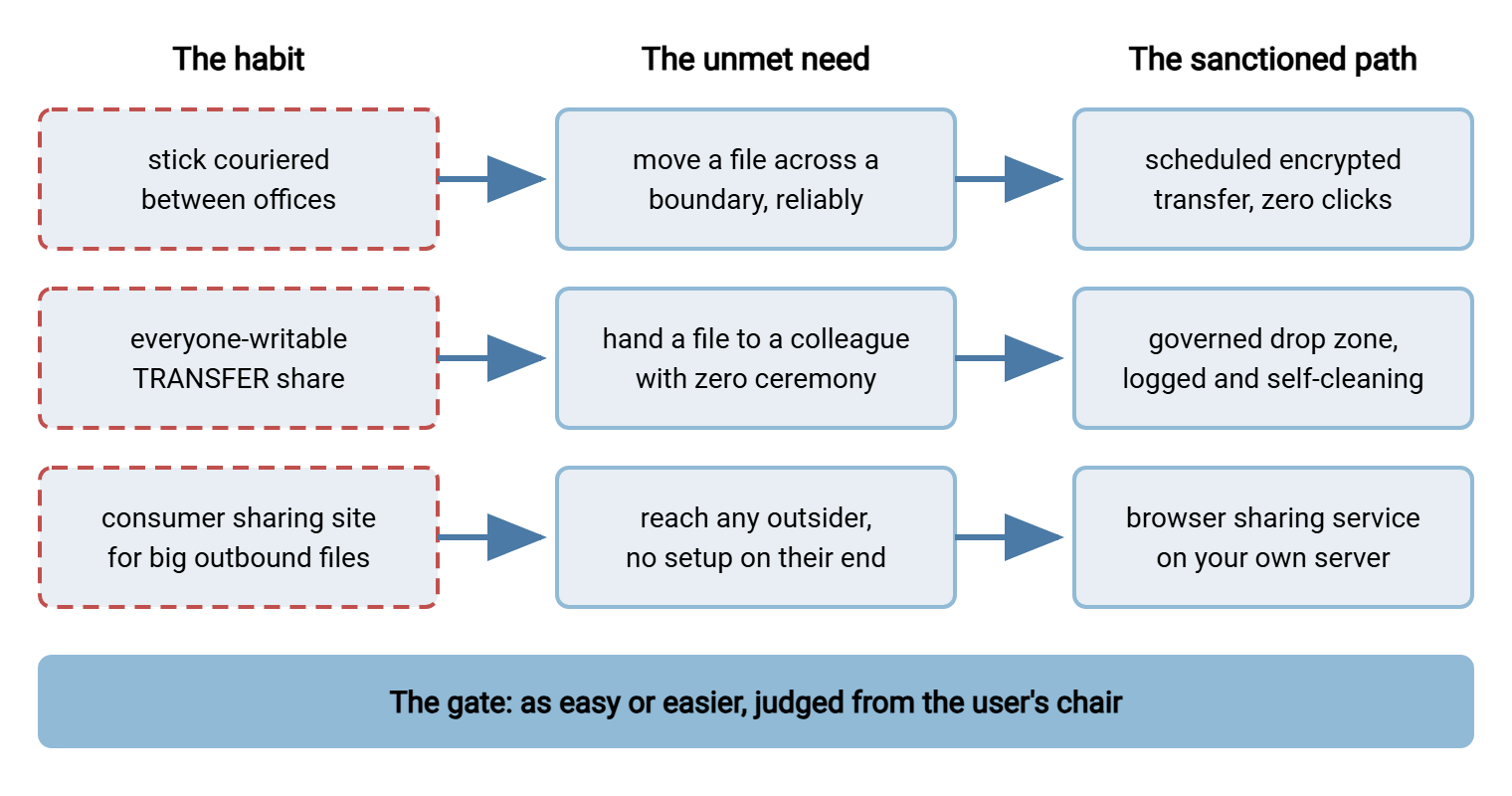
The diagram below shows the shape of the whole exercise. Habits on the left translate to needs in the middle. Each need is answered by a governed path on the right, with the test as the gate every mapping must pass through.
The Mapping Table
The table applies the exercise to the six habits that appear in almost every estate. Treat it as a starting template, not a prescription — your inventory may phrase the needs differently, and the phrasing matters more than the pattern name.
| Habit | The need it meets | Sanctioned path | How it passes the test |
|---|---|---|---|
| Stick couriered between sites or systems | Cross a network boundary, reliably, on a schedule | Scheduled encrypted transfer between the two endpoints | Easier: the user's steps drop from "copy, carry, copy" to zero — the job runs itself and emails when done |
| Everyone-writable junk share | Hand a file to a colleague or team in seconds, no permission requests | Governed drop zone: per-team areas, logging, retention | As easy: still drag-and-drop to a folder; easier to find things because areas are named and self-cleaning |
| Consumer sharing site for large outbound files | Send big files to any outsider with no setup on their end | Browser-based sharing service on your own transfer server | As easy: browser upload, recipient gets a link; easier when it is reachable from the tools people already use |
| Personal cloud account syncing work folders | Reach working files from home or the road; survive a dead laptop | HTTPS browser access to the governed server, from anywhere | As easy: log in from any browser, nothing to install; easier at offboarding — access ends with the account |
| Customers emailing files or sending consumer links | Let outsiders deliver files to you without being taught anything | Upload portal with per-customer areas and intake checks | Easier for the customer: one bookmarked page, no size bounces; easier for you: files arrive where processing expects them |
| Sticks for air-gapped systems and vendor media | Move files where no network path exists at all | USB stays — inside a contained process: scanning station, approved devices, transfer on arrival | Honest row: no network path can meet this need, so the goal shifts from replacing the habit to governing it |
Three of these rows lead into their own deep dives. The drop zone is built folder by folder in governed drop zones. The last row's containment kit is the subject of the genuine USB cases. And the sharing service — the replacement for attachments and consumer sites — has an entire sibling series of its own in person-to-person sharing. Inbound customer flows get the same treatment in customer-facing exchange.
Engineering the Ease
Passing the test is rarely about heroic features. It is about removing specific frictions, and the same few removals do most of the work in every estate:
Kill the install. Any path that requires client software fails setup friction for locked-down machines, home machines, and every outsider. A browser-based interface removes the whole category. With a server such as Sysax Multi Server, users upload and download over HTTPS from a plain web browser. That means the path works from the machines you manage and the machines you never will. For the habits driven by "it has to work from anywhere," this single property is usually the decisive one.
Kill the new password. Every credential you mint is friction at setup and at every forgotten-password moment after. Directory-integrated login means the sanctioned path opens with the password people already type all day. Multi Server can authenticate accounts against Windows or Active Directory. With directory-integrated login, the path closes itself when the account is disabled at offboarding. Per-area permissions then scope each person to the folders their team actually uses, which keeps the governed path from becoming a new junk drawer. Junk drawers are not a technology. They are a tendency.
Kill the manual step entirely where you can. The strongest possible test result is a path with no per-use friction because there is no per-use anything. Recurring flows — the courier stick, the nightly hand-off, the export that must land somewhere — should become automation. Sysax FTP Automation can watch a folder, pick up whatever appears, move it over an encrypted transfer, and send an email notification on completion. The user's entire job becomes "save the file where you always save it." No habit can beat that; the sanctioned path has become the path of least resistance in the literal, physical sense.
Kill the size anxiety. Part of the stick's grip is that nobody has ever seen it refuse a file. Whatever limits your governed path has, make them generous enough that ordinary work never meets them. State them plainly where the upload happens. "Packages up to X are fine here" reads as a promise. A surprise failure at the worst moment reads as a verdict on the whole path. The first person whose transfer dies at ninety percent will tell five colleagues, and all six go back to the stick.
Acme learned the size rule in the first week of its new upload page. The limit had been left at the installer's default, which was generous for documents and about a third of a drawing package. Three uploads died at ninety percent on the Wednesday, and by Thursday the estimating team had, politely, gone back to the stick. The pilot agreement said failures got reported the same day, so they were. The limit was raised and printed on the page by Friday. The team came back the following week, which is faster than trust usually returns. We learned the same lesson the slow way, over a quarter, and recommend the fast way.
Name paths after tasks, not technologies. "The fabricator send page" beats "the SFTP portal." Users navigate by errand; every translation step from errand to tool name is friction you chose to keep. Do not call it the portal. Nobody has an errand called portal.
Publish the path where the errand happens. A link in the intranet page people already use, a shortcut deployed to desktops, a saved bookmark in the onboarding image. The habit's greatest advantage is that it comes to mind first; you counter that with placement, not with memos. The memo, to be fair, was nicely formatted.
When the Test Fails Honestly
Sometimes you run the test in good faith and the governed candidate loses. This is a result, not an embarrassment, and it has three legitimate outcomes:
- Fix and re-test. Most failures name their own fix — too many steps, a required install, a recipient burden. Iterate until it passes. This is ordinary product work, applied to your own infrastructure.
- Concede the niche, contain it. The last table row is the model. Where no network path exists, USB legitimately survives. So you govern the practice instead of pretending to replace it. Better one honest contained exception than a fictional replacement everyone routes around.
- Route it through the exceptions lane. A handful of flows will be rare, weird, and not worth a designed path. Your transfer policy should include a lightweight exceptions process. That is a way to ask, get a quick answer, and have the exception recorded. An estate with no exceptions lane manufactures its own next generation of shadow habits.
What is never a legitimate outcome is announcing a path that has not passed yet and hoping enforcement will make up the difference. Users run the test themselves, individually, every day, whether you ran it or not. That is what adoption is. Our shadow-sharing series reaches the same gate from the consumer-tool side in building a sanctioned path just as easy. Ship a loser and they will quietly publish their own verdict.
Gotcha: beware the pilot-team illusion. A path that passes the test with your most patient, most technical team can still fail with the team that actually owns the risky habit. Run the comparison with the habit's heaviest users. They hold the real requirements, and winning them converts the loudest skeptics into your reference customers.
From Mapping to Policy
The finished mapping table is more than a design artifact. It is the raw material of your transfer policy's most-read page: the approved-methods list. The translation is mechanical. Each sanctioned path becomes an approved method, described by task ("sending files to outside recipients: use the sharing service at…"). Each habit becomes a forbidden or discouraged method. But every forbidden method must point at its sanctioned replacement in the same breath. This is the rule that separates policies people follow from policies people frame. No dead ends. A prohibition without an alternative is an instruction to improvise.
The craft of writing that page — phrasing, brevity, the by-task layout — is covered in writing rules people follow and the companion piece on approved and forbidden methods. So this series will not re-teach it. The one sequencing rule worth repeating: the policy page ships after the paths pass the test, never before. Policy is the announcement of a fait accompli, not a substitute for one.
The Exercise, Compressed
Here is the version you pin above your desk, with one sentence per step. Take the riskiest habit from your ranking. Write its need so a solution could fail. Pick the lightest governed path that could meet it. Walk both experiences from the user's chair and count the friction. Fix the path until it wins. Write the row. Repeat down the list. When the table is full, you have the blueprint for everything that follows. That includes the drop zones to build, the USB cases to contain, and the sequencing of the migration from chaos that turns rows into reality, one habit at a time.
And when a mapping stalls, return to the axiom. The habit is not the enemy; it is the incumbent. Incumbents are beaten by better products. For a file path, "better" is measured in clicks, waits, and the absence of surprises — from the chair of the person doing the work. When the new path is quicker than the stick, the person with the stick will be the first to say so.
Frequently Asked Questions
What does "as easy or easier" actually mean in practice?
Do I need a different tool for every habit?
What if the governed path really is slower for one case?
Should the policy ban the old habits as soon as the new paths exist?
How many sanctioned paths should we end up with?
From the Sysax team: we build secure file transfer software for Windows. Sysax Multi Server is an FTP, FTPS, SFTP, and HTTPS server. Sysax FTP Automation handles scheduled, scripted transfers. Free trials are on the download page.