
The Genuine USB Cases (and How to Contain Them)
The policy says no removable media, and it says so in bold. The survey crew is two hours from the nearest signal with a week of terrain data on the instrument's card. The isolated line controller has never had a network cable and never will. All of these facts are true at once, and the policy has a plan for none of them. Most of our Governed Alternatives series is about replacing removable media with network paths that are as easy or easier. This article is about the leftovers: the cases where that mapping honestly fails, because no network path exists at any reasonable cost. They are real, and they are fewer than people think. Pretending they do not exist is how organizations end up with a strict no-USB policy on paper and a drawer full of sticks in practice. The drawer is what a policy looks like when it forgot the survey crew.
The right response is neither surrender nor denial. It is containment: a designed, governed process for the removable media that legitimately remains. By the end of this article you will have the full kit. That includes the test that separates genuine cases from unmet requirements, an approved-device register you can copy, and a scanning station workflow. It includes the transfer-on-arrival pattern that gets files off media and into governed flows at the first possible moment. The survey crew keeps its card. The card just stops wandering.
When Removable Media Is the Right Answer
Three families account for nearly every genuine case:
- Air-gapped and isolated systems. Industrial controllers on segments that deliberately reach nothing, test rigs kept off the network so experiments stay clean, high-security enclaves, and equipment too old to connect safely. The isolation is a feature someone chose on purpose — which means files cross by media or they do not cross at all.
- Field collection. Instruments and recorders that work where connectivity does not: survey equipment on remote sites, loggers on machinery, cameras and monitors in the field. The data is born on removable media because the collection point has no other exit.
- Vendor and counterparty media. One case is the technician whose diagnostic and update tooling arrives on a stick. Another is the occasional counterparty — a court, a regulator, a customer with its own rules — that delivers or demands data on physical media. Here the media is imposed by someone else's process.
Everything else that feels like a USB case usually is not. Consider the presentation carried to a customer's meeting room, the file too big for email, or the hand-off to the next building. Those are unmet requirements wearing a plastic shell. They belong back in the mapping exercise from designing sanctioned paths. The test that sorts them is a single question: does a network path exist between the two endpoints at any acceptable cost? If yes — even a clumsy one — you have a path-design problem, and the earlier articles apply. Only when the answer is a clear no does the case land here. Apply the test ruthlessly, because every case admitted into the "genuine" category carries permanent process cost. A generous genuine list quietly becomes the loophole that swallows the policy. I have watched a genuine list grow from three entries to thirty, one reasonable exception at a time.
Two borderline examples show the test working. A plant engineer moves configuration exports from an isolated line controller to her desk PC on a stick, daily. The controller's segment is isolated by policy, so this looks genuine. But a one-way transfer path out of that segment may well exist at acceptable cost. If it does, this is a mapping-exercise case after all. Meanwhile, the survey crew collecting terrain data at unconnected sites passes the test cleanly: no coverage, no path, media it is. Same object in both pockets, different answers — which is why the test is about endpoints and paths, never about the stick. The stick has no opinion on the matter.
The Containment Principle
Recall the sharpest finding from the risks article: a stick is a network link that appears in nobody's diagram, bridging every machine it has ever touched. You cannot remove that property — it is what removable media is. What you can do is narrow every dimension of it. That means fewer devices, known devices, and one inspected crossing point instead of many casual ones. It means files leaving the media at the earliest governed moment, and a record of every crossing. Think of it as customs at a border: travel remains legal. But it happens at the checkpoint, with an inspection and a stamp — not over the fence at midnight.
One scoping note before the kit. Technical enforcement of "only these devices, only on these machines" is an endpoint-management capability. That means allowing registered device identifiers and blocking the rest at the port. It lives in the endpoint platform your desktop team runs, not in transfer software, and this series will not pretend otherwise. What this article builds is the process around that enforcement. It covers which devices earn a place on the allowlist, what happens at the checkpoint, and how files get from media into governed flows. Process without port control leaks; port control without process just blocks work. You want both, run by the same rules.
Remember: the goal of containment is not to make USB use rare for its own sake. It is to make every remaining use known: a registered device, an inspected crossing, a logged hand-off. A dozen crossings a week through the checkpoint is governed; one crossing a month around it is not.
The Approved-Device Register
Containment starts with knowing your fleet. The register is a boring document — deliberately — listing every device allowed to carry company data, one row each:
APPROVED-DEVICE REGISTER - one row per device

Device ID:      the label physically on the device (e.g. FLD-03)
Serial/HW ID:   hardware identifier, as the endpoint platform sees it
Type:           stick / external drive / instrument media
Encrypted:      hardware-encrypted? (required for sensitive flows)
Owner:          the named human accountable for it
Approved flows: which genuine case(s) it serves, by name
Home:           where it lives when idle (pool cabinet, rig cabinet)
Issued:         when it entered service
Last verified:  last time it was sighted, scanned, and wiped
Status:         in service / checked out / lost-reported / retired
Here are the rules that make the register mean something. Devices are company-owned. Personal media is never approved, full stop, because you cannot wipe, inspect, or retire what you do not own. Devices are labeled, so an unlabeled stick on a desk is instantly recognizable as an outsider. Anything carrying sensitive data is hardware-encrypted, which converts the lost-stick story from a disclosure assessment into a shrug. The register is reviewed quarterly: every device sighted, scanned, wiped if idle, and its row updated. This review also catches the device that quietly went missing months ago. And a lost device is a report, not a confession. The person who reports one promptly did the process a favor. The response is a register update and a risk check, never a scolding. Feed the serial numbers to the endpoint platform's allowlist and the register stops being advisory: unregistered media does not mount. The port does not take appeals.
The Scanning Station
The checkpoint itself is a scanning station: one dedicated machine, positioned where media naturally enters — by the operations desk, at the plant entrance. Every inbound device passes through it before it touches anything else. Its design is defensive minimalism:
- It stands apart from production: not signed into the domain (or joined with a heavily restricted account), no mapped drives, no stored credentials. It reaches only the one intake destination it needs.
- Autorun and autoplay disabled; kept patched; running current scanning tools — this is the machine where the scanner earns its license fee.
- Rebuilt easily: a documented image or checklist, because a checkpoint you cannot cheaply rebuild is a checkpoint you will hesitate to trust after a hit.
The workflow at the station, step by step:
- Log the crossing. Device ID, who brought it, where it came from, date. A sign-in sheet or a simple form — thirty seconds.
- Scan the media. Full scan, results recorded. A clean result is logged; a hit stops the line. With a hit, the device goes into the quarantine envelope, the crossing log gets the details, and the incident path begins. This is the same discipline described in quarantine workflow design.
- Copy off, immediately. The needed files move from the media to the station's intake folder. Nothing moves the other way onto an inbound device at this station.
- Verify what arrived. File count and sizes against expectation; a checksum where the source provides one. For field data feeding decisions or disputes, this is where a custody record starts — see documenting a file journey.
- Release the files onward, not the stick. The intake folder hands off to the governed flow (next section). The media is wiped if it is yours, or returned to its owner if it is not. Either way, the stick's journey ends at the station.
Keep the crossing log itself humble: a dated line per crossing with device ID, bearer, source, scan result, and file count is plenty. A paper sheet at the station works on day one. A small form that writes a row to a file works better by month three. It can be searched when the quarterly register review asks "when did FLD-03 last cross?" What matters is that the log exists at the station and is filled in at the moment of crossing. It is never reconstructed from memory a week later. I have reconstructed one from memory. It was confident and wrong.
The diagram below shows the whole crossing: media stops at the station, files continue without it.
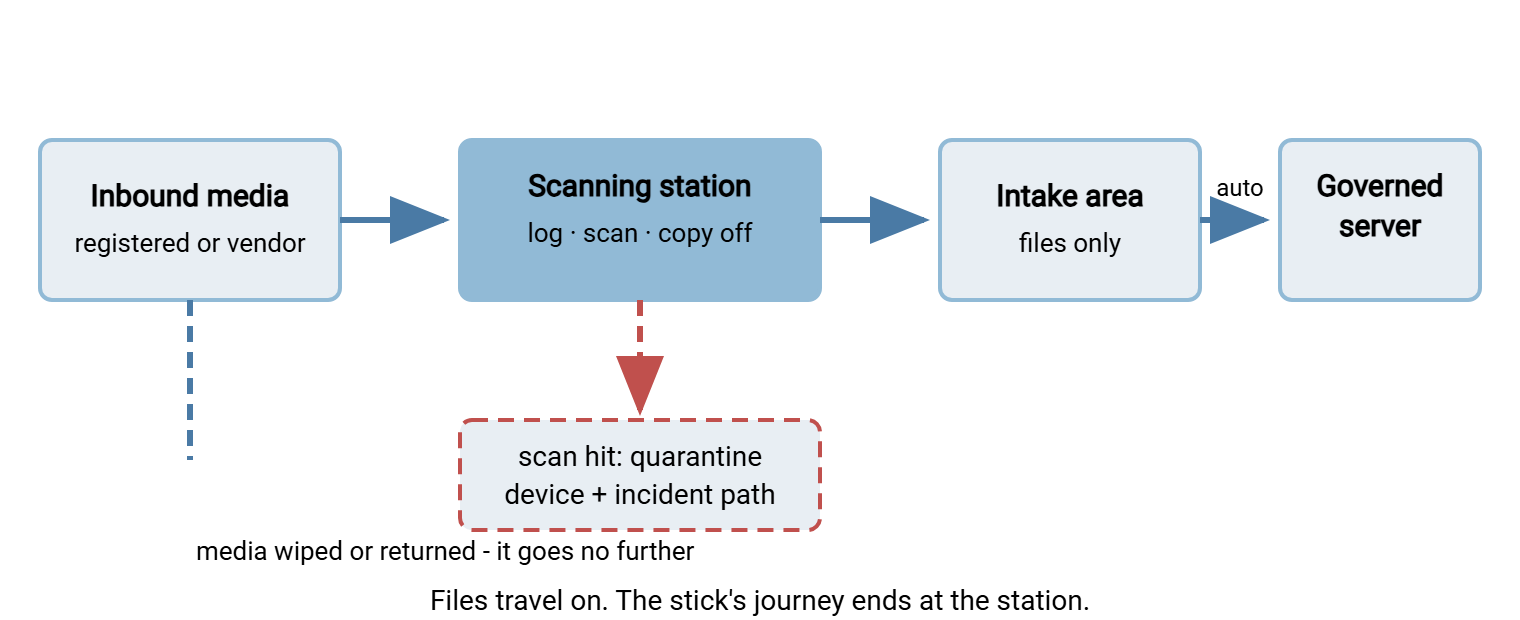
Transfer on Arrival: Media Stops at the Door
The third piece of the kit is what happens after the scan, and it is the piece that quietly does the most good. Transfer on arrival means the files leave the media and enter a governed flow at the first touchpoint. The stick never wanders the hallways, never visits three desks, never gets pocketed "to finish later." From the station's intake folder, automation takes over. A tool like Sysax FTP Automation can monitor that folder and move new arrivals to the right area on the transfer server the moment they appear. It can send an email notification to the flow's owner. So the field engineer who handed over the stick is back at their desk before the data is, and nobody carries anything anywhere.
The destination is a per-flow area on the governed server, exactly like the drop zones built in the previous article. The station is, in effect, a drop zone whose front door is physical. On a server such as Sysax Multi Server, each genuine case gets its own area with its own membership. Activity logging records the pickup, which completes the story the crossing log began. Media arrived at the station at nine. Files reached the survey team's area at two minutes past. The analyst downloaded them at ten. For the outbound direction — files that must travel to an isolated system — run the same pattern in reverse. Approved files are placed and reviewed in an outbound staging area on the server. A copy at the station puts them onto registered media. A log line records what crossed. Outbound deserves the same ceremony as inbound; what leaves on media matters as much as what arrives.
Field Collection as a Governed Loop
Put the pieces together for the field case and a clean loop appears. A hardware-encrypted device is checked out of the pool — a register row flips to "checked out," a two-line log says who and for what. It rides to the site, collects its data, rides back. At the station: sign-in, scan, copy off, verify; automation whisks the files to the survey team's area and notifies. The device is wiped and returns to the pool; the row flips back. The loss story from the risks article is defanged twice over. The device is encrypted. The register knows within days that it did not come home, instead of nobody noticing for a quarter. The register notices, which is more than the stick ever did.
The loop's weak point is ceremony decay: the tenth trip tempts everyone to skip the station "just this once, we're late." Two defenses work. Make the station fast — if sign-in, scan, and copy take five minutes, the shortcut saves almost nothing. And make the loop the only door that opens. If the endpoint platform refuses field media everywhere except the station, the shortcut is not merely discouraged. It is unavailable. Discouraged is one late Tuesday away from allowed.
Vendor Media Without the Standoff
The vendor technician's stick is the awkward case, because the device is not yours to register, wipe, or refuse. But the machines it wants to touch are yours. The move that avoids the doorstep argument is sequencing. Put the requirement in the work order and the service agreement: "all media is scanned at our station before use; allow fifteen minutes." That makes it a scheduling fact the vendor agreed to weeks ago, not a surprise sprung on a technician mid-visit. Most vendors have seen it before; the hygiene expectations you can reasonably set for counterparties are laid out in partner file hygiene.
Meridian Parts had the clause in its service agreement for a year before it was tested. A line went down on a Friday afternoon. The vendor's technician arrived with the fix on a stick. The shift lead, with the plant manager standing beside her, asked for fifteen minutes at the station. The scan flagged a file that had nothing to do with the update and everything to do with a previous customer's site. The technician was, if anything, relieved. The fix went in that evening from a clean copy of the package the vendor uploaded instead. The line was down for fifteen minutes longer than it might have been. Nobody at Meridian has argued about the station since.
Better still, remove the media from the story where you can. Offer the vendor an upload path. The update package is delivered through a portal to a governed intake area and scanned in flow. It is staged to registered media at your station only for the final air-gapped hop. The vendor keeps their process, you keep your boundary, and the only stick involved is yours. Patterns for giving outsiders a clean, governed way to deliver files are the subject of our customer-facing exchange series.
Gotcha: the vendor case is where personal-media discipline goes to die. The technician's stick gets waved through once because a line was down and everyone was stressed. That wave-through is now the precedent. Decide the exception rules on a calm day, write them into the vendor agreement, and the stressful day has a script instead of a negotiation.
Keeping the Exception Exceptional
Contained USB is still an exception regime, and exception regimes rot unless tended. Give each genuine case a written entry: what it is, why no network path exists, which devices serve it, who owns it. Give it a review date, handled through the same lightweight lane as any other policy exception. The mechanics are in the exceptions process. The review question is always the same: is the "no network path" answer still true? Networks change. The isolated rig gets a managed link during an upgrade; a site gains coverage. When the answer flips, the case graduates back into the mapping exercise. The register shrinks by a row, and containment has done its job — including the part where it ended.
Watch two health signals. The register should hold steady or shrink. Steady growth means unmet requirements are being misfiled as genuine cases, and the test from the first section needs re-applying. And station logs should show every registered device appearing periodically. A device with no crossings in two quarters is either idle (wipe it, pool it) or crossing somewhere unofficial. Fold both signals into the drift-back monitoring of the migration article. That keeps the genuine cases what they should be: a short, known, boring list. They are the governed remainder of a habit this series set out to retire everywhere else.
Here is the kit, then. A test admits only the cases with no network path. A register makes the device fleet known, owned, encrypted where it matters, and reviewed. A station is where every crossing is logged, scanned, and stripped down to files. Transfer on arrival puts those files into the same governed, logged flows as everything else in your estate. None of it is exotic, and all of it is affordable. Together it turns "we still use USB" from an admission into a design. The survey crew, for the record, never had anything to admit.
Frequently Asked Questions
How do I tell a genuine USB case from a habit we should replace?
Can our file transfer software block USB devices?
Does the scanning station have to be a separate machine?
What should we do when a vendor refuses the scanning step?
Are hardware-encrypted USB drives worth the cost?
From the Sysax team: we build secure file transfer software for Windows. Sysax Multi Server is an FTP, FTPS, SFTP, and HTTPS server. Sysax FTP Automation handles scheduled, scripted transfers. Free trials are on the download page.