
Governed Drop Zones for the Shared-Folder Habit
The share is called TRANSFER. It was created for a single project that ended before most of the current staff arrived. It now holds a folder for every quarter since, a folder called old, a folder called old2, and a spreadsheet whose owner left. Of all the habits cataloged in our Governed Alternatives series, the everyone-writable share is the one users will defend most sincerely. That is TRANSFER, TEMP, EXCHANGE, or whatever yours is called. And those users have a point. Dropping a file in a folder that a colleague picks up seconds later is a genuinely excellent interaction: no ceremony, no permission requests, no learning curve. The mapping exercise in designing sanctioned paths put it plainly: the need is real, and the replacement must keep the drag-and-drop soul of the thing.
This article builds that replacement: the governed drop zone. It keeps what the junk share gets right and adds the four properties the junk share cannot have. Those are a navigable structure, intake that does something when files arrive, retention that cleans up without a human, and a log that answers questions. By the end you will have a folder taxonomy you can copy, an intake design, and a retention scheme. You will have a walkthrough for standing up your first zone against a real team's habit. The folder called old2 does not survive the process.
What the Junk Share Gets Right — and How It Rots
Be precise about the virtues first, because the replacement must preserve them. The junk share is instant: writable by everyone, so no request precedes any hand-off. It is universal: every application and every user already knows how to save a file to a folder. And it is forgiving: no size limits anyone has met, no timeouts, no accounts to expire.
The rot comes from the same properties, on a delay. Because everyone can write, nobody owns. Because nobody owns, nothing is ever deleted. Because nothing is deleted, the share accumulates strata — this quarter's hand-offs on top of files from before the last office move. Finding anything means asking the person who put it there, if they still work for you. Because everyone can read, the share is also a quiet disclosure engine. The one sensitive file parked "for a minute" is visible to every account, contractor included, for as long as the minute lasts. And because a share records nothing, the questions that matter afterward have no answers. Who took a copy? When did it arrive? Which version did they get? If your organization is at the stage where the whole shared drive groans under this weight, the broader diagnosis in outgrowing the shared drive pairs well with this article.
The junk share, in other words, is a great interaction attached to a terrible lifecycle. The drop zone keeps the interaction and replaces the lifecycle. I have never met a user who missed the lifecycle.
The Drop Zone Concept
A governed drop zone is a transfer area with five deliberate properties. It has a named purpose (one flow or one team's hand-offs, not "stuff") and bounded membership (the accounts that need it, not everyone). It has automated intake (something happens when a file arrives). It has retention (files age out on a schedule) and logging (arrivals and pickups are recorded). None of these is exotic; the junk share just has none of them.
The deepest difference is philosophical: a drop zone is a waypoint, not a home. Files pass through on their way to where they actually live — the team's document system, the processing folder, the recipient's hands. The design principle to repeat until it sticks is nothing lives here. Every feature below serves that principle. Intake moves files onward, and retention removes what intake did not. The structure stays navigable precisely because nothing accumulates. Do not name any folder in it archive. It will become one.
Drop zones for hand-offs that never leave the building can live on a strictly disciplined file share; the pattern matters more than the protocol. But hosting the zones on a transfer server pays for itself quickly. You get per-account authentication and per-area permissions at the application level, and activity logging as a built-in rather than an afterthought. People outside the LAN — home workers, field staff, even partners — can reach the zones over HTTPS in a plain browser rather than over exposed file-sharing protocols. One server can host all your zones as sibling areas with different memberships. That also gives you one place to look when you need to know what happened.
It helps to narrate one file's life through a zone, because the lifecycle is the design. An estimator saves a drawing package into her team's outbound area. That is the whole user experience, identical in effort to the junk share. Behind the folder, the intake job notices the arrival and waits for the copy to finish. It checks the file matches what this area expects and moves it onward. The destination is the fabricator transfer, the processing system, wherever this area's readme says files go. A notification tells the receiving side it happened. If anything is left behind — a half-copied fragment, a file nobody claimed — the retention sweep removes it on schedule. At every step, a log line lands. The estimator saw a folder; the organization got a pipeline.
Remember: nothing lives in a drop zone. The moment a zone becomes a place where files are kept rather than passed, it has begun its career as the next junk drawer. Retention enforces the principle mechanically, but naming helps too — "hand-offs," "intake," and "outbound" set expectations that "shared files" does not.
A Taxonomy That Stays Navigable
Structure is what makes the governed zone easier to use than the junk share, not just safer — finding things stops requiring an interview. The rules that keep a taxonomy navigable for years:
- Shallow wins. Two levels: the area, then at most one layer inside it (
in/andout/, or per-counterparty folders). Depth is where files go to be forgotten; if a flow seems to need four levels, it is really two flows. - Name by errand, not by org chart.
estimating-to-fabricatorsoutlives a department rename and tells a stranger exactly what belongs inside. Areas named after people are prohibited — people leave, and their folders become archaeology. - Separate directions. An
in/and anout/per area, always, even when it feels redundant. Mixed-direction folders are where the wrong file gets picked up by the wrong side. - One owner per area. A named human who answers "what is this, who should be in it, and can we delete it?" The unowned area is the one that rots.
- A readme at the root of every area. Three lines: purpose, owner, retention. It costs a minute and ends a decade of guessing.
A starting taxonomy you can copy and adapt — three teams, one cross-team hand-off area, one external intake:
/dropzones/
  handoff/                    ad-hoc colleague-to-colleague hand-offs
    in/                       drop here; picked up or purged in seven days
  estimating-to-fabricators/  outbound drawing packages
    out/                      staged for send; job forwards and notifies
  accounting-payroll/         the retired courier-stick flow
    in/                       export lands here; job encrypts and moves nightly
  customer-intake/            files customers send us
    acme-corp/in/             per-customer areas, upload-only for their account
    bright-metals/in/
  _quarantine/                intake rejects and scan failures, admin-only

rules: two levels max below the area - every area has owner, purpose,
retention in its readme - nothing lives here
Names matter one level further down, too: the files themselves. Zones with automated intake should state a naming expectation in the readme. That means a datestamp in the name, the counterparty prefix, no spaces or exotic characters. The intake job will route and sort by name. Two users dropping report.xlsx into the same area on the same day is otherwise a guaranteed collision. You do not need an elaborate scheme; you need a stated one. The reasoning and the patterns that sort correctly are covered in why file names matter for automation.
Grant permissions per area, following least privilege. The estimating area is invisible to accounting. Customer accounts can reach only their own in/ and cannot list each other. The quarantine is admin-only. The craft of designing trees that stay clean at larger scale is its own subject. It covers inheritance, naming, and the mistakes that cost years. See designing directory trees. The taxonomy above is deliberately small enough not to need that depth yet. The case that structure is a security control rather than housekeeping is made in why folder structure is a control.
Intake Automation: The Zone That Does Something
What separates a drop zone from a tidy folder is that arrival triggers something. The pattern is the classic hot folder: a job watches the area. When a file lands, the job validates it, optionally scans or transforms it, moves it to its true destination, and tells someone. The mechanics — detection, complete-file checks, error handling — are the subject of our hot folder pattern guide, so here we stay at design level. Every zone's readme should be able to complete the sentence "when a file arrives here, …".
The diagram below shows one area end to end. The user's experience remains "save the file to the folder." The machinery behind the folder does what the junk share never did.
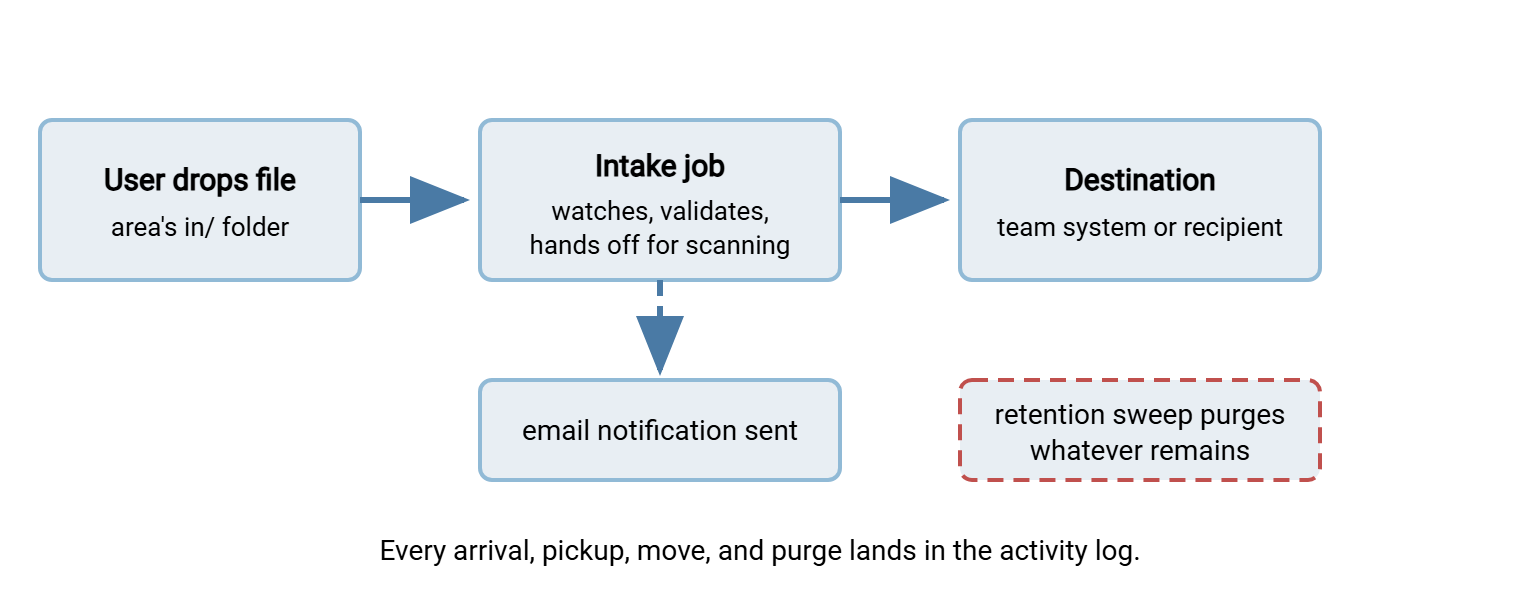
This is the natural home for an automation tool. Sysax FTP Automation can monitor a drop folder and move what arrives on a schedule or on detection. It can encrypt or decrypt with OpenPGP where a flow needs it. The payroll area in the taxonomy above encrypts before its nightly move. The tool can send email notifications so the receiving side stops polling the folder by hand. Where a flow's files should be checked for malware, the intake stage is exactly where a scanning step belongs. The arguments and integration points are in why transfer flows need scanning. Intake rejects go to the quarantine area rather than onward.
Not every zone needs rich intake. The colleague hand-off area's "intake" may be nothing but retention and logging — and that is fine. Automate the flows with a downstream destination; leave the purely human hand-offs simple. A folder that empties itself and keeps a diary is already a promotion.
Retention: The Zone That Cleans Itself
Retention is the feature that keeps the drop zone from re-becoming the junk drawer. So it must be automatic, per-area, and advertised. Automatic, because cleanup that depends on a human remembering is cleanup that stops at the first busy month. Per-area, because a seven-day sweep suits the hand-off area while the customer-intake areas might warrant thirty. Advertised, because a purge that surprises people destroys trust in the zone. The retention period goes in the area's readme. The first sweep in a new zone should be preceded by a notice period measured in weeks, not hours. Nobody has ever thanked a purge for its punctuality.
Bluewater Bank's first hand-off zone went live without a retention sweep, on the reasonable theory that a purge in week one would frighten people off. The sweep was switched on six months later, with the two-week notice this article recommends. The notice drew fourteen replies asking for files to be kept. The mortgage team had been using the zone as the place completed files lived, because it was the one folder everyone could find. Nothing was lost: the files were moved to the team's document system over two weeks, and the sweep ran on schedule. The lesson was not that the team had misused the zone. It was that a folder with no retention is a home, whatever the readme says.
Set the sweep to delete files older than the area's period, every night, and log what it removes. Two refinements earn their keep. First, sweep to a holding area for a grace period rather than deleting outright in the zone's first months. That converts "retention ate my file" incidents into thirty-second restorations while habits form. Second, respect holds. The rare file that must outlive the period because of a dispute or legal matter gets moved to a proper home, not exempted in place. The wider discipline — matching periods to policy, proving deletion happened — is covered in automated purge policies. The job itself, with its edge cases, is built in age-based cleanup jobs.
Concretely, consider the starting taxonomy above. The hand-off area sweeps at seven days because a hand-off nobody collected within a week was either completed by other means or forgotten. The customer intake areas hold thirty days because disputes about "we sent it, you lost it" benefit from the file still being present. The quarantine holds ninety, because scan rejects are evidence. Write each number in the area's readme the day you choose it, and revisit annually. Retention periods chosen once and never re-examined drift into superstition.
In a governed drop zone, empty is healthy, which is a pleasant inversion. A junk share's fullness was its badge of use. A drop zone trending toward empty means intake is moving things onward and retention is catching the stragglers. The zone is working precisely when there is nothing to see. You will check anyway. So do I.
Logging: The Questions the Zone Can Answer
The last property is the one nobody asks for until the day they need it. A governed zone records arrivals, downloads, moves, and purges, with account and timestamp. That means the questions that were unanswerable on the junk share become lookups: When did the customer's file actually arrive? Who picked up the payroll export? Did anyone besides the estimator touch the fabricator package? Was the file already gone before the dispute started?
Hosting zones on a transfer server makes this nearly free. Sysax Multi Server, for example, writes activity to a log file or a database as accounts connect and transfer. Its per-area permissions mean the log's story is short and legible. Each account could only have been where its membership allows. Authentication against Windows or Active Directory keeps identities real rather than shared, which is what makes a log line worth anything. IP allow and block rules can pin external-facing areas — the customer intake — to expected sources. What to keep, how long, and how to make logs tell stories quickly is the territory of reading transfer logs.
Gotcha: logging the zone is pointless if everyone signs in as the same shared account. One account per human, no exceptions, or every log line reads "the team did it." Directory integration makes this painless — accounts already exist, and offboarding disables zone access the same hour it disables everything else.
Standing Up Your First Zone
Do not attempt all zones at once; the organization-wide sequencing is the next article's subject. For the first zone, pick one habit — ideally the junk share's heaviest flow, identified in your inventory — and walk this order:
- Interview the flow's heaviest users. What lands, how big, how often, who picks it up, how fast? Their answers set the area names, the retention period, and the intake behavior.
- Create the area and its readme. Purpose, owner, retention — three lines, written before the first file arrives.
- Set membership and permissions. The people in the flow, per area, least privilege. Resist "just add everyone for now" — that sentence is how the last share happened.
- Wire the intake and the sweep. The watch job, the move, the notification; the nightly retention sweep with its grace-period holding area. Test with junk files until arrival-to-notification is boring.
- Run it in parallel. Point the flow's users at the zone while the old share still works. Fix what they trip on — every stumble is a design defect, not a user defect.
- Close the old path gently. A readme in the old share pointing to the zone; then read-only; then gone. By the read-only stage, nobody should notice.
Then measure the only number that matters: is the flow using the zone without being reminded? If yes, take the next flow from your ranking. If no, the as-easy-or-easier test from designing sanctioned paths failed somewhere. Find the friction and remove it before scaling. A zone that needed three reminders this month will need thirty next year.
The Habit, Kept
The governed drop zone succeeds by being a better junk share, not a lecture about one. It is still drag-and-drop, still instant, but now findable, self-cleaning, bounded, and able to answer questions. Build the first one against a real flow, let it earn its users, and let word of mouth do what mandates cannot. From here, the series turns to the habits that resist this treatment. Those involve the genuinely necessary removable media handled in the genuine USB cases. Then comes the org-wide rollout in the migration from chaos. There, zones like this one become the destinations that make retiring the old shares realistic. Nobody will miss old2.
Frequently Asked Questions
Isn't a governed drop zone just another shared folder?
Should drop zones live on a file share or a transfer server?
How long should files stay in a drop zone?
What stops the drop zone from becoming a junk drawer again?
Do internal-only drop zones need malware scanning?
From the Sysax team: we build secure file transfer software for Windows. Sysax Multi Server is an FTP, FTPS, SFTP, and HTTPS server. Sysax FTP Automation handles scheduled, scripted transfers. Free trials are on the download page.